





























The best social media OAuth software for agencies lets clients authorise their own accounts, so your team never touches a credential. If you're still chasing passwords or logging into client accounts by hand, you're acting as a high-stakes storage locker for liabilities that should never sit on your server.
We get it. The "password dance" is part of agency life, but that doesn't make it any less of a security nightmare. Ask a client to share a password, or worse, a set of MFA codes, and you've created a manual point of failure that breaks the moment a password changes or a token expires. What you need is a system that treats social connections as assets the client owns, not burdens the agency carries.
What the best tools need to handle

Moving from agency-controlled to client-controlled connections isn't only about security. It's about keeping your sanity. You want a platform that treats OAuth as a self-service portal feature, not an admin chore.
Here's what a mature connection flow looks like in practice:
- Zero-Credential Handover: The software should never ask a client for a raw password. It should send the client to the native platform (LinkedIn or Instagram, say), let them sign in there, and pass a secure token back to your portal.
- Intelligent Account Discovery: When a client grants access, the tool has to cope with "multi-page" scenarios. If they link a personal Facebook account that manages 50 business pages, the software should offer a
pending profile connectionstep where the client picks exactly which assets to sync. - Lifecycle Awareness: Tokens die. That's a fact of life with platform APIs. The best tools don't just fail silently over a weekend. They send automatic, white-labelled expiry notices to the client, with a simple "re-authorise" button inside your portal.
Operator rule: If your tool needs you to run the OAuth flow on behalf of the client, you've already failed the zero-credential test. The connection has to start from the client's own session in your portal.
Mydrop pricing check, September 2026: the entry paid plans of the eight tools most often compared with Mydrop run from $6 per channel (Buffer) and $25 a month (Later) to $99 per user (Hootsuite) and $199 per seat (Sprout Social), read on each vendor's pricing page. Mydrop is free to start, then $19 a month flat, not per seat. Full table on Mydrop's compare pages.
The Credential-Handling Audit
| Workflow Mode | Security Risk | Manual Overhead | Client Trust |
|---|---|---|---|
| Manual Password Collection | Maximum (Full Liability) | High (Chasing/Updating) | Low (Friction) |
| Agency-Led Proxy Login | High (Policy Breach) | Moderate (Maintenance) | Medium |
| Client-Led Portal OAuth | Minimal (Token Isolated) | Zero (Self-Service) | High (Professional) |
Most agencies think they have a "process" problem. In fact, they have coordination debt. If your team spends even two hours a week syncing accounts by hand or chasing expired tokens, you're burning billable time on plumbing instead of strategy.
A solid portal flow lets the client see exactly what they're connecting. At Mydrop, we find clients feel far more in control when they can preview their own pages and confirm their own scopes. It takes the mystery out of what you're doing with their account. The aim is to move from password middleman to strategic partner, and you can't do that while your operational foundation is a spreadsheet of sticky notes.
Where basic tools start to break

The real headache starts when a tool treats your enterprise needs like a simple consumer app. Most basic social media tools are built around a "one-to-one" idea: one user logs in and authorises their personal account. But you aren't managing personal accounts. You're managing hundreds of business assets across several markets.
Without a robust pending profile connection flow, you land in the "Multi-Page Nightmare". A client tries to connect their Facebook account, and the OAuth screen comes back with a list of 50 pages they have admin rights to. A basic tool might make them authorise the lot, clogging your dashboard with irrelevant noise. Worse, it might fail to import any of them, because the API handshake was never designed for bulk selection.
We've seen too many teams lose whole afternoons troubleshooting tokens by hand because their platform couldn't handle the selection step gracefully.
The "Service vs. Social" Trap
Another common failure point is the "Service Connection" masquerade. Some platforms lump social publishing profiles in with service connections such as Google Drive or Canva. If your tool doesn't clearly separate the two in the interface, you end up with a messy, unverified list of connections, some of which aren't actually ready to publish anything.
Common mistake: Treating a connection to a client's Google Calendar as a publishable social profile. It creates "ghost" profiles in your portal that confuse the team and clutter your analytics dashboard.
The buying criteria that matter
When you assess software for your agency portal, a slick interface isn't enough. You need a rigorous standard for how the tool handles the whole token lifecycle. If you still rely on a "copy-paste-password" workflow, your team is left holding the bag for every security risk that follows.
Use this scorecard to size up your next provider.
The Enterprise OAuth Scorecard
| Capability | High Risk (Manual/Basic) | Enterprise Ready (Mydrop/Best-in-class) |
|---|---|---|
| Credential Handling | Requires password sharing or manual entry. | Client-led OAuth. Agency never sees credentials. |
| Multi-Page Sync | Fails or imports everything by default. | Offers pending profile review before creation. |
| Token Health | Silent failure until a post breaks. | Proactive alerts on expiry or scope drift. |
| Onboarding UX | Heavy documentation/email back-and-forth. | Self-serve portal flow for clients. |
| Relationship | Account-level only. | Brand-portal grouped access. |
The Non-Negotiable Checklist
Before you commit to a platform, put it through these three tests:
- Can the client start the connection themselves? The flow has to begin inside the client-facing portal, not in the agency back end.
- Does the provider include a "Pending" staging state? You need a screen to review and confirm which accounts are being imported before they go live in your publishing calendar or analytics dashboard.
- Is there a clear path for token renewal? When a token expires (and it will), does the platform send the client a white-labelled notification with a secure, one-click link to re-authorise?
The aim is to move from password middleman to strategic partner. If a tool makes you chase clients for login details, it's just adding to your coordination debt. Choose software that lets clients handle their own connections securely, so you can stay focused on the strategy that drives their growth.
How Mydrop supports this workflow
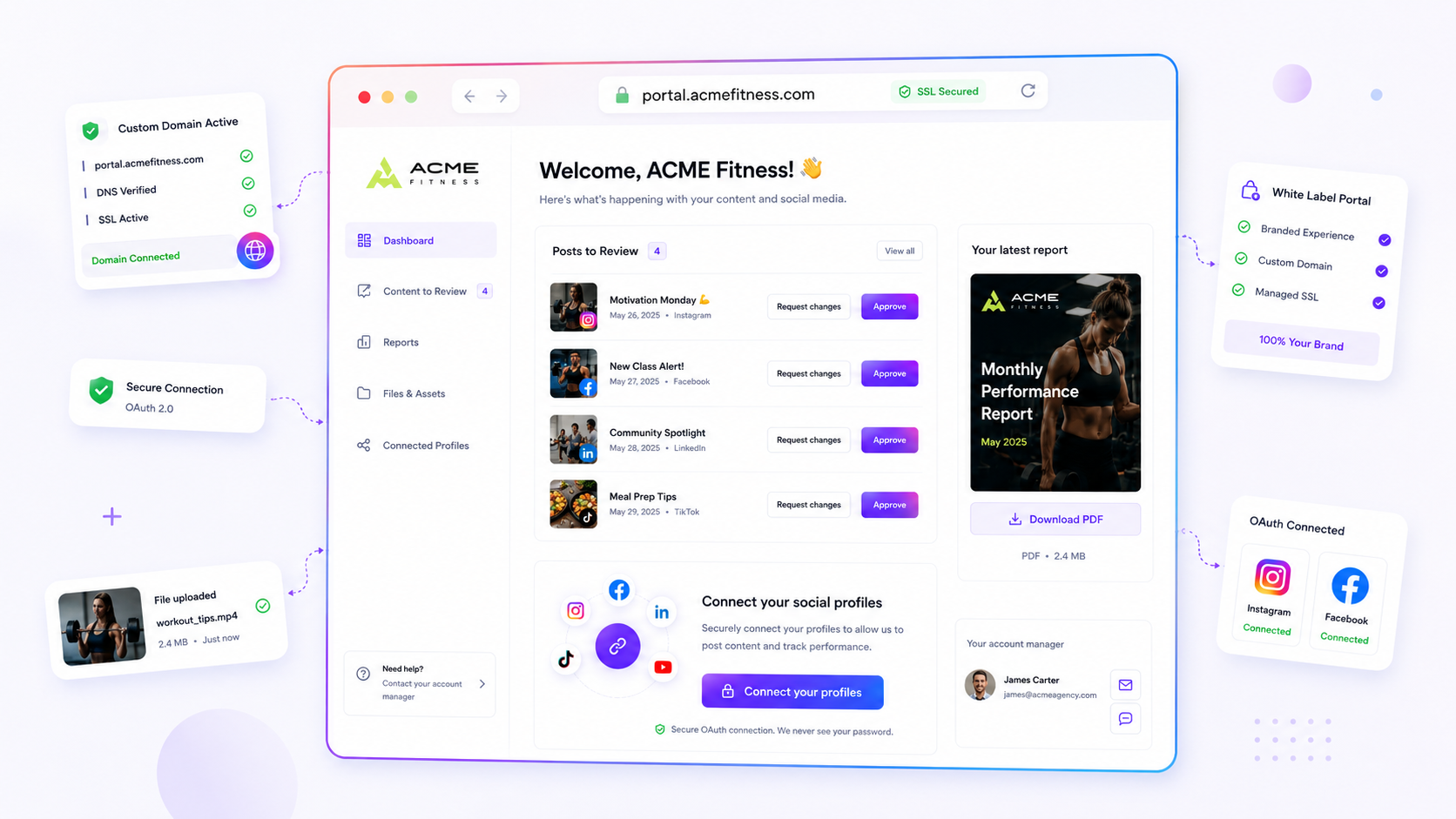
At Mydrop, we built our profile connection logic on one simple belief: the agency should never see the client's social media password. It's a security liability that creates more friction than it solves. When a client needs to connect a brand profile, they shouldn't be emailing you a password or joining a Zoom call to type it in while you watch.
Instead, Mydrop offers a public brand portal flow. You send your client a link, they land on a clean, white-labelled page, and they start the OAuth connection themselves, directly with the platform: Facebook, LinkedIn, TikTok, whichever it is. Our system handles the code_verifier and the token exchange in the background, so the client only sees the provider's standard "Grant Access" screen.
Once they've authorised, our pending profile connection system takes over. This is where most tools fall down: they simply dump every page that user has access to into your account. We don't. We show the client a clear list of the profiles we've found, so they can confirm exactly which ones to import. That avoids the messy scenario where you accidentally import a client's personal Instagram account along with their business page.
It keeps the token owner propagation clean and makes sure the agency gets exactly what it needs, and nothing more.
A simple shortlist checklist
Before you commit to a platform, run this list against the tool you use now or the one you're considering. If you have to tick "No" more than once, you're probably buying yourself a future headache.
| Requirement | Why it matters |
|---|---|
| Zero-Password UI | Does the flow rely only on official provider OAuth? If the tool asks for a password, stop. |
| Multi-Profile Filtering | When a client logs in, can they pick specific pages to import, or does the tool import everything automatically? |
| White-Labelled Portal | Can the client authorise accounts from a branded portal, or do they have to join your main dashboard? |
| Automated Expiry Alerts | Does the system warn you before the token dies, or do you only find out when the post fails? |
| Service vs. Profile Split | Does the tool tell actual publishable profiles apart from "service" connections like Google Photos or Drive? |
Conclusion
The "password dance" is a relic of the early days of social media management. It wears out your team, puts your clients at risk and, frankly, holds back your agency's growth. If you're serious about scale, you have to move past handling credentials by hand.
The goal isn't just to make connecting easier. It's to make it invisible. When the platform handles the handshake, the security liability goes back to the provider, where it belongs, and your team wins back the hours it used to lose to credential support.
Most agencies don't have a connection problem. They have a coordination debt problem. Fix the connection flow first, and the rest of your publishing pipeline will finally have room to breathe.

 Google review
 Trustpilot review
 Product Hunt comment




