








































ClaudeChatGPTCursorGeminiWorks with your AI agentsChromeMydropTry Mydrop Chrome Extension
Social media management · Team & permissions

Grant access, without handing over the keys

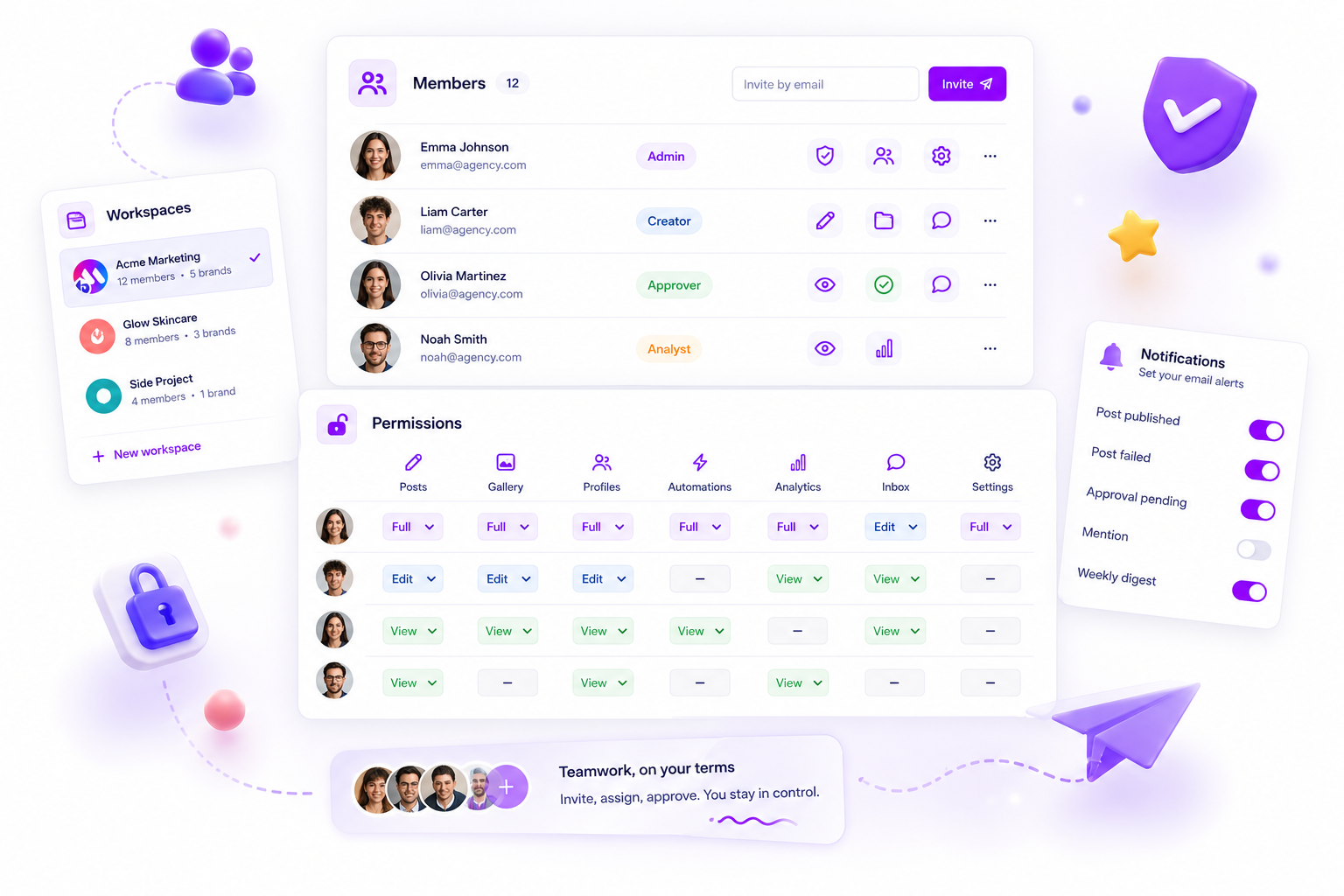
Invite teammates, give each person exactly the access they need, keep separate operations in separate workspaces, and let everyone tune their own notifications. Control without the bottleneck.

  • Team members
  • Four roles
  • Multiple workspaces
  • Notifications
Schedules, publishes and listens across:
Rated Excellent on Trustpilot by agencies, freelancers and brand teams4.4
Mydrop AI reviews on TrustpilotMydrop AI reviews on GoogleMydrop AI reviews on SaasHubMydrop AI reviews on SourceForgeMydrop AI reviews on SlashdotMydrop AI reviews on TopBusinessSoftwareMydrop AI - Social Media OS for Agencies - The social media OS for agencies and multi-brand teams | Product HuntMydrop AI featured on NextGen ToolsMydrop AI featured on LaunchBuff

A workspace per brand

Teams that keep every client perfectly separate.

Isolated workspaces, shared standards. Here's how teams scale without the mess.

Friends smiling while filming on stairs
0cross-brand mix-ups
I was looking for a scheduling tool as my clients were using more and more platforms. Mydrop does the job very well, and automations and forms are very useful and save me a lot of time. I recommend!
Smiling social media managerSmiling social media managerSmiling social media managerSmiling social media managerSmiling social media managerSmiling social media manager

Excellent · 3,000+ accounts connected

Managing 14+ social platforms felt like a 2 a.m. nightmare until Mydrop. The AI brand-voice mapping is scary accurate, and the client approval portal saved me easily 15 hours this week alone. It's the ultimate set-and-forget workspace for busy agencies.
A true automation tool for scheduling (and creating) social media content! It has saved me over 20 hours of work already in just my first couple weeks. A true game-changer for anyone in business, big or small!
Finally tried Mydrop on a test client and the white-label portal on a custom domain actually looks legit, no Mydrop branding sneaking in. The OAuth setup saved me from the usual “what's my password” back-and-forth.
Absolute game-changer. Mydrop completely automated my content workflow. The scheduling is flawless, it actually feels intuitive, and it saved me 10+ hours in my very first week. Best decision I've made for my socials!
Mydrop AI has been an absolute game changer, it has saved me so much time and effort. It does what it promises. Easy to use, versatile, and the creator is really open to feedback. Very happy!
I was looking through a bunch of management tools for my client, as it was getting out of control; after comparing every solution, I found Mydrop to be a no brainer.
This app helps me more than any other I have ever used. I've got all of my pages and accounts and I can drag and drop like I want. Mydrop has really been a huge asset to my business!
I was looking for a scheduling tool as my clients were using more and more platforms. Mydrop does the job very well, and automations and forms are very useful and save me a lot of time. I recommend!
Love that you baked in white-label portals from day one, that's a huge pain point for agencies.
Love this platform for scheduling social media posts! Easy and very intuitive to use! Highly recommend!
Very nice tool, you will save a lot of time. Very easy to use, user friendly. I have used it for several months and it is very helpful.
Helpful app if you are trying to streamline social content creation for clients.

The trust problem

You want leverage. You don't want everyone able to hit publish.

Delegation usually means choosing between "do nothing" and "do everything." The fix: permissions precise enough to hand over the work without handing over the wheel.

Members

01

Get the team set up in a couple of clicks

Add teammates by email and they're straight into the workspace. Give each one a role (Admin, Publisher, Creator or Reader) so the right people can do the right things from day one.

  • Invite members by email
  • Four roles: Admin, Publisher, Creator and Reader
  • Update roles or revoke access on demand

Permissions

02

Four roles, clear limits

Each role spells out exactly what a member can do. A Creator makes posts, profiles, automations and forms, but can't publish. A Publisher can publish too. A Reader can see the workspace without changing a thing. Only an Admin manages the workspace and its roles.

  • Creator: creates, never publishes
  • Publisher: creates and publishes
  • Pair with approvals so nothing ships without sign-off

Multiple workspaces

03

Separate operations, cleanly isolated

Need a hard wall (a side venture, a sub-team, a client demanding isolation)? Each workspace has its own members, brands, billing, and data. Switch without logging out.

  • Isolate a workspace per operation, fully
  • Scope its own members, brands, billing, and timezone
  • Switch between workspaces in one place

Notifications

04

Everyone hears the signal, none of the noise

Everyone sets their own alerts (posts published, failures, approvals waiting), so publishers get pinged and readers aren't buried in noise.

  • Configure per-member email notification preferences
  • Alerts on publishing, failures, and pending approvals
  • Let each person command their own signal

What you command

Delegate the work, retain the wheel

Member roles

Admin, Publisher, Creator or Reader. Your call.

Clear permissions

Who creates, who publishes, who manages.

Invitations

Onboard teammates by email in seconds.

Multiple workspaces

Isolated operations with their own data.

Notifications

Each member tunes their own alerts.

Safe by default

Pairs with approvals so nothing ships unchecked.
Managing 14+ social platforms felt like a 2 a.m. nightmare until Mydrop. The AI brand-voice mapping is scary accurate, and the client approval portal saved me easily 15 hours this week alone. It's the ultimate set-and-forget workspace for busy agencies.
A true automation tool for scheduling (and creating) social media content! It has saved me over 20 hours of work already in just my first couple weeks. A true game-changer for anyone in business, big or small!
Finally tried Mydrop on a test client and the white-label portal on a custom domain actually looks legit, no Mydrop branding sneaking in. The OAuth setup saved me from the usual “what's my password” back-and-forth.
Absolute game-changer. Mydrop completely automated my content workflow. The scheduling is flawless, it actually feels intuitive, and it saved me 10+ hours in my very first week. Best decision I've made for my socials!
Mydrop AI has been an absolute game changer, it has saved me so much time and effort. It does what it promises. Easy to use, versatile, and the creator is really open to feedback. Very happy!
I was looking through a bunch of management tools for my client, as it was getting out of control; after comparing every solution, I found Mydrop to be a no brainer.
This app helps me more than any other I have ever used. I've got all of my pages and accounts and I can drag and drop like I want. Mydrop has really been a huge asset to my business!
I was looking for a scheduling tool as my clients were using more and more platforms. Mydrop does the job very well, and automations and forms are very useful and save me a lot of time. I recommend!
Love that you baked in white-label portals from day one, that's a huge pain point for agencies.
Love this platform for scheduling social media posts! Easy and very intuitive to use! Highly recommend!
Very nice tool, you will save a lot of time. Very easy to use, user friendly. I have used it for several months and it is very helpful.
Helpful app if you are trying to streamline social content creation for clients.
Smiling social media managerSmiling social media managerSmiling social media managerSmiling social media managerSmiling social media managerSmiling social media manager

Excellent · 3,000+ accounts connected

FAQ

Questions, answered.

Admin does the lot, including managing the workspace and roles. Publisher creates and publishes posts. Creator creates posts, profiles, automations and forms, and a Publisher or Admin publishes them. Reader can open the workspace without changing anything.

Yes. Workspaces are fully isolated, each with its own members, brands, billing, timezone, and data, and you can switch between them.

No. Clients use the no-login brand portal, with their own permissions for each section. Members are your team, each with one of the four roles described here. Pro includes 5 members, Enterprise has no limit.

Yes. Each member sets their own email preferences for operational events like publishing, failures, and pending approvals.

Scale the team without scaling the chaos.

Onboard members, govern precise permissions, and isolate every operation cleanly.

Free to start. No credit card. Built for real client work.

Smiling social media managerSmiling social media managerSmiling social media managerSmiling social media managerSmiling social media managerSmiling social media manager
Excellent · 3,000+ accounts connected