














ClaudeChatGPTCursorGeminiWorks with your AI agentsChromeMydropTry Mydrop Chrome Extension
Social Media Analytics

Client Report Not Arriving? 7 Checks and a Same-Day Fallback

A scheduled client report that never turned up usually comes down to an expired connection, stale data or a bad recipient. Work through these 7 checks in order.

4 min read

Updated: Oct 31, 2026

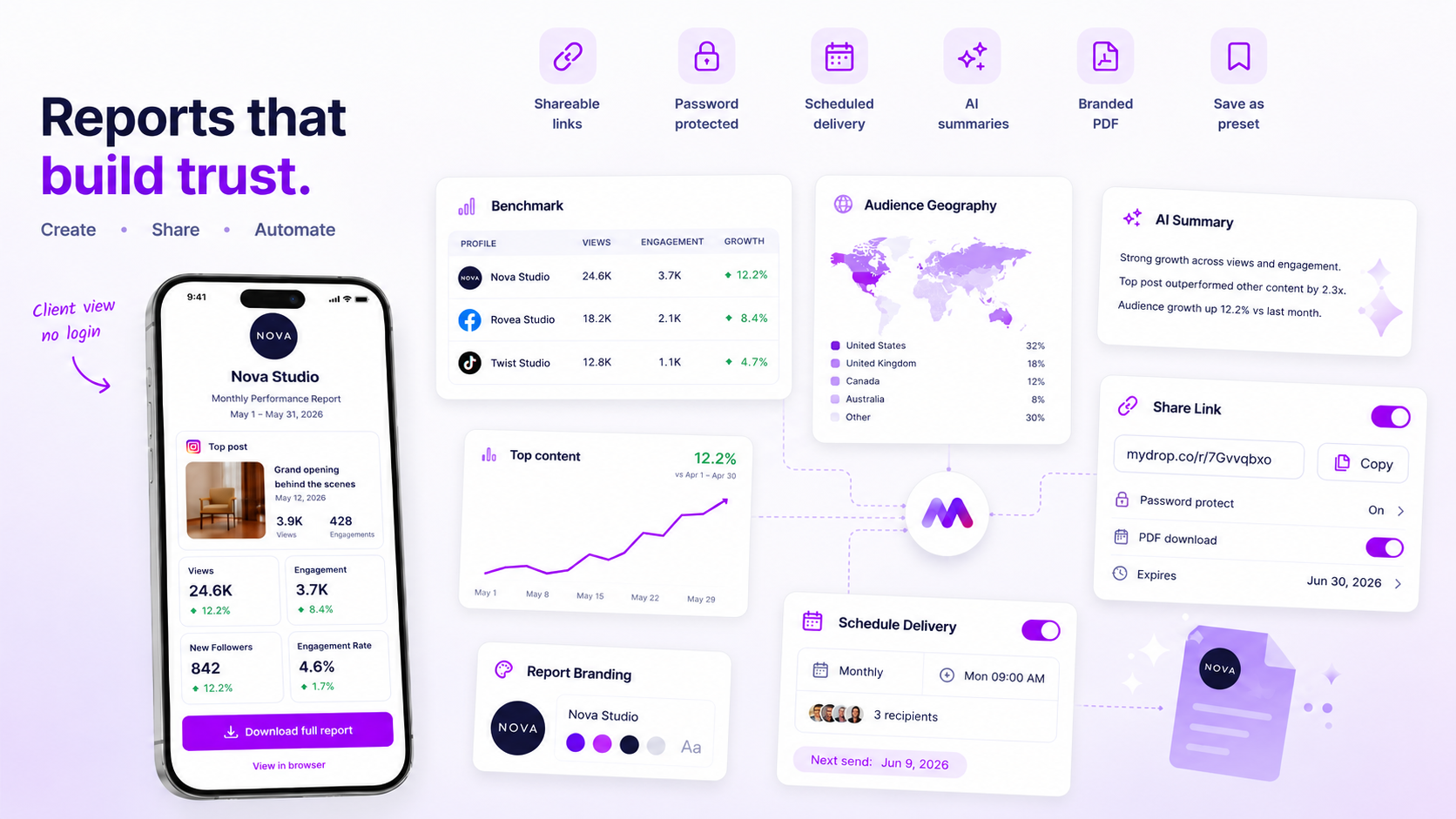
Screenshot of Mydrop's analytics report scheduling feature

When a client report does not arrive, check the data before you check the delivery. A report is only as fresh as the last successful sync, and a sync that fails overnight can leave you with a report that is missing, stale or half empty. Which of the three you get depends on the tool, so find out what yours does before a client does.

TLDR: Run seven checks in this order: platform connection, last sync time, date range, recipients, schedule and time zone, report contents, and file size or link access. Then send a manual copy the same day with two lines of context, and fix the cause before the next scheduled send.

The seven checks, in the order they usually fail

# Check What you are looking for
1 Platform connection Any profile showing as disconnected or needing re-authorization
2 Last sync time A timestamp older than a day, or a profile with no recent data
3 Date range A report set to "last month" sent on the 1st, before final numbers land
4 Recipients Typos, an old address, or a client mail filter holding it
5 Schedule and time zone A send time that fell before the sync, or in a different zone than you assumed
6 Report contents A removed profile or an empty section that stopped the build
7 File size or link A large PDF bounced by the client's mailbox, or a share link with the wrong access

Start at row 1. In Mydrop's publishing data the most common hard failure was an expired platform connection, and in our experience the same cause is behind most reports built on stale numbers.

Why the data fails before the email does

Platforms expire access tokens, ask for re-authorization after a password change, and sometimes revise numbers a day or two after posting. A report sent at 06:00 on the 1st of the month can pull day-old totals and look wrong without anyone seeing an error.

Two habits prevent it. Schedule reports for the 2nd or 3rd of the month, not the 1st. And add yourself as a recipient so you see every report when the client does.

Check the inbox side, too

If the data is fine and the report still is not there, look at the recipient:

  • Ask the client to search spam and any quarantine folder, and to allow the sending address.
  • Confirm the address with a short plain email. A typo here sends reports into the void.
  • Large PDFs with many charts can exceed a mailbox limit. Send a share link instead of an attachment.
  • If the client uses a company link-scanner, a shared link may be blocked once and work the second time.

The same-day fallback

Do not wait for the next cycle. Export the report as a PDF or open its share link yourself and email it with a message like:

"Hi Sam, here is June's report. The automatic send did not go out, so I sent it manually. Headline: reach up 14%, three leads from tagged links. Happy to walk through it on Thursday."

Two lines of context, no apology paragraph. The client cares about the numbers, not the plumbing.

A pre-send routine that takes five minutes

Run this on the day before each scheduled send:

  • Open every connected profile and confirm none is flagged.
  • Check the last sync time on each one.
  • Skim the report for empty sections or zeroes that look wrong.
  • Confirm the recipient list matches the client's current team.

Five minutes before a send beats an hour of apologizing after one.

What to do about a report that is wrong rather than late

A report that arrives with strange numbers is worse than one that does not arrive. If reach or followers show a sudden drop to zero, assume a sync failure, not a real collapse. Compare against the native platform insight for one profile, and hold the report until the two match. Sending a wrong report and correcting it costs more trust than a one-day delay.

Fix it for good

Once the cause is found, write it in the client's workspace notes. Mydrop's scheduled reports support recurring delivery and share links, and a no-login client portal gives clients a place to open the latest report even if an email goes missing. If numbers still look wrong after a re-sync, read our checklist for analytics data that stalls.

Next step: open your next scheduled report today, confirm all profiles are connected, and add your own address as a recipient.
Free tools

Free Report Template

Fill in a month of numbers, get a one-page client report to print as a PDF.

FAQ

Quick answers

It depends on the tool: it might skip the send, send partial numbers or send stale ones. Find out which yours does before a client notices, and check the last sync time before every send.

The usual causes are an expired platform connection, a wrong or blocked recipient address, or a schedule set for a date before the data was ready. Check the connection first.

Export it as a PDF or open its share link yourself and send it by email with two lines of context. Then fix the cause before the next scheduled send.

Next step

Stop coordinating around the work

If your team spends more time chasing approvals, assets, and publish details than creating better posts, the problem is probably not your people. It is the workflow around them. Mydrop brings planning, review, scheduling, and performance into one calmer operating system.

Mydrop Editorial Team

About the author

Mydrop Editorial Team

Mydrop

The Mydrop Editorial Team writes the guides, comparisons, and playbooks on this blog. We cover social media planning, publishing, approvals, analytics, and multi-brand workflows, drawing on how teams actually use Mydrop to run their social programs. Every article is researched, edited, and maintained by the team behind the product.

View all articles by Mydrop Editorial Team

Managing 14+ social platforms felt like a 2 a.m. nightmare until Mydrop. The AI brand-voice mapping is scary accurate, and the client approval portal saved me easily 15 hours this week alone. It's the ultimate set-and-forget workspace for busy agencies.
A true automation tool for scheduling (and creating) social media content! It has saved me over 20 hours of work already in just my first couple weeks. A true game-changer for anyone in business, big or small!
Finally tried Mydrop on a test client and the white-label portal on a custom domain actually looks legit, no Mydrop branding sneaking in. The OAuth setup saved me from the usual “what's my password” back-and-forth.
Absolute game-changer. Mydrop completely automated my content workflow. The scheduling is flawless, it actually feels intuitive, and it saved me 10+ hours in my very first week. Best decision I've made for my socials!
Mydrop AI has been an absolute game changer, it has saved me so much time and effort. It does what it promises. Easy to use, versatile, and the creator is really open to feedback. Very happy!
I was looking through a bunch of management tools for my client, as it was getting out of control; after comparing every solution, I found Mydrop to be a no brainer.
This app helps me more than any other I have ever used. I've got all of my pages and accounts and I can drag and drop like I want. Mydrop has really been a huge asset to my business!
I was looking for a scheduling tool as my clients were using more and more platforms. Mydrop does the job very well, and automations and forms are very useful and save me a lot of time. I recommend!
Love that you baked in white-label portals from day one, that's a huge pain point for agencies.
Love this platform for scheduling social media posts! Easy and very intuitive to use! Highly recommend!
Very nice tool, you will save a lot of time. Very easy to use, user friendly. I have used it for several months and it is very helpful.
Helpful app if you are trying to streamline social content creation for clients.
Managing 14+ social platforms felt like a 2 a.m. nightmare until Mydrop. The AI brand-voice mapping is scary accurate, and the client approval portal saved me easily 15 hours this week alone. It's the ultimate set-and-forget workspace for busy agencies.
A true automation tool for scheduling (and creating) social media content! It has saved me over 20 hours of work already in just my first couple weeks. A true game-changer for anyone in business, big or small!
Finally tried Mydrop on a test client and the white-label portal on a custom domain actually looks legit, no Mydrop branding sneaking in. The OAuth setup saved me from the usual “what's my password” back-and-forth.
Absolute game-changer. Mydrop completely automated my content workflow. The scheduling is flawless, it actually feels intuitive, and it saved me 10+ hours in my very first week. Best decision I've made for my socials!
Mydrop AI has been an absolute game changer, it has saved me so much time and effort. It does what it promises. Easy to use, versatile, and the creator is really open to feedback. Very happy!
I was looking through a bunch of management tools for my client, as it was getting out of control; after comparing every solution, I found Mydrop to be a no brainer.
This app helps me more than any other I have ever used. I've got all of my pages and accounts and I can drag and drop like I want. Mydrop has really been a huge asset to my business!
I was looking for a scheduling tool as my clients were using more and more platforms. Mydrop does the job very well, and automations and forms are very useful and save me a lot of time. I recommend!
Love that you baked in white-label portals from day one, that's a huge pain point for agencies.
Love this platform for scheduling social media posts! Easy and very intuitive to use! Highly recommend!
Very nice tool, you will save a lot of time. Very easy to use, user friendly. I have used it for several months and it is very helpful.
Helpful app if you are trying to streamline social content creation for clients.
Smiling social media managerSmiling social media managerSmiling social media managerSmiling social media managerSmiling social media managerSmiling social media manager

4.8/5 · on Trustpilot & Google







