














ClaudeChatGPTCursorGeminiWorks with your AI agentsChromeMydropTry Mydrop Chrome Extension
Community Management

Inbox Trigger Words for Social Support: 6 Rules to Cut Delays

Set up trigger words in your social inbox: six starter rules for order status, refunds, pricing and urgent issues, plus what to leave to a human.

3 min read

Updated: Oct 31, 2026

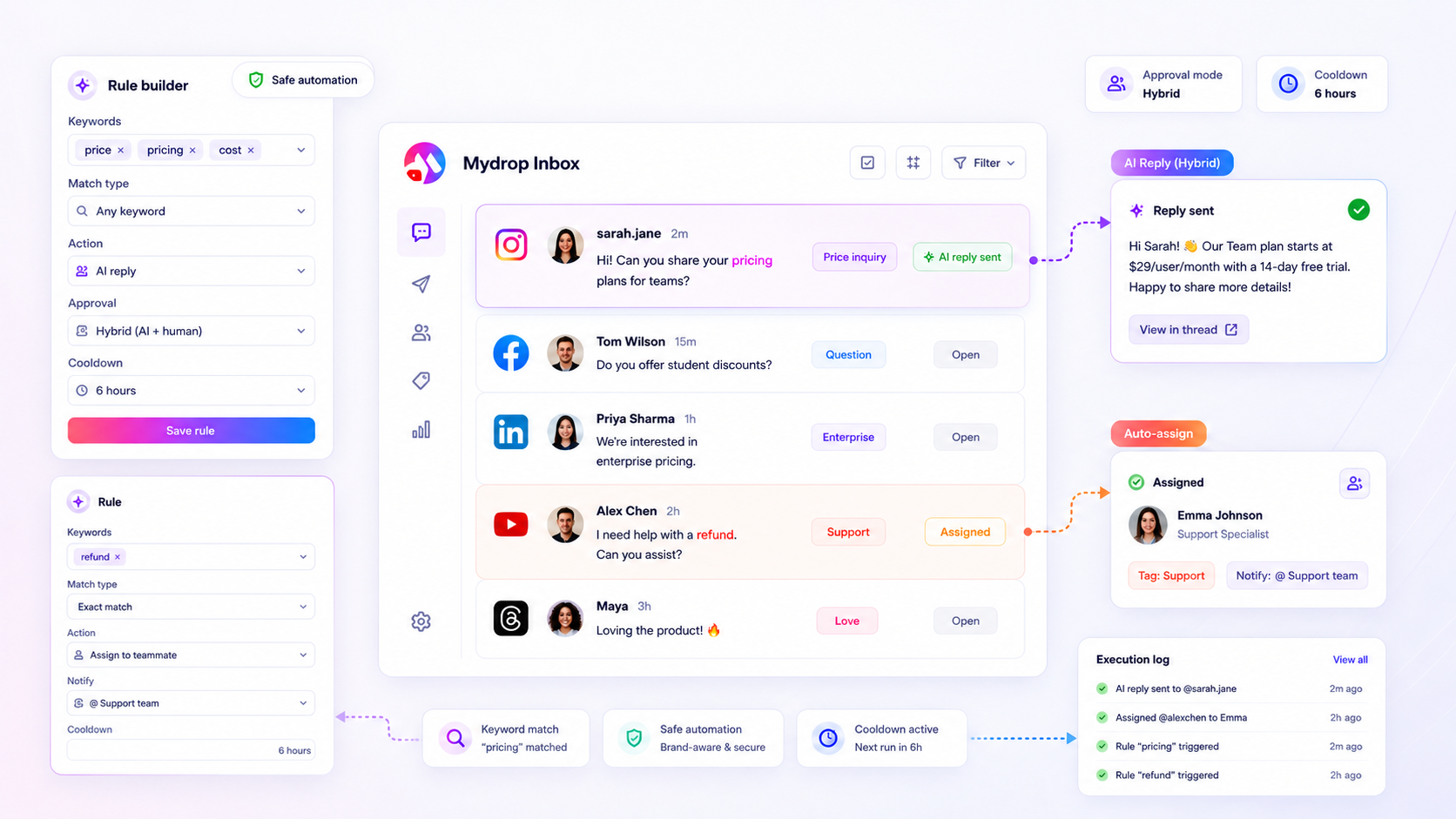
Mydrop Inbox Trigger Words feature interface

Most support delays on social aren't a staffing problem. They come from people typing the same answer to the same five questions all day. Trigger words let the inbox spot those questions and either handle them or flag them, so your team's time goes to the messages that need judgment.

TLDR: Start with six trigger-word rules: order status, shipping, refunds, pricing, opening hours and urgent problems. Automate the answer for the first five, send the sixth straight to a human. Test with real phrases, then review what was caught after one week.

Find your five repeat questions first

Open your last 100 messages and comments and tally up the questions. Almost every brand finds the same pattern: a handful of questions make up most of the volume. Those are your trigger-word candidates. Questions that need context, like a complaint about a specific order, are not.

Write each one as a plain list of the words people really use. Customers say "where is my order", "tracking", "hasn't arrived", not your internal term.

Six starter rules

Rule Example trigger words What happens
Order status "where is my order", "tracking", "hasn't arrived" Reply with the tracking page link
Shipping "delivery time", "ship to", "international" Reply with your shipping policy summary
Refunds "refund", "return", "money back" Reply with the steps, flag for a human to follow up
Pricing "price", "how much", "cost" Reply with the pricing page link
Opening hours "open", "hours", "closed" Reply with hours and the booking link
Urgent "broken", "damaged", "urgent", "wrong item" No auto reply, send to a person now

Notice the last row. The most important rule is the one that doesn't answer. It catches the messages where a fast, human reply saves the customer.

Write replies that sound like a person

An automatic reply should be short, name the next step and say what happens if it didn't help. For example: "Thanks for asking. Your tracking link is here. If it doesn't show your parcel, reply here and we'll look into it today."

Don't pretend to be a person, and don't say "we value your feedback". Give the answer, then the way out.

Set it up in Mydrop

Mydrop has trigger words for comment and message automation, and a social inbox that gathers conversations from your connected accounts in one place. Build one rule per row above, give each a short reply, and keep the urgent rule as a flag. If you run several brands, create the rule set per brand, since each one has its own questions and policies. For choosing between tools, see the best comment trigger-word tools.

Test with typos, then review after a week

Before turning rules on, send yourself test messages: the exact words, a typo, a plural and a sentence that contains the word by accident. A rule on "open" can fire on "I just opened the box". Tighten the words that over-trigger. If rules fire less than you expect, this guide to missed messages walks through the usual causes.

After seven days, read every auto-handled conversation. Look for two things: customers who replied angrily after an auto reply, and questions that still arrived untouched. Edit the rules for both.

What to leave to a human

Automation is good at questions with one right answer. It's bad at anything with feeling or risk. Keep these with a person:

  • Complaints about a person or a past experience. A template makes them angrier.
  • Anything legal, medical or financial. One wrong auto reply is costly.
  • Questions from a big customer or a partner. Those deserve a name, not a rule.
  • Messages where the customer is confused after an auto reply. If they write back twice, a person takes over.

A good target isn't "automate as much as possible". It's that every customer gets either a correct instant answer or a fast human one.

Add your first three rules this afternoon

Pick the three questions with the highest volume from your last 100 messages, write down the words people used and a two-line reply for each. Add the urgent rule on top. Then start free with Mydrop and set them up in the inbox. Review on Friday.

Free tools

Free tools

Calculators, templates and generators for social media teams.

FAQ

Quick answers

They are keywords or phrases that a rule watches for in incoming messages and comments. When one appears, the rule can respond or flag the message so it reaches the right person.

Anything angry, legal, medical, financial or involving a complaint about a person. Route those to a human, quickly.

Send yourself test messages with the exact words and a few variations like typos and plural forms. Check each one fires, and review what was caught in the first week.

Next step

Stop coordinating around the work

If your team spends more time chasing approvals, assets, and publish details than creating better posts, the problem is probably not your people. It is the workflow around them. Mydrop brings planning, review, scheduling, and performance into one calmer operating system.

Mydrop Editorial Team

About the author

Mydrop Editorial Team

Mydrop

The Mydrop Editorial Team writes the guides, comparisons, and playbooks on this blog. We cover social media planning, publishing, approvals, analytics, and multi-brand workflows, drawing on how teams actually use Mydrop to run their social programs. Every article is researched, edited, and maintained by the team behind the product.

View all articles by Mydrop Editorial Team

Managing 14+ social platforms felt like a 2 a.m. nightmare until Mydrop. The AI brand-voice mapping is scary accurate, and the client approval portal saved me easily 15 hours this week alone. It's the ultimate set-and-forget workspace for busy agencies.
A true automation tool for scheduling (and creating) social media content! It has saved me over 20 hours of work already in just my first couple weeks. A true game-changer for anyone in business, big or small!
Finally tried Mydrop on a test client and the white-label portal on a custom domain actually looks legit, no Mydrop branding sneaking in. The OAuth setup saved me from the usual “what's my password” back-and-forth.
Absolute game-changer. Mydrop completely automated my content workflow. The scheduling is flawless, it actually feels intuitive, and it saved me 10+ hours in my very first week. Best decision I've made for my socials!
Mydrop AI has been an absolute game changer, it has saved me so much time and effort. It does what it promises. Easy to use, versatile, and the creator is really open to feedback. Very happy!
I was looking through a bunch of management tools for my client, as it was getting out of control; after comparing every solution, I found Mydrop to be a no brainer.
This app helps me more than any other I have ever used. I've got all of my pages and accounts and I can drag and drop like I want. Mydrop has really been a huge asset to my business!
I was looking for a scheduling tool as my clients were using more and more platforms. Mydrop does the job very well, and automations and forms are very useful and save me a lot of time. I recommend!
Love that you baked in white-label portals from day one, that's a huge pain point for agencies.
Love this platform for scheduling social media posts! Easy and very intuitive to use! Highly recommend!
Very nice tool, you will save a lot of time. Very easy to use, user friendly. I have used it for several months and it is very helpful.
Helpful app if you are trying to streamline social content creation for clients.
Managing 14+ social platforms felt like a 2 a.m. nightmare until Mydrop. The AI brand-voice mapping is scary accurate, and the client approval portal saved me easily 15 hours this week alone. It's the ultimate set-and-forget workspace for busy agencies.
A true automation tool for scheduling (and creating) social media content! It has saved me over 20 hours of work already in just my first couple weeks. A true game-changer for anyone in business, big or small!
Finally tried Mydrop on a test client and the white-label portal on a custom domain actually looks legit, no Mydrop branding sneaking in. The OAuth setup saved me from the usual “what's my password” back-and-forth.
Absolute game-changer. Mydrop completely automated my content workflow. The scheduling is flawless, it actually feels intuitive, and it saved me 10+ hours in my very first week. Best decision I've made for my socials!
Mydrop AI has been an absolute game changer, it has saved me so much time and effort. It does what it promises. Easy to use, versatile, and the creator is really open to feedback. Very happy!
I was looking through a bunch of management tools for my client, as it was getting out of control; after comparing every solution, I found Mydrop to be a no brainer.
This app helps me more than any other I have ever used. I've got all of my pages and accounts and I can drag and drop like I want. Mydrop has really been a huge asset to my business!
I was looking for a scheduling tool as my clients were using more and more platforms. Mydrop does the job very well, and automations and forms are very useful and save me a lot of time. I recommend!
Love that you baked in white-label portals from day one, that's a huge pain point for agencies.
Love this platform for scheduling social media posts! Easy and very intuitive to use! Highly recommend!
Very nice tool, you will save a lot of time. Very easy to use, user friendly. I have used it for several months and it is very helpful.
Helpful app if you are trying to streamline social content creation for clients.
Smiling social media managerSmiling social media managerSmiling social media managerSmiling social media managerSmiling social media managerSmiling social media manager

4.8/5 · on Trustpilot & Google







