






























Short social video needs two reviews, not one: a cut review, where the editor gets time-stamped comments on the video itself, and a post approval, where the client or brand signs off on the finished Reel or TikTok (video, caption, cover and platform) before it publishes. Video review tools like Frame.io, Vimeo and Filestage are built for the first. Social approval tools like Mydrop and Planable are built for the second. Most teams need both, in that order.
TLDR: Do frame-level feedback in a video review tool, then approve the finished post on a true-to-platform preview in the tool that publishes it. Mixing the two stages is why video approvals take five rounds instead of two.
Mydrop pricing check, September 2026: the entry paid plans of the eight tools most often compared with Mydrop run from $6 per channel (Buffer) and $25 a month (Later) to $99 per user (Hootsuite) and $199 per seat (Sprout Social), read on each vendor's pricing page. Mydrop is free to start, then $19 a month flat, not per seat. Full table on Mydrop's compare pages.
The two reviews every Reel, TikTok and Short needs
Most video approval pain comes from asking one person to do both jobs at once. A client watching a rough cut comments on the caption. A creative lead looking at the final post asks for a new edit. Split the stages and each review gets shorter.
| Stage | Who reviews | What they check | Tool type |
|---|---|---|---|
| Cut review | Editor, creative lead | Pacing, frames, burned-in captions, music, the first 2 seconds | Video review tool with time-stamped comments |
| Post approval | Client, brand lead, legal | Caption, cover frame, hashtags, crop, offer terms | Social approval tool with a platform preview |
The rule: once the cut is locked, nobody asks for a new edit at post approval unless something is wrong, not just different.
7 video review and approval tools for social teams
The first five tools are built around reviewing the video file. The last two review the finished social post and publish it.
| Tool | Stage it covers | Strongest at |
|---|---|---|
| Frame.io | Cut review | Frame-accurate, time-stamped comments, close to the editing software |
| Vimeo | Cut review | Review pages with time-coded notes on hosted videos |
| Filestage | Cut review | Multi-step review of video, images and documents with time-stamped comments |
| Ziflow | Cut review | Online proofing for video alongside other creative files |
| Wipster | Cut review | Video review and sign-off for creative teams |
| Planable | Post approval | Feed-style review of social posts, video included |
| Mydrop | Post approval | True-to-platform preview of Reels, Stories and TikToks, no-login review links, publishing to 14 networks |
If your edits are light (a UGC clip, a quick product shot), you can often skip the cut review tool and write the timestamp in the comment, like "0:04, logo too small". For agency edits with many versions, a dedicated video review tool saves hours.
What reviewers miss on vertical video
A video that looked great in the editor can fail on the phone. Add these checks to the post approval stage:
- The first two seconds. Is the hook visible before anyone would scroll?
- Safe zones. On TikTok and Reels, the app's buttons and caption cover the right side and the bottom of the frame. Text placed there disappears.
- Captions on a phone. Burned-in subtitles must be readable at phone size, with sound off.
- The cover frame. On a grid, the cover is what people see. Approve it on purpose.
- Sound rights. Business accounts need music cleared for commercial use.
- Caption length. Mydrop's publisher enforces TikTok's 2,200-character cap with hashtags counted inside the caption, so a long caption can fail at send time even if it looked fine in a doc.
One check you can stop doing: arguing about length. In Mydrop's data, every video length bucket from under 15 seconds to 3 minutes sat within 6% of each account's average post. Cutting a 45-second video to 15 is rarely worth a review round.
Approve the finished Reel in Mydrop before it publishes
Once the cut is locked, Mydrop handles the post approval stage:
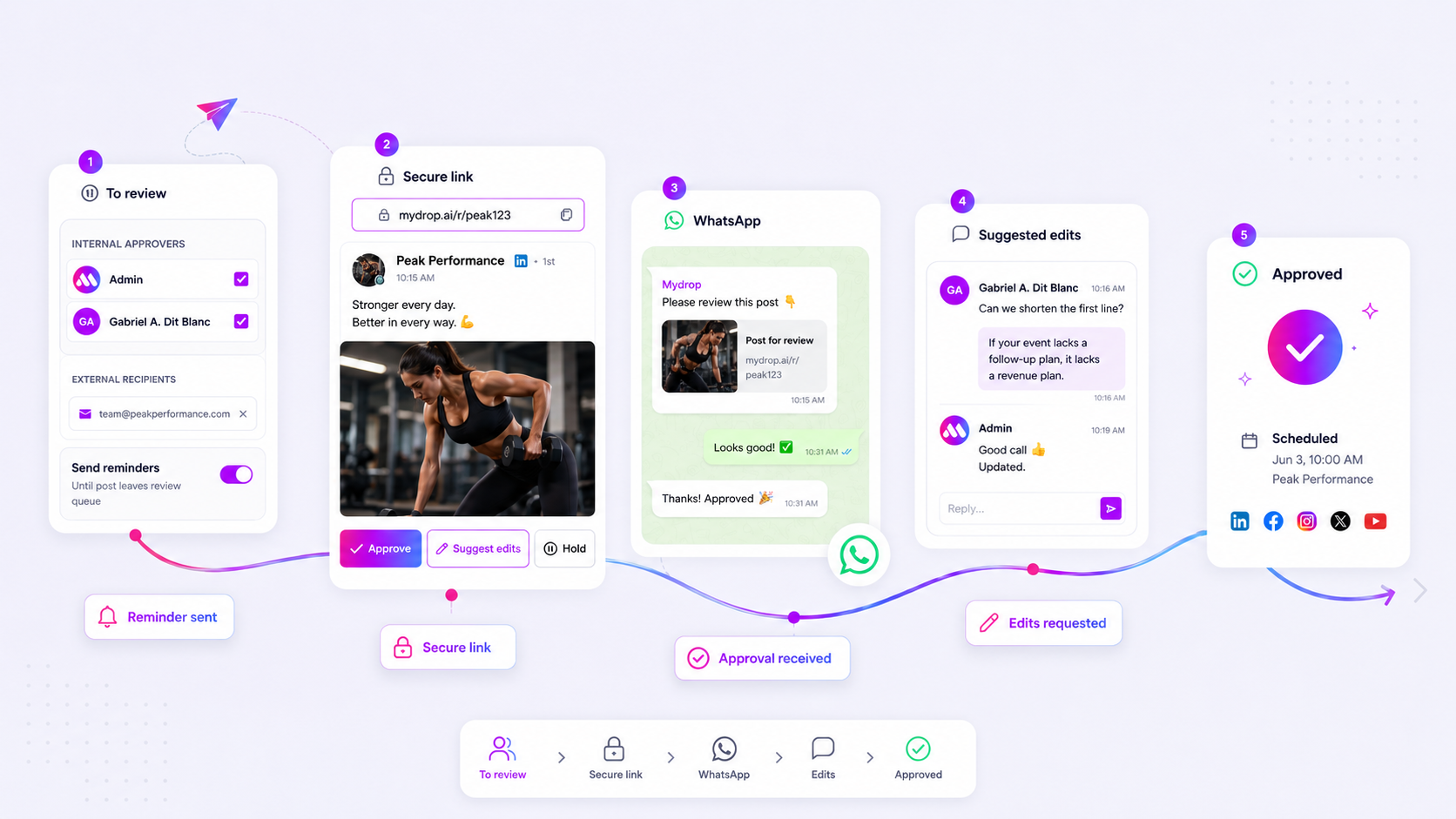
- The client sees the real post. Every post gets a secure review link with a true-to-platform preview, so the reviewer sees the Reel, Story or TikTok as it will appear, with the caption and crop.
- No login needed. The client approves, holds or suggests edits from the link. With a verified WhatsApp number, they can approve inside the chat, on the phone, which is exactly how their audience will watch it.
- Feedback stays on the post. Comments and suggested edits land in the post's conversation, with @mentions and attachments, so the editor sees them in context.
- Nothing ships unapproved. A post on hold stays paused until an approver moves it forward.
After approval, the same post publishes natively to Instagram, TikTok, YouTube, Facebook and the rest. See the approvals feature for the full flow, and our guide to publishing native video on five platforms for the publishing side.
Split your next video into two review stages
For your next Reel or TikTok, lock the cut first: one round of time-stamped comments from the creative lead, then no more edits. Then send the finished post, with caption and cover, for client approval on a phone-sized preview.
To run the second stage with the real preview, start free with Mydrop, connect Instagram or TikTok, and send your next video post for approval with a no-login link.


 Google review
 Trustpilot review
 Product Hunt comment




