
Productivity & Resourcing

Automate Social Posting Without Losing Quality: 5 Gates (2026)

Automate scheduling, reminders and reports, and keep people on the idea and the final yes. Five quality gates, with Mydrop data on approval times.

4 min read

Updated: Oct 24, 2026

Smiling students in a library

Automate the moving work (scheduling, reminders, link tagging, reports) and keep a person on the deciding work (the idea, the wording, the final yes). Quality does not drop because a tool scheduled a post. It drops when a tool published something nobody read.

TLDR: Sort every task into automate, assist or human. Then put five gates between a draft and a live post: drafts instead of auto-publish, one named approver, a true-to-platform preview, no-login client sign-off, and a three-question final read. Measure how many automated drafts need rewriting.

Sort every task before you automate anything

Most quality problems come from automating a task that needed judgment. Sort your weekly work like this:

Task Mode Why
Publishing approved posts at the scheduled time Automate No creative judgment left
Adding UTM tags to links Automate Pure repetition
Approval reminders Automate Nobody enjoys chasing
Weekly client report Automate Same format every time
First-draft captions Assist AI drafts, a person edits
Recurring posts (the weekly tip) Assist Automation drafts, an approver checks
Campaign angle and hook Human This is the creative work
Replies to complaints Human Tone matters more than speed
Legal, crisis, sensitive topics Human Zero automation

The five gates

1. Create drafts, not live posts. Set every automation to produce a draft or a review item. Reserve "publish now" for content a person has already approved. In Mydrop's automations you choose draft, review, scheduled or publish-now per automation, and you can route the output to an approver first.

2. Name one approver per brand. "The team" is not an approver. When two people can approve, each assumes the other did.

3. Approve against a real preview. Reviewing a caption in a spreadsheet misses cut-off text and cropped images. Approve the post as the platform will show it, using post preview.

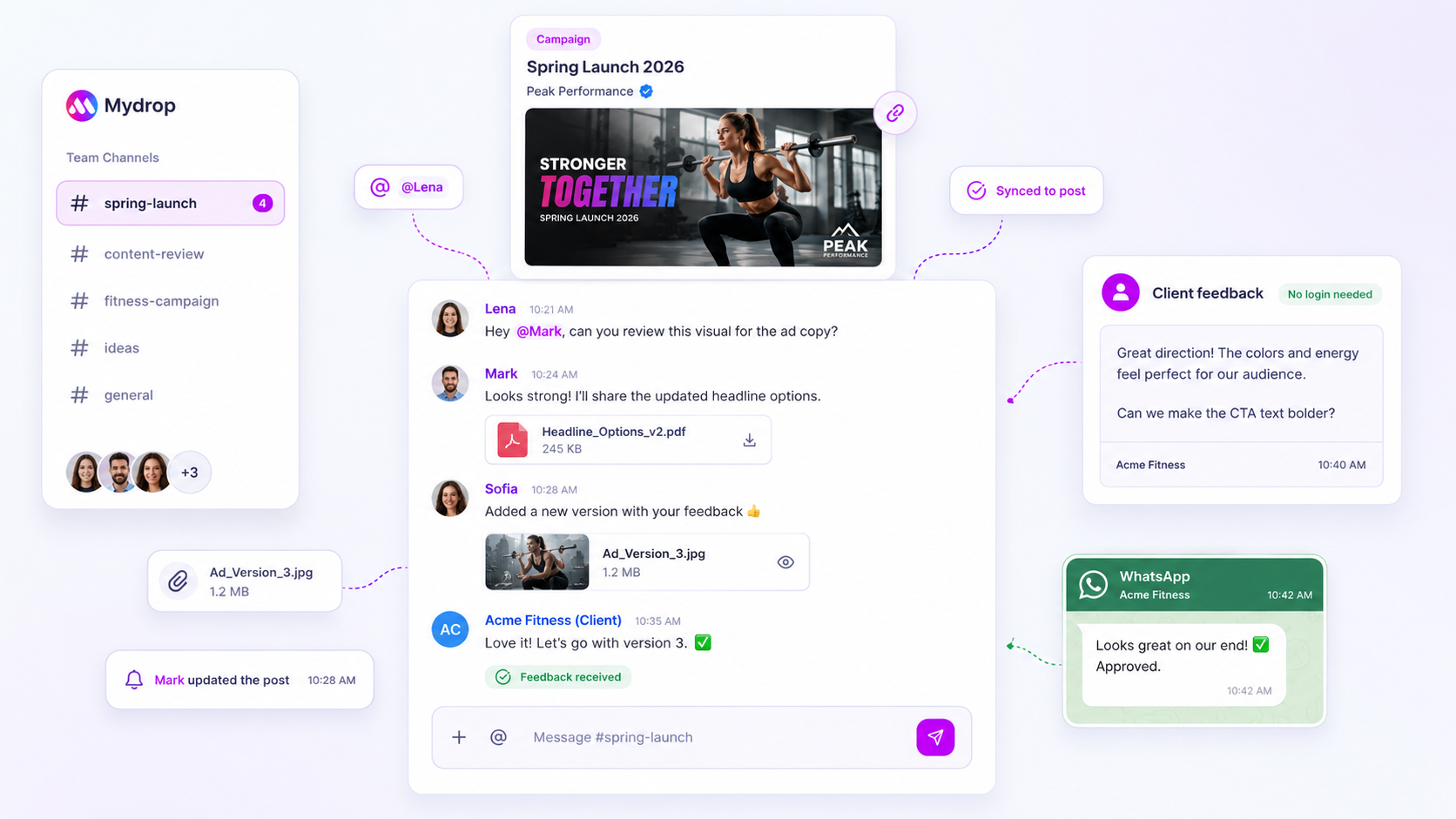
4. Let clients approve without an account. The slowest step is usually a client who has to log in somewhere. A secure review link per post, or approval from a WhatsApp message, removes the excuse. In Mydrop's September 2026 data, the median time from submission to approval was 6 hours, and 66% of posts were approved within 24 hours.

5. Finish with a three-question final read. Before anything goes live, the approver asks: Is it true? Is it on brand? Would we be happy to see it quoted in a screenshot?

Keep the conversation on the post

Control also means being able to see who decided what. When feedback lives in Slack, email and DMs, nobody can tell which version was approved.

Mydrop's collaboration tools keep a chat on every post, with mentions, attachments and assignments, so the approval, the edit request and the final file sit in one place. It is the cheapest audit trail you will ever build.

Files are the other common leak. If your team re-uploads media by hand, read how to move assets in from Google Drive without chasing files.

Example: automating the weekly tip

Say a client gets a tip post every Monday. The old way is a person writing it, sending a screenshot, waiting for a reply and scheduling it by hand.

The gated way: an automation drafts the tip every Sunday from the brand's voice and a saved prompt, creates it as a review item, and notifies the approver. The approver edits or approves it on Monday morning, and it publishes on schedule. Nobody wrote from scratch, nobody chased anyone, and nothing went live unread.

The test of whether it works is simple: the post the client sees is better than the one the old process produced, and it took the team less time.

A four-week rollout

  • Week 1: Sort your tasks with the table above. Do not automate anything yet.
  • Week 2: Automate the safe four: publishing, UTM tags, reminders, reports.
  • Week 3: Turn on one automation that creates drafts, with a named approver.
  • Week 4: Count how many drafts the approver changed. If it is more than half, fix the brief or the prompt, not the approver.

That last number is your quality metric. A falling edit rate means the system is learning your standards, and a rising one is an early warning before a bad post goes live.

Next step: write down the one task in your week you would hand to a tool tomorrow, and the person who would check its output. Start free with Mydrop and set that one automation to create drafts only.

Free tools

Free Content Calendar Template

Plan a month of posts, then download it as a CSV or a printable calendar.

FAQ

Quick answers

Automate the moving parts (scheduling, reminders, link tagging, reports) and keep a person on the content. Put one human approval between every draft and publish.

The core idea and hook, replies to complaints, and anything legal or sensitive. A tool can draft these, but a person decides.

In Mydrop's September 2026 data, the median time from submission to approval was 6 hours, and 66% of posts were approved within 24 hours. The sample is small, so treat it as a shape, not a benchmark.

Next step

Stop coordinating around the work

If your team spends more time chasing approvals, assets, and publish details than creating better posts, the problem is probably not your people. It is the workflow around them. Mydrop brings planning, review, scheduling, and performance into one calmer operating system.

Mydrop Editorial Team

About the author

Mydrop Editorial Team

Mydrop

The Mydrop Editorial Team writes the guides, comparisons, and playbooks on this blog. We cover social media planning, publishing, approvals, analytics, and multi-brand workflows, drawing on how teams actually use Mydrop to run their social programs. Every article is researched, edited, and maintained by the team behind the product.

View all articles by Mydrop Editorial Team

Managing 14+ social platforms felt like a 2 a.m. nightmare until Mydrop. The AI brand-voice mapping is scary accurate, and the client approval portal saved me easily 15 hours this week alone. It's the ultimate set-and-forget workspace for busy agencies.
A true automation tool for scheduling (and creating) social media content! It has saved me over 20 hours of work already in just my first couple weeks. A true game-changer for anyone in business, big or small!
Finally tried Mydrop on a test client and the white-label portal on a custom domain actually looks legit, no Mydrop branding sneaking in. The OAuth setup saved me from the usual “what's my password” back-and-forth.
Absolute game-changer. Mydrop completely automated my content workflow. The scheduling is flawless, it actually feels intuitive, and it saved me 10+ hours in my very first week. Best decision I've made for my socials!
Mydrop AI has been an absolute game changer, it has saved me so much time and effort. It does what it promises. Easy to use, versatile, and the creator is really open to feedback. Very happy!
I was looking through a bunch of management tools for my client, as it was getting out of control; after comparing every solution, I found Mydrop to be a no brainer.
This app helps me more than any other I have ever used. I've got all of my pages and accounts and I can drag and drop like I want. Mydrop has really been a huge asset to my business!
I was looking for a scheduling tool as my clients were using more and more platforms. Mydrop does the job very well, and automations and forms are very useful and save me a lot of time. I recommend!
Love that you baked in white-label portals from day one, that's a huge pain point for agencies.
Love this platform for scheduling social media posts! Easy and very intuitive to use! Highly recommend!
Very nice tool, you will save a lot of time. Very easy to use, user friendly. I have used it for several months and it is very helpful.
Helpful app if you are trying to streamline social content creation for clients.
Managing 14+ social platforms felt like a 2 a.m. nightmare until Mydrop. The AI brand-voice mapping is scary accurate, and the client approval portal saved me easily 15 hours this week alone. It's the ultimate set-and-forget workspace for busy agencies.
A true automation tool for scheduling (and creating) social media content! It has saved me over 20 hours of work already in just my first couple weeks. A true game-changer for anyone in business, big or small!
Finally tried Mydrop on a test client and the white-label portal on a custom domain actually looks legit, no Mydrop branding sneaking in. The OAuth setup saved me from the usual “what's my password” back-and-forth.
Absolute game-changer. Mydrop completely automated my content workflow. The scheduling is flawless, it actually feels intuitive, and it saved me 10+ hours in my very first week. Best decision I've made for my socials!
Mydrop AI has been an absolute game changer, it has saved me so much time and effort. It does what it promises. Easy to use, versatile, and the creator is really open to feedback. Very happy!
I was looking through a bunch of management tools for my client, as it was getting out of control; after comparing every solution, I found Mydrop to be a no brainer.
This app helps me more than any other I have ever used. I've got all of my pages and accounts and I can drag and drop like I want. Mydrop has really been a huge asset to my business!
I was looking for a scheduling tool as my clients were using more and more platforms. Mydrop does the job very well, and automations and forms are very useful and save me a lot of time. I recommend!
Love that you baked in white-label portals from day one, that's a huge pain point for agencies.
Love this platform for scheduling social media posts! Easy and very intuitive to use! Highly recommend!
Very nice tool, you will save a lot of time. Very easy to use, user friendly. I have used it for several months and it is very helpful.
Helpful app if you are trying to streamline social content creation for clients.
Smiling social media managerSmiling social media managerSmiling social media managerSmiling social media managerSmiling social media managerSmiling social media manager

4.8/5 · on Trustpilot & Google