














ClaudeChatGPTCursorGeminiWorks with your AI agentsChromeMydropTry Mydrop Chrome Extension
AI Content Operations

Find Rising Content Themes: A 30-Minute Weekly Routine

Spot topics gaining traction in your niche before they peak. A 30-minute weekly routine with monitoring and AI, plus a test to confirm each theme.

3 min read

Updated: Oct 31, 2026

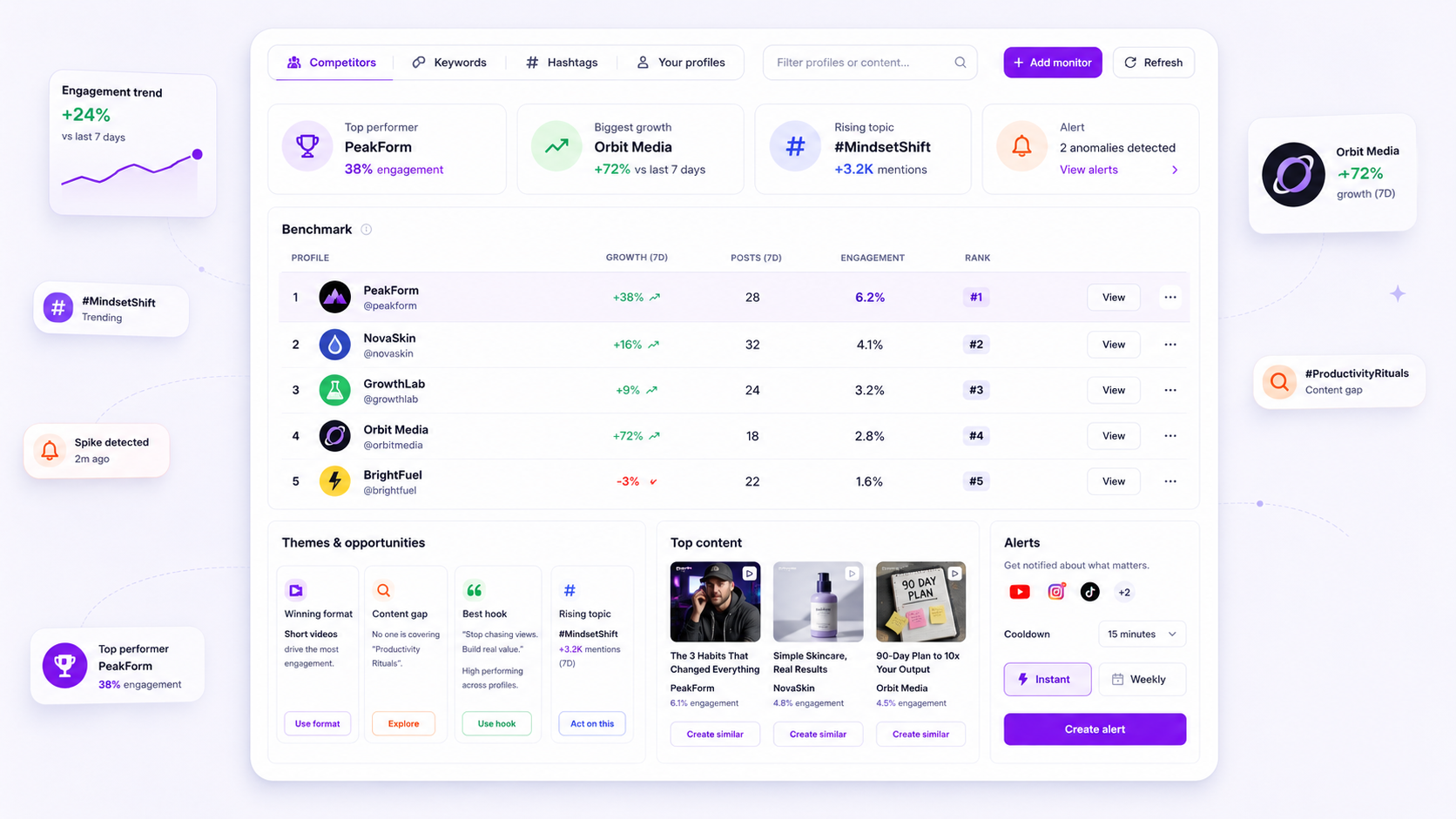
Mydrop monitoring screen showing tracked topics and mentions

Rising content themes are topics that come up more often this month than last, across several sources at once. You don't need an alarm for viral trends. You need a 30-minute weekly routine that checks the same places, groups what it finds and tests each candidate with a few posts. Here's how it works.

TLDR: Once a week, review a fixed set of sources, group the mentions into topics, mark the ones that have been growing for two or more weeks, then test each with 3 posts. Keep a theme only if it beats your own median engagement. AI speeds up the grouping, not the judgment.

Pick a theme, not a trend

A trend is a meme, a sound or a news hook. It spikes and dies in days, and by the time your post clears approval it's stale. A theme is a question your audience keeps asking: "how do I price this", "is X worth it", "what should I do about Y".

Trend Theme
Lifespan Days Months
Signal One big spike Steady growth across weeks
Content you build One reactive post A series of 6 to 10 posts
Risk Arrive late Arrive early and wait

Themes are what the routine below looks for.

Minutes 0 to 10: collect from the same sources every week

Consistency matters more than volume. Fix a short list and review it at the same time each week.

  • 5 to 10 keywords your customers would use (not your internal jargon)
  • 3 to 5 competitors or peers
  • 2 to 3 communities where your audience asks questions (subreddits, LinkedIn groups, comment sections)
  • Your own inbox and comments, which are the cheapest source of real questions

Mydrop's monitoring lets you track keywords and accounts in one place, so this step becomes a read of one screen instead of a tour of six apps.

Minutes 10 to 20: group mentions into topics

Raw mentions are noise. Cluster them. Write each mention under a short topic label ("pricing objections", "approval delays", "AI disclosure rules"), then count.

This is where AI earns its keep. Paste the week's list into an AI assistant and ask it to group by topic and give a one-line summary per group. Check its grouping against two or three raw examples, because it will sometimes merge things that are really different.

Minutes 20 to 30: mark what is growing

Keep a simple tracker with one row per topic and one column per week.

Topic Week 1 Week 2 Week 3 Week 4 Verdict
Topic A 4 6 9 14 Rising: test
Topic B 20 18 21 19 Steady: evergreen
Topic C 2 15 3 1 Spike: skip or one post

Mark a topic as a candidate only after two consecutive weeks of growth. One week of growth is a spike, and spikes belong in the "skip" column.

Test every candidate with three posts

A rising theme is a hypothesis, not a result. Before you commit a month to it:

  1. Write three posts on the theme in different formats (a carousel, a short video, a text post).
  2. Publish them over two weeks, at your normal posting times.
  3. Compare each to your own median engagement, not to a benchmark.

In Mydrop's data, carousels ran 10% above an account's typical post, so a carousel is a sensible first test format. If two of three beat your median, the theme earns a series. If none do, drop it without guilt.

Turn winners into a calendar block

Give each confirmed theme a slot, for example a weekly "Pricing Q and A" post. Use AI-assisted post ideas to draft ten angles in one sitting, then plan them in the content calendar so the series runs without a weekly scramble.

Review the tracker every quarter. A theme that has flattened for six weeks has become evergreen, and evergreen themes fill the calendar between the new bets.

Your next step: set up your source list today and run the routine once this week. After four weeks you'll have a real growth table, and your first two or three tested themes.


Free tools

Free Content Calendar Template

Plan a month of posts, then download it as a CSV or a printable calendar.

FAQ

Quick answers

Track a fixed set of keywords, competitors and communities each week, group what you see into topics, and flag any topic that shows up more often than it did a month ago.

A trend peaks and fades in days. A theme is a topic your audience keeps coming back to for months, so it is worth building a series around.

AI can group mentions and suggest angles quickly, but it cannot promise performance. Test each theme with two or three posts and keep the ones that beat your own median.

Next step

Stop coordinating around the work

If your team spends more time chasing approvals, assets, and publish details than creating better posts, the problem is probably not your people. It is the workflow around them. Mydrop brings planning, review, scheduling, and performance into one calmer operating system.

Mydrop Editorial Team

About the author

Mydrop Editorial Team

Mydrop

The Mydrop Editorial Team writes the guides, comparisons, and playbooks on this blog. We cover social media planning, publishing, approvals, analytics, and multi-brand workflows, drawing on how teams actually use Mydrop to run their social programs. Every article is researched, edited, and maintained by the team behind the product.

View all articles by Mydrop Editorial Team

Managing 14+ social platforms felt like a 2 a.m. nightmare until Mydrop. The AI brand-voice mapping is scary accurate, and the client approval portal saved me easily 15 hours this week alone. It's the ultimate set-and-forget workspace for busy agencies.
A true automation tool for scheduling (and creating) social media content! It has saved me over 20 hours of work already in just my first couple weeks. A true game-changer for anyone in business, big or small!
Finally tried Mydrop on a test client and the white-label portal on a custom domain actually looks legit, no Mydrop branding sneaking in. The OAuth setup saved me from the usual “what's my password” back-and-forth.
Absolute game-changer. Mydrop completely automated my content workflow. The scheduling is flawless, it actually feels intuitive, and it saved me 10+ hours in my very first week. Best decision I've made for my socials!
Mydrop AI has been an absolute game changer, it has saved me so much time and effort. It does what it promises. Easy to use, versatile, and the creator is really open to feedback. Very happy!
I was looking through a bunch of management tools for my client, as it was getting out of control; after comparing every solution, I found Mydrop to be a no brainer.
This app helps me more than any other I have ever used. I've got all of my pages and accounts and I can drag and drop like I want. Mydrop has really been a huge asset to my business!
I was looking for a scheduling tool as my clients were using more and more platforms. Mydrop does the job very well, and automations and forms are very useful and save me a lot of time. I recommend!
Love that you baked in white-label portals from day one, that's a huge pain point for agencies.
Love this platform for scheduling social media posts! Easy and very intuitive to use! Highly recommend!
Very nice tool, you will save a lot of time. Very easy to use, user friendly. I have used it for several months and it is very helpful.
Helpful app if you are trying to streamline social content creation for clients.
Managing 14+ social platforms felt like a 2 a.m. nightmare until Mydrop. The AI brand-voice mapping is scary accurate, and the client approval portal saved me easily 15 hours this week alone. It's the ultimate set-and-forget workspace for busy agencies.
A true automation tool for scheduling (and creating) social media content! It has saved me over 20 hours of work already in just my first couple weeks. A true game-changer for anyone in business, big or small!
Finally tried Mydrop on a test client and the white-label portal on a custom domain actually looks legit, no Mydrop branding sneaking in. The OAuth setup saved me from the usual “what's my password” back-and-forth.
Absolute game-changer. Mydrop completely automated my content workflow. The scheduling is flawless, it actually feels intuitive, and it saved me 10+ hours in my very first week. Best decision I've made for my socials!
Mydrop AI has been an absolute game changer, it has saved me so much time and effort. It does what it promises. Easy to use, versatile, and the creator is really open to feedback. Very happy!
I was looking through a bunch of management tools for my client, as it was getting out of control; after comparing every solution, I found Mydrop to be a no brainer.
This app helps me more than any other I have ever used. I've got all of my pages and accounts and I can drag and drop like I want. Mydrop has really been a huge asset to my business!
I was looking for a scheduling tool as my clients were using more and more platforms. Mydrop does the job very well, and automations and forms are very useful and save me a lot of time. I recommend!
Love that you baked in white-label portals from day one, that's a huge pain point for agencies.
Love this platform for scheduling social media posts! Easy and very intuitive to use! Highly recommend!
Very nice tool, you will save a lot of time. Very easy to use, user friendly. I have used it for several months and it is very helpful.
Helpful app if you are trying to streamline social content creation for clients.
Smiling social media managerSmiling social media managerSmiling social media managerSmiling social media managerSmiling social media managerSmiling social media manager

4.8/5 · on Trustpilot & Google







