
















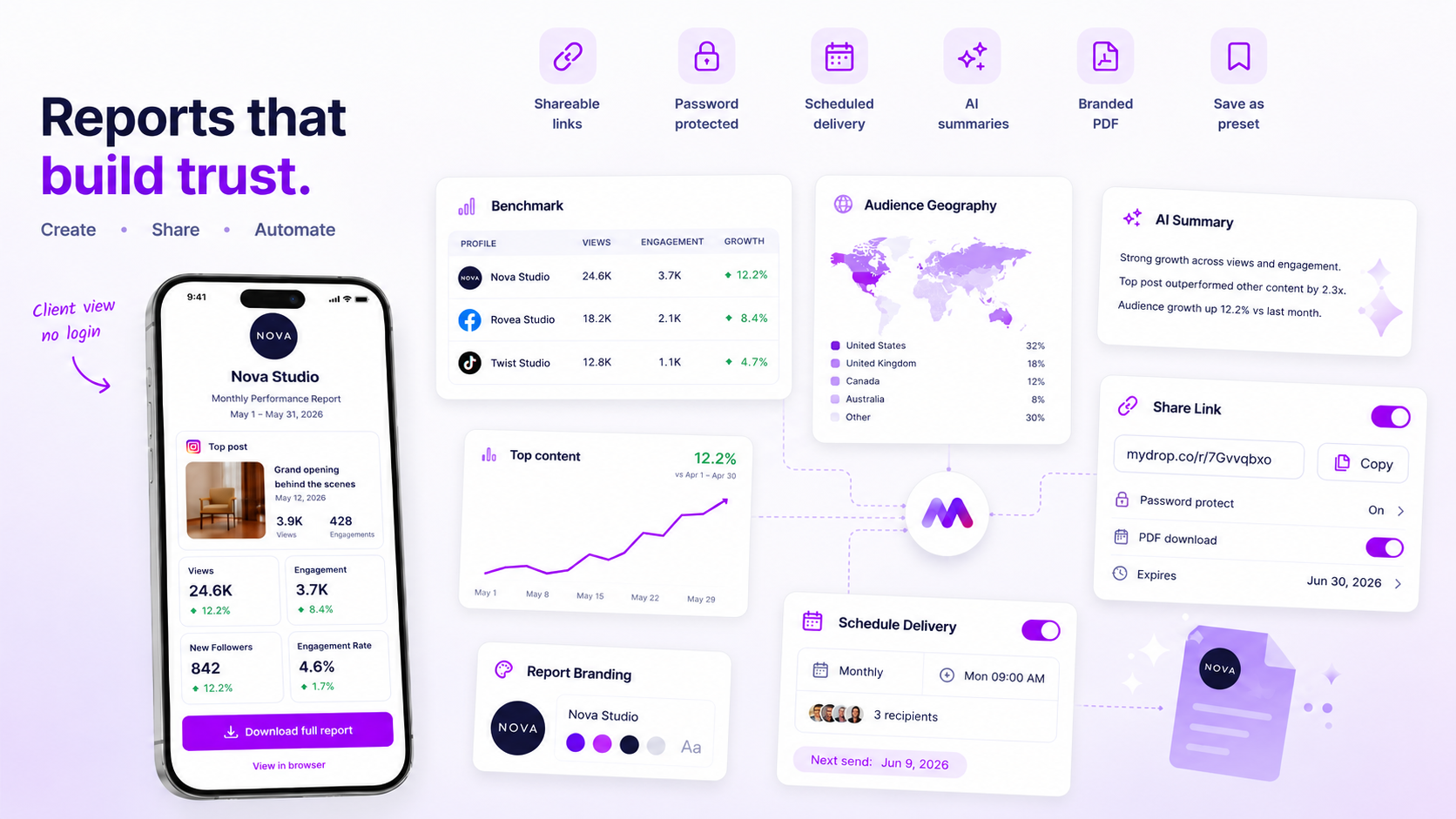
If your team is still downloading spreadsheets and writing individual emails every Friday to update clients, you're not scaling your reporting. You're stuck in an expensive admin loop. The best way to protect your margins and keep client trust is to treat reporting as a recurring, automated product asset, not an ad-hoc service task.
We've all felt the sting of a chaotic Friday afternoon, when the pressure to prove ROI turns into a race against the clock to format PDFs. It's draining, it's easy to get wrong and, most importantly, it's completely unnecessary. Shift from making reports by hand to managing a delivery cadence, and you stop being a data-entry clerk and start being a strategic partner.
Operator rule: If a report needs someone to step in by hand before it reaches the client, it's a cost centre. If it runs on a scheduled cadence with failure alerts, it's an automated retention engine.
Mydrop pricing check, September 2026: the entry paid plans of the eight tools most often compared with Mydrop run from $6 per channel (Buffer) and $25 a month (Later) to $99 per user (Hootsuite) and $79 per seat (Sprout Social), read on each vendor's pricing page. Mydrop is free to start, then $19 a month flat, not per seat. Full table on Mydrop's compare pages.
What the best tools need to handle

Once you're past the "do it all by hand" stage, what you need shifts from basic data collection to operational reliability. You're no longer just looking for a tool that can make a chart. You need a system that makes sure that chart actually reaches the stakeholder on time, every time, without anyone on your team checking the "Sent" folder.
To scale successfully, your reporting setup has to nail these four things:
- Reliable recurrence: The tool should handle daily, weekly and monthly jobs natively. You set the logic once, and the system takes care of the rest.
- Multi-channel delivery: Clients have different preferences. Look for tools that can produce a professional PDF, provide a secure public link, or give direct app access, depending on what the stakeholder needs.
- Fail-safe operations: If a data provider has an outage or an API connection drops, the tool should alert you straight away. You need to know before your client does.
- Snapshot integrity: This is often overlooked. Your setup needs to be saved as a snapshot, so that if you update a dashboard or delete a profile later, your historical client reports stay intact and consistent.
| Feature | Manual Workflow (Risk) | Automated Workflow (Asset) |
|---|---|---|
| Cadence | Ad-hoc; prone to "forgot to send" | Set-and-forget; reliable recurrence |
| Delivery | Individual emails; manual attachments | Automated PDF/Link/App delivery |
| Failures | Silent; client notices first | Proactive alerts; internal visibility |
| Scalability | Linear; more clients = more work | Fixed; same effort for 1 or 50 clients |
If your current tool can't handle a "run now" manual override, or lacks a clear audit trail of who received what and when, you'll hit a ceiling the moment you take on your next big account. Managing reporting at scale is about building a pipeline that keeps working even when your team is off duty.
Where basic tools start to break

Most entry-level social media tools are built for the creator or the solo marketer, not the agency running twenty accounts. These tools handle the "publish" part just fine, but they fall apart the moment you need to scale the "report" part.
The most common point of failure is silence. A basic tool might fail to pull data from a specific API connection because of a token expiry or a rate limit, but it won't tell you. You find out when your client emails you on Monday morning asking why the report link is broken or why the PDF is empty. By then, the damage to your agency's reputation is already done.
Common mistake: Relying on tools that don't have explicit failure notification workflows. If a report doesn't generate, you need to know before your client does.
Another breaking point is the "manual re-run." If you can't hit a "run now" button for a specific client report on demand, you're at the mercy of the tool's original schedule. When a client calls for an ad-hoc meeting to discuss a campaign spike, you should be able to trigger a fresh report instantly, not wait until next Tuesday for the next automated cycle to kick in.
The buying criteria that matter
Stop looking for the tool with the most charts and start looking for the tool with the most robust delivery engine. If you're managing multiple brands, consistency should drive your reporting strategy, not customisation.
Use this scorecard to work out whether a tool is actually saving you time or just adding new admin tasks to your Friday afternoon.
Agency Reporting Maturity Scorecard
| Criteria | Feature Requirement | Why it matters |
|---|---|---|
| Recurrence Reliability | Daily, weekly, monthly options | Keeps clients informed without manual setup. |
| Failure Visibility | Automated error emails/logs | Stops "did you forget to send the report" emails. |
| Delivery Flexibility | PDF, Public Link, App Access | Clients have different security/access needs. |
| Snapshot Stability | Config snapshots preserve state | Report data shouldn't shift if profiles are renamed. |
| Instant Action | Run-now / Pause / Resume | Allows ad-hoc client support without heavy lifting. |
The Scaling Reality Check
Ask your team these three questions. If the answer to any of them is "No," you're currently paying your employees to be glorified data-entry clerks.
- Can we pause an entire client's reporting cadence with one click? (Crucial when a client pauses their retainer or changes scope.)
- Does our tool alert us before a client is supposed to receive a report if the data isn't ready? (This is the difference between being proactive and being embarrassed.)
- If a team member leaves, does the reporting setup stay in the account, or is it tied to their personal login? (This is a major governance risk that often gets ignored until it's too late.)
In our experience at Mydrop, agencies usually come unstuck when they try to treat reporting as a creative task. It isn't. It's an operational service. The best report is the one that arrives exactly when the client expects it, perfectly formatted, without anyone on your team having to touch a spreadsheet.
How Mydrop supports this workflow
At Mydrop, we see the reporting wall every day. Teams reach a threshold, usually around a dozen clients, where "personal touch" turns into "operational debt." You stop being a strategist and start being a human mail-merge. We built the Analytics Schedule engine to break that cycle.
Instead of hunting for spreadsheets, you set up a report once and let our Schedule Runner handle the rest. When you set a schedule, Mydrop captures a configSnapshot. This matters because it locks in the metrics, brand profiles and layout you agreed with the client. Even if your internal team updates a dashboard or changes a tracking metric for a live campaign next month, the client's recurring report stays consistent with the original requirements.
We also treat reporting like a production environment. If a data stream hits a snag or an external provider has a temporary gap, you aren't left in the dark. Our system logs the failure and alerts you, so you can sort the issue before your client wonders why their inbox is empty. You get:
- Set-and-forget cadence: Daily, weekly or monthly delivery via email, secure public links or direct app access.
- Safety valves: Pause or resume schedules without deleting your setup, perfect for seasonal campaigns.
- On-demand reliability: Need to send a report early for a board meeting? Use Run-Now to trigger the snapshot immediately, bypassing the cron schedule without breaking the routine.
This isn't just about sending PDFs. It's about taking the "did they get it?" anxiety out of your Friday afternoons.
A simple shortlist checklist
Before you commit to a tool, whether it's Mydrop or another enterprise-grade platform, run your current candidate through this scorecard. If they can't hit these four operational marks, you're just buying yourself a new set of manual tasks.
| Criteria | The "Manual Trap" Warning | The Enterprise Standard |
|---|---|---|
| Fail-Safe Alerts | No notification if a report fails to send. | Automated failure emails + log visibility. |
| Versioning | Report changes every time you open it. | Config snapshots preserve historical report state. |
| Delivery Mix | Only sends static PDF attachments. | Offers choice: PDF, secure link, or app login. |
| Operational Control | Requires delete/re-create to modify. | Pause/resume and run-now controls included. |
Decision check: If your team spends more than 30 minutes a week manually "gathering" data for clients, you're paying a reporting tax that's eating into your agency's profit margins.
Conclusion
The shift from "generating reports" to "managing reporting cadences" is the quietest, most profitable pivot an agency can make. You stop competing on how many hours your team can bill for data entry and start competing on the actual strategy your reports represent.
Stop treating your reporting as a chore you have to survive. Treat it as a passive product you deliver. When your reporting is automated, reliable and invisible to the client, you finally clear the bandwidth to do the work they actually hired you for. The best reporting tool is the one that lets you forget it exists until the client replies with, "Great insights, let's discuss the plan for next month."

 Google review
 Trustpilot review
 Product Hunt comment





