





























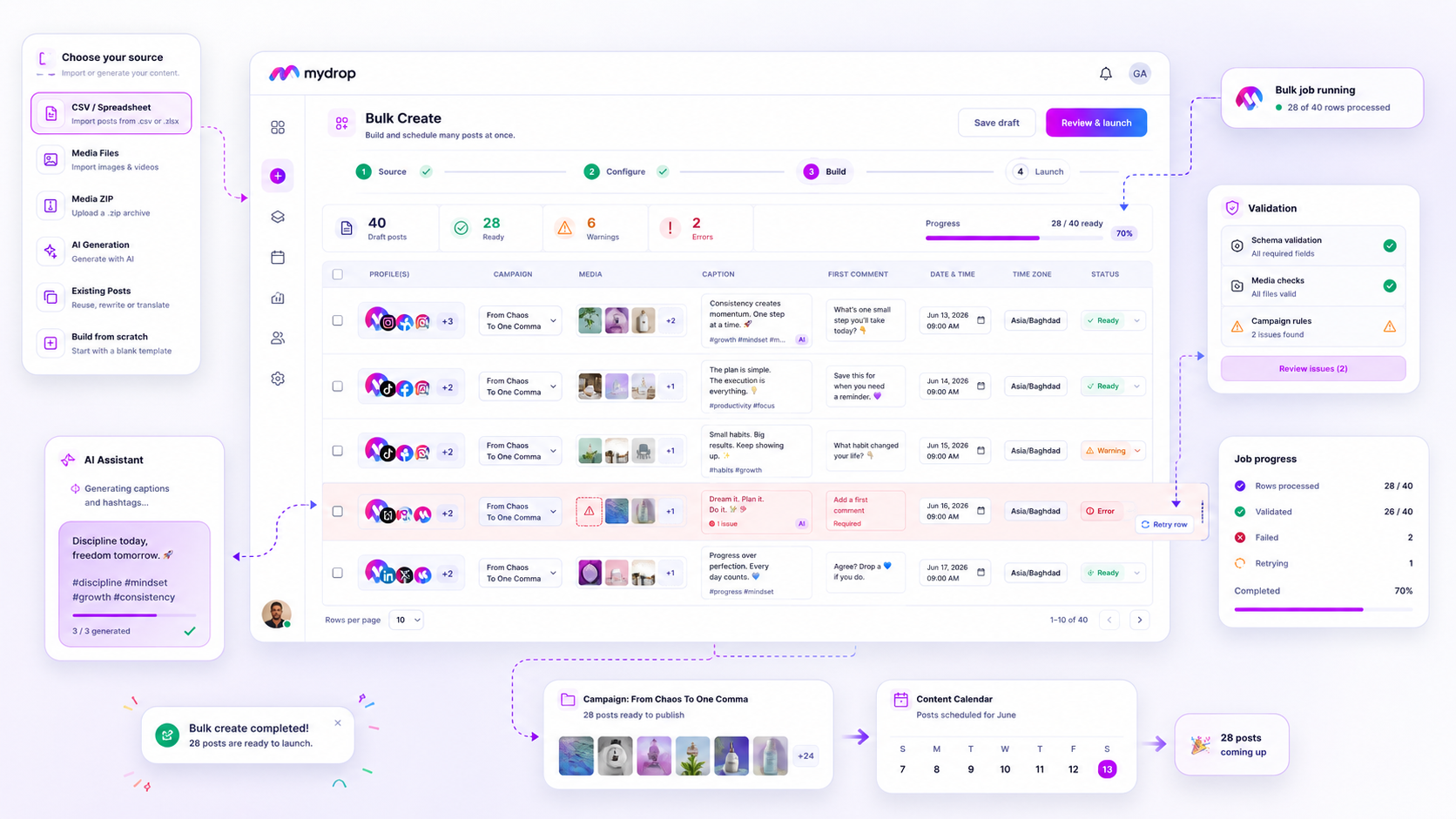
The best bulk scheduling tools for busy agencies aren't the ones that swallow the most rows per second. They're the ones that cope cleanly with the 5% of rows that will always fail validation. If your team still spends Friday afternoons re-cleaning spreadsheets because a "bulk upload" tool treated a 500-post campaign as one solid brick, you're paying a hidden tax in lost coordination time.
We've all been there. You hit upload, the progress bar flickers, and the screen turns red. All you get is a vague error message, and a choice: rebuild dozens of posts by hand, or re-upload the whole batch and risk duplicates across your brand profiles. It's a classic trap: software that cares more about raw speed than about each individual post. To move faster, you need a system that treats every post as its own item, one you can recover, from the moment it goes in.
What the best tools need to handle

When you're managing hundreds of brand profiles across several markets, a "bulk" tool without row-level control is a liability. Stop asking "How many posts can I upload?" and start asking "What happens when the connection drops, the API hits a rate limit or a single row has a typo?"
The best platforms act as a safety net. They don't just shift data from a CSV into a database: they validate, track and keep an audit trail for every single item.
Here's the baseline you should expect from your scheduling stack:
| Capability | Why it matters for your team |
|---|---|
| Atomic Row Validation | Fails only the row with a bad date or missing tag, so the rest of the campaign carries on. |
| State Persistence | Keeps the job running even if your browser crashes or you close the window, so you never lose progress. |
| Row-Level Retries | Gives you a simple "Retry Failed Rows" button that targets only the items that didn't make it, instead of a full re-upload. |
| Visual Progress Tracking | Shows you in real time which posts are queued, processing, done or stuck on an error. |
Operator rule: If you have to re-upload a CSV more than once to fix a row-level error, the tool has let you down. You should be able to see, edit and fix the failing post right inside the app, without touching the source file again.
Mydrop pricing check, September 2026: the entry paid plans of the eight tools most often compared with Mydrop run from $6 per channel (Buffer) and $25 a month (Later) to $99 per user (Hootsuite) and $199 per seat (Sprout Social), read on each vendor's pricing page. Mydrop is free to start, then $19 a month flat, not per seat. Full table on Mydrop's compare pages.
When you shop for your next tool, put resilience ahead of raw speed. A tool that uploads 1,000 posts in seconds but makes you start again after one error is slower in practice than one that takes a minute longer and needs no manual clean-up. You want a system that soaks up the friction of campaign management, so your team can get on with strategy instead of data entry.
Where basic tools start to break

Most entry-level schedulers treat a bulk upload like one big pane of glass. If a single row has an invalid date, a broken image link or a character count that's too long, the whole batch (often hundreds of posts) simply crashes or gets refused. And all you get is a vague message like "Upload failed."
That's the classic "all-or-nothing" trap.
We've seen it across hundreds of brand profiles. An agency manager spends two hours perfecting a CSV for a big launch, hits "Upload" and watches the progress bar freeze because post #142 had an extra space in the platform handle. The tool can't cope with partial failures, so the manager has to hunt for the error, fix the file and hope the system doesn't duplicate the 141 posts that went through. It's a huge drain on your team's patience, and frankly, it's avoidable.
If your tool makes you rebuild a campaign over one formatting error, it isn't a management platform. It's a glorified pipe that expects perfect data.
Common mistake: Treating "Batch Finished" as the only measure of success. Real efficiency is how many clicks it takes to fix a single failed row.
The buying criteria that matter
Stop judging tools by how fast they take in your CSV and look at how they handle the whole life of the job. You need a tool that treats every row as its own unit of work.
Use this scorecard to check whether a scheduling platform can really cope at enterprise scale.
| Feature | The "Brittle" Tool (Avoid) | The "Resilient" Tool (Buy) |
|---|---|---|
| Atomicity | One row error stops the entire batch. | Row-level failures are isolated. |
| Persistence | You must keep the tab open until done. | Jobs run asynchronously in the background. |
| State Tracking | "Success" or "Failure" for the whole file. | Detailed status per row (Pending, Done, Failed). |
| Remediation | Delete everything and re-upload. | One-click retry for failed rows only. |
| Safety | No way to undo a partial mess. | Automatic cleanup of created assets on cancel. |
The Bulk Resilience Checklist
When you're on a demo with a vendor, don't just ask "Does it support CSV?" Ask these five questions to find out whether their engineers really understand agency workflows:
- State Persistence: If I close my browser mid-upload, does the server finish the job, or does it stop and leave me with half-finished work?
- Row-Level Atomicity: If I have 500 rows and 10 fail, can I see the errors for just those 10 and fix them without touching the other 490?
- Conflict Handling: Does the system check for permission or character limit problems before it tries to publish, or does it only fail once it hits the API?
- Bulk Cleanup: If I realise a job is set up wrongly, can I cancel it and have the posts it just created deleted, or am I stuck deleting 500 posts one by one?
- Audit Trail: Can I see who launched the bulk job and the status history of every item, or is the process a black box?
The hard truth is that most teams don't have a content problem. They have a coordination bottleneck. If your tool needs you to babysit the import, you aren't saving time: you're just turning your creative work into data-janitor work.
At Mydrop, we designed our Bulk Create engine to work like a factory floor, not a data chute. We assume things will go wrong (an API rate limit, a missing asset, a stray character) and we build in the resilience to let you fix that one row without stopping the campaign.
How Mydrop supports this workflow
At Mydrop, we see bulk creation as a campaign factory, not a data dump. With hundreds of posts across dozens of markets, you can't afford to nurse individual rows one at a time. You need a system that expects things to go sideways now and then and builds that into the process.
Our bulk engine keeps intake separate from execution. You upload your CSV or media set, and Mydrop turns the raw input into a queue of validated, separate tasks. If a row fails (say, an AI-generated caption runs over a character limit, or an image link times out), the rest of the job keeps going. You don't end up with a broken half-upload. You get a clear report of what finished and what needs your attention.
Decision check: Never settle for a "whole job" failure. If a tool doesn't show you the status of individual rows in real time, you're flying blind.
While the job runs, the Bulk Jobs listener keeps you posted. You don't have to keep the browser tab open or watch the loading bar. If there are errors, you fix just those rows and hit retry. The system resets only the failed items, and your successful posts stay exactly where they belong: scheduled and ready to go.
A simple shortlist checklist
Before you commit to a new scheduling tool, run it through this check. If the answer is "no" to more than one of these, you're only buying yourself a fresh set of manual headaches.
| Criteria | The "Brittle" Test | The "Resilient" Standard |
|---|---|---|
| Atomicity | Entire batch fails if one row is invalid. | Rows process independently; failures are isolated. |
| Persistence | Job status vanishes on browser refresh. | Status tracks in the background; job survives disconnects. |
| Retry-ability | Must rebuild the CSV to fix one typo. | One-click retry for specific failed rows only. |
| Validation | Errors appear only after attempted publish. | Validation runs pre-launch; errors flagged immediately. |
| Cleanup | Manual deletion of partial job posts. | Cancelled jobs automatically rollback created posts. |
Conclusion
Most teams don't have a content production problem. They have a coordination bottleneck. When you're running high-volume social calendars, your tool should work as a shock absorber, not a fragile glass pipe that shatters at the first malformed row.
Stop measuring success by how quickly you can hit "Upload". Real efficiency is how few minutes it takes to clean up a messy import on a Friday afternoon. Find a system that respects your time, keeps failures contained and lets you focus on strategy instead of status bars. Your team, and your sanity, will thank you.

 Google review
 Trustpilot review
 Product Hunt comment




