
















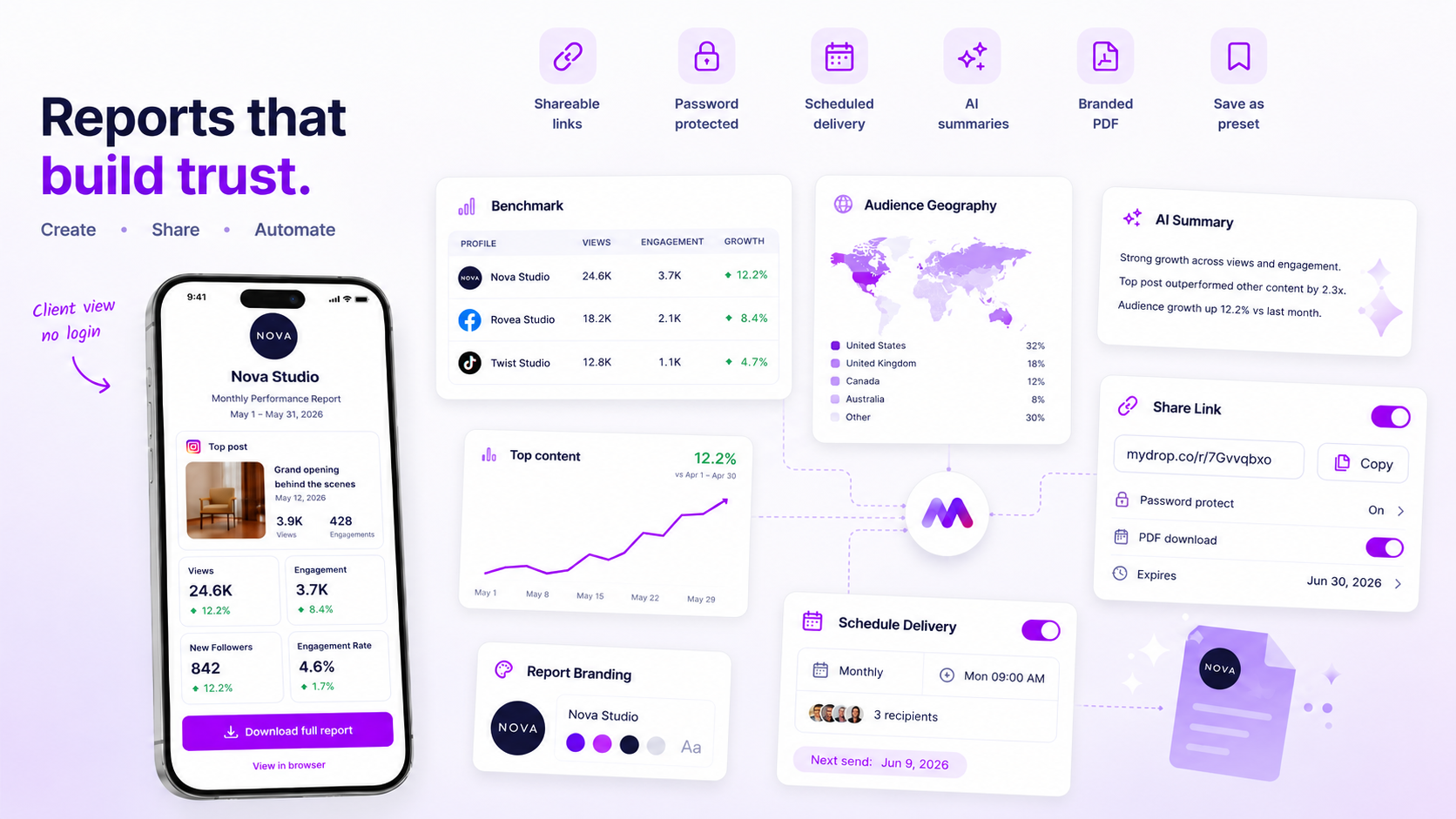
Stop manually exporting analytics data the moment your "coordination tax" starts eating into your team's ability to actually analyse results. That is the time you spend formatting decks and chasing approvals. If you are spending your Friday afternoons fighting with CSVs instead of spotting performance trends, you are not providing a premium service. You are doing manual data entry. Moving to automated delivery isn't just about efficiency. It's about shifting your agency's output from data delivery to data consulting.
We have all been there. It is the end of a long campaign week, your browser is bloated with twenty open tabs, and you are desperately copy-pasting screenshots into a presentation, praying you didn't leave a typo in the client's name. It is messy, repetitive, and it kills your team's creative momentum. The goal is to get the right insights into your stakeholders' hands without you having to touch a mouse, so you can focus on the "why" instead of the "what."
The decision teams usually frame too broadly

Most agencies assume that manual reporting is inherently higher quality than automated reporting, but that is a dangerous misconception. This "Customization Trap" suggests that because you touched the file, the client will value it more. In reality, clients care about two things: consistent visibility and actionable insight. When you treat every single report as a bespoke craft project, you build a bottleneck that stops your team from scaling.
Here is where the confusion usually starts. Teams often treat "reporting" (the act of delivering data) and "consulting" (the act of interpreting that data to make decisions) as the same task. They are not. If your client needs a monthly baseline of their social reach and engagement, they do not need you to manually re-format those numbers every time. They need that data in their inbox consistently, on time, and without errors.
Operator rule: If the time required to prepare and send a report exceeds 10% of the account's monthly billable management hours, you are paying a "coordination tax" that is destroying your margin.
This tax is rarely about the complexity of the data itself. It is usually the result of legacy promises made during the sales cycle, where you pledged "white-glove" service, that have now become an operational anchor. Moving to automation lets you reclaim that time. You aren't cutting service. You are standardising the delivery so your best people have the bandwidth to solve actual problems for your clients.
To work out where your team stands, use this audit to see if you are stuck in the manual grind:
| Audit Point | Signal | Action |
|---|---|---|
| Data Plumbing | You spend >30 mins cleaning/merging sources. | Standardise data pipeline. |
| Frequency | You send the same metrics to the same person. | Automate delivery cadence. |
| Approval Loop | You wait for internal sign-off on simple data. | Define static template guardrails. |
| Consistency | The client asks "Is this report ready yet?" | Move to recurring schedule. |
| Value Add | You only offer "here are your numbers." | Pivot to manual consulting. |
If you are ticking more than two boxes, your current reporting model is a liability. It is time to treat data delivery like a utility, reliable and automated, so your team can get back to being consultants.
What should stay manual and what can move faster

The golden rule here is simple: Automate the delivery of performance data, but never automate the delivery of performance insights.
If a client expects a high-level update on baseline metrics, such as reach, follower growth or standard engagement rates, keep the human out of the loop. They don't need to wait for your team to copy-paste charts at 4 p.m. on a Friday. Moving this to a recurring, scheduled rhythm gives your client faster feedback and gives your team their Friday afternoons back.
However, keep the "strategic pivot" reports manual. If a campaign is underperforming, if a brand is navigating a sudden PR storm, or if you are preparing to pitch a major budget shift for the next quarter, this needs a human voice. You need to frame the "why," interpret the volatility, and hold their hand through the uncertainty.
Decision check: Use automated reports to build trust through consistency, and manual reports to build authority through context.
The tradeoff matrix
Working out where a client fits in your reporting workflow should not be a guessing game. If you are managing dozens of brand profiles across different markets, you need an objective way to sort these tasks. If your "coordination tax", the time spent on non-analytical labour, takes up more than 10% of your billable hours for an account, it is time to move that client into a formal automation schedule.
The following matrix helps you map your clients based on their need for either standardised visibility or high-touch consulting.
| Client Tier | Reporting Cadence | Primary Report Type | Automation Suitability |
|---|---|---|---|
| Baseline | Weekly / Monthly | Baseline KPIs (Reach, Growth) | High (Set it and forget it) |
| Growth | Bi-weekly | KPI + Content Trends | Medium (Automated run, add human commentary) |
| Strategic | On-Demand / Monthly | Narrative, Strategy, Pivot | Low (Human-authored, custom deck) |
At Mydrop, we see teams struggle most when they treat every client like a "Strategic" account. It creates a massive bottleneck. When you have a client in the Baseline or Growth tiers, the Mydrop analytics scheduler lets you set up your preferred report once, then automate the delivery by PDF or a secure public link on a fixed recurring schedule.
This takes the "data plumbing" off your plate. Instead of chasing approvals for a routine weekly update, you spend those saved hours actually talking to the client about what the data means for their business. Automation isn't about removing the human. It is about freeing the human to do the work that actually justifies your agency's fee.
If your team is currently spending more time fighting with spreadsheets than you are explaining performance trends, your reporting model is fundamentally broken. Stop trading your best talent's time for manual data entry. Move the baseline reporting to an automated schedule, and save your human energy for the conversations that only you can have.
How to pilot the workflow safely
You do not flip a switch and walk away. The most reliable way to transition is a two-week parallel run. During this time, keep sending your manual deck alongside the automated delivery. This lets you catch any discrepancies in how specific metrics map to your client's preferred view without risking a communications breakdown.
Use this checklist to make sure you are ready to cut the cord:
- Map the data. Does the automated snapshot pull every KPI the client actually reads, or just the ones you have been manually highlighting?
- Test the delivery. Trigger a
run-nowinstance to check that the email formatting and PDF attachment look exactly how you want them to appear in your client's inbox. - Confirm audience alignment. Double-check that your recipient list in the scheduler matches the current stakeholder group.
- Set failure alerts. Make sure the person responsible for the account gets the automated failure email if a schedule hits a data gap.
- Review the cadence. Is the frequency (daily, weekly, monthly) actually helping the client make decisions, or is it just noise?
If your client replies during those two weeks with "I noticed the format changed," you have a chance to explain that the new process delivers the same data faster and more reliably. If they do not notice, you have your answer: they value the insight, not the handmade spreadsheet.
The operating rule to keep
The biggest risk in automating reporting is the "set it and forget it" trap. A scheduled snapshot can go stale if you rotate profiles, rename brands, or change your tagging structure behind the scenes.
Workflow check: Treat your report schedules like a living piece of infrastructure. Do a "config audit" once a quarter to make sure the snapshots still line up with your current reporting taxonomy. If you are not actively reviewing what the machine sends out, you are essentially automating your own obsolescence.
At Mydrop, we often see that the best teams do not just automate the sending of reports. They use the time saved to build a one-page "Executive Summary" that highlights the why behind the numbers. Automation gives you the space to be a consultant rather than a data clerk.
Conclusion
The move from manual exports to automated scheduling is a rite of passage for any agency serious about scaling. When you offload the repetitive tasks to an engine, you stop competing on who can spend the most hours in a spreadsheet and start competing on who can provide the most strategic value.
Remember, the goal is not to remove yourself from the relationship. The goal is to remove the "coordination tax" that stops you doing the work your clients actually pay you for. Pick your highest-volume, lowest-strategy account, set up a recurring schedule, and see how much your Friday afternoons improve. The clients will appreciate the consistency, and your team will appreciate the time back.


 Google review
 Trustpilot review
 Product Hunt comment





