






























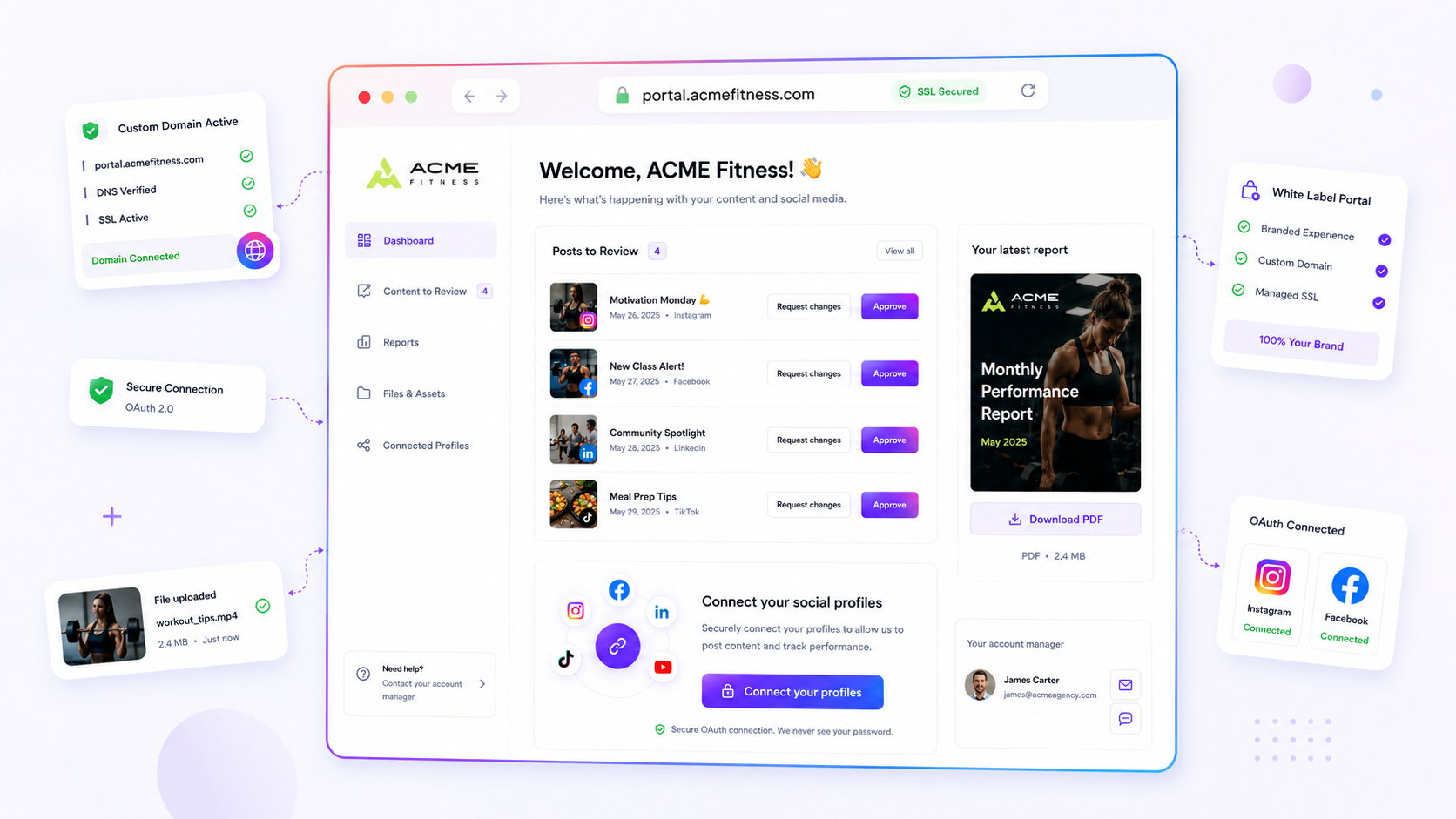
When your agency sends a client a link that starts with a third-party platform's name, you are not just sending a file. You are telling them your professional service is an add-on to someone else's software. The most successful agencies stop this leak at the source by putting every portal and link-in-bio on their own branded domains.
We get it. You are juggling twenty client requests, and the last thing you want is a fight with DNS records or a hunt for expired SSL certificates. It feels like a technical hurdle that pulls you away from the creative work, but ignoring it costs you perceived value every time a client clicks a link. The goal isn't just looks: it's making your agency the owner of the digital experience.
Operator rule: Every client-facing link must pass three gates: DNS Validation (ownership), Managed SSL (security) and Host Dispatch (proper routing). If a tool lacks one, it is not an agency-grade solution.
Mydrop pricing check, September 2026: the entry paid plans of the eight tools most often compared with Mydrop run from $6 per channel (Buffer) and $25 a month (Later) to $99 per user (Hootsuite) and $79 per seat (Sprout Social), read on each vendor's pricing page. Mydrop is free to start, then $19 a month flat, not per seat. Full table on Mydrop's compare pages.
What the best tools need to handle

Agencies that struggle with domain infrastructure usually treat it as a manual one-off chore for every new client. That is a trap. You want a tool that makes domain setup a repeatable, templated step in your onboarding flow. If your current software has you copying and pasting SSL keys by hand, or emails you to say a certificate is about to expire, you have already lost.
The best tools move that burden from your team to the infrastructure layer. They should handle the whole lifecycle, from the first DNS check to background SSL provisioning, without you ever logging into a registrar or looking after a server.
When you assess a tool, look for these three core capabilities:
| Capability | Why it matters for agencies |
|---|---|
| Automated DNS Verification | Prevents "domain not found" errors by confirming the configuration before a portal goes live. |
| Asynchronous Managed SSL | Removes the "Connection Not Private" warning by renewing certificates automatically in the background. |
| Host Dispatch Routing | Lets you point one client-owned domain at different surfaces, like a landing portal or a bio page, depending on what you need to deliver right now. |
This is where the gap between "creator-grade" and "agency-grade" software becomes obvious. A creator-grade tool might let you plug in a domain, but if that domain fails to route, or throws a browser security warning because the platform-managed certificate timed out, it's the agency that looks incompetent in the client check-in. At Mydrop, we see teams managing hundreds of brand profiles, and we know that the moment a client sees a generic platform.me URL in their browser bar, the perceived value of your agency's strategy takes a hit. You are, in effect, training the client to look past your brand and towards your vendor.
Where basic tools start to break

Most teams find out their domain setup is failing at the worst possible moment: in the middle of a high-stakes campaign launch or a live client meeting. You add a new portal, assume the platform's "auto-setup" works, and then hit a wall.
The cracks usually appear in three predictable ways:
- The SSL Dead Zone: Many "easy" tools treat SSL certificates as a one-time setup. They don't watch for expiry or renew automatically. Suddenly your client's site shows a "Connection Not Private" warning. You're scrambling to refresh certificates while your client asks why their professional brand looks like a security risk.
- The DNS Black Hole: If a tool asks for manual DNS configuration with no built-in verification check, your team is left guessing whether the record has propagated. You lose hours, or days, playing tag with IT departments because you can't see the domain's status.
- Routing Rigidity: You might want
portal.client.comfor their asset hub andbio.client.comfor their link-in-bio. Basic platforms push you into a one-size-fits-all host path, which wrecks your branding and leaves you with disjointed URLs for different client touchpoints.
At Mydrop, we see agencies get stuck when they treat domain assignment as a "set it and forget it" job. When your infrastructure doesn't handle the async heavy lifting (DNS validation, certificate provisioning, host dispatch), it becomes a permanent part of your overhead. You stop being a creative partner and become an unpaid server administrator.
The buying criteria that matter
When you are ready to stop leaking authority, you need to move beyond "does it support custom domains?" and look at how reliably the tool runs day to day. Use this scorecard to judge whether your current platform is ready for enterprise-level agency work.
| Capability | What to demand | Why it matters |
|---|---|---|
| DNS Verification | Real-time status checks with clear error feedback. | Ends the "waiting game" while IT confirms whether records are live. |
| Managed SSL Lifecycle | Zero-touch, asynchronous provisioning and auto-renewal. | Spares you the "Connection Not Private" embarrassment in front of clients. |
| Target Assignment | Granular routing (portals vs. links) on the same domain. | Keeps your agency's branding ecosystem unified under one roof. |
| Service Integration | Internal health checks and service account authorisation. | Makes sure the platform itself is talking to your DNS records securely. |
| Removal Hygiene | Automated cleanup of resources when a domain is deleted. | Prevents orphaned SSL certificates and security gaps when a project ends. |
Decision check: If your domain tool makes you monitor or refresh your SSL certificates by hand, it is not an agency-grade platform. It is a liability.
The best tools are practically invisible. Once you set up the initial CNAME or A record, the platform should take over the full lifecycle. It should handle the handshake with the certificate authority, confirm the domain is ready and route the host correctly, without anyone on your team refreshing a status page.
If you spend your Monday mornings checking SSL statuses instead of reviewing content strategy, you aren't just losing time. You are failing a basic security gate that your clients expect you to have under control.
That is the hidden cost of "simple" tools: they are cheap upfront but expensive to maintain as your brand list grows. You aren't paying for the domain. You are paying for the peace of mind that every link, portal and bio page looks as professional as the work you actually delivered.
How Mydrop supports this workflow
At Mydrop, we have seen enough broken brand experiences to know that domain management is rarely a technical problem. It is a coordination problem. When you need to spin up a new client portal or link-in-bio page, the last thing you want is a multi-day delay while your IT team works through a ticket queue, or, worse, a panicked email from a client whose site is showing an SSL warning.
We built our custom brand domain infrastructure to take the technical heavy lifting off your plate. Instead of manual DNS hand-offs or custom scripts, Mydrop automates the whole lifecycle. You enter the domain you want in your workspace settings, do the initial DNS verification, and the platform takes over. We provision the managed SSL certificates, run the automated checks and manage the host dispatch that sends visitors to the right portal or bio page.
The real benefit is that your team stops being the bottleneck. Once the domain is verified, you can assign it to any target, whether that's a client-specific bio page or a full brand portal, without touching DNS records again. We treat your domains as a reusable, secure asset you can point at whatever surface the client needs right now.
Workflow check: If your domain tool makes you copy and paste certificate files or run regular status checks, you are not using a tool. You are doing unpaid IT maintenance.
A simple shortlist checklist
Before you commit to a platform for client-facing surfaces, run your current setup (or your next candidate) through this audit. If it fails on any of these four points, you will feel the friction within the first three months.
| Requirement | Why it matters | Decision Check |
|---|---|---|
| Automated SSL | Ends the "Connection Not Private" panic during meetings. | Does the tool auto-renew and monitor health? |
| DNS Verification | Proves ownership and prevents unauthorised spoofing. | Is the validation step clear and non-destructive? |
| Granular Routing | Lets one domain serve several types of surface. | Can I switch a domain between a portal and a bio page? |
| Async Provisioning | Keeps your team moving while the web catches up. | Does the tool handle the waiting time without blocking the UI? |
Conclusion
The difference between an agency that feels like a partner and one that feels like a commodity often comes down to small, persistent details, and nothing is more persistent than the URL in the address bar.
When you consistently deliver branded, secure, professional client surfaces, you build authority without saying a word about it. And every time you fall back on a generic, platform-owned URL, you are quietly telling your client they could have gone straight to the software vendor.
Stop the leak. Move your client-facing surfaces to your own domains, automate the security layer and treat your web infrastructure as brand equity that you own. You will save hours of manual upkeep and, more importantly, you will look as professional as the work you actually deliver.

 Google review
 Trustpilot review
 Product Hunt comment





