


























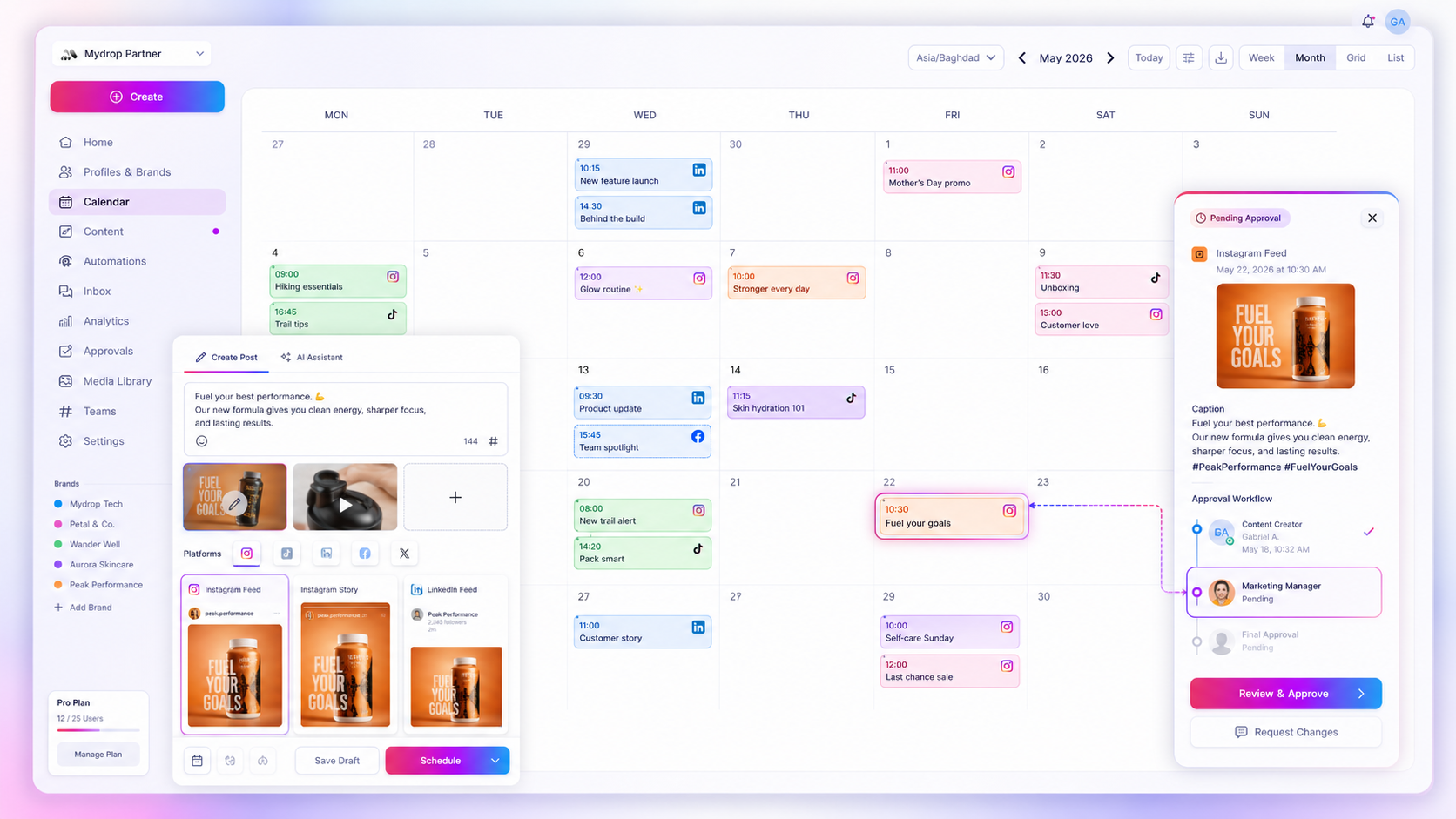
Stop treating your recurring social media planning as an admin side-hustle. When your content calendar is cut off from your execution tasks, you don't only lose time. You lose the context that keeps brand quality consistent at scale.
We get it. The content calendar looks tidy, but the real workflow is a graveyard of sticky notes, forgotten follow-up emails and recurring tasks that live nowhere near the assets they belong to. It's messy and frantic, and it's why your team feels like it's forever chasing its tail instead of getting on with strategy.
The real culprit behind the burnout isn't the volume of content. It's the hidden friction of manual tracking: the endless tab-switching between your project board, your asset folder and the social calendar itself.
What the best tools need to handle

Once you're juggling dozens of stakeholders or hundreds of brand profiles, your software has to be the nervous system of the operation, not a passive noticeboard.
The best operational tools treat planning tasks as first-class citizens linked straight to the content, not as orphans in a separate spreadsheet or task manager. If your current tool makes you copy a post title into a second app just to track its review status, you've already lost.
Here is the rubric your team should work from:
| Requirement | Why it matters for large teams |
|---|---|
| Object linking | Tasks must be physically attached to posts, media or profiles. |
| Done state visibility | Leads need to see task status on the calendar without asking for status updates. |
| Calendar-native sync | The task must exist where the work is scheduled, not just where it is tracked. |
| Recurrence logic | Recurring tasks (e.g. monthly compliance audits) must handle exceptions automatically. |
Where basic tools start to break
Most entry-level platforms assume your planning tasks are linear and independent. In a real enterprise setting, though, even a single planning task, like verifying brand rights or checking for updated compliance disclaimers, is usually tied to a specific set of assets.
If your tool is just a simple calendar, those tasks inevitably turn into "ghost items" drifting around your workspace. You can see the post, but you can't tell whether the related operational check was ever done.
Common mistake: Relying on separate task-management software to track "social media work". It forces your team to update two systems at once, and one of them will always end up wrong.
Mydrop pricing check, September 2026: the entry paid plans of the eight tools most often compared with Mydrop run from $6 per channel (Buffer) and $25 a month (Later) to $99 per user (Hootsuite) and $199 per seat (Sprout Social), read on each vendor's pricing page. Mydrop is free to start, then $19 a month flat, not per seat. Full table on Mydrop's compare pages.
The buying criteria that matter
Your aim is to kill off the manual "ping" culture: the endless Slack messages asking "Hey, is that video cleared for posting?" A better tool closes that gap for you.
Look for platforms that let you build task layers right inside your calendar view. When a task is marked "done", the rest of the team should know straight away that the campaign can move to the next stage. In Mydrop, for example, you can set up recurring reminders tied to specific media or posts. Mark a reminder done and the system updates across your shared view and pushes that state to your connected Google Calendar too, so stakeholders stay in the loop without a single manual email.
That's the shift from "tracking work" to "executing workflows". Your team's energy should go into content strategy, not into being the human glue between disconnected software.
Where basic tools start to break

The real trouble starts when your "don't forget" list outgrows a sticky note. Most teams begin with a generic calendar or a project board, but both work like silos. They hold the task, yet they have no idea what the task is actually for.
If you have to copy a link from your project board, paste it into a spreadsheet, then check your social calendar by hand to see whether the post went live, you're doing manual labour you shouldn't have to. It's where most content operations lose their rhythm.
Here's what happens when your planning surface is disconnected from your execution:
- Orphaned tasks: A recurring task like "Review influencer assets" sits in a project board. It isn't connected to the media files or profiles involved, so when the asset changes, the task stays out of date.
- The sync gap: Someone marks a planning step "Done" in a task tracker, and the change never reaches the calendar. You're left asking "Is this ready?" while the calendar tells you nothing.
- Context scavenger hunt: You spend more time hunting for the right asset or the latest version of a brief than you do planning.
Watch out: Avoid tools that treat content as just another "item" to tick off, rather than a live object that changes state, needs approvals and has to land at a specific time on the calendar.
If your tool knows nothing about your actual social media campaigns, you stop being an operator and become a glorified copy-and-paste machine.
The buying criteria that matter
If you're auditing your current stack, ask how much manual heavy lifting it takes to keep your calendar honest. If you're constantly moving data between tabs, the tool is the problem, not the team.
Use this scorecard to judge whether your setup is built for scale or just hanging on by a thread.
| Feature | Low-maturity tool (the trap) | Enterprise-ready tool (the standard) |
|---|---|---|
| Object linking | Tasks are text fields with no links. | Tasks link directly to posts, profiles and media. |
| Done state | Manual update in a separate app. | Instant status change that ripples across views. |
| Sync logic | Periodic manual re-entry. | Native two-way sync with your team's main calendar. |
| Recurrence | Simple repeats; hard to skip a week. | Smart logic: skip, override or edit specific occurrences. |
| Visibility | Hidden in a task list. | Tasks appear as calendar-native objects alongside content. |
Decision check: the 5-point audit
- Does the task live with the asset? If you have to go and find the post after reading the reminder, you're wasting time.
- Can you trust the calendar view? If it only shows published content and not the work needed to get there, it's incomplete.
- Is the "Done" state accurate? Can a team lead glance at the calendar and know a task is finished, without opening a side tool?
- Does it handle real-world messiness? Can you skip a single instance of a recurring task without deleting the whole series or breaking your calendar feed?
- Is the sync passive or active? Does the tool push updates to your team's Google Calendar automatically, or does someone have to move events by hand?
Most teams don't have a content problem. They have a coordination bottleneck that stops them moving faster. If your tool needs a manual step to get from "task" to "published", you're hitting the ceiling of what your team can handle.
At Mydrop, we see this pattern all the time. We built our reminder system as a native operational layer. Instead of parking planning tasks in a separate silo, you attach them straight to your profiles, media and posts. Mark a task done and that state shows everywhere, including your synced Google Calendar. Planning stops being a background chore and becomes a visible, joined-up part of your daily workflow.
How Mydrop supports this workflow
At Mydrop, we see the most successful teams stop treating planning tasks as orphans. They treat them as essential campaign objects, right alongside the videos, copy drafts and approval logs. Use Mydrop Reminders and you're not just creating a digital sticky note. You're building an operational bridge.
You can link a reminder to the posts, profiles or specific assets involved in your campaign. A generic "post this" reminder becomes a task with context, sitting where the work actually happens. And because reminders can recur hourly, daily, weekly or monthly, they cover your predictable operational load, so you never have to re-create the same calendar entry each time the cycle comes round.
More importantly, the done state syncs straight to your connected Google Calendar. When you or a teammate marks a recurring occurrence as done, the status updates for everyone. You see what's really finished in real time, with no status meeting to confirm the basics. If a campaign pause means skipping a week, the system handles the exception, so your calendar stays clean and your team isn't wasting time on tasks that no longer apply.
Operator rule: Never track a task in a silo if the asset it serves lives in your calendar. If the task isn't linked to the media or post, it will inevitably drift away from the campaign timeline.
A simple shortlist checklist
Use this rubric to judge whether a tool can handle your team's operational load. If your current setup fails more than two of these, you're probably losing over five hours a week to manual synchronisation.
| Criterion | Why it matters |
|---|---|
| Object linking | Can you attach a task directly to a specific post or media asset? |
| Persistent context | Does the task keep its description and metadata across recurrences? |
| Done state sync | Does marking a task complete update external calendars (e.g. Google Calendar)? |
| Exception handling | Can you skip or override a single occurrence without deleting the whole series? |
| Team visibility | Can leads filter tasks by assignee or status without leaving the content calendar? |
Conclusion
The goal isn't more tasks. It's a clearer map for your team. Build your planning layer into your execution workflow and you stop managing the process and start managing the content.
Most teams don't have a content production problem. They have a decision bottleneck, and it usually starts with a forgotten follow-up. Choose tools that treat your operational tasks as first-class citizens and you give your team the breathing room to focus on the work that actually grows your brand. Stop chasing status updates. Start building a pipeline that runs itself.
 Google review
 Trustpilot review
 Product Hunt comment




