





























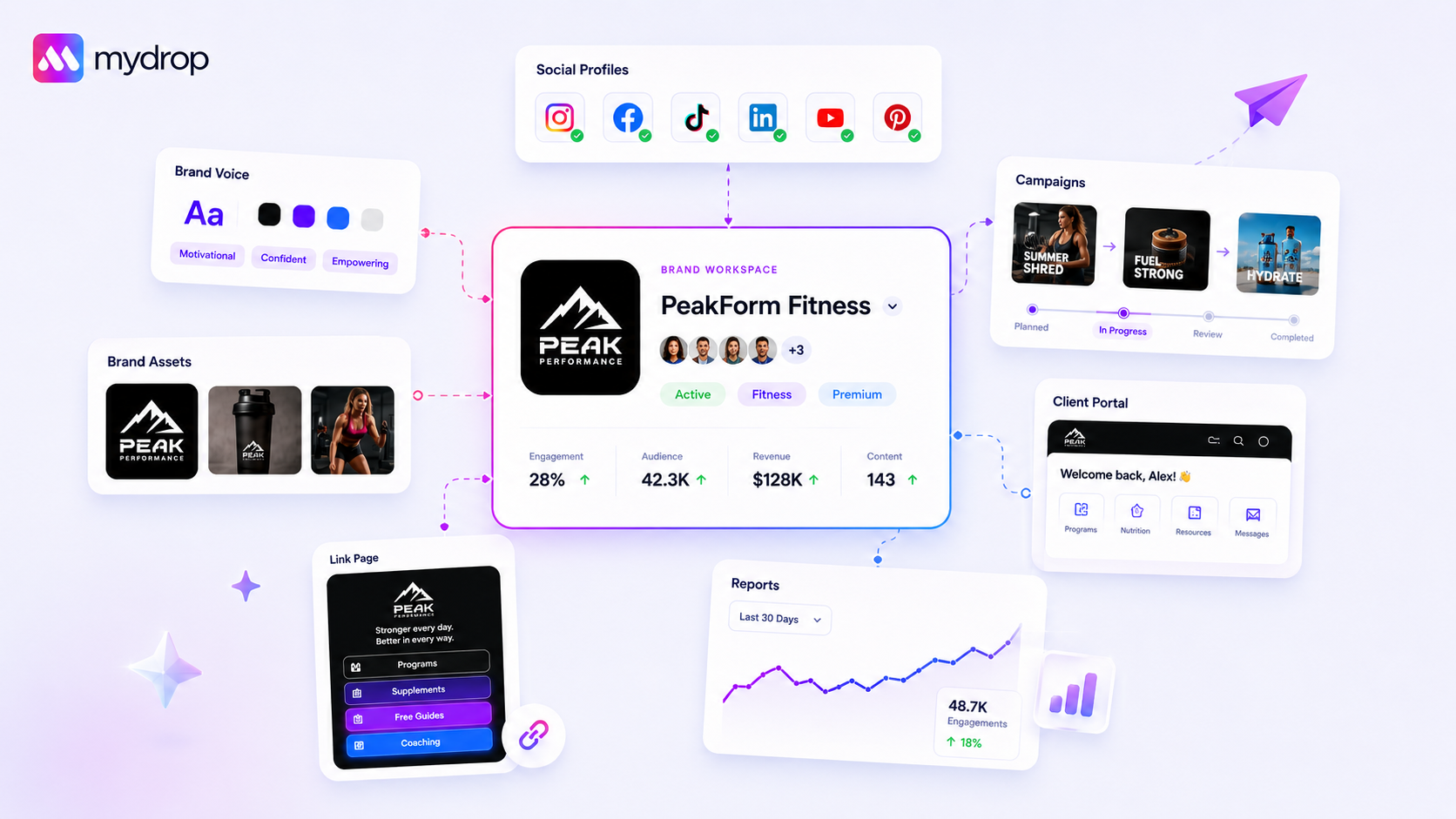
Centralised brand management isn't just about secure asset storage; it's the structural foundation for consistent output across very different client workflows. If your tool doesn’t group profiles with their brand identity, you aren't managing brands: you're just organising files. Agencies and multi-brand companies are constantly drowning in fragmented context. Every time a team member switches between a fashion client and a tech client, they shouldn't have to swap brand assets by hand, re-check the tone, or hunt for the right profile group. This is the part people underestimate: the real hidden cost isn't finding files; it’s the fragmentation of context that kills your team’s efficiency.
We get it: this work is messy. Managing several clients feels like constantly swapping hats, and one wrong file or off-brand post can put weeks of relationship-building at risk. You're worn out by the admin of making sure the right content reaches the right brand profile. One simple rule helps keep the chaos at bay: One Brand = One Source of Truth (Profiles + Assets + Identity). If a profile group doesn't automatically pull in its colour palette, font family, tone guidance and AI-ready brand context, the tool is failing you.
What the best tools need to handle

The best brand management tools stop treating profiles as isolated entities. Instead, they lock profiles, assets and identity into a single, cohesive unit. When you're managing hundreds of brand profiles, the admin debt of manual configuration isn't just annoying: it’s a major compliance and brand risk.
This is where most basic tools start to break. They work as a "generic workspace" where assets are stored centrally but aren't context-aware. If you have to map a colour palette by hand or re-select a tone guide every time you open the composer, you're paying for storage, not management.
Operator rule: If your tool doesn't know that the "fashion client" profiles always use this specific font, this colour set and this AI-prompt tone, you are essentially building your own brand compliance software from scratch, by hand.
Mydrop pricing check, September 2026: the entry paid plans of the eight tools most often compared with Mydrop run from $6 per channel (Buffer) and $25 a month (Later) to $99 per user (Hootsuite) and $199 per seat (Sprout Social), read on each vendor's pricing page. Mydrop is free to start, then $19 a month flat, not per seat. Full table on Mydrop's compare pages.
You need tools that handle dynamic context, not just static files. Look for these four pillars:
- Dynamic Profile Grouping: The ability to add or remove profiles from a brand without reconnecting or re-authenticating them.
- AI-Context Awareness: The system should automatically read the brand's target audience, marketing goals and tone when you hit "generate" in the composer.
- Automated Asset Application: If you import a website, the tool should extract colours and assets automatically to speed up setup.
- Centralised Identity Record: One source of truth for the brand's description, contact details and core messaging, carried across reports, portals and link-in-bio pages.
At Mydrop, we approach this by locking profiles into Brand Groups. A brand isn't just a container; it's the operational hub where we keep the structured context, like tone and marketing goals, that drives our AI generation and publishing workflows. When you change an asset in the brand group, it updates everywhere, instantly, across that profile group. If your current tool makes your team chase down the "latest" version of a logo or double-check hex codes before a post, you're working harder than you need to.
Where basic tools start to break

You know that moment when a team member accidentally posts an old logo or uses a stale colour palette for a client campaign? That isn't a minor slip; it's a clear system failure. Many standard tools treat social profiles as isolated, blank slates in a workspace. They're great for scheduling a single post to a single account, but they collapse the moment you need to manage the actual DNA of a brand across several channels.
If your current tool makes you dig through sub-folders to find a brand colour, or copy and paste the "brand voice" into an AI generator every time you create content, your setup is actively holding your team back. You're spending more time managing the logistics of being "on brand" than actually building the brand.
At Mydrop, we see this coordination debt build up quickly. When profiles aren't locked to their specific brand identity, meaning their font families, colour palettes and marketing goals aren't automatically surfaced, every post becomes a potential compliance risk. It's a slow, quiet erosion of quality that eventually leads to a messy brand reputation.
The "generic workspace" trap is where most teams get stuck. They treat every profile as an independent entity rather than part of a larger, branded machine. When you onboard a new client, that means adding every asset to every profile by hand, which is not only slow but error-prone. You end up with versions of your brand living in five different places, and nobody is quite sure which one is the "official" version.
The buying criteria that matter
Stop looking for "more storage" and start looking for "orchestration". A tool is only as good as its ability to bridge the gap between asset management and content distribution. When you manage dozens of clients across hundreds of profiles, judge your tech stack by how well it keeps the context aligned.
Here is what separates a generic tool from one that really scales for agencies and multi-brand teams.
| Capability | Generic Asset Storage | Centralised Brand Orchestration |
|---|---|---|
| Profile-to-Brand Mapping | Manual (Post-by-post) | Automatic (Group-based) |
| Asset Auto-Application | User-managed (Copy/Paste) | System-applied (Dynamic) |
| AI-Context Awareness | Zero (Requires prompt input) | Native (Reads brand goals/tone) |
| Profile Re-grouping | Time-intensive (Reconnect) | Flexible (Drag-and-drop) |
Evaluation Threshold: If your current tool can't handle at least 3 of the 4 items in the right-hand column, your workflow is highly vulnerable to scaling bottlenecks.
When you audit your next tool, look for these three operational realities:
- Flexible Grouping: Can you add or remove profiles from a brand without re-authenticating the whole brand group? This is a massive hidden time sink for agencies, which often rotate clients in and out of active campaigns.
- Native AI Context: Does the AI writing your captions know the specific brand voice and target audience without you having to re-educate it every time? At Mydrop, we approach this by locking profiles into Brand Groups, which act as the central record for that client. It means that when you open the composer, the brand's colours and voice are already there. You aren't "finding" them; they're simply part of the workflow.
- Scalable Asset Folders: Are assets automatically available to anyone working within that brand group, or does someone need to share a file link each time? If a team member can’t reach the right files from inside the publishing interface, they'll inevitably use whatever is easiest, not what is right.
Most teams don't have a content problem; they have a decision bottleneck. If your tool doesn't automate the boring parts of brand compliance, your team will keep paying the price in missed deadlines and inconsistency.
How Mydrop supports this workflow
At Mydrop, we approach this by locking profiles into distinct Brand Groups. Think of it as a logical container that sits above your individual social accounts. Instead of managing assets in a shared drive and then applying them to profiles by hand, you define the brand identity once (colours, fonts, logos and even AI tone guidance) and that context automatically follows your profiles across the platform.
When you create a brand, the system generates a dedicated media folder and pulls your brand colours straight from your website. You stop hunting for the "latest" version of a logo because the Brand Detail view becomes the single source of truth. If you need to add a new LinkedIn page or remove an Instagram handle, you just update the Brand Group. You never have to reconnect profiles or re-upload files.
This centralised approach pays off most when your team starts using AI. Because Mydrop stores structured brand intelligence, like your specific target audience, marketing goals and tone, the AI tools understand who they're writing for. You don't have to re-prompt the AI with brand guidelines every time you open the composer. The context is already there, built into the Brand Group, so every post feels intentional and aligned, even when your team is managing dozens of clients at once.
A simple shortlist checklist
Before you commit to a brand management tool, run your current workflow through this audit. If you answer "No" to any of these, you're carrying unnecessary coordination debt.
| Capability | Requirement | Why it matters |
|---|---|---|
| Profile-to-Brand Mapping | Can you group multiple profiles under one brand? | Eliminates switching silos. |
| Asset Auto-Application | Do brand colours/logos populate automatically? | Prevents version control drift. |
| AI-Context Awareness | Does the tool know your brand tone/goals? | Removes repetitive AI prompting. |
| Dynamic Grouping | Can you add/remove profiles instantly? | Handles client onboarding/offboarding. |
| Website Integration | Can it import assets directly from a URL? | Speeds up initial brand setup. |
Decision check: If your team spends more than an hour a week just organising files or checking asset usage, your tool is acting as a storage unit, not a brand management solution.
Conclusion
Most teams don't have a content creation problem. They have a coordination bottleneck. When you scale from managing three brands to thirty, the traditional folder-based approach breaks down immediately. Every manual step, whether it's a re-upload, a colour check or a profile re-auth, is a small tax on your team’s focus, and those taxes compound until your brand consistency starts to slip.
True brand orchestration is about making the right choice the easiest one for your team. When you centralise identity, linking profiles directly to their assets, tone and goals, you stop managing assets and start managing the brand itself. You give your team the guardrails they need to stay fast and consistent without constant supervision.
Stop treating your social media management tool like a digital filing cabinet. The goal isn't just to keep your files tidy; it's to create a frictionless environment where your team can go from strategy to publication without tripping over the infrastructure. When the platform handles the coordination, you finally have the headspace to focus on what actually matters: the quality of the content and the strength of your client relationships.


 Google review
 Trustpilot review
 Product Hunt comment




