





























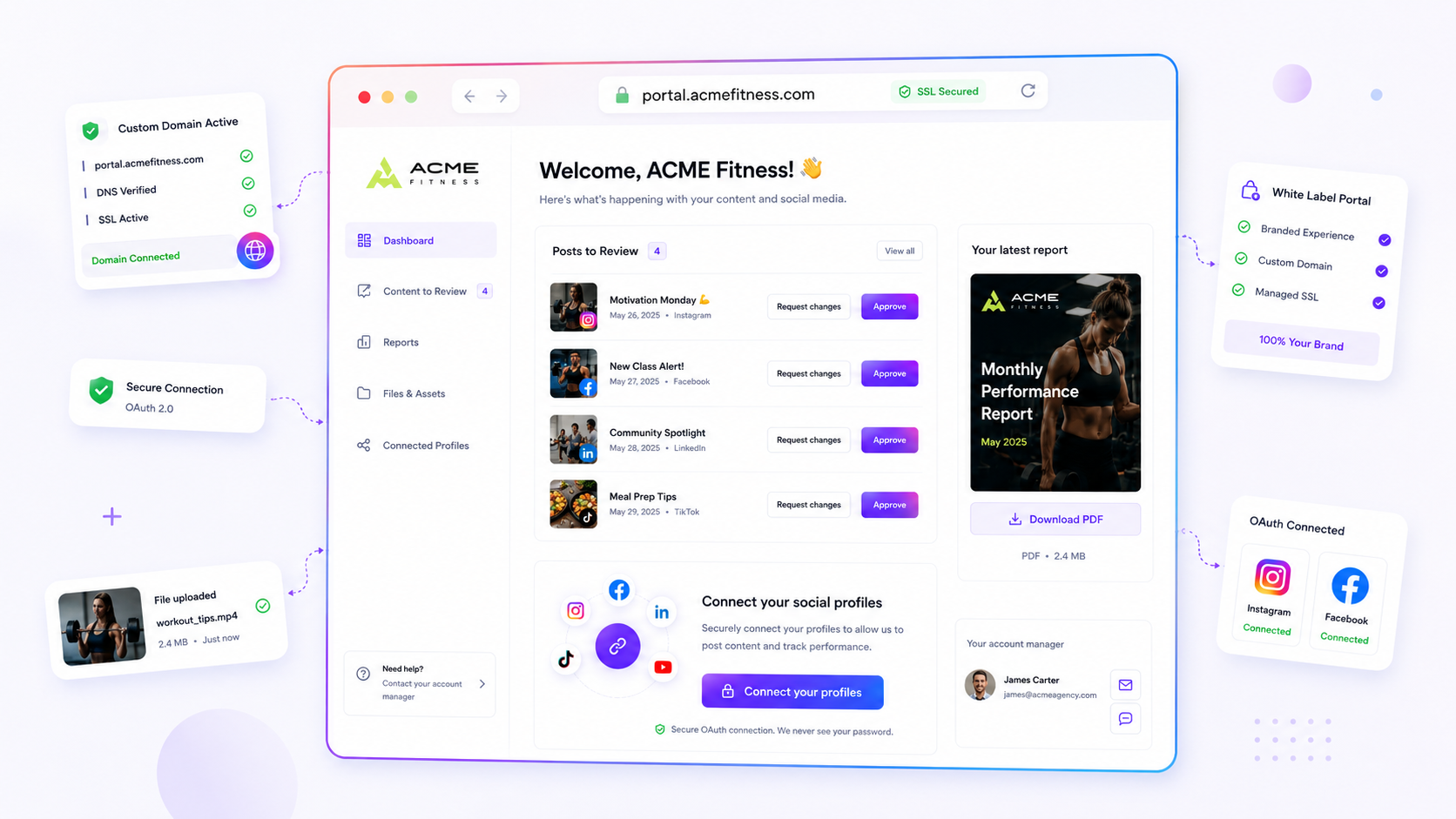
The best custom domain software for multi-brand social teams isn't about hosting. It's about total surface ownership. If you manage portfolios across dozens of channels, every link-in-bio page and brand portal should feel like a seamless extension of the client's identity, not a vendor's subdomain. Scaling social is messy: you're juggling brand guidelines, deadlines and the pressure to publish more. Watching your team wrestle with fragmented URLs or broken SSL checks is an avoidable headache. You're building a powerhouse experience, not a directory of vendor subdomains. Your infrastructure has to keep your brand, not the platform's, front and centre. It's time to stop letting technical friction dictate your brand strategy.
What the best tools need to handle

Enterprise-grade domain management takes you from "it works" to "it scales." When you're responsible for hundreds of profiles across dozens of brands, you can't afford to treat domain setup as a manual, ticket-driven process. The bottlenecks here aren't just technical. They're operational.
To streamline your workflow properly, look for a platform that handles these core pillars of infrastructure itself:
- Asynchronous DNS Verification: Stop the manual ping-pong with IT. A good tool automatically checks that a custom domain points to the right target and keeps you posted, without making you refresh a browser every thirty seconds.
- Automated Managed SSL Lifecycle: Renewing certificates by hand is the fastest way to break a campaign. You need a system that provisions managed certificates, polls SSL status and handles renewals quietly in the background. If you're still setting calendar reminders to check SSL, you're working too hard.
- Flexible Target Assignment: Your domain strategy needs to be fluid. A top-tier tool lets you assign an active, verified domain to any target, whether that's a link-in-bio page for an influencer campaign or a full brand portal, without redeploying or re-verifying.
Decision check: Can your team connect a new client-owned domain, verify DNS and provision SSL in under 10 minutes without opening a support ticket? If not, the platform is a bottleneck for your growth.
Mydrop pricing check, September 2026: the entry paid plans of the eight tools most often compared with Mydrop run from $6 per channel (Buffer) and $25 a month (Later) to $99 per user (Hootsuite) and $199 per seat (Sprout Social), read on each vendor's pricing page. Mydrop is free to start, then $19 a month flat, not per seat. Full table on Mydrop's compare pages.
When domain management is a core service, it clears the "coordination debt" that slows down onboarding. Instead of waiting for tech sign-off on every new brand asset, your team can set up secure, branded surfaces themselves, at speed. That's when operations stop firefighting and start running like a proactive, scalable engine.
Where basic tools start to break

Most "link-in-bio" tools are built for a single creator with one brand identity. They work perfectly when you have one account, one domain and one target.
But that isn't the reality of enterprise marketing.
Once your team is managing dozens of brand identities, markets or client portfolios, the cracks in these "simple" tools turn into big operational sinkholes. You start seeing the same patterns:
- The SSL Expiry Trap: You set up a domain months ago, forgot about it, and suddenly a campaign goes live to a "Connection Not Secure" error. Now you're scrambling to fix certificates by hand while the campaign traffic drops to zero.
- The DNS Bottleneck: New brand launch? Time to open a ticket with IT, wait for a propagation window and cross your fingers that the DNS records stick. If the tool doesn't verify this instantly, you're burning time you don't have.
- Fragmented Brand Experience: When your audience clicks a link and sees a third-party vendor domain instead of the brand name, you lose trust. It signals that your brand experience is outsourced, not owned.
The "spreadsheet of shame" becomes inevitable here. You know the one: the master list of domains, expiry dates and workarounds that someone has to update every week just to keep the lights on.
Treating domain management as a "set it and forget it" job is a common trap. For an enterprise, it's living infrastructure that needs constant validation and automated renewal.
The buying criteria that matter
If you're moving away from basic, manual-heavy tools, look for features that treat domain management as automated infrastructure, not a simple redirect.
The goal is total surface ownership. That means your link-in-bio pages and brand portals look and behave exactly like part of the brand's own domain.
Here's how to assess the tools on your shortlist.
Enterprise Domain Capability Matrix
| Feature | The "Simple" Tool | The Enterprise Standard |
|---|---|---|
| DNS Verification | Manual/Delayed | Instant validation via API |
| SSL Lifecycle | Manual renewal/monitoring | Automated provisioning + auto-renew |
| Surface Flexibility | Single-use only | Swap domains between Portal/Bio |
| Ops Load | High (Tickets required) | Low (Self-service workflow) |
What to prioritise
When you're comparing options, ignore the "number of links" and "custom background" marketing fluff. Focus on these three things instead:
- Asynchronous SSL Provisioning: Does the tool automatically request, install and monitor certificates? If you have to step in when a certificate expires, the tool has failed.
- Routing Flexibility: Can you assign the same white-label domain to a link-in-bio page today and a brand portal tomorrow? That's what flexible infrastructure looks like. At Mydrop, we built our host dispatch layer to handle this natively, because brand requirements change faster than developers can update code.
- Target Assignment Speed: How long does it take to connect a client-owned domain to a new surface? If it's more than 10 minutes, you're building a coordination bottleneck.
Ultimately, the right software should be invisible to your audience and fully transparent to your team. If your tool keeps you updated on DNS status and SSL health without being asked, you've found the right foundation. If you're still chasing approvals or checking links by hand at 6pm, the tool isn't working for you. You're working for the tool.
How Mydrop supports this workflow
We built the custom domain infrastructure at Mydrop to solve exactly the kind of bottleneck you're facing. The aim isn't just to let you connect a URL. It's to make that connection invisible to the end user while giving your team total control.
When you bring a new brand onto the platform, the system treats its domain as a first-class asset. You enter your domain and the system runs the DNS check straight away. Waiting for a support ticket or an IT team to verify a record is how campaigns die, so we made verification instant.
Once DNS is verified, the platform moves on to managed SSL provisioning. You don't need to hunt for certificates, copy and paste private keys or manage renewals in a separate service. Everything runs asynchronously. If a certificate needs a refresh or the system spots an error, you get a notification rather than finding out because a visitor hit a broken link.
The real flexibility comes from target assignment. Because Mydrop separates the domain from the surface, you can map the same white-label domain to a link-in-bio page today, then flip it to a full-featured brand portal tomorrow without reconfiguring your DNS. Our host dispatch logic treats the domain as a pure pointer, so you can move your client-facing surface to suit your campaign strategy, not your technical limits.
That means you spend your time on brand identity, not on troubleshooting record propagation. You're not just managing links. You're managing a stable, secure, branded experience that grows with your portfolio.
A simple shortlist checklist
Use this checklist when you're judging whether a tool can handle multi-brand domain management. If a candidate fails more than two of these, it will become a liability as your team grows.
- SSL Automation: Can it provision and renew SSL certificates with no input from you? If the process needs manual key uploads or outside tools, pass on it.
- DNS Verification Speed: Does the tool give immediate feedback on DNS status? You should know within seconds whether your records are pointing the right way.
- Cross-Surface Mapping: Can you swap a domain between different page types, such as a link-in-bio target and a dedicated brand portal, without deleting and recreating the domain record?
- Zero-Ticket Onboarding: Can a non-technical brand manager start and finish the whole connection workflow without sending a request to your internal IT or DevOps team?
- Error Reporting: Does the tool warn you when a domain or certificate status changes, rather than waiting for you to spot a broken link in a live campaign?
If you're currently holding this together with a patchwork of subdomains, redirected pages and manual DNS entries, the cost of that technical debt is probably higher than you think. It isn't only the time lost to manual configuration. It's the risk of a campaign going live with broken links, the friction of onboarding new brands, and the nagging feeling that your team is one configuration error away from a very public failure.
Conclusion
Moving to enterprise-grade, white-label domain management is usually the moment teams stop behaving like a collection of disconnected accounts and start acting like one brand engine. Stop patching together fragmented, vendor-owned URLs and start building surfaces that reflect the strength and maturity of your brand portfolio.
The right tool should disappear into your workflow. It should handle the complexity of DNS, SSL and routing so your team can focus on the only work that really delivers value: creating and distributing brand experiences. If your current tool is creating more work than it saves, you're holding on to a bottleneck disguised as a solution. Make the switch, clear the path, and stop apologising for broken links.
 Google review
 Trustpilot review
 Product Hunt comment




