



























Publishing Workflows

Multi-User Content Calendar With Approval Chains: 5-Step Setup

Stop asking "is this approved?". Show approval status on the calendar, name approvers, set review deadlines and block unapproved posts. 5 steps.

4 min read

Updated: Oct 15, 2026

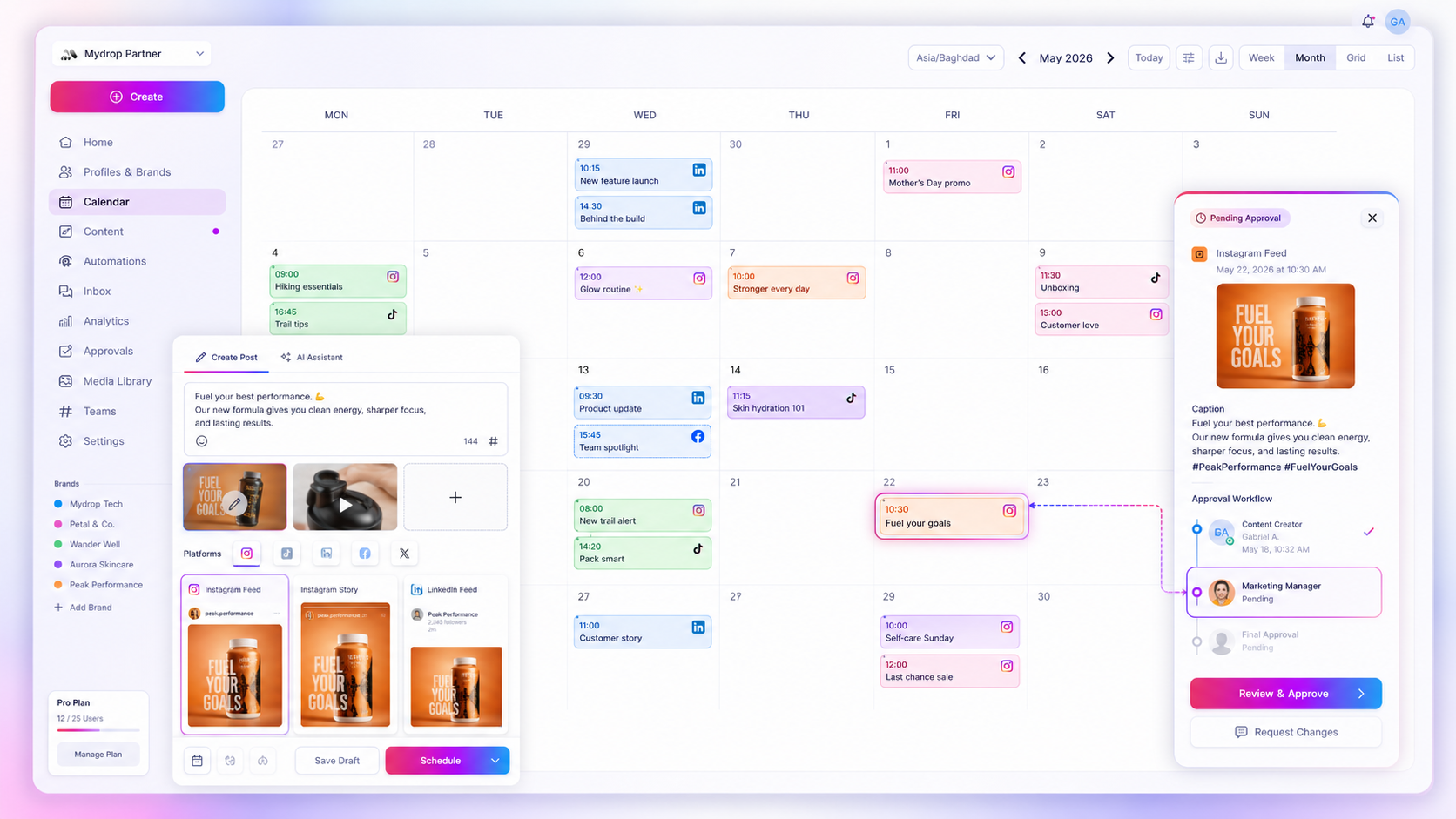
Mydrop content calendar showing scheduled social posts across several brands

To streamline a multi-user content calendar with approval chains, put the approval status on the calendar itself, give every post one owner and named approvers, and set review deadlines counted back from the publish date. Then let reminders do the chasing, and make sure an unapproved post can never go live. Five steps, about an hour to set up.

TLDR: Keep the chain to two or three stages, show each stage as a status on the calendar, and give client sign-off a three-day buffer. In Mydrop's data, the median approval took 6 hours, but the slowest quarter waited almost three days.

Mydrop pricing check, September 2026: the entry paid plans of the eight tools most often compared with Mydrop run from $6 per channel (Buffer) and $25 a month (Later) to $99 per user (Hootsuite) and $199 per seat (Sprout Social), read on each vendor's pricing page. Mydrop is free to start, then $19 a month flat, not per seat. Full table on Mydrop's compare pages.

Why approval chains stall on a shared calendar

A multi-user calendar shows what is planned. It rarely shows where each post is stuck. The writer thinks the post is with the manager, the manager thinks it went to the client, and the client never received it.

Three patterns cause almost every stall:

  • Status lives somewhere else. The calendar shows a block on Thursday, while the approval sits in an email thread.
  • "The team" approves. When nobody is named, everybody waits for somebody else.
  • No deadline before the deadline. The only date on the post is the publish date, so review starts the night before.

The five steps below fix each one.

Step 1: Cap the chain at three stages and name them

Every stage you add costs a day. Most teams only need these:

Stage Status on the calendar Who moves it forward Done by
Draft Draft Writer or designer 5 days before publish
Internal review Pending Account lead or manager 4 days before publish
Client sign-off Pending, sent to client Client 3 days before publish
Ready Approved and scheduled Scheduler (often the lead) Publish time

If legal or compliance need to see some posts, add them only on those posts, not as a stage for everything. A chain built around your riskiest post slows down the other 90%.

Step 2: Give each post one owner and named approvers

Every post on the calendar gets one owner (the person who answers "where is it?") and named approvers (real people, not a role or a channel). Tagging "@marketing" for approval is the same as tagging nobody.

On a shared calendar, this also fixes visibility. Filter by owner and each person sees exactly which posts they need to push forward today.

Step 3: Count review deadlines back from the publish date

This is where most chains break. Give each stage a due date, counted backwards from the moment the post goes live.

How much buffer does the client stage need? In Mydrop's data on posts that went through client approval, the median time from submission to approval was 6 hours, and 66% were approved within 24 hours. The slowest quarter took more than 66 hours. A three-day buffer covers almost everyone. With a one-day buffer, a third of your posts are at risk.

Step 4: Make the status filter your morning view

Open the calendar every morning filtered by status, not by date. Two lists matter:

  • Pending and due within 72 hours: these need a nudge today.
  • Approved but not scheduled: these are finished work about to miss their slot.

In Mydrop's calendar you can filter by brand, profile, platform, campaign or status, so one view covers every client. For a deeper version, see how to filter a social media calendar by campaign.

Step 5: Automate the chasing and block unapproved posts

Manual follow-ups are the hidden cost of every approval chain. Two rules take them away:

  1. Reminders go out on their own. Overdue approvals trigger a nudge to the named approver, by email or in the app.
  2. Pending means paused. A post that isn't approved can't publish, even if it is scheduled. If someone puts it back on hold, scheduling stops.

Ask any tool you test what happens when an approver rejects a post an hour before it is due. The only good answer is "it doesn't go out".

How the Mydrop calendar shows the whole chain on one screen

This is how Mydrop's calendar works. Each post on the calendar carries its own chat, its approvers and its review link, so the conversation and the status sit on the same card.

  • Assign approvers inside the composer: teammates, or outside email addresses.
  • Clients approve from a no-login review link, the client portal, or with one tap in WhatsApp. Their edits land in the post's chat.
  • Approval reminders fire automatically for overdue and scheduled posts.
  • Each member chooses their own alerts, so approvers get pinged and analysts don't.
  • A post on hold goes back to pending and pauses scheduling.

Roles keep the chain honest: creators draft, approvers approve, admins manage, and nobody can skip a stage they don't own.

Set up your calendar chain before next week's posts

Take next week's posts and run them through the five steps today. Name the stages, assign one owner and named approvers to each post, and set the client deadline three days before each publish date.

If your current calendar can't show the status on the post itself, start free with Mydrop, connect one brand and send its next five posts through the chain. By Friday you'll know exactly where every post is and who is holding it up.


Free tools

Free Post Mockup Generator

Show a client how a post will look on 10 networks, and download it as an image.

FAQ

Quick answers

Show each approval stage as a status on the calendar, give every post one owner and named approvers, and set review deadlines counted back from the publish date. Then automate reminders and block unapproved posts from going out.

Two or three for most teams: internal review, client sign-off, then scheduled. Add legal or compliance only for the posts that need it.

About three days. In Mydrop's data, the median approval took 6 hours, but the slowest quarter took more than 66 hours.

Next step

Stop coordinating around the work

If your team spends more time chasing approvals, assets, and publish details than creating better posts, the problem is probably not your people. It is the workflow around them. Mydrop brings planning, review, scheduling, and performance into one calmer operating system.

Mydrop Editorial Team

About the author

Mydrop Editorial Team

Mydrop

The Mydrop Editorial Team writes the guides, comparisons, and playbooks on this blog. We cover social media planning, publishing, approvals, analytics, and multi-brand workflows, drawing on how teams actually use Mydrop to run their social programs. Every article is researched, edited, and maintained by the team behind the product.

View all articles by Mydrop Editorial Team

Managing 14+ social platforms felt like a 2 a.m. nightmare until Mydrop. The AI brand-voice mapping is scary accurate, and the client approval portal saved me easily 15 hours this week alone. It's the ultimate set-and-forget workspace for busy agencies.
A true automation tool for scheduling (and creating) social media content! It has saved me over 20 hours of work already in just my first couple weeks. A true game-changer for anyone in business, big or small!
Finally tried Mydrop on a test client and the white-label portal on a custom domain actually looks legit, no Mydrop branding sneaking in. The OAuth setup saved me from the usual “what's my password” back-and-forth.
Absolute game-changer. Mydrop completely automated my content workflow. The scheduling is flawless, it actually feels intuitive, and it saved me 10+ hours in my very first week. Best decision I've made for my socials!
Mydrop AI has been an absolute game changer, it has saved me so much time and effort. It does what it promises. Easy to use, versatile, and the creator is really open to feedback. Very happy!
I was looking through a bunch of management tools for my client, as it was getting out of control; after comparing every solution, I found Mydrop to be a no brainer.
This app helps me more than any other I have ever used. I've got all of my pages and accounts and I can drag and drop like I want. Mydrop has really been a huge asset to my business!
I was looking for a scheduling tool as my clients were using more and more platforms. Mydrop does the job very well, and automations and forms are very useful and save me a lot of time. I recommend!
Love that you baked in white-label portals from day one, that's a huge pain point for agencies.
Love this platform for scheduling social media posts! Easy and very intuitive to use! Highly recommend!
Very nice tool, you will save a lot of time. Very easy to use, user friendly. I have used it for several months and it is very helpful.
Helpful app if you are trying to streamline social content creation for clients.
Managing 14+ social platforms felt like a 2 a.m. nightmare until Mydrop. The AI brand-voice mapping is scary accurate, and the client approval portal saved me easily 15 hours this week alone. It's the ultimate set-and-forget workspace for busy agencies.
A true automation tool for scheduling (and creating) social media content! It has saved me over 20 hours of work already in just my first couple weeks. A true game-changer for anyone in business, big or small!
Finally tried Mydrop on a test client and the white-label portal on a custom domain actually looks legit, no Mydrop branding sneaking in. The OAuth setup saved me from the usual “what's my password” back-and-forth.
Absolute game-changer. Mydrop completely automated my content workflow. The scheduling is flawless, it actually feels intuitive, and it saved me 10+ hours in my very first week. Best decision I've made for my socials!
Mydrop AI has been an absolute game changer, it has saved me so much time and effort. It does what it promises. Easy to use, versatile, and the creator is really open to feedback. Very happy!
I was looking through a bunch of management tools for my client, as it was getting out of control; after comparing every solution, I found Mydrop to be a no brainer.
This app helps me more than any other I have ever used. I've got all of my pages and accounts and I can drag and drop like I want. Mydrop has really been a huge asset to my business!
I was looking for a scheduling tool as my clients were using more and more platforms. Mydrop does the job very well, and automations and forms are very useful and save me a lot of time. I recommend!
Love that you baked in white-label portals from day one, that's a huge pain point for agencies.
Love this platform for scheduling social media posts! Easy and very intuitive to use! Highly recommend!
Very nice tool, you will save a lot of time. Very easy to use, user friendly. I have used it for several months and it is very helpful.
Helpful app if you are trying to streamline social content creation for clients.
Smiling social media managerSmiling social media managerSmiling social media managerSmiling social media managerSmiling social media managerSmiling social media manager

4.8/5 · on Trustpilot & Google






