
















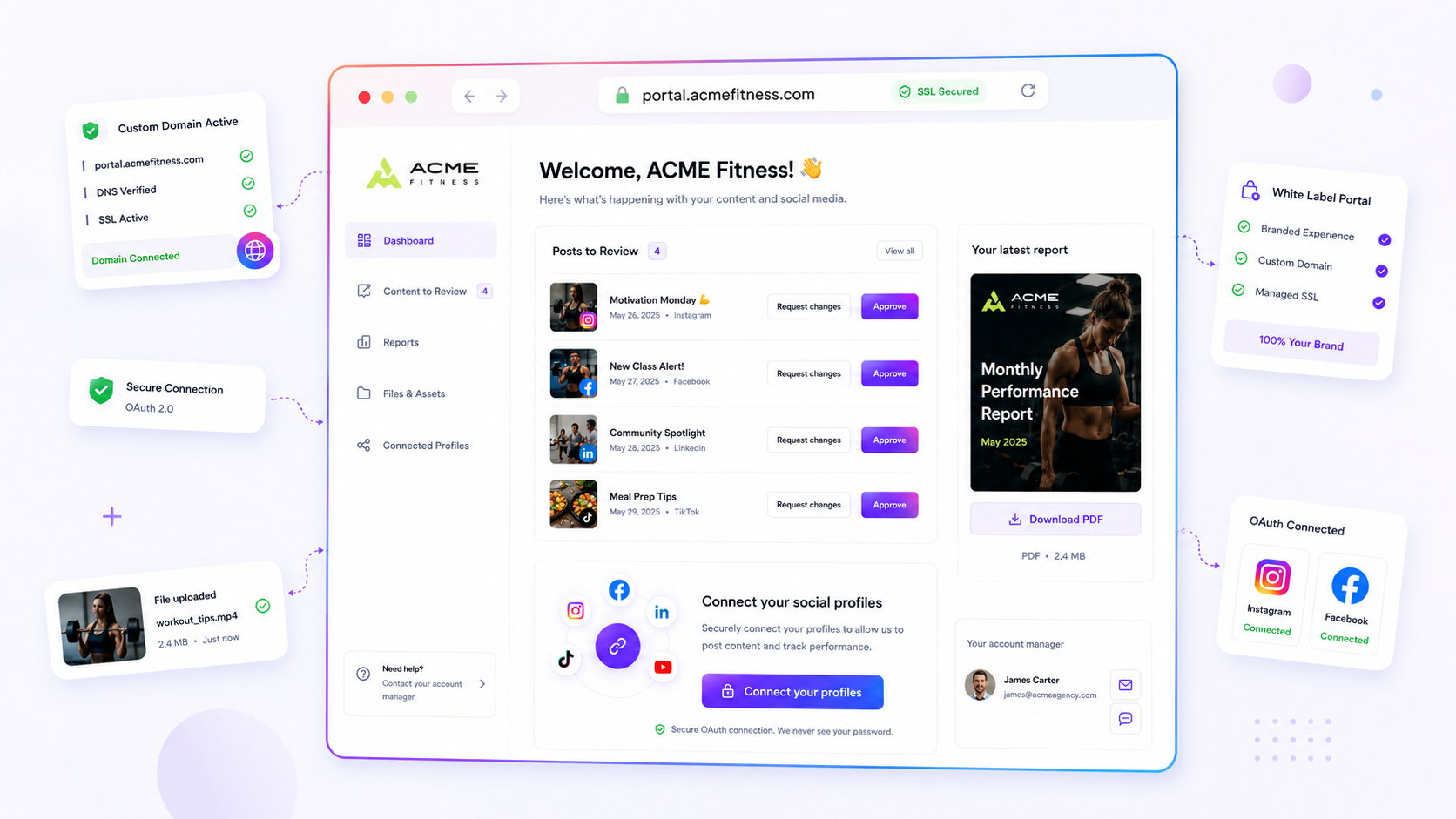
The moment your team spends more time hunting for the right file version or chasing permissions than actually making content, it's time to move off email and shared drive attachments and onto a single Brand Portal. If you're regularly playing digital detective, you've reached the point where the coordination tax on your creative output is simply too high to justify carrying on as you are.
We get it. You're juggling a dozen live campaigns, and your inbox has become a graveyard of "Final_v2_REAL.png" attachments. It's exhausting, inefficient, and frankly a bit embarrassing when a client asks if you saw their file and you have to dig through three different Slack threads and a forgotten Google Drive folder to find it. You're not alone, and this mess is costing you hours of billable, creative focus every single week.
The decision each metric should trigger

Moving from ad hoc attachments to a structured intake workflow isn't about buying more software. It's about giving your team its autonomy back. When you centralise asset intake, you stop being a file clerk and go back to being a creative strategist.
To work out whether your current intake method is a bottleneck, score your team against this scorecard. If you hit three or more, it's time to move.
| Symptom | The "Coordination Debt" Score |
|---|---|
| Versioning chaos | You have more than three versions of a "final" asset in your history. |
| Permission fatigue | You spend at least 15 minutes a week fixing folder access requests. |
| Status anxiety | You or your team spend time daily answering "Did you get my file?" |
| Integration gap | You have to manually download, rename, and re-upload files to your scheduler. |
| Compliance risk | You are juggling social platform passwords via email or plaintext notes. |
Threshold for action: A score of 3 or higher means you're currently paying a heavy coordination tax that will only grow as you add more brands or stakeholders.
Beyond the metrics, consider the Asset Ownership Rule: if your client needs to contribute files throughout the lifecycle of a project, the intake method has to be as accessible as it is secure. Email is perfect for a one-off asset send, but it's a disaster for ongoing collaboration. A purpose-built portal lets your clients upload files, manage selections, and even connect their own social profiles via OAuth, without you ever having to handle their private passwords. It takes away the friction of "Did you get it?" and replaces it with a single, secure source of truth.
The scorecard that keeps reporting useful

You've probably sat through a quarterly review where the analytics deck looked like a pile of disjointed screenshots rather than a cohesive story. If your reporting workflow relies on manual exports and "latest version" email threads, you're essentially asking your stakeholders to solve a puzzle before they can even see the results. When analytics delivery is disconnected from the actual content production, data loses its urgency.
Use this scorecard to audit your current client reporting cycle. If you score below 15, your reporting process is probably generating more noise than insight.
| Metric | Point Value | Note |
|---|---|---|
| Centralised access | 5 | Client can download report PDFs without emailing you |
| Real-time visibility | 5 | Reports are live or auto-updated (no manual PDF creation) |
| Sanitised data | 3 | Client only sees the KPIs relevant to their specific goals |
| Feedback loop | 2 | Client can discuss reports directly in the platform |
| Password control | 2 | Client accesses reports via secure portal, not shared links |
Total Score Thresholds:
- 18-20: Mature. Your reporting is an asset, not an admin task.
- 10-17: Risky. You're spending too much time on manual data grooming.
- < 10: Critical. Your reporting workflow is a liability that risks data exposure and stakeholder frustration.
At Mydrop, we see teams move reports into a centralised Brand Portal specifically to kill this friction. By enabling the analytics permission, you turn the portal from a simple file repository into a self-service hub. The client gets their PDF download when they need it, and you get your afternoon back.
What to stop measuring by default
The most common trap we see in enterprise marketing is an obsession with vanity output metrics at the expense of outcome clarity. Teams often spend weeks perfecting report layouts that count every single social post, but they fail to track the one thing that actually matters: time-to-approval.
Stop measuring "number of reports delivered" or "total files exchanged per month." Those are just proxies for your own internal inefficiency. Instead, start measuring your coordination speed.
Operator rule: If a client has to ask "did you get that file?" or "is this the latest version?", you've failed the workflow, no matter how many reports you sent.
Measure the gap between an asset request and the asset being available. If that gap is widening, your intake method is the problem. Stop trying to improve the report design and start fixing the pipe. If you keep using email to collect assets, you're just painting over the cracks in your foundation. A truly professional brand portal stops the guessing game by giving you a single, unambiguous location where "final" actually means final. You don't need a more creative report designer; you need a more reliable handoff.
How to connect metrics to next actions
The secret to a reporting model that actually drives growth is simple: if a metric doesn't have a clear, corresponding "next action" attached to it, stop tracking it. Most enterprise teams drown in data because they report on everything, which effectively means they ignore everything.
We've seen teams struggle to make sense of performance dashboards that feel like a firehose of vanity numbers. To fix this, we recommend mapping every key metric to an operational toggle:
| Metric | What it tells you | Next operational action |
|---|---|---|
| Reach/Impressions | Brand awareness health | Adjust budget or frequency |
| Engagement Rate | Content-audience resonance | Swap creative or format |
| Click-Through Rate | Intent conversion | Update landing page/link-in-bio |
| Approval Latency | Internal/Client workflow | Simplify review loops |
If you can't immediately name the action that changes based on a metric's movement, remove it from your executive view. Keep your reporting focused on the signals that force a choice.
The review cadence that makes the model stick
A reporting system is only as good as the rhythm you build around it. If your team only looks at analytics when a crisis hits or a quarter ends, you're merely archiving history rather than shaping the future.
We find the best teams use a "Pulse-Check" cadence to stay in control without getting bogged down in meetings:
- Weekly Pulse (15 min): Review high-level reach and immediate engagement trends to spot any "flatline" content.
- Monthly Alignment (45 min): Review performance against targets with your clients or stakeholders. Use this time to adjust the upcoming content calendar based on what worked.
- Quarterly Strategy (90 min): Deep dive into the "why" behind the data. Look for long-term trends in audience behaviour and evolve your brand pillars accordingly.
If you're using a Brand Portal, your clients can download these reports themselves whenever they need, which frees your team from being the perpetual middleman. They get the data on their schedule, and you save hours of manual exports every month.
Decision check: Never present a report without a "So What?" slide; if the client sees a graph but doesn't know what to do next, you've failed the communication test.
Conclusion
Moving away from attachment-filled emails and scattered cloud drives isn't just about tidying up your file system. It's about getting back the capacity to do actual creative work.
When you move your intake and reporting into a controlled space like Mydrop, you stop playing the role of a document delivery service. You gain the ability to lock down your workflow, invite stakeholders into a safe, branded environment, and, most importantly, make sure the assets you use to represent your brand are the final, approved versions.
Your inbox should be for communication, not for hosting the messy, fragmented history of your creative projects. Take the leap, centralise your intake, and watch the coordination debt evaporate. Your team will notice the difference by the next campaign cycle.


 Google review
 Trustpilot review
 Product Hunt comment





