
















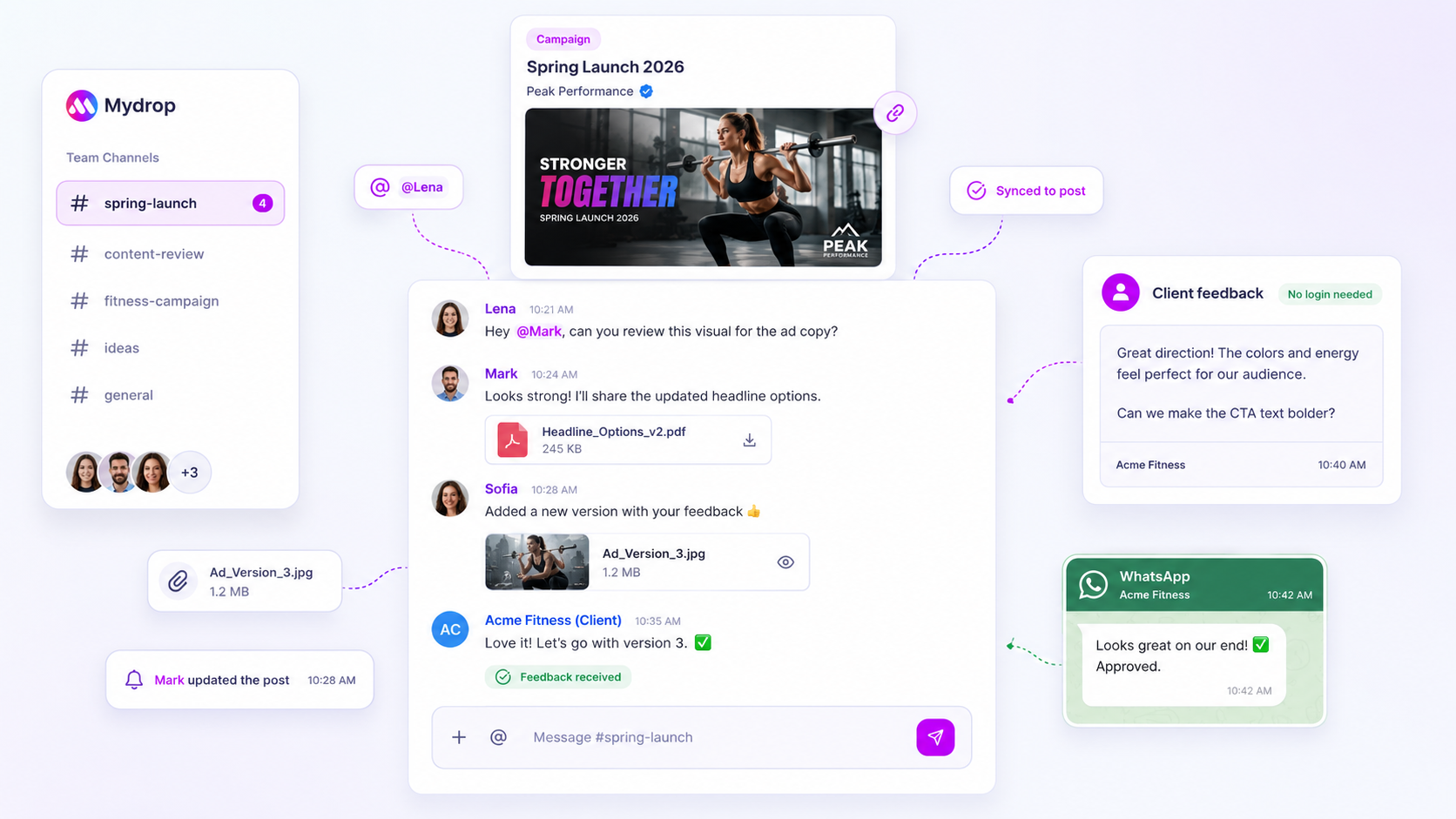
When a notification goes "missing", the fix usually isn't waiting for a dev team to reboot a server. It's auditing the notification fan-out to see where the logic broke. If a collaborator misses a critical update, the cause is almost always a mismatch between the trigger (like a @mention) and the recipient's own delivery preferences or workspace permissions. Before you assume the system is down, check whether the "invisible" message went to someone who actually has permission to see that specific brand portal, or whether their individual email toggles are simply switched off.
We've all lived through that awkward 6pm call where a client asks why their feedback was ignored for six hours, only for your team to realise no one ever got the ping. It's frustrating, it dents your professional credibility, and in the high-stakes world of multi-brand management it's the digital equivalent of a lost sticky note. A silent notification isn't just a glitch; it's coordination debt that stalls your entire publishing pipeline. So let's audit the "why" behind that silence and get your team back on the same page.
What changed before the numbers moved

In our experience at Mydrop, when a perfectly healthy workflow suddenly goes quiet, it's rarely a ghost in the machine. Usually someone tweaked a setting to "quiet the noise" during a heavy campaign week and forgot to switch it back, or a new stakeholder was added to the workspace but not to the specific Brand Portal conversation thread.
The most dangerous failure isn't a broken button; it's the Partial Silence. That's when three people get the email, but the one person who actually needed to approve the creative never got the ping. To fix it, you need to understand the "Fan-Out" Principle. Every message is a seed, but for it to grow into a notification it needs three things: Visibility (was the right person tagged?), Permission (do they have access to that specific brand or portal?) and Preference (is their delivery actually switched on?).
If any one of those three legs is missing, the chair falls over. Use this scorecard to find the disconnect:
| Checkpoint | Expected Behaviour | The Reality Check |
|---|---|---|
| The Trigger | User gets a ping for every comment. | Notifications only fire on direct @mentions. |
| The Bridge | Client feedback syncs to the team. | Messages are trapped in a public portal "suggest edits" flow. |
| The Fence | New hires see all discussions. | User lacks InviteMember access to that specific brand. |
| The Filter | Emails land in the primary inbox. | Corporate IT has "greylisted" the notification domain. |
At Mydrop, we see this most often when teams scale from five to fifty users. The "everyone sees everything" logic that worked last year becomes a notification nightmare today, and people end up aggressively muting their own productivity. When that happens, the problem isn't the software. It's a workflow that has outgrown its own guardrails.
The failure patterns to check first
When the notification loop breaks, it usually follows a few predictable paths. Most teams assume it's a server issue, but really it's more like a plumbing problem: the water is running, but a valve is shut somewhere downstream.
The first pattern we see is the "General Chat" Trap. As teams grow, they often stop tagging specific people and start posting broad updates to a conversation thread. They assume that because someone is "in" the brand workspace, they'll automatically get a ping for every comment. In a high-volume enterprise environment, that would be a noise nightmare. If a direct @mention isn't used, the notification engine often treats the message as a "nice to know" update rather than a "must see" alert, and the fan-out logic stays dormant.
Next is what we call the "Portal Bridge" Disconnect. This happens when you're working with external clients or stakeholders who use a brand portal or a "no-login" approval link. They leave a brilliant, critical piece of feedback that needs to reach your creative lead. But if that client hasn't been properly mapped to the internal workspace conversation, the message might land in the "Conversations" detail view without triggering an external email to your team. It's a classic case of the software doing exactly what it was told (protecting the workspace from unauthorised noise) while your team waits for a ping that never comes.
Finally, don't underestimate Enterprise IT Greylisting. We've seen cases where a marketing team is convinced the software is broken, only to find their own corporate security filters started "holding" notification emails for 30 minutes to "inspect" them. To the person waiting for an approval, that 30-minute lag feels like a total system failure.
The proof that separates signal from noise
To fix the silence, you need to move beyond "Is it plugged in?" and start auditing the actual logic. Use this scorecard to identify where the "fan-out" is failing. If you find a "No" in any of these boxes, you've found your bottleneck.
The Silence Scorecard: Notification Fan-Out Audit
| Audit Point | Expected Behaviour | Decision Rule / Check |
|---|---|---|
| Trigger Validation | Direct @mention used in the message. |
If no @tag is present, notification defaults to "In-App Only" for most users. |
| Preference Parity | User has "Conversation Email" switched ON. | Check the user's Mydrop profile settings; email delivery is a per-workspace toggle. |
| InviteMember Scope | User is explicitly added to the conversation. | Check if the user has "InviteMember" access to that specific thread or brand portal. |
| Portal Sanitisation | External feedback creates a workspace alert. | Verify if the "Public Feedback Bridge" is active for that specific approval link. |
| Delivery Reputation | Email arrives in the primary inbox. | Check headers for "Greylisting" or SPAM flags at the corporate gateway level. |
Operator rule: Notifications are a privilege, not a right. If you want a 100% hit rate, you have to own the configuration.
In our experience, about 80% of "missing" notifications are solved by simply checking the user's preference settings or making sure they were actually tagged. It sounds basic, but in a multi-brand environment with dozens of stakeholders, these small settings drift over time.
If you're managing thousands of posts across a global team, you can't afford "Partial Silence." Better to have a rigid, boring notification rule that everyone understands than a "smart" system people have to second-guess. The goal is to move from "Did you see my comment?" to "I know you saw it because the loop is closed." Coordination debt is paid in time, and a broken notification loop is the most expensive interest rate your team can pay.
If you have a collaborator who swears they're not getting pings, the fastest fix is to stop looking at the server status and start looking at their profile settings. Most "broken" notification loops are actually just "muted" ones, where a well-meaning teammate switched off "extra noise" three months ago and forgot to turn it back on.
We've all lived through that awkward Monday morning where a post went live with a typo because the final reviewer never got the email. It feels like you're shouting into a void while your professional reputation takes a slow, painful dent. No one enjoys chasing approvals at 6pm because a digital sticky note didn't stick. The good news is that once you identify the "fan-out" logic, you can usually patch the hole in under five minutes.
What to fix this week
Start by treating notifications as a technical handshake between the software and your team's actual habits. If the hand isn't shaking, check the connection points in this order.
- Enforce the @mention rule. In high-volume workspaces, "watching" every conversation is a recipe for burnout. Most enterprise teams move too fast for general updates. Make it a hard operating rule: if you need a reply, you must tag the person. No tag, no notification, no blame.
- Audit the "Email Preference" toggle. Have your "silent" collaborator share their screen for thirty seconds. Check whether their "Conversation Email" is switched on. It sounds simple, but in our experience this is the cause of roughly 80 percent of missing updates.
- Whitelist the sender. If the app says the email was sent but the inbox is empty, it's time to talk to IT. Aggressive corporate filters love to "greylist" automated notification emails. Ask them to whitelist your platform's sending domain specifically.
- Check the "InviteMember" status. If a message is sent in a private thread or a specific Brand Portal conversation, the recipient won't get a ping if they haven't been explicitly added to that "room."
The Notification Health Checklist
| Audit Point | Check | Fix |
|---|---|---|
| Direct Tagging | Was a specific @name used? | Retrain the team to tag owners, not channels. |
| Delivery Toggle | Is "Email for Conversations" on? | Reset profile preferences to "Standard." |
| IT Visibility | Is the domain in the Spam folder? | Give the sender IP/Domain to IT for whitelisting. |
| Context Access | Is the user a member of that Brand? | Verify workspace permissions for the specific brand. |
| Portal Sync | Is the client using the Portal link? | Make sure clients use the "Suggest Edits" flow to trigger pings. |
When to stop diagnosing and change the workflow
Sometimes the notifications are working perfectly, but the team is still missing the updates. This is what we call Notification Blindness. If your "Conversations" tab has 50 unread messages, a 51st ping isn't a help; it's just more debt.
When you see the same person missing pings every week despite "correct" settings, the problem is likely Coordination Debt. You're probably asking too many people to look at too many things. This is the moment to stop auditing the tech and start narrowing the scope.
Decision check: A notification is a request for focus, not just a ping. If you notify everyone, you notify no one.
Try moving to an "Exception-Only" model. Instead of notifying the whole "Social Team" for every comment on a draft, only notify the Assigned Content Lead. If the lead doesn't respond within four hours, then and only then do you "fan out" to the wider group. This preserves the "alarm" quality of the notification.
Conclusion
The most dangerous silence in social media management is the "Partial Silence": the gap where some people are in the loop and others are left guessing. In the messy reality of multi-brand management, your collaboration tech should be a safety net, not a source of mystery.
At Mydrop, we see that the most successful teams don't just have better ideas; they have better handoffs. By auditing your "fan-out" logic and making sure your @mentions match your team's permissions, you turn "I didn't see it" into a thing of the past.
One strong truth to take away: Software can't fix a broken culture of accountability, but it can provide the paper trail that proves where the loop actually broke. Fix the settings this week, but fix the tagging habits for the long haul. Your 6pm self will thank you.


 Google review
 Trustpilot review
 Product Hunt comment





