
















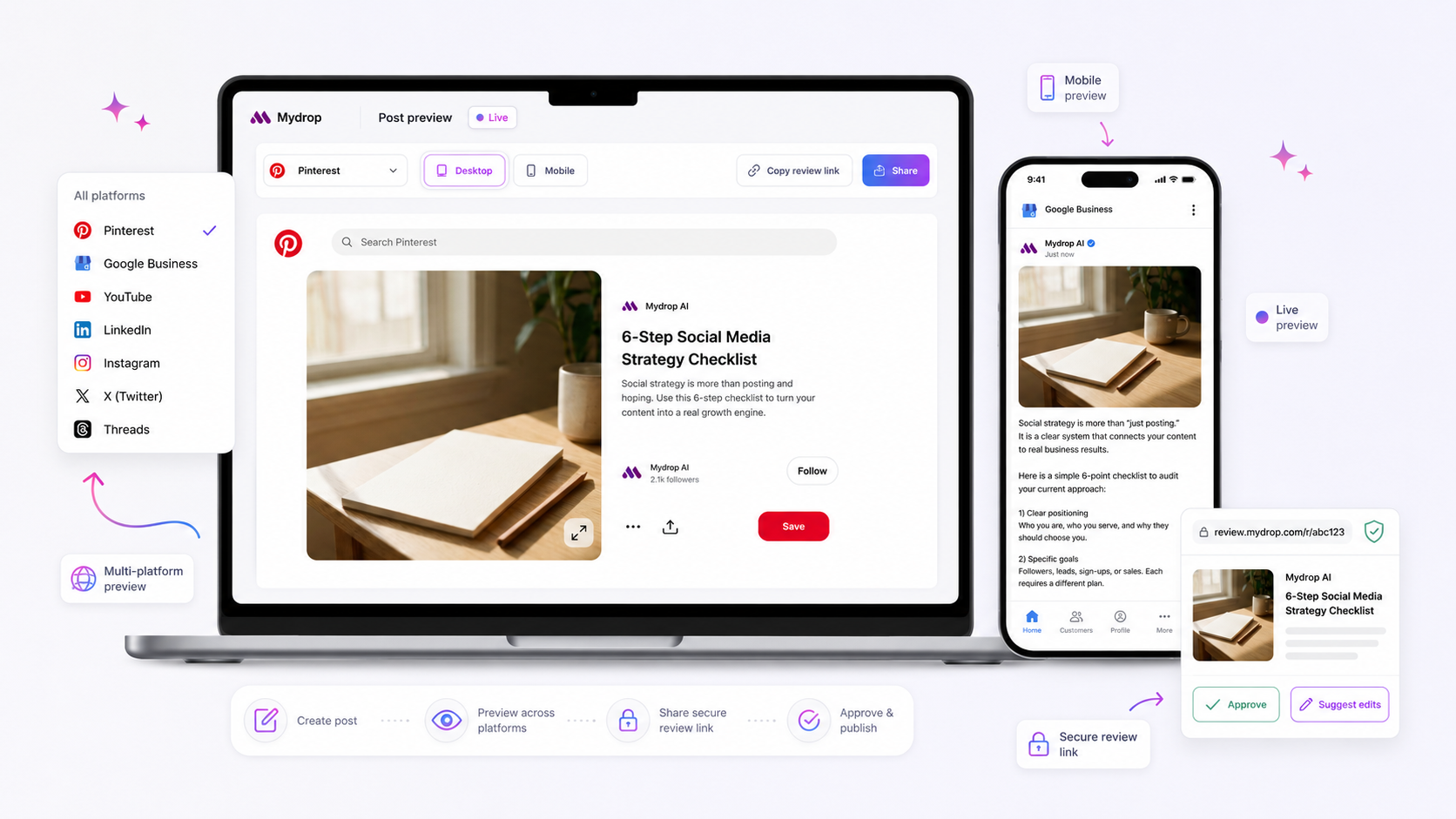
When a preview doesn't match the published post, the cause is almost always one of six things: image ratio, caption length, a stale link card, a rejected thumbnail, a platform added after the media, or a connection that expired. Check them in that order. The first three take under two minutes.
TLDR: Compare ratio, then caption length, then the link card, then the thumbnail. Look at the preview after your last edit. In Mydrop's data, most failed or flagged publishes trace back to a thumbnail rule or an expired connection, not to the composer.
Mydrop data, September 2026: in the 30 days to 16 September 2026, 98.5% of posts published through Mydrop went live at the first attempt. The most common warning was a YouTube custom thumbnail rejected because the channel was not phone-verified; the most common hard failure was an expired platform connection. Method in the Mydrop social media benchmarks.
A preview is a promise made before the platform has done its work. Then the platform crops, compresses and trims, and sometimes refuses part of the post outright. Your job is to work out which step changed it.
Check 1: the image ratio against the placement
Every placement crops to its own shape. A square image can sit perfectly in a feed and get chopped in a Story or a Reel cover.
- Open the original file and note its pixel size and ratio.
- Compare it with the platform's placement: 4:5 or 1:1 for feed images, 9:16 for Stories and Reels.
- If the ratio differs, crop it yourself. Never let the platform pick the crop.
Keep the subject in the middle 60% of the frame. That survives any crop.
Check 2: the caption against the fold and the cap
Two limits matter, and they're not the same thing. The fold is where a platform hides the rest behind "more". The cap is where it refuses the text.
| Platform | Caption cap | What often gets cut |
|---|---|---|
| 2,200 characters, 5 hashtags | The first line shows; the rest folds | |
| TikTok | 2,200 characters, hashtags counted inside | Long captions lose the end |
| X | 280 weighted characters | Links and emoji count for more than you think |
| Bluesky | 300 characters | Hard cut at the limit |
Put the hook and the link in the first line or two. Anything after the fold is a bonus.
Check 3: the link card
A link card is fetched from the page the moment it's first seen. If you changed the page title or the share image afterwards, the platform may still show the old card.
- Open the link in a private window and read the page title and image.
- Run it through the platform's own link debugger if it has one.
- Re-save the post so the card is fetched again.
If the card shows the wrong image, the fix is on the web page, not in the composer.
Check 4: the thumbnail and the video file
A custom video thumbnail is the most common warning we see. In Mydrop's publishing data, a YouTube thumbnail rejected because the channel wasn't phone-verified was the top warning. The video publishes, but with an auto-picked frame, so the preview and the post disagree.
- Verify the channel with a phone number.
- Keep thumbnails under the platform's size limit and in 16:9.
- If a video looks different after publishing, re-export it and keep the ratio the same.
Check 5: did you add a platform after the media?
This one catches careful teams. Add a third platform after you upload the image, and that platform's rules now apply to a file chosen for the first two. The preview for the new platform can look right while the file is wrong for it.
Rule: choose platforms first, upload media second, and check each platform's preview one at a time. In Mydrop's post preview each platform has its own view, so a crop that works on Instagram but fails on LinkedIn shows up before you schedule.
Check 6: the connection behind the post
If the post never went out the way the preview promised, look at the account connection. The most common hard failure we see is an expired platform connection. Reconnect the profile, then reschedule.
Make the check a habit, not a rescue
Add a thirty-second pass to your process: ratio, fold, link, thumbnail, connection. For teams, build it into the approval step so a second person looks at the final preview, not the first draft. Mydrop's approval workflow lets a reviewer comment on the exact version that will publish.
Next step: take the last post that looked wrong, run the six checks in order, and write down which one it was. After three posts you'll know your own most common cause, and you can fix it at the source. Start free with Mydrop to preview every platform in one composer.

 Google review
 Trustpilot review
 Product Hunt comment





