
















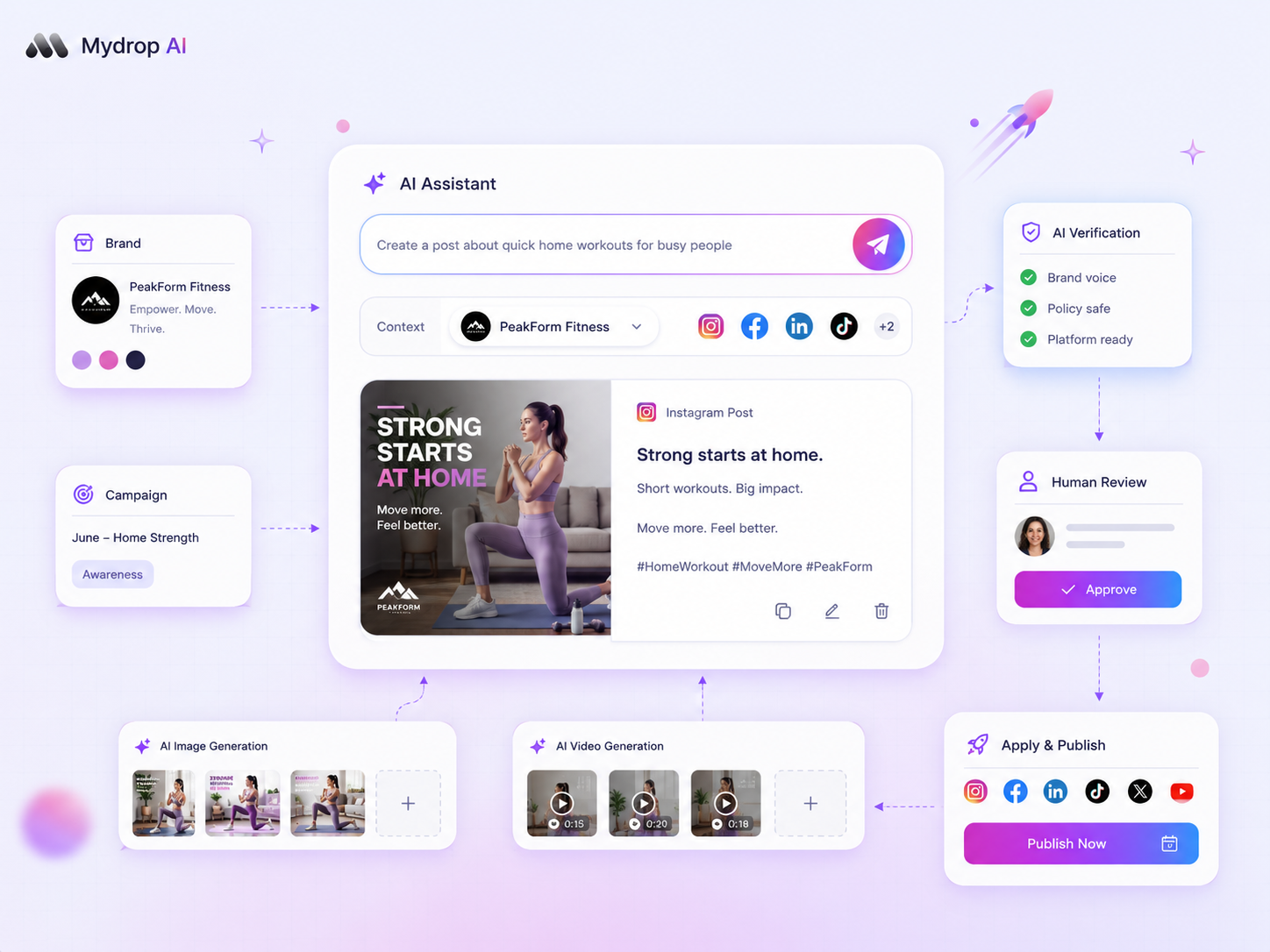
The secret to ending "draft rot" in your AI-driven campaigns is to stop treating generated text as a finished product and start treating it as a raw data structure that needs a rigid, automated verification loop. You're not failing at AI; you're just missing the bridge between a generated suggestion and your workspace reality. When we see teams stuck in endless edit cycles, it's rarely because the AI lacks creativity. It's because they're manually copy-pasting text, re-checking brand constraints, and guessing at platform compliance in separate windows.
If you can't verify your draft against your live workspace assets, constraints, and scheduling logic within the same system, you're not working with a campaign; you're just hosting a hallucination.
At Mydrop, we've seen this across hundreds of brand profiles: the moment you move generation and verification into one continuous flow, the "coordination debt" (that invisible tax of moving content between tools) simply evaporates. The goal is to move from "prompting for more content" to "verifying for more velocity."
What changed before the numbers moved

We often talk to marketing leads who feel like they're fighting their own tools. They describe the same cycle: the AI writes a great hook, but it's missing the specific brand link-in-bio update, the correct media tagging, or the alignment with an existing automation. They end up doing more work to fix the "assistant" than they would have spent writing the post from scratch.
When teams stop treating AI output as "copy" and start using it as an artifact, the bottleneck clears. Here's the operational shift:
| Stage | Blind Pasting (The Old Way) | Verified Artifact (The New Way) |
|---|---|---|
| Output Type | Raw text in chat | Structured entity (Post, Campaign, Media Plan) |
| Verification | Human manual cross-check | System-run pre-flight check |
| Feedback | Retype prompts | Fix specific blocking issues (e.g., media format) |
| Application | Copy-paste to CMS | Single-click apply to workspace object |
This shift turns the workflow from a series of manual guesses into a repeatable, high-confidence process. We call it the Verification Loop: generate the artifact, run the pre-flight check, resolve blockers, and only then commit to the calendar.
Operator rule: If your AI Assistant can't see your workspace context, like your active media library or current automation schedules, it will always produce generic "draft rot." A draft is only as valuable as its ability to pass a structural audit.
When you start auditing your pending drafts, look for the "Four-Point Gap." If your current AI-generated work fails any of these checks, it's a guaranteed stall:
- Context Match: Does the draft reference your actual, live-account brand assets and media?
- Structural Compliance: Is the output ready for your specific platform format, or is it just generic "text"?
- Logic Sync: Does the draft conflict with an existing automation or scheduled campaign window?
- Human-in-the-Loop Verification: Can you see the specific verification notes highlighting compliance or format errors?
Most teams fail here because they treat these as "editing" steps. In reality, these are validation requirements. You aren't editing creative; you're correcting data. Once you see your AI assistant as a partner in building valid workspace objects, rather than a generator of infinite text, you stop the stall.
The failure patterns to check first

When your AI-driven campaign drafts hit a wall, the problem is rarely the generative engine itself. It's almost always a failure of integration. You're likely dealing with one of these three failure patterns that kill momentum before the first post ever reaches a social channel.
- The Context Vacuum: The AI wrote a brilliant hook, but it ignored your brand's current messaging guidelines or upcoming product launch dates. It feels generic because it lacks the specific, workspace-aware data needed to make it "yours."
- The Compliance Gap: The draft sounds great to a copywriter but fails a basic reality check against your active media assets or legal constraints. If the artifact can't be matched to the actual asset folder or the correct brand group, it stays in "draft hell" forever.
- The "One-Way Street" Problem: You asked the AI for a campaign, and it gave you a pile of text. You then have to manually copy, paste, reformat, and tag everything into your social management tool. By the time you do that, the initial creative spark is gone, and the "coordination debt" of manual entry has already cost you more time than if you'd just written the thing yourself.
Here's a simple way to diagnose exactly where your process is breaking down.
| Failure Pattern | Symptom | Diagnostic Question |
|---|---|---|
| Context Mismatch | Post is tone-deaf or off-brand. | Did the agent have access to my active brand documents? |
| Asset Disconnect | Media references are missing or broken. | Is the draft linked to a real, existing media asset ID? |
| Schedule Conflict | Post timings ignore current campaign windows. | Does this draft align with our active campaign calendar? |
| Approval Block | No clear path for stakeholder review. | Can a human verify this draft against our requirements? |
If you can't answer those diagnostic questions with a simple "yes," your AI drafts are going to keep stalling.
The proof that separates signal from noise
We've seen this across hundreds of brand profiles: the teams that win aren't the ones with the most powerful prompts, but the ones that treat AI output as a structured artifact rather than a loose document.
In a mature workflow, you stop pasting text and start verifying data. At Mydrop, we see the most successful teams move from Generate to Verify as a single, atomic motion.
Decision check: If your tool lets you
Verifyan AI draft against live workspace data (like media plans, brand voice, or campaign constraints), do it before you move a single word into your publishing queue.
Think of it as a pre-flight checklist for your content. When you generate a campaign using the Mydrop AI Assistant, the system doesn't just output text. It builds a formal, reviewable artifact. This artifact contains the metadata needed to validate the post against your actual workspace configuration.
This is the shift that ends the "draft rot" cycle:
- Drafting: The assistant proposes the campaign as a structured object, not a raw note.
- Verification: You run a systemic check. The assistant cross-references your media assets, brand guidelines, and schedule.
- Flagging: The tool highlights exactly what's missing, maybe a missing image asset, an incorrect brand tag, or a scheduling conflict.
- Correction: You fix the specific constraint rather than rewriting the entire post.
When you use this structured approach, you stop guessing whether a post is ready. You get a clear signal from the system that it either meets your governance rules or needs a specific, tactical tweak. This turns your AI from a chaotic idea-generator into a predictable, high-velocity part of your team. You aren't just shipping posts faster; you're finally shipping with confidence.
What to fix this week
If you're currently staring at a mountain of stalled drafts, don't try to improve your prompts for the next batch. Instead, spend the next three days forcing your existing "dead" drafts through a Verification Audit. Use this simple checklist to pinpoint exactly why they failed to make the jump from AI output to your live schedule.
- Context Check: Did the AI have access to your specific brand assets and recent campaign data? If the draft feels generic, it's because it was generated in a vacuum.
- Structural Compliance: Does the draft meet your channel-specific requirements for length, media format, and call-to-action placement?
- Approval Logic: Who actually needs to sign off on this, and is that person currently blocked by a lack of clarity in the draft?
- Automation Alignment: Does this post trigger or conflict with any of your existing evergreen automations?
At Mydrop, we suggest taking one of these "stalled" campaigns and running it through the AI Assistant's verification route. This isn't just about editing text; it's about checking the artifact against your actual workspace rules. If the assistant flags a conflict with an existing automation or a missing asset, you've found your bottleneck. Fix that specific gap, not the copy itself.
When to stop diagnosing and change the workflow
There's a point where diagnostic work becomes a procrastination tactic. If you find your team spending more time "refining" individual AI outputs than it would take to write a standard post from scratch, you've hit the Workflow Redline.
This happens when you treat the AI as a creative partner but ignore it as an operational tool. You need a system that forces the output to be "born" as a structured artifact. If your output arrives as a block of text in a chat window, it's destined to get lost in an email thread or a messy spreadsheet. You must move to a model where the output is a native object (a campaign, a post set, or a media plan) that you can verify and apply with a single click.
Workflow check: If a campaign draft can't be verified against your live workspace settings in less than two minutes, it's not a draft. It's an expensive, hallucinated suggestion.
Stop trying to fix the output of a broken process. Instead, start requiring that the assistant generates a structured artifact that connects directly to your Mydrop media plans and brand assets.
Conclusion
The goal isn't to get the AI to write perfect posts. The goal is to build a predictable, repeatable machine that turns raw generative power into verified assets your team can actually ship.
When you shift from treating AI as a "creative writer" to treating it as a "workspace architect," your stalled drafts will stop being a source of stress and start being what they were always meant to be: a massive head start on your actual work. You have the tools to govern these drafts now. Use the verification layer, clear the coordination debt, and get back to managing your brands with the control you actually need.



 Google review
 Trustpilot review
 Product Hunt comment





