
ClaudeChatGPTCursorGeminiWorks with your AI agentsChromeMydropTry Mydrop Chrome Extension
Agency Collaboration

Client Approval for Freelance Social Media Managers 2026: 6 Tools

Freelancer chasing client sign-off? 6 approval tools compared, how to get a yes without a client login, and a copy-paste approval request.

4 min read

Updated: Nov 3, 2026

Five women gathered around a laptop in an office discussing work together

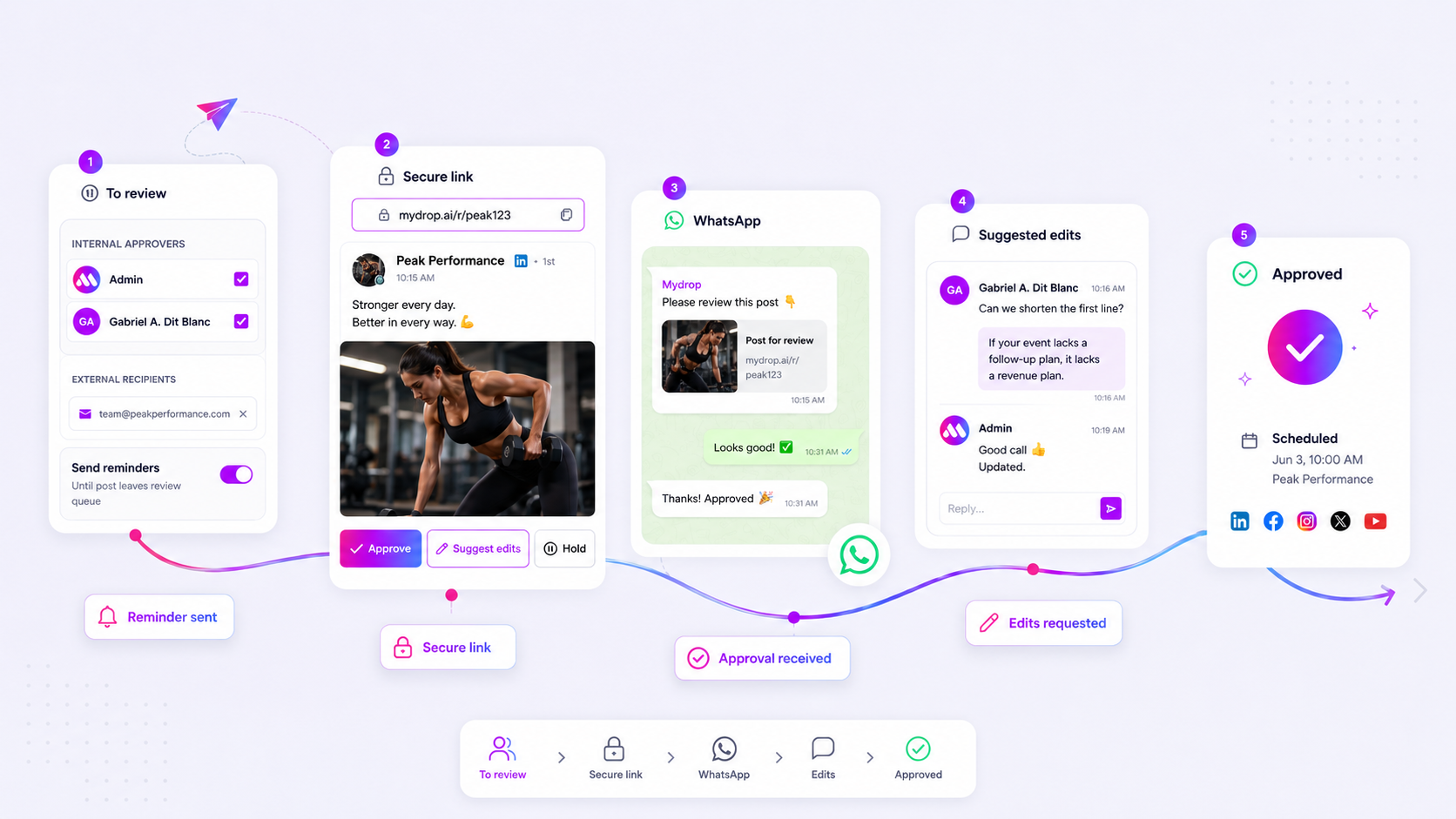
The best client approval tool for a freelance social media manager is one your client can use without creating an account: you send a link, they see each post as it will look, and they tap approve or leave a note. Every extra step on the client's side (a login, an app, a password reset) adds days to sign-off.

TLDR: Judge approval tools from the client's chair, not yours. Mydrop, Planable, Loomly, Kontentino and Agorapulse all handle client review; Mydrop does it with a no-login link, a branded portal and WhatsApp approvals, so a client who never opens your tools can still sign off.

Mydrop pricing check, September 2026: the entry paid plans of the eight tools most often compared with Mydrop run from $6 per channel (Buffer) and $25 a month (Later) to $99 per user (Hootsuite) and $79 per seat (Sprout Social), read on each vendor's pricing page. Mydrop is free to start, then $19 a month flat, not per seat. Full table on Mydrop's compare pages.

Why clients sit on approval requests

Your clients are busy running a café, a clinic or a shop. Approving posts is the fourteenth thing on their list. In our experience, three things kill a quick yes:

  • A login. "I'll do it later when I find my password" is how a Monday post becomes a Thursday post.
  • A file instead of a post. A doc full of captions plus a folder of images forces the client to imagine the post. They ask for another round instead of deciding.
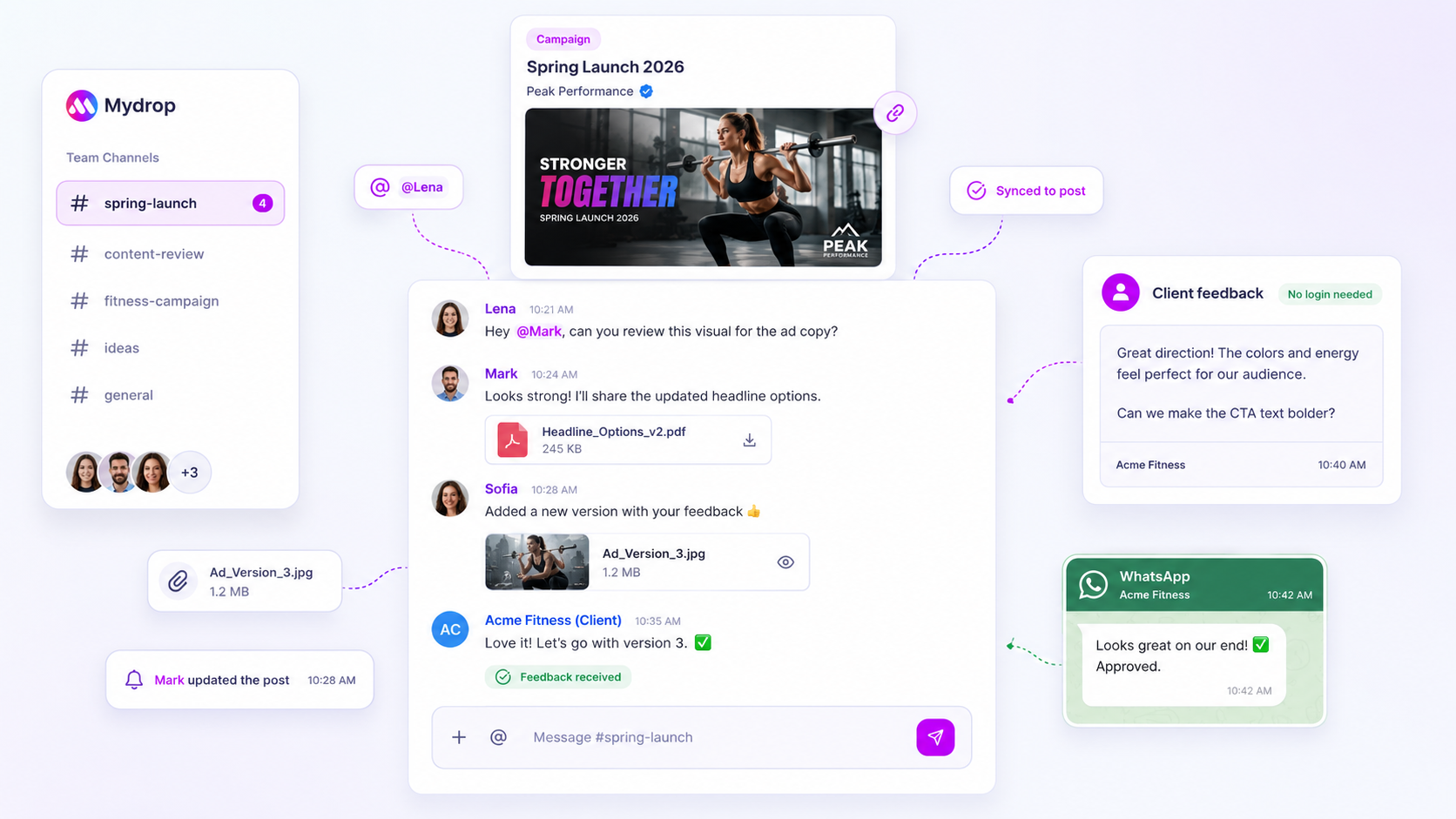
  • Feedback in five places. One note comes by email, one in WhatsApp, one on a call. You end up publishing a version nobody fully approved.

6 client approval tools freelancers use

Tool How the client reviews Good fit for
Mydrop Review link or branded portal with a live preview: approve, hold or suggest edits, no login; also from WhatsApp Several small clients, wants to look like an agency
Planable Feed-style preview of each post, with comments and approval Clients who want to see a mock feed
Loomly Post previews with comments and approval steps Freelancers who also need an idea library
Kontentino Client-facing approval view built for agencies Freelancers growing into a small agency
Agorapulse Review and approval inside the publishing calendar Freelancers who also manage the inbox
Google Docs and email Comments in a doc, approval by reply One client, very low volume

Before you choose, ask each vendor one question: can my client approve without a paid seat or a login? Guest access rules differ by tool and by plan, and the answer decides how fast your clients reply.

The client approval flow that gets a yes in hours

  1. Batch the week. Send all of next week's posts in one request, on the same day every week. Clients learn the rhythm.
  2. Show the real post. Mydrop's review link carries a live preview of each post as it will appear on Instagram, LinkedIn or TikTok, so the client judges the real crop and caption.
  3. Give three clear choices: approve, hold or suggest an edit. Never "let me know what you think".
  4. Set the default in the contract. "Posts not reviewed within 48 hours publish as planned" protects your calendar. Put it in your service agreement, not in a reminder email.
  5. Let reminders chase. Mydrop sends approval reminders to overdue reviewers automatically, so you are not the one sending "just checking in" every Tuesday.

A copy-paste approval request

Hi Sarah, next week's 5 posts are ready: [link]. Tap approve on each one, or leave a note right on the post. Anything not reviewed by Thursday 5pm goes out as planned. Thank you!

One link, one deadline, one default. That is the whole message. If the client prefers WhatsApp, send the same request there; in Mydrop, a client with a verified WhatsApp number can approve or suggest edits without leaving the chat, and the edit lands back on the post.

How fast client sign-off can be

Mydrop's data on client approvals gives a realistic target. On posts that went through a client approval on Mydrop with both timestamps recorded, the median time from submission to approval was 6 hours, and 66% were approved within 24 hours. The sample is small, but it shows the shape.

If your clients take three days, the fix is usually removing a step, not sending more reminders.

A branded client portal makes a freelancer look like an agency

Once you have four or five clients, a link per post is not enough. Clients want one place to see what is scheduled, what is waiting for them and last month's results.

Mydrop's client portal gives each client their own branded space, on your domain or theirs. They approve pending posts, upload photos, connect their own profiles without sharing passwords and download reports. You choose which sections each client sees. It feels like an agency service, which makes your next rate increase easier to justify.

For the full no-login setup with an email script, read client approval without a login. For clients who answer everything on their phone, see when to use WhatsApp for client approvals.

This week: pick your slowest client and move only them to link-based approval. Start free with Mydrop, send next week's posts as one review link and compare their turnaround with last month. More on running several clients from one desk: Mydrop for freelance social media managers.
Free tools

Free Post Mockup Generator

Show a client how a post will look on 10 networks, and download it as an image.

FAQ

Quick answers

One your client can use without an account. Mydrop sends a review link with a live preview, so clients approve, hold or suggest edits with no login, or straight from WhatsApp.

Not in Mydrop: clients approve from a secure per-post link or a branded client portal without logging in. Guest access differs in other tools and plans, so ask each vendor.

Send the week's posts in one request, set a clear deadline with a default (not reviewed by Thursday means it publishes as planned) and let automatic reminders do the chasing.

Next step

Stop coordinating around the work

If your team spends more time chasing approvals, assets, and publish details than creating better posts, the problem is probably not your people. It is the workflow around them. Mydrop brings planning, review, scheduling, and performance into one calmer operating system.

Mydrop Editorial Team

About the author

Mydrop Editorial Team

Mydrop

The Mydrop Editorial Team writes the guides, comparisons, and playbooks on this blog. We cover social media planning, publishing, approvals, analytics, and multi-brand workflows, drawing on how teams actually use Mydrop to run their social programs. Every article is researched, edited, and maintained by the team behind the product.

View all articles by Mydrop Editorial Team

Managing 14+ social platforms felt like a 2 a.m. nightmare until Mydrop. The AI brand-voice mapping is scary accurate, and the client approval portal saved me easily 15 hours this week alone. It's the ultimate set-and-forget workspace for busy agencies.
A true automation tool for scheduling (and creating) social media content! It has saved me over 20 hours of work already in just my first couple weeks. A true game-changer for anyone in business, big or small!
Finally tried Mydrop on a test client and the white-label portal on a custom domain actually looks legit, no Mydrop branding sneaking in. The OAuth setup saved me from the usual “what's my password” back-and-forth.
Absolute game-changer. Mydrop completely automated my content workflow. The scheduling is flawless, it actually feels intuitive, and it saved me 10+ hours in my very first week. Best decision I've made for my socials!
Mydrop AI has been an absolute game changer, it has saved me so much time and effort. It does what it promises. Easy to use, versatile, and the creator is really open to feedback. Very happy!
I was looking through a bunch of management tools for my client, as it was getting out of control; after comparing every solution, I found Mydrop to be a no brainer.
This app helps me more than any other I have ever used. I've got all of my pages and accounts and I can drag and drop like I want. Mydrop has really been a huge asset to my business!
I was looking for a scheduling tool as my clients were using more and more platforms. Mydrop does the job very well, and automations and forms are very useful and save me a lot of time. I recommend!
Love that you baked in white-label portals from day one, that's a huge pain point for agencies.
Love this platform for scheduling social media posts! Easy and very intuitive to use! Highly recommend!
Very nice tool, you will save a lot of time. Very easy to use, user friendly. I have used it for several months and it is very helpful.
Helpful app if you are trying to streamline social content creation for clients.
Managing 14+ social platforms felt like a 2 a.m. nightmare until Mydrop. The AI brand-voice mapping is scary accurate, and the client approval portal saved me easily 15 hours this week alone. It's the ultimate set-and-forget workspace for busy agencies.
A true automation tool for scheduling (and creating) social media content! It has saved me over 20 hours of work already in just my first couple weeks. A true game-changer for anyone in business, big or small!
Finally tried Mydrop on a test client and the white-label portal on a custom domain actually looks legit, no Mydrop branding sneaking in. The OAuth setup saved me from the usual “what's my password” back-and-forth.
Absolute game-changer. Mydrop completely automated my content workflow. The scheduling is flawless, it actually feels intuitive, and it saved me 10+ hours in my very first week. Best decision I've made for my socials!
Mydrop AI has been an absolute game changer, it has saved me so much time and effort. It does what it promises. Easy to use, versatile, and the creator is really open to feedback. Very happy!
I was looking through a bunch of management tools for my client, as it was getting out of control; after comparing every solution, I found Mydrop to be a no brainer.
This app helps me more than any other I have ever used. I've got all of my pages and accounts and I can drag and drop like I want. Mydrop has really been a huge asset to my business!
I was looking for a scheduling tool as my clients were using more and more platforms. Mydrop does the job very well, and automations and forms are very useful and save me a lot of time. I recommend!
Love that you baked in white-label portals from day one, that's a huge pain point for agencies.
Love this platform for scheduling social media posts! Easy and very intuitive to use! Highly recommend!
Very nice tool, you will save a lot of time. Very easy to use, user friendly. I have used it for several months and it is very helpful.
Helpful app if you are trying to streamline social content creation for clients.
Smiling social media managerSmiling social media managerSmiling social media managerSmiling social media managerSmiling social media managerSmiling social media manager

4.8/5 · on Trustpilot & Google