
















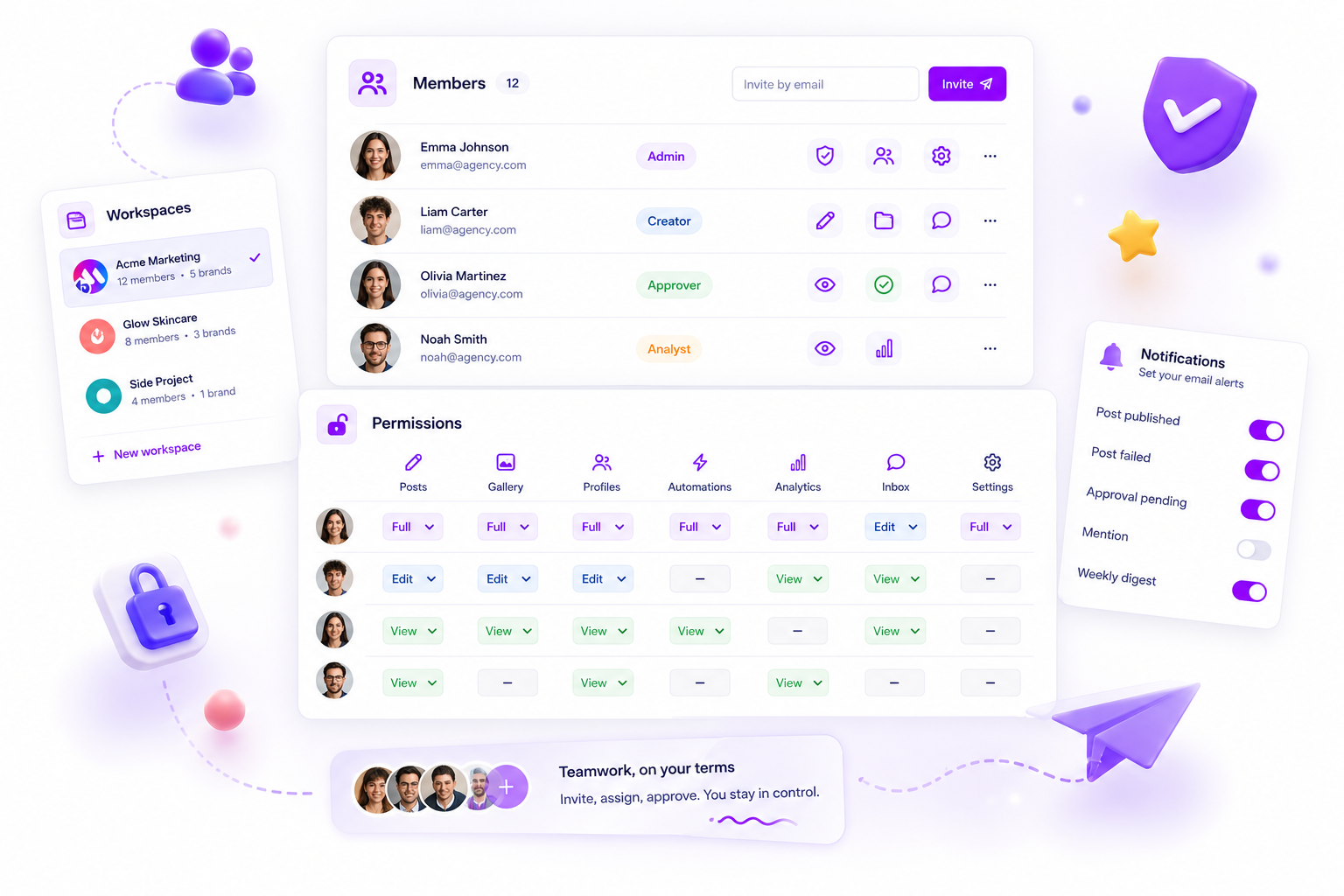
If you manage more than one client or brand, your workspace platform has to treat them as isolated, independently configurable silos, not just tagged projects sitting in a shared pool. Real multi-brand scalability isn't about organising folders; it's about enforcing hard boundaries between billing, data and permissions. Anything less invites catastrophic client cross-contamination.
We know that adrenaline spike when a client accidentally sees a dashboard, internal note or asset meant for their direct competitor. Running multi-brand operations is inherently messy, and one slip-up in settings can ruin a reputation you worked hard to earn. We get it: this work is high-stakes. The goal here is simple: stop relying on hope and start relying on structural architecture to keep your client relationships safe.
What the best tools need to handle

The most robust platforms for agencies and large teams treat "workspaces" as the absolute highest level of containerisation. When you're operating at scale, you can't afford "soft" boundaries where data is merely flagged by a client ID but ultimately lives in the same bucket.
At a minimum, a serious platform must provide hard architectural isolation at the database and container level. This ensures that every configuration (billing, member access, timezones and product quotas) is scoped exclusively to that specific workspace.
If an action or setting change in Brand A (like a credit card update or a new team member addition) accidentally impacts Brand B, your platform is failing your operational security. We've seen too many teams burn daylight and trust because a "simple" project management tool didn't have the stomach for true multi-brand isolation.
To help you audit your current setup, here's a breakdown of how these boundaries work in practice:
| Feature | Hard Bound (The Goal) | Soft Bound (The Risk) |
|---|---|---|
| Permissions | Users are siloed per workspace. | Users inherit global access; rely on tags. |
| Billing | Separate invoices/cards per client. | One shared bill, manual allocation. |
| Quotas | Limits restricted to the workspace. | Shared "pool" limits; risk of depletion. |
| Timezones | Per-workspace scheduling logic. | Global timezone settings only. |
Operator rule: If your team has to manually "check" or "filter" before hitting publish to make sure they're in the right client environment, your tool is effectively a spreadsheet with a better interface. You need the platform to do the checking for you.
Mydrop pricing check, September 2026: the entry paid plans of the eight tools most often compared with Mydrop run from $6 per channel (Buffer) and $25 a month (Later) to $99 per user (Hootsuite) and $79 per seat (Sprout Social), read on each vendor's pricing page. Mydrop is free to start, then $19 a month flat, not per seat. Full table on Mydrop's compare pages.
Where basic tools start to break

We've all had that heart-stopping moment: a client sends a Slack message asking why their competitor's creative assets showed up in their draft library, or your finance lead flags an overage bill that should have been split three ways but was charged entirely to one brand.
Tag-based systems or simple "project folders" feel clean when you have one or two accounts. You think you have control. But the second you scale to five, ten or fifty brands, the "soft boundary" model fails. A tag is not a firewall. When the tool relies on a user remembering to assign the right tag to every asset, user or report, the system will eventually fail. It's not a matter of if your team makes a mistake, but when.
This is what we call "organisational drift." You start with a shared global pool of team members and billing limits. Then suddenly a freelancer hired for Brand A keeps access to Brand B after their contract ends because someone forgot to untag them. Or a spike in API requests for a viral campaign on one account eats up the entire team's quota, bringing the other four client accounts to a standstill.
The Structural Divide: Hard vs. Soft Boundaries
To help you audit your current setup, it's useful to map out whether your tools are actually separating your client environments or just masking the chaos.
| Feature | "Soft Bound" (Tag-based) | "Hard Bound" (Workspace-scoped) |
|---|---|---|
| Billing/Quotas | Global (Shared pool, no isolation) | Isolated per client / project unit |
| Member Access | Tag-based (High drift risk) | Permission-gated per workspace |
| Timezone | Single global setting (Conflicts) | Per-workspace configuration |
| Data Integrity | High risk of cross-contamination | Zero leakage by design |
| Asset Security | Shared pool (Permissions per asset) | Enclosed container (Boundary) |
If your current platform lives entirely in the "Soft Bound" column, your team is probably spending more time managing permissions and cleaning up data than actually building content.
The buying criteria that matter
When you're evaluating a new platform, stop asking if it has "good organisation." That's too vague. Instead, look for structural isolation. You're essentially looking for an architecture that treats every client as a tenant in their own dedicated environment.
At Mydrop, we designed workspaces as rigid containers. We built them so that billing, timezone, members and product quotas are strictly scoped. If you change a setting in one workspace, it has zero impact on another. This is the only way to manage a complex portfolio without constant anxiety.
Here's the "Fail-Safe" checklist to run during your next tool trial:
- Does the workspace boundary encompass billing? If the platform can't separate invoice lines or usage quotas by client/workspace, you're managing a spreadsheet nightmare, not a professional workflow.
- Is member access resolved at the workspace level? If you add a user to a brand, does that grant them access to everything else in the organisation by default? If yes, it's not built for secure agency operations.
- Can you force specific timezones per brand? Reporting and scheduling must reflect the brand's local reality. If your scheduling tool assumes the team's HQ time for a global brand, your engagement will suffer.
- Is there an "Active Workspace" context? The best systems force you to explicitly load the workspace context. This makes it impossible to accidentally post content to the wrong brand profile.
- How are destructive actions scoped? If you delete a workspace, does it break the global account, or is it contained to that specific client silo?
Most teams don't have a content problem. They have a decision bottleneck, and that bottleneck is almost always caused by an architecture that makes them fight their own tools just to keep client data separated. Don't settle for "tag-based" safety. Demand architectural boundaries.
How Mydrop supports this workflow
We built Mydrop for teams that have outgrown the "one giant bucket" approach to social media management. Once you reach a certain scale, organising by folders or tags isn't just ineffective; it becomes a liability.
At Mydrop, we designed workspaces as true containers, not just organisational labels. Each workspace manages its own state independently: billing and quotas are ring-fenced, team member permissions are scoped specifically to that environment, and timezones are configured per client. This is how we solve the multi-brand dilemma. When your marketing team in London manages a beauty brand and your team in New York manages a retail client, the platform handles the shift automatically. The London team sees their local hours and their specific assets, while the New York team does the same, all without ever seeing the other team's drafts, internal notes or analytics data.
Decision check: If an action or setting change in Brand A (e.g. billing, member access, timezone) impacts Brand B, your platform is failing your operational security.
By anchoring product collections to a workspace-scoped boundary, we make sure permission checks are resolved locally. This means that if a freelancer is granted access to a specific client workspace, they literally don't exist to the system in any other workspace. You gain the operational agility to onboard new clients in minutes, knowing that the structural boundary between them is enforced at the platform level, not just by team policy.
A simple shortlist checklist
When you're trialling a new platform for your agency or multi-brand team, use this checklist to separate "tag-based" systems from true, multi-workspace platforms. If you can't answer "yes" to these questions during your trial, you're likely looking at a tool that will eventually create a coordination bottleneck.
- Hard Billing Segregation: Does upgrading, cancelling or exceeding usage limits in one client project have zero impact on the billing or quotas of other client projects?
- Localised Context: Can you configure unique timezones, local working hours and language settings for each workspace without affecting global platform defaults?
- Permission Isolation: If you add a user to Workspace A, are they completely invisible and inaccessible within Workspace B unless explicitly invited?
- Destructive Action Safety: If you delete a workspace or an asset within a workspace, does the platform explicitly confirm that this action is isolated to that specific container and will not purge cross-client data?
- Context Visibility: Does the application UI always show you which workspace you're currently in, and does it force a re-load of all product modules when you switch environments?
Conclusion
The move from "simple management" to "enterprise scalability" is rarely about adding more features. It's about removing the friction that builds up when your operations are constrained by your tools. We've seen this across thousands of campaigns: the platforms that treat every brand as an isolated, independently configurable silo are the ones that survive the growth phase.
If your team is currently spending more time managing permissions, fixing timezone errors or explaining why a client saw the wrong dashboard, you're not failing at management. You're experiencing coordination debt. The fix isn't to work harder or hire more people. The fix is to make sure your underlying platform enforces the boundaries your business requires. Whether you choose Mydrop or another enterprise-grade solution, the criteria for success stay the same: demand structural isolation, protect your client data, and stop paying the price for tools that treat your diverse portfolio as a shared pool.
 Google review
 Trustpilot review
 Product Hunt comment





