
















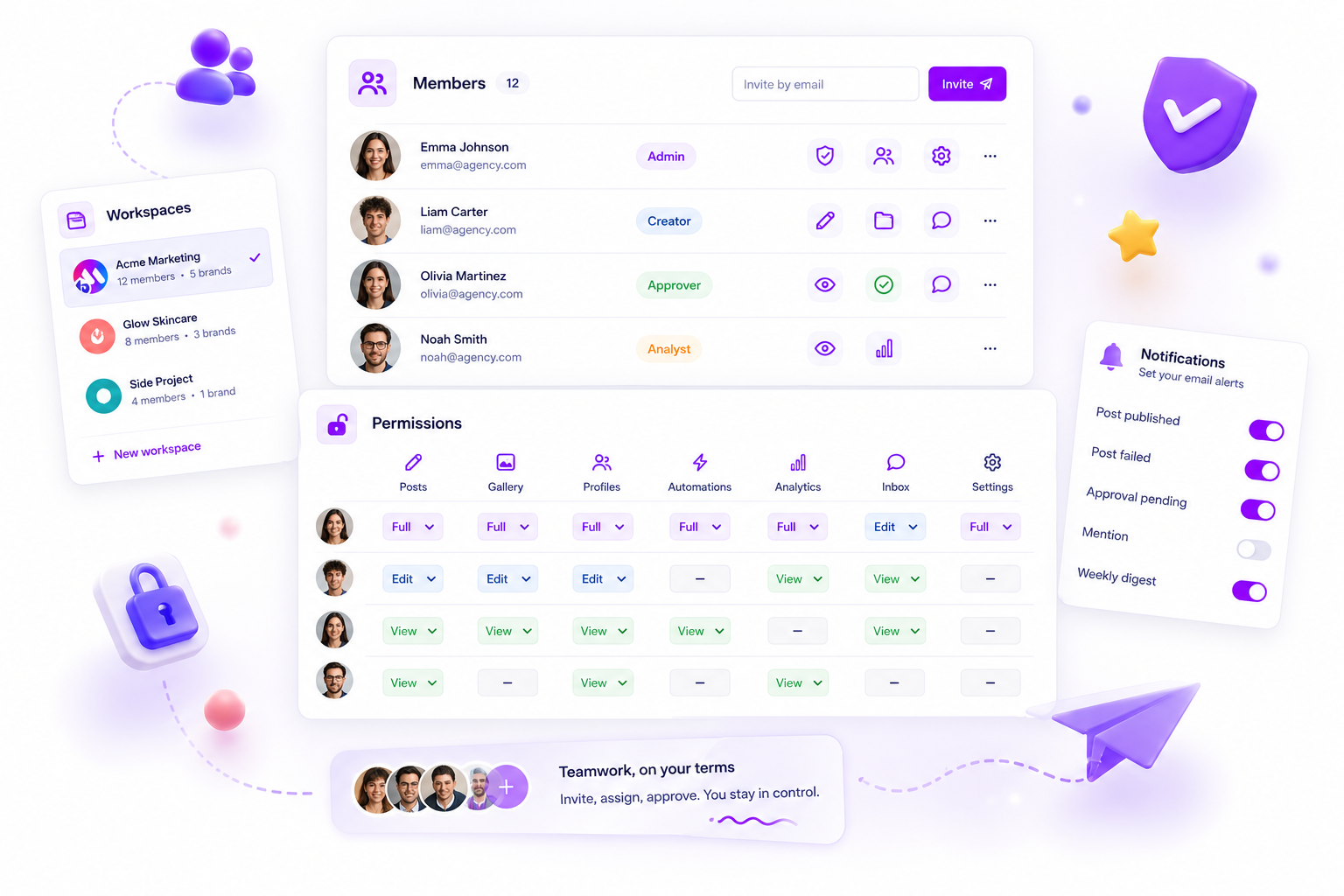
To scale an agency properly, you need to move past broad role-based access and towards granular, resource-based permissions that match what people actually do all day.
As your headcount grows, the biggest bottleneck isn't your creative output. It's the chaotic, permission-heavy "who can approve what" loop that slows everything down and invites unnecessary risk. We get it. You've been there: a post goes out to the wrong brand account, a crucial draft gets deleted, or a client gets frustrated because they can't see what they need to. It's messy, it's stressful, and it always seems to happen right before a major campaign launch.
Most agencies start with a few "Admins" and everyone else as "Editors." That feels fast until you're managing ten clients, twenty platforms, and fifty stakeholders. Suddenly, that trust-based model becomes a liability. The silent killer of agency growth is permission bloat: giving everyone broad access because it's easier than managing the alternative. The goal is to move from "who has access to the tool" to "who can perform this specific action on this specific resource." When you're supporting dozens of clients, a simple rule helps: every team member should have the minimum access they need to do their job, and nothing more.
What the best tools need to handle

If your current social media platform forces you to choose between "all-access Admin" and "restricted Viewer," you're already working with a broken model. The best tools for scaling agencies have to handle complexity without sacrificing speed. Here's what matters when you're weighing up your next platform:
- Resource-based mapping: You need to define access per resource (like a specific post, an inbox thread, or a set of analytics), not just per workspace.
- Granular actions: Access should be granular. Can a junior designer draft a post? Yes. Can they publish it? No. Can an Account Director approve it? Yes.
- Actionable audit trails: You need clear visibility on who changed a permission and when, especially when you're dealing with dozens of client-facing accounts.
At Mydrop, we built our permission system as a resource/action map rather than a set of hard-coded roles. Instead of giving a user a rigid "Manager" role, you define exactly what they can do with each part of the platform. That lets you tailor access to specific resources like posts, profiles, or inbox threads, creating truly custom, flexible workflows.
| Agency Stage | Primary Risk | Recommended Access Structure |
|---|---|---|
| Startup (1-3 clients) | Manual bottlenecks | Simple role-based (Admin/Editor) |
| Growth (5-10 clients) | Access creep | Resource-level scoping |
| Enterprise (15+ clients) | Compliance failure | Full granular action maps |
Most teams don't have a content problem; they have a decision bottleneck. Without granular control, you're constantly caught between micromanaging every post or risking a major PR crisis.
Where basic tools start to break

Rigid, tier-based roles, where you pick "Admin," "Editor," or "Viewer" from a dropdown, work fine when you're a team of three managing one brand. But try scaling that to a 50-person agency managing 20 global brands, and those broad roles become a liability. You end up choosing between two bad options: make everyone an "Admin" so they can actually get work done, or lock everything down so tightly that your creative team needs a manager's permission to fix a typo in a draft.
When access is too broad, the risk of a "career-limiting event," like posting a draft straight to the wrong client's page, spikes. When access is too restrictive, your workflow grinds to a halt as people wait for someone with the right "god-mode" credentials to click "approve."
The fundamental failure of these basic tools is the inability to map access to real-world responsibilities. They treat "Managing Content" as one single activity. In reality, your junior designer needs access to draft content in the gallery, your account manager needs to review and approve that content, and your senior editor needs to schedule the final asset. A simple "Editor" role doesn't understand that distinction, which leads to unnecessary friction or dangerous exposure.
Operator rule: If your tool forces you to grant "Publish" rights just so someone can "Draft," you have an access architecture problem, not a people problem.
Mydrop pricing check, September 2026: the entry paid plans of the eight tools most often compared with Mydrop run from $6 per channel (Buffer) and $25 a month (Later) to $99 per user (Hootsuite) and $79 per seat (Sprout Social), read on each vendor's pricing page. Mydrop is free to start, then $19 a month flat, not per seat. Full table on Mydrop's compare pages.
The buying criteria that matter
Stop judging tools by how many "admin" seats they offer. Instead, look for a platform that treats permissions as a granular, resource-based map. When you're vetting software for a large team, use this scorecard to work out whether the platform can actually handle your complexity.
| Criteria | Why it matters for scaling |
|---|---|
| Resource Granularity | Can you restrict access to specific objects like posts, inboxThreads, or analytics? |
| Action Mapping | Can you tell the difference between create, read, update, delete, and approve permissions for each resource? |
| No "Hard-Coded" Enums | Does the platform rely on rigid "Admin/Editor" labels, or can you define unique roles like "External Client Observer"? |
| Notification Logic | Can team members toggle specific operational alerts (e.g., approval requests) without muting everything? |
When we built Mydrop, we deliberately moved away from hard-coded role enums. We saw too many teams forced into awkward workarounds. Instead, we use a granular resource/action map. You can define a role that lets a team member access a specific brand's posts to create and read, but blocks them from the approve action.
That means you can bring on a new contractor, client, or junior hire and give them exactly what they need to contribute, without opening the door to everything else. You're building a system that lets people move fast, while making sure the "big red button" stays reserved for the team members who have explicit authorisation to push it.
Most teams don't have a content problem. They have a coordination bottleneck. Solving it takes an architecture that matches your actual organisational hierarchy, not one that forces you to shoehorn your workflow into three generic buckets.
How Mydrop supports this workflow
At Mydrop, we took a different path by ditching the rigid "Admin" or "Editor" drop-down menus common in other tools. Those old-school role definitions fall apart the second you add a fourth client or a second timezone. Instead, we use a member resource/action map. That means every team member has a set of granular permissions tailored exactly to their responsibilities.
We built it this way because we've seen thousands of workflows across agencies of all sizes, and the "one-size-fits-all" role is almost always a lie. In practice, a junior designer needs to draft content for Brand A, but they have no business editing the inbox threads for Brand B. A client stakeholder needs to approve posts, but they should never accidentally invite new members or change workspace settings.
In our experience, governance works best when it's invisible. You don't want to spend your morning manually flipping switches or chasing permissions in Slack. When you open Settings > Members and permissions in Mydrop, you aren't just assigning a label. You're defining what that user can do (create, read, update, delete, or approve) for specific resources like posts, gallery items, profiles, or inbox threads.
If you bring on a new freelancer, you grant them access to exactly the profiles they manage and nothing more. If a social media manager gets promoted to a director role, you update their permission map in seconds to include approval rights. It's flexible because it isn't hard-coded. Because permissions are stored as arbitrary member document maps, we can adapt to your team structure as you grow. Missing keys behave as false by default, which is our way of making sure that new, powerful features don't accidentally leak access until you're ready to assign them.
This granularity lets your team operate with autonomy. Instead of waiting for an account director to log in and click "approve" on every single tweet, your junior staff can draft, your managers can edit, and the approval chain stays secure. You get speed without the risk.
A simple shortlist checklist
Before you overhaul your next set of permissions, run through this quick audit to see whether your current setup is helping you scale or holding you back.
- Task Independence: Can your junior team members draft and edit their own assignments without needing "Admin" access to the entire workspace?
- Client Isolation: Can you clearly define which clients a specific team member, or even a client stakeholder, can see, interact with, and approve?
- Approval Integrity: Is the "approve" action restricted to your senior staff, or does "Editor" access accidentally let anyone publish live?
- Notification Noise: Do your team members have granular control over their own operational emails, or are they getting flooded with alerts for threads and profiles they don't manage?
- Growth Readiness: Does your platform support granular per-resource control, or are you forced to create multiple workspaces just to separate brand access?
Conclusion
The biggest lie in agency growth is that you have to choose between speed and control. Most teams think that to go faster, they have to loosen the reins and accept a little chaos. That's a trap. You don't need less governance; you need better governance.
By moving from broad, blunt-force roles to granular, resource-based permissions, you turn governance into an enabler. It lets your team take ownership, keeps your client profiles safe, and removes the daily friction of manual approvals. When everyone knows exactly what they can (and can't) do, the work flows faster.
You'll know you've cracked the code when your agency can onboard a new brand or hire a new specialist in minutes rather than hours. Stop treating permissions as a static setting you touch once a year. They're a living, breathing part of your operational stack. Get this right, and you stop chasing approvals at 6 p.m. on a Friday and start actually scaling your team.
 Google review
 Trustpilot review
 Product Hunt comment





