ClaudeChatGPTCursorGeminiWorks with your AI agentsChromeMydropTry Mydrop Chrome Extension
AI Content Operations

AI Pre-Checks Before Approval: Banned Words, Voice, Compliance

Use AI to catch banned words, off-brand tone and platform errors before human approval. A four-layer check plan and 6 tools that run it.

4 min read

Updated: Oct 31, 2026

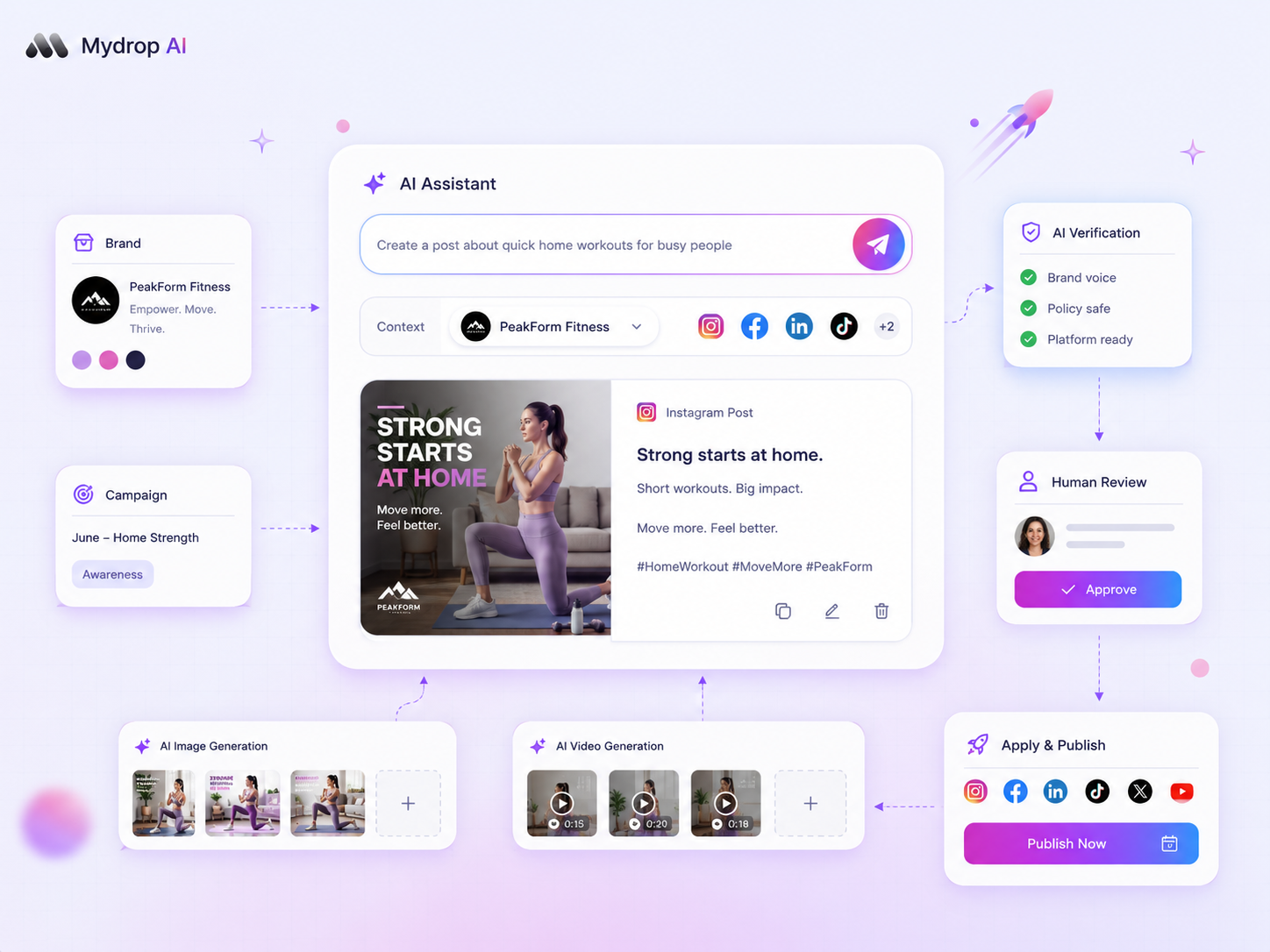
Mydrop AI content studio drafting a social media post

The best way to use AI in an approval workflow is as a pre-check that runs before any human sees the draft. It catches banned words, missing disclaimers, off-brand tone and platform errors, so reviewers can spend their time on judgment calls. The AI never replaces the approver: in regulated work, a named person still signs off.

TLDR: Split your checks into four layers: platform rules, a banned and required word list, brand voice, and regulated compliance. Automate the first three, keep a human on the fourth, and send only clean drafts to approval.

Mydrop data, September 2026: across posts that went through a client approval on Mydrop, the median time from submission to approval was 6 hours, and 66% were approved within 24 hours. Method in the Mydrop social media benchmarks.

Four layers of checks, and which ones AI should run

Most review rounds get eaten up by things a machine could have caught. Sort every check your reviewers make into one of four layers.

Layer Examples Who should catch it
Platform rules Caption too long, too many hashtags, bad crop The scheduler, automatically
Word list Banned claims ("guaranteed", "risk-free"), competitor names, missing disclaimer A rule-based checker or AI, before review
Brand voice Tone, reading level, banned phrases, house style An AI writing assistant, before review
Regulated compliance Performance claims, testimonials, offers in finance, health or insurance A trained person, with a record of the decision

The rule of thumb: if the check has a yes-or-no answer, a machine should run it. If it needs context about the law or the client, a person should.

Build the banned keyword list before you buy a tool

Every pre-check tool is only as good as the list you give it. Before any demo, write a one-page list with three sections:

  • Never say: words that create legal risk in your industry, such as "guaranteed returns", "cure" or "best rate".
  • Always say: disclaimers or tags a post must carry, for example "#ad" on paid partnerships or a risk line on investment content.
  • Say it this way: house terms, product names with the right capitals, phrases your brand prefers.

For regulated sales teams, ask the compliance officer to sign off the list once. After that, the AI enforces a list a qualified person has already approved. That is much faster than reviewing every post from scratch.

Six tools that run checks before human approval

  • Mydrop. The AI writes drafts from the brand's stored voice, audience and do and do-not rules, so your list shapes the draft instead of only flagging it afterwards. Every draft then goes through a true-to-platform preview and an approval gate before it can publish. See the AI content studio.
  • Writer. A business AI writing platform with style guides and terminology rules, useful when legal wants exact wording enforced.
  • Grammarly for business. Style guides and brand tones applied as people type, which catches voice drift in copy written by humans.
  • Acrolinx. Content governance software that scores text against a company style guide, aimed at large content teams.
  • Hearsay. Social selling for financial advisors, with compliance review built for regulated firms.
  • Smarsh. Archiving and supervision for regulated communications, used by firms that must keep records of social activity.

Pick by the layer that hurts most. If tone and word choice cause most rework, a writing assistant is enough. If an auditor can ask for every post, you need archiving and supervision as well.

Platform checks your scheduler should already run

Platform rules are the cheapest layer, and your scheduler should handle them without a separate tool. Mydrop's publisher checks the caption length each network enforces before a post is sent. Instagram's API rejects captions over 2,200 characters, and X allows 280 weighted characters. A draft that breaks a cap gets flagged while you can still fix it, not after the slot is missed. Instagram also caps posts and Reels at 5 hashtags, a rule you keep yourself.

The post preview covers the visual side. Reviewers see the real crop and the point where the caption cuts off on each network, so "the image hides the logo" never reaches approval.

What the human reviewer checks once drafts arrive clean

When the first three layers are automated, the reviewer answers one question: is this post right for this brand, this week? That is the job worth a senior person's time.

The approval step itself still matters. Route the draft to the right approver, keep feedback on the post, and let any requested change send it back to draft so nobody signs off an old version. Mydrop works this way: a "suggest edits" answer returns the post to draft with the note in its chat. For the voice side, read how to catch brand voice drift before publishing.

Test your word list on last month's rejected posts

Run this before you change any tool:

  1. Write the one-page Never say, Always say, Say it this way list.
  2. Take last month's 20 most-edited posts and note why each one was sent back.
  3. Mark each reason as platform, word list, voice or compliance.

If most rework came from the first three layers, AI pre-checks will cut most of it. To try the drafting side, start free with Mydrop, store the list in your brand's rules and generate next week's posts from it.


Free tools

Free Post Mockup Generator

Show a client how a post will look on 10 networks, and download it as an image.

FAQ

Quick answers

Yes. Writing assistants such as Writer or Grammarly can enforce a word list as people type, and Mydrop's AI writes drafts from the brand's stored do and do-not rules. A person still approves the final post.

No. Firms in finance, insurance and health usually need a qualified person to approve risky claims and keep a record. AI shortens that review by sending only clean drafts.

Platform limits, banned and required words, and brand tone. Leave claims that need legal judgment to a human reviewer.

Next step

Stop coordinating around the work

If your team spends more time chasing approvals, assets, and publish details than creating better posts, the problem is probably not your people. It is the workflow around them. Mydrop brings planning, review, scheduling, and performance into one calmer operating system.

Mydrop Editorial Team

About the author

Mydrop Editorial Team

Mydrop

The Mydrop Editorial Team writes the guides, comparisons, and playbooks on this blog. We cover social media planning, publishing, approvals, analytics, and multi-brand workflows, drawing on how teams actually use Mydrop to run their social programs. Every article is researched, edited, and maintained by the team behind the product.

View all articles by Mydrop Editorial Team

Managing 14+ social platforms felt like a 2 a.m. nightmare until Mydrop. The AI brand-voice mapping is scary accurate, and the client approval portal saved me easily 15 hours this week alone. It's the ultimate set-and-forget workspace for busy agencies.
A true automation tool for scheduling (and creating) social media content! It has saved me over 20 hours of work already in just my first couple weeks. A true game-changer for anyone in business, big or small!
Finally tried Mydrop on a test client and the white-label portal on a custom domain actually looks legit, no Mydrop branding sneaking in. The OAuth setup saved me from the usual “what's my password” back-and-forth.
Absolute game-changer. Mydrop completely automated my content workflow. The scheduling is flawless, it actually feels intuitive, and it saved me 10+ hours in my very first week. Best decision I've made for my socials!
Mydrop AI has been an absolute game changer, it has saved me so much time and effort. It does what it promises. Easy to use, versatile, and the creator is really open to feedback. Very happy!
I was looking through a bunch of management tools for my client, as it was getting out of control; after comparing every solution, I found Mydrop to be a no brainer.
This app helps me more than any other I have ever used. I've got all of my pages and accounts and I can drag and drop like I want. Mydrop has really been a huge asset to my business!
I was looking for a scheduling tool as my clients were using more and more platforms. Mydrop does the job very well, and automations and forms are very useful and save me a lot of time. I recommend!
Love that you baked in white-label portals from day one, that's a huge pain point for agencies.
Love this platform for scheduling social media posts! Easy and very intuitive to use! Highly recommend!
Very nice tool, you will save a lot of time. Very easy to use, user friendly. I have used it for several months and it is very helpful.
Helpful app if you are trying to streamline social content creation for clients.
Managing 14+ social platforms felt like a 2 a.m. nightmare until Mydrop. The AI brand-voice mapping is scary accurate, and the client approval portal saved me easily 15 hours this week alone. It's the ultimate set-and-forget workspace for busy agencies.
A true automation tool for scheduling (and creating) social media content! It has saved me over 20 hours of work already in just my first couple weeks. A true game-changer for anyone in business, big or small!
Finally tried Mydrop on a test client and the white-label portal on a custom domain actually looks legit, no Mydrop branding sneaking in. The OAuth setup saved me from the usual “what's my password” back-and-forth.
Absolute game-changer. Mydrop completely automated my content workflow. The scheduling is flawless, it actually feels intuitive, and it saved me 10+ hours in my very first week. Best decision I've made for my socials!
Mydrop AI has been an absolute game changer, it has saved me so much time and effort. It does what it promises. Easy to use, versatile, and the creator is really open to feedback. Very happy!
I was looking through a bunch of management tools for my client, as it was getting out of control; after comparing every solution, I found Mydrop to be a no brainer.
This app helps me more than any other I have ever used. I've got all of my pages and accounts and I can drag and drop like I want. Mydrop has really been a huge asset to my business!
I was looking for a scheduling tool as my clients were using more and more platforms. Mydrop does the job very well, and automations and forms are very useful and save me a lot of time. I recommend!
Love that you baked in white-label portals from day one, that's a huge pain point for agencies.
Love this platform for scheduling social media posts! Easy and very intuitive to use! Highly recommend!
Very nice tool, you will save a lot of time. Very easy to use, user friendly. I have used it for several months and it is very helpful.
Helpful app if you are trying to streamline social content creation for clients.
Smiling social media managerSmiling social media managerSmiling social media managerSmiling social media managerSmiling social media managerSmiling social media manager

4.8/5 · on Trustpilot & Google