














ClaudeChatGPTCursorGeminiWorks with your AI agentsChromeMydropTry Mydrop Chrome Extension
AI Content Operations

Workspace-Aware AI vs a Generic Chatbot (2026): When to Switch

A generic chatbot knows nothing about your brands. Four signs you need an AI that works inside your workspace, and a comparison by task.

4 min read

Updated: Nov 3, 2026

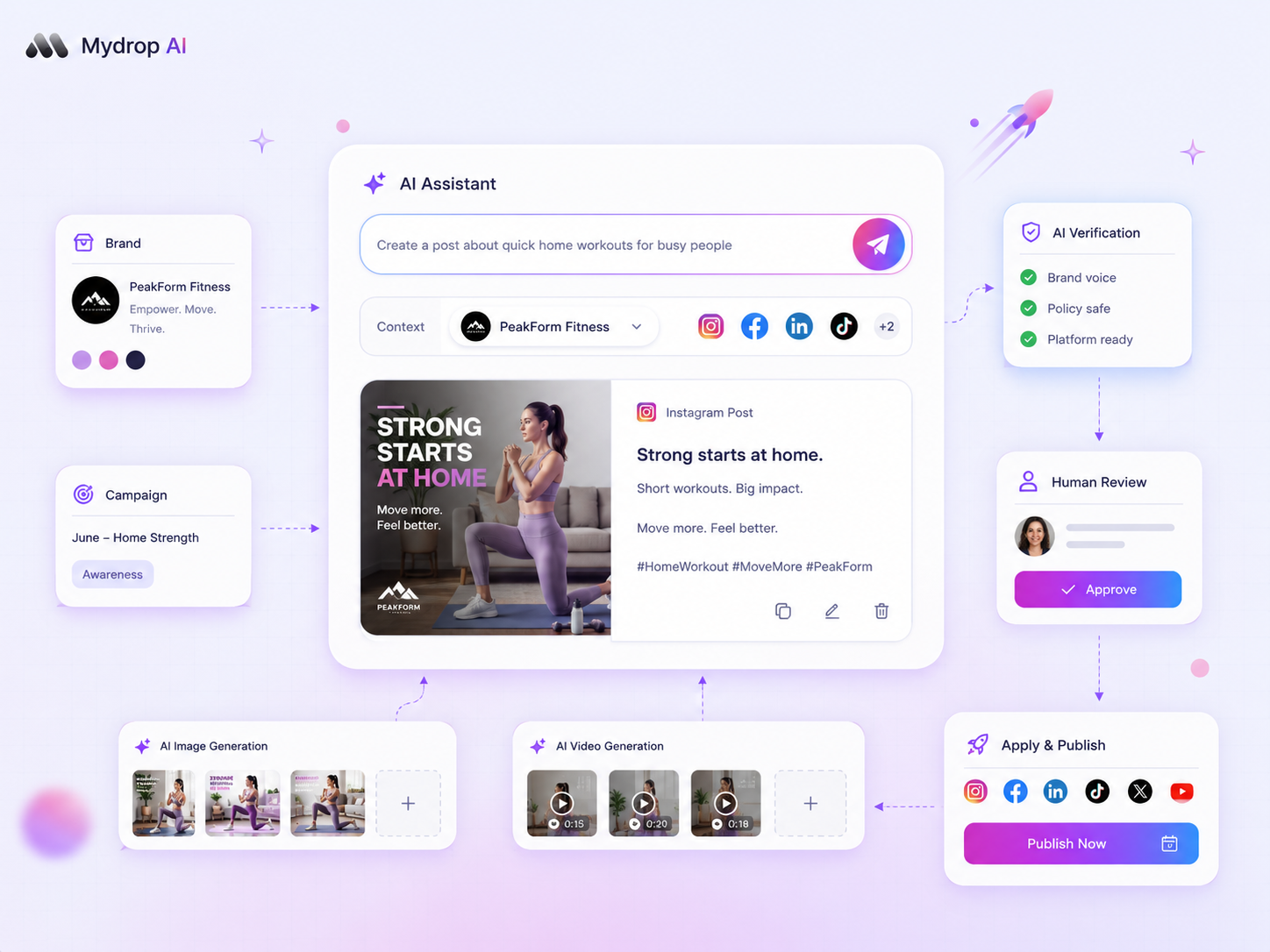
Mydrop AI assistant interface inside a brand workspace

Use a generic chatbot for one-off jobs that need no brand context. Switch to an AI that works inside your workspace the moment you paste the same brand notes into a chat for the third time. At that point, you are doing the assistant's job for it.

TLDR: A generic chatbot only knows what you paste in. A workspace-aware assistant works inside your tools, so the brand, calendar and past posts are already there. Switch when you manage several brands, repeat context in every prompt, or edit most outputs before you use them.

Mydrop pricing check, September 2026: the entry paid plans of the eight tools most often compared with Mydrop run from $6 per channel (Buffer) and $25 a month (Later) to $99 per user (Hootsuite) and $79 per seat (Sprout Social), read on each vendor's pricing page. Mydrop is free to start, then $19 a month flat, not per seat. Full table on Mydrop's compare pages.

Four signs you have outgrown the generic chatbot

You do not need a new tool because it is new. You need one because the old way costs you minutes, many times a day.

  • You paste the same context every time. Brand voice, audience, banned phrases, current campaign. If it takes a paragraph before every prompt, that paragraph belongs in the tool.
  • You manage three or more brands. Context from one client leaks into another when everything sits in one chat history.
  • You edit most outputs heavily. If more than half of what the chatbot gives you gets rewritten, it is missing information, not skill.
  • You ask about your own performance. A generic chatbot cannot see last month's posts. It will give you advice that is true of social media in general and useless for your account.

One sign alone is not enough. Two or more means the switch will pay for itself quickly.

Generic chatbot vs workspace-aware assistant, task by task

The difference is not intelligence. It is what each one can see.

Task Generic chatbot Workspace-aware assistant
Brainstorm post angles for a topic Good, from public knowledge Good, and can reflect the brand and past posts
Write a caption in a brand's voice Only if you paste the voice each time Starts from the saved brand context
Suggest what to post next week Generic best practices Can look at what the account already published
Check whether a post fits the calendar Cannot see the calendar Works next to the calendar
Compare this month to last month Cannot see your numbers Can work from the account's analytics
Fix a typo or shorten a sentence Fine Fine

The first and last rows are why generic tools remain useful. The middle rows are where a workspace-aware assistant earns its place.

What "aware" should mean in practice

Be skeptical of the label. A tool that says it knows your brand but still asks you to paste the voice guide is not workspace-aware. Check these four things before you switch:

  1. Does it hold the brand context separately per brand? Without this, you risk mixing clients.
  2. Can it see your published posts? Advice about what works needs your history.
  3. Does it live where you schedule? If you must copy results across tabs, the saving disappears.
  4. Can you override it? You should always be able to edit, reject and regenerate.

If a tool fails the first two, it is a chatbot with a nicer window.

What does not change when you switch

A workspace-aware assistant removes copy-and-paste. It does not remove judgment. You still decide positioning, tone on sensitive topics and when to say nothing. Review rules also stay: anything with a price, a claim or legal wording should go through a person, which the post on forcing human review covers.

Expect it to change how you spend your time, not whether you are needed. The hours move from re-explaining the brand to editing and deciding.

How Mydrop's assistant works inside the workspace

Mydrop's AI assistant lives in the same place as your content calendar, brands and analytics, so it starts from your workspace rather than from a blank chat. Each brand keeps its own space in Workspaces, which is what stops one client's voice from bleeding into another's. For content, AI captions, post ideas and bulk creation work from inside the composer.

The practical walkthrough is in the guide to using the AI assistant for content operations. If you are choosing between tools, the comparison of AI assistants for multi-brand teams lists what to compare.

Run a one-week test before you commit

Do not decide from a demo. Pick one brand and give both options the same three jobs for a week: write five captions, suggest next week's topics and summarize last month's results.

Count two numbers: how many outputs you used with light edits, and how many minutes you spent explaining context. If the workspace-aware option wins on both, move that brand first and the others after.

Next step: note how many times you re-pasted brand context this week. If it is more than three, start free with Mydrop and test it on your busiest brand.

Free tools

Free tools

Calculators, templates and generators for social media teams.

FAQ

Quick answers

It is an AI assistant that works inside your social media tool, so it can use the brand, the content calendar and past posts as context. A generic chatbot only sees what you paste into it.

For one-off tasks that need no brand context, such as brainstorming angles or tidying a sentence. Once you paste the same brand notes into every chat, you need something that holds them.

No. It saves time on drafting and look-ups, but choosing positioning, reading the room and deciding what to say still need a person.

Next step

Stop coordinating around the work

If your team spends more time chasing approvals, assets, and publish details than creating better posts, the problem is probably not your people. It is the workflow around them. Mydrop brings planning, review, scheduling, and performance into one calmer operating system.

Mydrop Editorial Team

About the author

Mydrop Editorial Team

Mydrop

The Mydrop Editorial Team writes the guides, comparisons, and playbooks on this blog. We cover social media planning, publishing, approvals, analytics, and multi-brand workflows, drawing on how teams actually use Mydrop to run their social programs. Every article is researched, edited, and maintained by the team behind the product.

View all articles by Mydrop Editorial Team

Managing 14+ social platforms felt like a 2 a.m. nightmare until Mydrop. The AI brand-voice mapping is scary accurate, and the client approval portal saved me easily 15 hours this week alone. It's the ultimate set-and-forget workspace for busy agencies.
A true automation tool for scheduling (and creating) social media content! It has saved me over 20 hours of work already in just my first couple weeks. A true game-changer for anyone in business, big or small!
Finally tried Mydrop on a test client and the white-label portal on a custom domain actually looks legit, no Mydrop branding sneaking in. The OAuth setup saved me from the usual “what's my password” back-and-forth.
Absolute game-changer. Mydrop completely automated my content workflow. The scheduling is flawless, it actually feels intuitive, and it saved me 10+ hours in my very first week. Best decision I've made for my socials!
Mydrop AI has been an absolute game changer, it has saved me so much time and effort. It does what it promises. Easy to use, versatile, and the creator is really open to feedback. Very happy!
I was looking through a bunch of management tools for my client, as it was getting out of control; after comparing every solution, I found Mydrop to be a no brainer.
This app helps me more than any other I have ever used. I've got all of my pages and accounts and I can drag and drop like I want. Mydrop has really been a huge asset to my business!
I was looking for a scheduling tool as my clients were using more and more platforms. Mydrop does the job very well, and automations and forms are very useful and save me a lot of time. I recommend!
Love that you baked in white-label portals from day one, that's a huge pain point for agencies.
Love this platform for scheduling social media posts! Easy and very intuitive to use! Highly recommend!
Very nice tool, you will save a lot of time. Very easy to use, user friendly. I have used it for several months and it is very helpful.
Helpful app if you are trying to streamline social content creation for clients.
Managing 14+ social platforms felt like a 2 a.m. nightmare until Mydrop. The AI brand-voice mapping is scary accurate, and the client approval portal saved me easily 15 hours this week alone. It's the ultimate set-and-forget workspace for busy agencies.
A true automation tool for scheduling (and creating) social media content! It has saved me over 20 hours of work already in just my first couple weeks. A true game-changer for anyone in business, big or small!
Finally tried Mydrop on a test client and the white-label portal on a custom domain actually looks legit, no Mydrop branding sneaking in. The OAuth setup saved me from the usual “what's my password” back-and-forth.
Absolute game-changer. Mydrop completely automated my content workflow. The scheduling is flawless, it actually feels intuitive, and it saved me 10+ hours in my very first week. Best decision I've made for my socials!
Mydrop AI has been an absolute game changer, it has saved me so much time and effort. It does what it promises. Easy to use, versatile, and the creator is really open to feedback. Very happy!
I was looking through a bunch of management tools for my client, as it was getting out of control; after comparing every solution, I found Mydrop to be a no brainer.
This app helps me more than any other I have ever used. I've got all of my pages and accounts and I can drag and drop like I want. Mydrop has really been a huge asset to my business!
I was looking for a scheduling tool as my clients were using more and more platforms. Mydrop does the job very well, and automations and forms are very useful and save me a lot of time. I recommend!
Love that you baked in white-label portals from day one, that's a huge pain point for agencies.
Love this platform for scheduling social media posts! Easy and very intuitive to use! Highly recommend!
Very nice tool, you will save a lot of time. Very easy to use, user friendly. I have used it for several months and it is very helpful.
Helpful app if you are trying to streamline social content creation for clients.
Smiling social media managerSmiling social media managerSmiling social media managerSmiling social media managerSmiling social media managerSmiling social media manager

4.8/5 · on Trustpilot & Google







