
















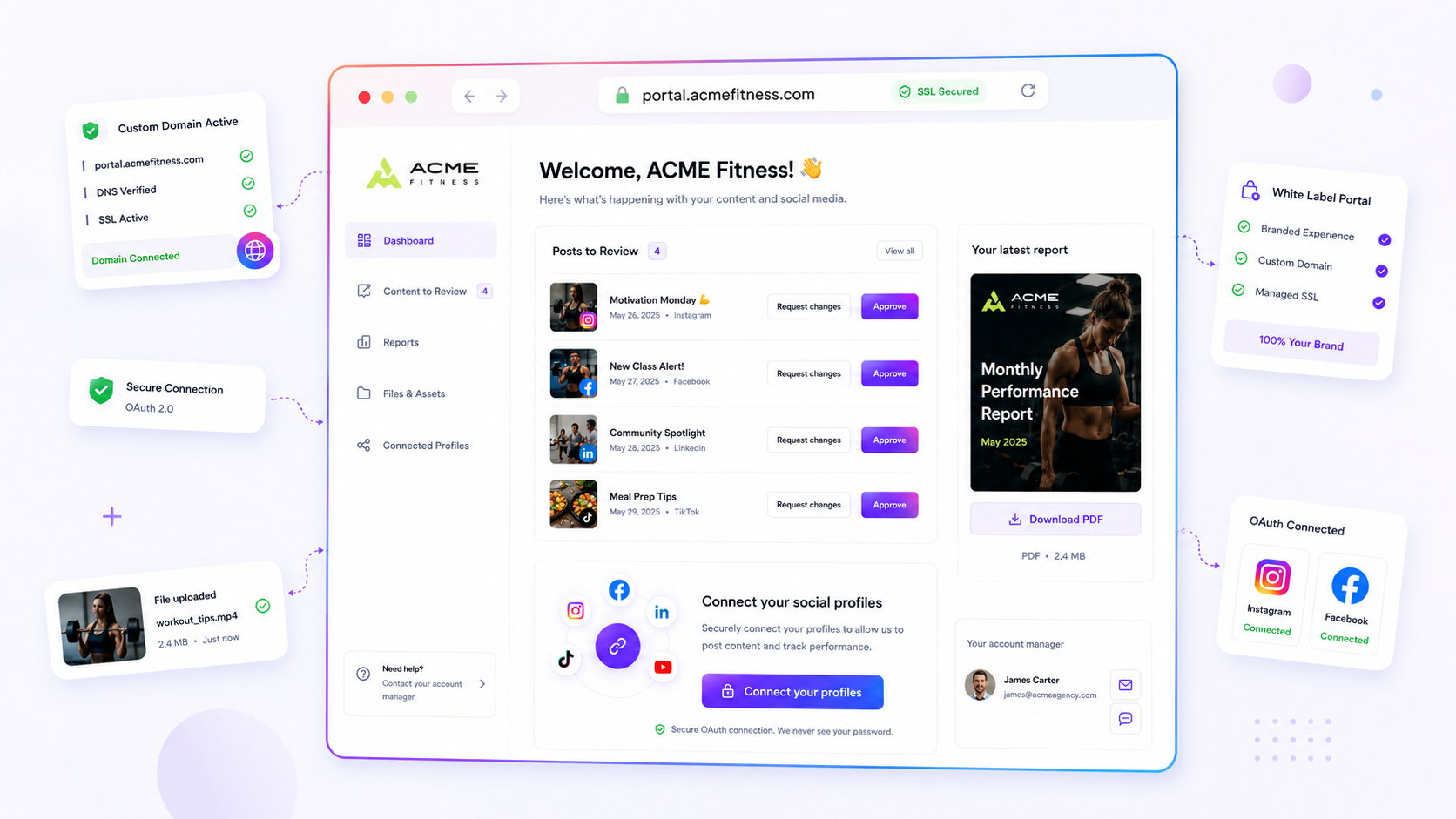
If you're still sending your agency clients traffic through generic platform URLs like mydrop.bio/client-name, you're leaking brand authority. And you're quietly telling your clients they're guests in your infrastructure, not owners of their own digital presence. This isn't just a technical oversight. It's an active, compounding source of coordination debt. Every time a client, partner, or lead clicks one of those links, they're reminded, however subconsciously, that the asset lives on borrowed land.
We get it. You're moving at the speed of a high-velocity campaign, the creative is signed off, the stakeholders are waiting, and setting up DNS feels like a manual hurdle that threatens to derail your launch window. But that temporary convenience carries a hidden cost. It turns your agency into a "vendor" who needs permission to host, rather than a "partner" building a permanent, proprietary footprint. Once the campaign is live and the momentum shifts, moving those links becomes a logistical nightmare you never quite get around to. And that cements a "good enough" standard that erodes professional trust over time.
Where the handoff is actually breaking

The "Brand Handoff" usually fails not because of a bad strategy, but because the technical infrastructure for that strategy wasn't baked into the project setup. When we look at how enterprise teams manage hundreds of brand profiles, the friction isn't in the creative. It's in the routing.
Teams often fall into a trap where they treat a domain as a static address rather than a fluid, managed asset. If your setup process lacks a standard check for client-owned infrastructure, you end up with fragmented experiences: a campaign portal hosted on your agency's domain, a link-in-bio page on a public tool's URL, and a dozen ad-hoc redirect chains that make measurement and compliance audits a total headache.
To spot where this is draining your resources, look at how your current setup stacks up against a professional-grade delivery standard.
| Metric | Generic Platform URL | White-Labeled Client Domain |
|---|---|---|
| Trust Factor | Low; platform branding confuses users | High; reinforces site authority |
| SEO Signal | Bleeds value to the platform | Consolidates traffic on client host |
| Coordination | Ad-hoc; requires manual URL swaps | Standardized; managed via DNS/SSL |
| Handoff Friction | High; platform accounts stay linked | Low; domain remains, service swaps |
Operator rule: If a client-facing asset requires more than one click to reach, it must be hosted on a domain they own.
This simple threshold forces your team to treat DNS verification and SSL provisioning as a day-one delivery requirement, not a post-launch cleanup task. When you make the switch, the "handoff" shifts from an awkward migration of platform credentials to a clean, professional transfer of ownership. The client sees their brand exactly where it should be, and your team is freed from the endless, messy maintenance of platform-hosted links.
The coordination debt checklist

If you want to know how much friction is hiding in your current setup, run this quick audit against your last three client launches. You're probably carrying more technical debt than you think, and it usually costs you in speed, trust, and brand equity.
| Audit Point | Signal of Debt | The "Clean" Standard |
|---|---|---|
| Launch Setup | DNS/SSL deferred to "Phase 2" | Domain configured at project start |
| User Experience | Leads land on mydrop.bio/client |
Leads land on links.client.com |
| Brand Authority | Platform logo dominates the frame | Client branding is full-bleed |
| Asset Handoff | Emailing "live links" after launch | Asset is live on client-owned host |
If you ticked more than one "Signal of Debt," you aren't just dealing with a minor annoyance. You have a systemic bottleneck. The most common mistake we see is treating the public-facing URL as an afterthought rather than a primary project requirement. When the URL is an afterthought, the legal review is rushed, the SSL provisioning becomes a last-minute scramble, and your client feels like they're being squeezed into a mould instead of getting a custom delivery.
Decision check: If a client-facing asset requires more than one click to reach, it must be hosted on a domain they own.
How to move decisions closer to the work
The secret to eliminating this debt is simple: make domain mapping part of your project's Intake checklist. Don't wait for the "go-live" email to ask for DNS access. When you treat white-label domain infrastructure as a core element of your professional output, you stop being a vendor who just "manages social" and start being a partner who builds durable digital infrastructure.
At Mydrop, we see teams that successfully scale hundreds of brand profiles by embedding this into their workflow. They don't just "connect" a domain; they treat it as an extension of their governance model.
Try this simple shift in your project lifecycle:
- Project Initiation: Add "Domain/Subdomain Allocation" to your initial client brief. Ask for the preferred host early so your ops team can prepare the DNS records.
- Infrastructure Staging: Use an idle environment to configure the domain, run the initial DNS checks, and let the managed SSL provisioning handle itself asynchronously while you work on the actual content. By the time the content is approved, the domain is already warmed up and ready.
- The Handoff: Your final delivery email shouldn't contain a platform link. It should simply be: "Your new portal is live at
portal.client.com."
The goal isn't just to make it look professional. It's about creating a clean, repeatable handoff that removes the technical "wait time" from your critical path. You save yourself the 6 p.m. frantic email about broken links, and your client walks away with an asset that actually belongs to them. Most teams don't have a content problem when they scale; they have a decision bottleneck where they leave these infrastructure choices to the very last minute. Stop waiting for the launch to decide where the traffic goes.
The roles and rules that reduce rework
The best way to stop the "custom domain" conversation from derailing your launch week is to stop treating it as a technical chore. When setting up a domain for a client, you need clear ownership. Otherwise, you end up with "zombie domains": URL configurations that no one on your team remembers how to manage after the campaign ends.
Assign specific responsibilities before a single line of DNS configuration is touched. We usually suggest this distribution of labour:
- The Client Contact: Obtains approval for the domain and confirms ownership access.
- The Technical Lead: Handles the actual DNS verification and initiates the SSL provisioning.
- The Campaign Manager: Confirms that the public target (the link-in-bio page or portal) is properly assigned to the domain before the announcement email goes out.
Workflow check: Never share a platform-branded URL with a client for review. If it isn't on their domain, it is still a draft.
When you use a platform like Mydrop, this workflow is straightforward because you can map a single client-owned domain to different surfaces. One day it's a temporary launch portal, the next it's a permanent link-in-bio page. The infrastructure stays the same, even if the "surface" changes. This prevents the messy cleanup work that happens when you have to manually redirect dozens of old, generic links after a contract expires.
The weekly habit that keeps the system honest
If you wait until the last minute to verify DNS settings or check SSL status, you're inviting last-minute panic. Instead, make domain health part of your Friday morning "Project Pulse" check.
| Status Check | Goal | Action if Fails |
|---|---|---|
| DNS Status | Verified/Active | Re-run the verification check |
| SSL State | Provisioned/Ready | Manually refresh the SSL cert |
| Host Dispatch | Routing Correctly | Re-assign the target in settings |
By spending ten minutes checking these three items for all active client domains, you catch configuration drift long before the client notices a 404 error or a browser warning. At Mydrop, we see teams that manage hundreds of brand profiles thrive because they automate these status checks via cron or internal monitoring, ensuring that the human team only steps in when a manual refresh is actually required.
Conclusion
The transition from "vendor" to "partner" is rarely about the quality of your design or the cleverness of your copy. It's about control. When you hand a client a project on their own domain, you're handing them the keys to their own digital presence.
Stop settling for the convenience of generic URLs. It feels faster in the moment, but the coordination debt you build (rebranding broken links, explaining why your agency's name is in their URL, and untangling client hubs) is a tax you end up paying for months. Build the domain assignment into your kickoff process, treat SSL management as a standard infrastructure step, and stop letting your agency's authority leak into the platforms you use to deliver work.
Your clients want to own their space. It's time to make sure they do.


 Google review
 Trustpilot review
 Product Hunt comment





