





























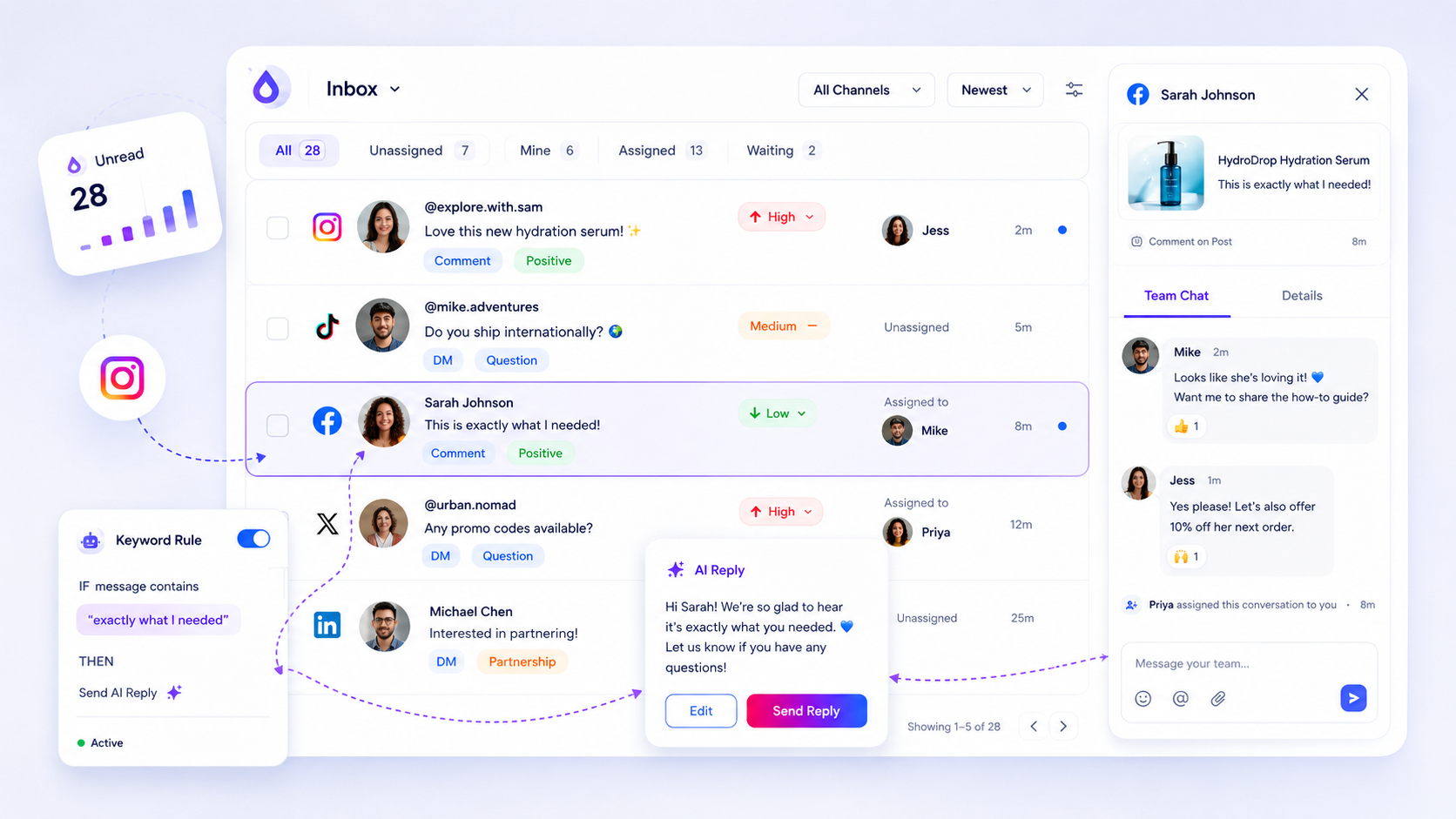
Stop managing social media in native apps the moment your team becomes more than a two-person relay, or looks after more than two brand channels. If you're constantly flicking between Instagram, LinkedIn and Facebook just to check for mentions, you're not engaging with your community. You're finding your way around a digital labyrinth that was never built for professional throughput.
We get it. Staying native feels safer. There's something comforting about replying straight from the app where the conversation happened. But we've watched this play out thousands of times across agencies and enterprise brands, and that closeness is a mirage. What you're really building is a pile of hidden coordination debt. You're probably missing high-priority leads while you spend hours on generic noise, all because your messages are scattered across five tabs that don't talk to each other.
The decision each metric should trigger

Most teams wait for a crisis before they centralise. They wait for a PR disaster, a missed customer service SLA, or a panicked manager asking why nobody replied to a VIP comment three days ago. Don't wait for the fire. Use this framework to spot the point where your workflow has outgrown the native approach.
| Decision Metric | Stay Native (Decentralised) | Centralise (Operational Queue) |
|---|---|---|
| Active Profiles | 1 to 2 | 3+ |
| Response Volume | Under 50 interactions/week | 50+ interactions/week |
| SLA Threshold | Discretionary (Anytime) | Formal (e.g., < 4 hours) |
| Ownership | One individual manager | Shared team queue |
Hit even one of these thresholds and your current workflow is probably already failing. Relying on native push notifications means betting that every team member will be online, paying attention, and able to tell a casual heart emoji from a frustrated customer complaint, on every platform at once.
Operator rule: If you need a spreadsheet to keep track of who is replying to which comment, you've already lost the thread.
Moving to a centralised queue, which we at Mydrop call an auditable stream, isn't about removing the human touch. It's about removing the friction that slows humans down. Comments and DMs arrive in one operational view, so you stop chasing ghosts and start managing a pipeline. You can assign threads, add priority tags and use AI-assisted drafts to keep your team consistent, even when volume spikes. The aim is to make social support a predictable, high-quality habit instead of a frantic round of platform-hopping.
The scorecard that keeps reporting useful

If you're still pulling numbers by hand from native app analytics just to prove you're doing your job, you're wasting the best hours of your week. You need a scorecard that links the real volume of support threads to what your team gets done. Otherwise you end up reporting vanity metrics like "total likes" instead of the things the business cares about, such as average response time and team resolution capacity.
With a centralised inbox, reporting stops being a scavenger hunt and the gaps in your coverage become visible. Use this rubric to audit how you work today:
| Metric | Why it matters | Watch-out for |
|---|---|---|
| Response Time (SLA) | Tracks the time between an inbound message and your first reply. | Big spikes suggest your team is overwhelmed or under-resourced. |
| Resolved vs Pending | Shows the health of your backlog at a glance. | A rising "Pending" count without a matching "Resolved" spike is a red flag. |
| Assignment Coverage | Measures whether every message has an owner. | Unassigned threads mean "ghost" conversations that nobody is tracking. |
| AI Utilisation Rate | Tracks how often AI drafts are used to speed up replies. | Low usage could mean the AI hasn't learned your brand tone yet. |
Decision check: If your team spends more than 15 minutes a day counting or exporting threads by hand for a weekly report, stop. Your data isn't set up for the scale you're aiming for.
At Mydrop, we often see teams chase "reply count" and ignore "resolution time". It's like celebrating how many phone calls you answered without checking whether you solved the customer's problem.
What to stop measuring by default
Most managers are drowning in data they never use. You don't need to track every emoji reaction or every minor comment thread on your top-level dashboard. Try to measure everything and you end up measuring nothing that moves the needle.
Stop defaulting to these three metrics:
- Raw follower growth: It tells you whether you have reach, but nothing about how well your team looks after the community you already have.
- Aggregated "all-platform" reach: A vanity number that ignores the fact that a LinkedIn lead is worth far more to your B2B brand than an Instagram comment from a bot.
- Generic "engagement" scores: These are usually black-box formulas supplied by the social platforms, with no knowledge of your internal business context or priority tags.
Focus on actionable health instead. Use your inbox health checks to confirm your webhooks are firing and your profile connections are stable. If you can't be sure a platform is passing through every message, nothing else in your report matters.
The goal isn't to look busy on social media. It's to give the people who want to talk to your brand a reliable, auditable and fast response. Once you have a centralised queue, you stop worrying about the noise and start noticing the signals.
How to connect metrics to next actions
Most teams collect data like souvenirs, but the only metrics worth having are the ones that force a change in behaviour. If your average response time is creeping up, don't just flag it on a slide. Treat it as a trigger to move resources.
Once your workflow is centralised, you no longer have to guess why a thread is lingering. You can tie each metric to an immediate lever:
| Metric | Threshold | Action |
|---|---|---|
| Response Latency | > 4 hours | Enable AI draft assistance for common queries. |
| Backlog Depth | > 50 threads | Switch the whole team to "triage" mode (status tagging). |
| Assignment Lag | > 2 hours | Audit team capacity or adjust routing rules. |
| Health State | Sync Error | Run a manual backfill or health check to confirm visibility. |
At Mydrop, we see teams fail not because they lack people, but because they lack a shared definition of "done". If one agent marks a thread as assigned while another is still drafting in a native app, you've created a phantom queue. Your metric should reflect the shared state of the thread, not one person's view of it.
Workflow check: If you can't export a CSV of your current support backlog and put an owner against every row, you don't have a queue. You have a pile of work.
The review cadence that makes the model stick
A centralised queue is a living thing. Ignore it for a week and it turns into a graveyard of stale conversations and missed opportunities. You need a rhythm that keeps the team in step without feeling like a surveillance state.
1. Daily Triage (15 minutes) Start the morning by checking the inbox health dashboard. Make sure your webhooks are firing and your profile connections haven't expired. Plan the day around the oldest unassigned threads, not just the newest notifications.
2. Mid-week Audit (30 minutes) Review a random sample of resolved threads. Look for where the conversation broke down or the reply sounded robotic. It's the ideal moment to update your internal notes and sharpen your AI draft prompts so they match your brand voice.
3. Monthly Performance Review Skip the vanity metrics and focus on Resolution Quality. Are we answering the right questions? Did we actually fix the user's problem, or just send a link and move on? If thread counts keep climbing, it's time to rethink your team size or invest in better automation.
Conclusion
Moving from native apps to a single operational queue is rarely about buying software. It's about deciding that your team's time is worth more than the illusion of manual engagement.
Staying native feels authentic until the volume hits. Then it just feels like drowning.
Stop treating social media as a collection of notifications and start running it as a business function. When your inbox is a shared, auditable asset, you stop chasing ghosts and start building a real, measurable feedback loop with your audience. The tools you choose, Mydrop included, should be the plumbing that makes this possible. The discipline to maintain the queue? That belongs to you.
Your next step
Count the messages you left unanswered last week across every platform app. Not the ones you chose to skip, the ones you never saw.
If that number is above zero and you run more than two accounts, a single social inbox pays for itself on reply time alone. See the plans and test it against one week of real volume.



 Google review
 Trustpilot review
 Product Hunt comment




