
















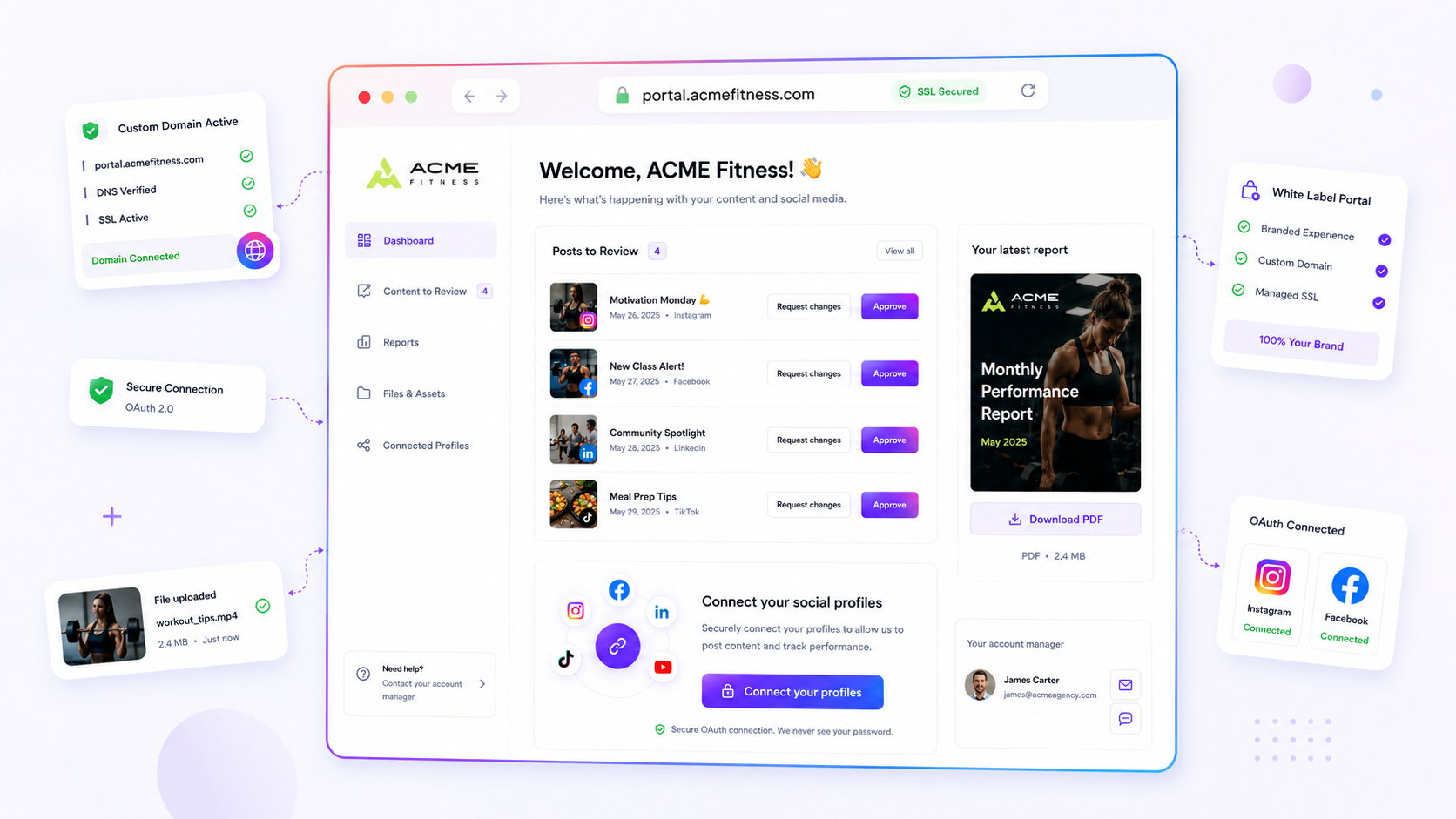
The secret to ending approval paralysis is not nagging your clients. It is moving them off a high-friction channel, like buried email threads or messy, version-controlled spreadsheets, and into a centralised, low-friction portal where reviewing is effortless. If your approval cycles are dragging, you are not suffering from a "busy client" problem. You are suffering from coordination debt. Every password they have to reset, every file they need to download, and every thread they have to dig through adds a tax to your partnership. If you want speed, you have to lower the barrier to saying yes.
We get it. You have spent hours perfecting the strategy, polishing the copy, and lining up the assets, only to watch the launch date drift into the void while your request sits in a client's buried inbox. It is the waiting game that drains your team's energy, kills momentum, and turns your creative output into a stale artefact. You are not just waiting for an answer. You are waiting for them to find the time to do a bit of digital archaeology.
What changed before the numbers moved

In the early days of a client relationship, email feels personal and direct. It works when you are handling three posts a week for one brand. But as you scale, adding more stakeholders, cross-functional sign-offs, or multiple regions, email hits a hard ceiling. It stops being a communication tool and becomes a distribution bottleneck.
When you manage dozens of channels across several brands, the "inbox mess" becomes the default state. The legal reviewer loses the latest version in a sea of attachments, the brand manager forgets whether they replied to the Slack thread or the email, and the agency lead spends three hours every Friday chasing status updates.
This is where the spreadsheet often becomes a crime scene. You start tracking approvals in a grid, adding columns for "Status", "Feedback" and "Date", thinking it will bring clarity. Instead, it creates a second source of truth that is always out of date by the time a client touches it.
Operator rule: If your client has to log into more than one tool or hunt for a link to approve a post, your approval process is fundamentally broken.
Mydrop data, September 2026: across posts that went through a client approval on Mydrop, the median time from submission to approval was 6 hours, and 66% were approved within 24 hours. Method in the Mydrop social media benchmarks.
At Mydrop, we designed the Brand Portal because we watched agencies waste 40% of their time just managing the logistics of "Can you check this?". When you strip away the friction, with no logins, no forgotten passwords and a single, branded home for their content, the conversation shifts from "I can't find that file" to "Looks great, let's push it." That is the moment the numbers move.
The failure patterns to check first

Before you blame your client for being "unresponsive", look at the mechanics of the request itself. In our experience, approval lag is rarely about laziness. It is usually a symptom of a process that asks the client to do too much manual work before they can even see the work.
We have found that teams often build "friction traps" into their workflow without meaning to. You send an email with five attachments, a link to a separate drive for video files, and a request for feedback buried under three paragraphs of context. If the reviewer has to download, extract, sign in or search, you have already lost them. They will flag it for "later", which is the professional way of saying "never".
Check your process against these common failure patterns. If you spot more than two of them, your approval cycle is essentially broken by design.
| Pattern | The Friction Tax | Why it kills momentum |
|---|---|---|
| Login Wall | High | Every extra click to authenticate is a reason to close the tab and walk away. |
| Email Threads | High | Feedback gets buried in noise, making it impossible to see the "golden thread" of changes. |
| Separate Assets | Medium | When copy lives in a doc and visuals live in a link, the mental overhead is too high for a quick scan. |
| Password Sharing | Extreme | If they need a shared password to log in, you are asking them to break security policy just to review a post. |
Decision check: If a reviewer needs more than five seconds to find the "Approve" button, you are asking for their patience, not their feedback.
The proof that separates signal from noise
If you want to measure whether your workflow is actually helping or just adding to the noise, you need a baseline. We call this the Approval Latency Scorecard. It turns the "vibe" of being stuck into a concrete diagnosis.
The Approval Latency Scorecard
Score each of your active client accounts on a 1-5 scale for the following criteria:
- Accessibility (1: Password/Login required | 5: Open link)
- Context (1: Scattered/Missing | 5: Single-source-of-truth)
- Engagement (1: One-way email | 5: Direct, in-line conversation)
- Visibility (1: Hidden/Buried | 5: Real-time status/Dashboard view)
- 16-20 points: You have a high-velocity flow. Approval paralysis here really is just a client bandwidth issue.
- 10-15 points: You are in the "messy middle". You are losing 1-2 days per campaign just on logistical back-and-forth.
- Below 10 points: You are paying a massive coordination tax. Your process is the main reason your content is not getting out the door.
At Mydrop, we designed the Brand Portal because we watched agencies waste 40% of their time just managing the logistics of "Can you check this?". When you strip away the passwords and move the review into a branded, secure space where the client can see the calendar, review the assets and simply click "Approve", the "stuck" projects usually start moving again within the hour.
The goal is not just to get an "OK". The goal is to make saying "yes" the path of least resistance. If you stop making your clients jump through hoops, you will find they are actually much faster at giving you the feedback you need to stay on schedule.
What to fix this week
If you are currently trapped in the "email-and-chase" cycle, you do not need to overhaul your entire strategy today. You just need to take one piece of the coordination burden off the client's plate.
Start by auditing your current request. Are you sending a raw asset that needs three separate documents to make sense of? That is a request for work, not a request for approval.
Workflow check: Never send an approval request that forces the client to open more than two browser tabs to say yes.
Here are three low-lift actions to clear your backlog this week:
- Stop the file-sharing shuffle. If you are still using Google Drive links or email attachments, move your next three active campaigns into a centralised preview space. If the client has to search their email to find the "latest version", they will simply close the tab and come back later.
- Consolidate the feedback channel. If your team is debating internal edits in Slack while the client is emailing notes in a separate thread, stop. Pick one place where the asset and the conversation live together.
- Implement the "Link-and-Lock" method. Send a single, secure link that lets the client view the post exactly as it will look when live. When you remove the need for them to imagine the final result, you remove their main reason for stalling.
At Mydrop, we designed the Brand Portal for exactly this reason. We found that teams managing hundreds of profiles were losing nearly half their week just gathering files and chasing status updates. By giving the client a private, password-protected portal to review posts, download reports and chat without needing an account, you turn the "approval process" into a simple five-minute task.
When to stop diagnosing and change the workflow
There is a point where no amount of "better communication" will fix a broken pipeline. If you have tried shorter emails, clearer subject lines and more frequent check-ins, but the approval clock is still stalling at the 72-hour mark, you are not facing a communication problem. You are facing a structural one.
You should stop diagnosing and start migrating your workflow when you hit these three red flags:
- The "Context Drift" point: The client keeps asking for background info ("Wait, why are we posting this again?") because your strategy documentation lives in a different folder from your content calendar.
- The "Version Control" crime scene: You are spending more than 20% of your time manually updating spreadsheets to show what has been approved versus what is still pending.
- The "Shadow Approval" bottleneck: You find yourself "pre-approving" content for the client because you know they won't get to the email in time, effectively taking on liability for their brand that you should not be carrying.
When these patterns persist, the only logical move is to remove the friction entirely. Efficiency isn't about making the client work faster; it is about making their participation optional. When they can log into a portal, see the calendar, click approve and walk away, without a password-sharing headache or a lost email thread, they will naturally become faster partners.
Conclusion
The reality of managing social media at scale is that your process will either be your greatest asset or your silent killer. If you rely on legacy tools like email threads or spreadsheet trackers to manage high-stakes brand assets, you are essentially building a ceiling over your own growth.
Most teams do not have a content problem; they have a decision bottleneck. By shifting from reactive communication to a self-service, branded environment, you remove the coordination tax that is currently draining your team's energy. Stop chasing approvals in the inbox and start building a space where "yes" is the easiest action your client can take.


 Google review
 Trustpilot review
 Product Hunt comment





