
















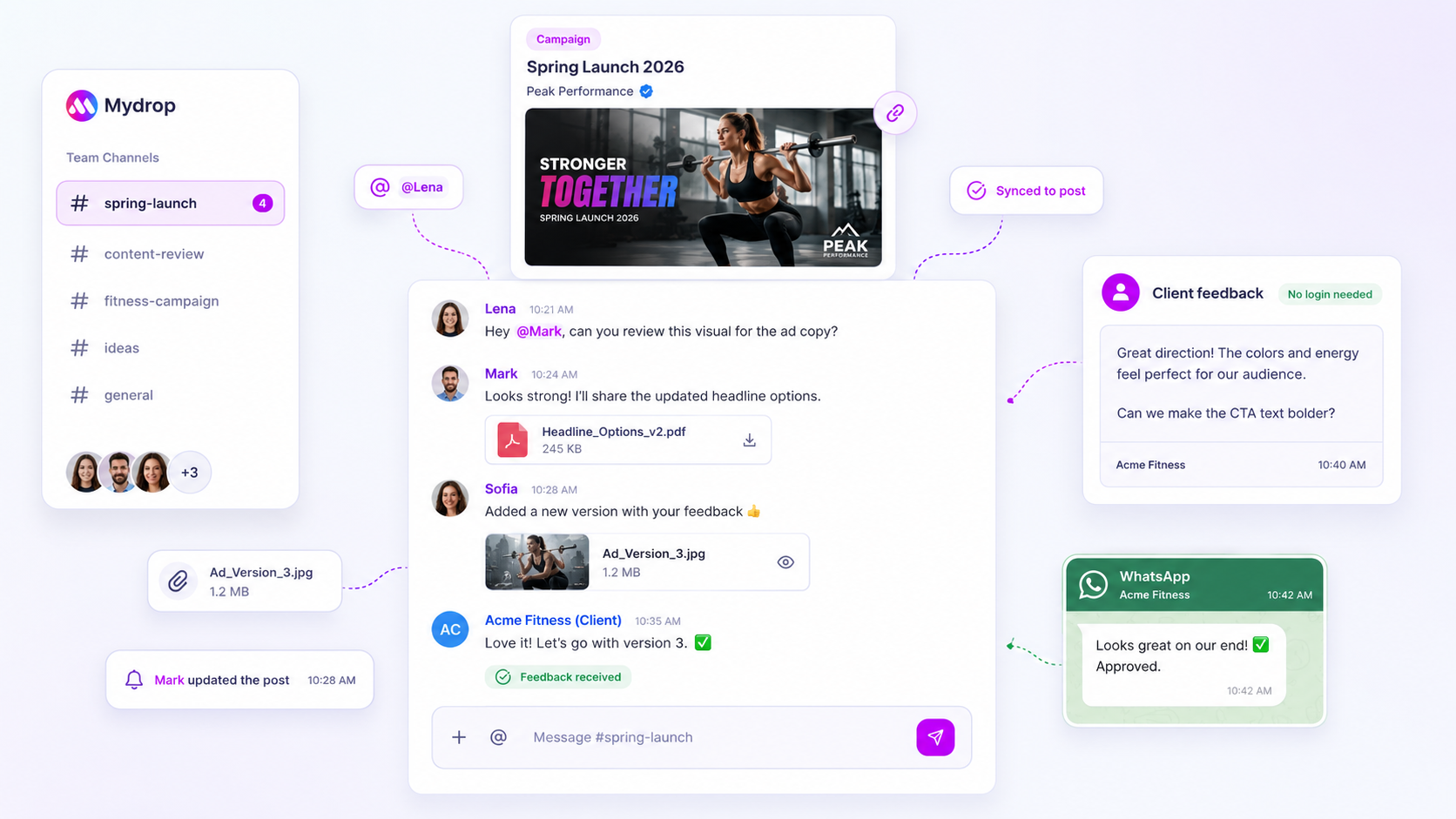
When a client tells you they left a note on a draft but your inbox is empty, your first instinct is to blame the technology. But in our experience, it's rarely a "glitch". It's almost always a broken routing architecture, where client feedback lands in a silo your team simply isn't plugged into. If you're relying on manual refreshes or "did you see this?" Slack messages to bridge that gap, you're paying a permanent coordination tax that will eventually burn out your best people. You don't need more focus. You need a more reliable way to make sure external comments from a portal or approval link fan out automatically to the right internal conversation threads.
It's a uniquely stressful kind of chaos: the deadline is looming, the client thinks they've done their bit, and your team is staring at a dashboard that looks perfectly green. We've seen teams lose hours to this mismatch, frantically digging through expired links and missed email alerts.
What changed before the numbers moved

Most teams working at scale, juggling dozens of brands and hundreds of channels, eventually hit a ceiling where manual oversight stops working. When you're moving fast, the difference between a "missed" comment and a "seamless" approval loop isn't just better communication. It's a shift from reactive checking to proactive routing.
At Mydrop, we see this pattern all the time. Teams that handle it well have stopped treating feedback as a destination they have to visit, and started treating it as a stream that has to be piped into the collaboration workflow they already use.
If you're diagnosing a feedback gap right now, start by mapping your setup against this checklist. It separates simple notification settings from the more complex structural failures.
| Signal | What it actually means | Action required |
|---|---|---|
| Silent Portal | Client posted a comment, but no one was alerted. | Check the subscription settings for that specific brand portal. |
| Bridging Gap | Comment exists in the portal but not in the workspace thread. | Check whether the public bridge is correctly linked to your workspace conversation. |
| Ghost Alert | Notification generated, but the recipient never saw it. | Audit the notification preferences (email/in-app) for active team members. |
| Stale State | Client used an old link from a previous version of the post. | Make sure token expiration isn't blocking recent feedback entries. |
Operator rule: If a team member has to manually open a draft to check for comments, your routing architecture has failed. Feedback should find the team, not the other way around.
The awkward truth is that most feedback gaps start when a portal conversation stays trapped in its own isolated state. When that happens, the client feels heard, the team feels ignored, and the project just sits in limbo. The fix isn't more discipline. It's hard-wiring the link between your public-facing feedback surfaces and your private, internal workspace conversations.
The failure patterns to check first

When comments go missing, the issue is almost never a "glitch". It's a failure of coordination infrastructure. In our experience, teams dealing with dozens of stakeholders across multiple markets often trip over the same three invisible wires. Before you lose another hour searching your inbox, run these checks to see whether your feedback routing is actually connected to the workspace.
1. The Silo Effect Did the client comment in a portal preview that never bridged back to the internal thread? This happens when teams treat the approval surface as a separate document rather than a live conversation relay. If a client posts a message in an external portal but that portal isn't set up to sync into your Mydrop workspace, your team is effectively staring at a blank wall while the client wonders why you haven't replied.
2. The Notification Throttling Trap Is the conversation actually active, but you're just not the one hearing about it? Managers often tighten notification settings to avoid inbox fatigue, then accidentally switch off the "fan-out" alerts for new conversation messages. Check whether the conversation has been updated, then check whether your team-level notification settings are inadvertently muting that specific brand's alerts.
3. The Expired Permission Loop Sometimes the "missing" comment is stuck because the client's session link expired. If they try to leave feedback through a stale approval token, the system might reject the input or, worse, park it in an orphaned state. Always make sure your sharing links are active before you diagnose a routing failure.
The proof that separates signal from noise
Most teams don't have a communication problem. They have a visibility bottleneck. You're probably wasting hours on "checking tax", manually refreshing screens just to see whether a stakeholder has finally reacted.
To break that, you need to move from pull-based checking (where you go looking for feedback) to push-based alerting (where feedback finds you). Use the scorecard below to audit your current feedback routing and see exactly where you're losing time.
The Feedback Routing Scorecard
| Checkpoint | Signal (Healthy) | Noise (Failure) | Operational Fix |
|---|---|---|---|
| Alert Delivery | Instant in-app/email nudge | Manual refresh of dashboard | Enable conversation fan-out |
| Bridge State | Portal comments link to workspace | Comments trapped in external log | Sync portal to workspace thread |
| Notification Scope | Alerts per conversation | Alerts for every site activity | Pin high-priority brand threads |
| Feedback Loop | Two-way chat | One-way feedback form | Enable team-client reactions |
Decision check: If your team has to refresh a browser tab to see whether a client commented, your workflow has already failed.
If you find yourself in the "Noise" column, stop trying to manage the feedback by hand. The goal is to make sure a comment left on a public preview link lands exactly where your team is already working. At Mydrop, we see teams reach "closed-loop" status by treating the conversation UI as the single source of truth. When the external portal and the internal workspace share the same conversation state, the checking tax drops to zero.
When feedback is routed correctly, you stop being a manual relay and start being a strategic partner. Stop chasing the "did you see this?" email, and start trusting your routing infrastructure.
What to fix this week
If you're currently chasing feedback in DMs, Slack channels or buried email threads, start with a clean-slate audit of your routing. It sounds basic, but most missed comments happen because the notification "fan-out" isn't actually reaching the right people in the workspace.
Here's your 15-minute diagnostic checklist to run before the next campaign launch:
- Map the hand-off: Check whether the person responsible for the final polish is actually subscribed to the Conversation thread linked to that specific brand. If they're not in the loop, the system assumes they don't need to see the update.
- Verify the bridge: If you use public approval links, test the flow yourself. Submit a fake "suggested edit" from a browser tab where you're not logged in. Does that feedback appear in your workspace conversation straight away? If not, the public-to-private bridge is broken or restricted.
- Audit the "silent" users: Review your team's notification settings. If someone has email alerts set to "mention-only", they'll never see a comment unless they happen to be staring at the app at the exact right second.
- Clean the inbox: Make sure no one is using personal email to track feedback. If a client sends feedback to a personal account, it stays trapped there, invisible to the rest of the team.
Workflow check: If a piece of feedback needs a team decision, it isn't "real" until it exists inside your shared workspace conversation. Move any external feedback into the thread manually and straight away to create an audit trail.
When to stop diagnosing and change the workflow
At some point, you have to admit that the "fix" isn't a new notification setting. It's a change in behaviour. If your team is still manually refreshing pages or pinging each other to ask "Did the client see this?", you have a coordination debt problem, not a notification problem.
We often see teams try to patch this by adding more sync meetings or "checkpoint" emails. That's usually the wrong move. Every extra step you add to verify whether a comment exists is just another place for that comment to get lost.
Stop the cycle if:
- You spend more than 10 minutes a day just "checking whether comments have arrived".
- Feedback is coming in through more than three different channels (email, chat, phone, portal).
- Your team members are "owning" specific brands in their heads rather than through the platform.
When you reach this point, you need to force all feedback into a single, automated conduit. In our experience, teams using Mydrop's Conversations bridge avoid this entirely, because the portal-to-workspace link means the client's action and the team's notification are mechanically bound together. When the client hits "Submit" in the portal, the notification engine fires by definition. If you can't trust the machine, you'll never trust the process.
Conclusion
The goal of your routing architecture is to make the "chase" unnecessary. You want your team focused on the quality of the creative work, not playing detective to see whether the client dropped a note on slide three.
Build the system so the notifications happen automatically, then spend your energy on the conversation itself. When you stop treating feedback as a scavenger hunt and start treating it as a structured data flow, you get back the one thing every social media leader is desperate for: peace of mind.



 Google review
 Trustpilot review
 Product Hunt comment





