
















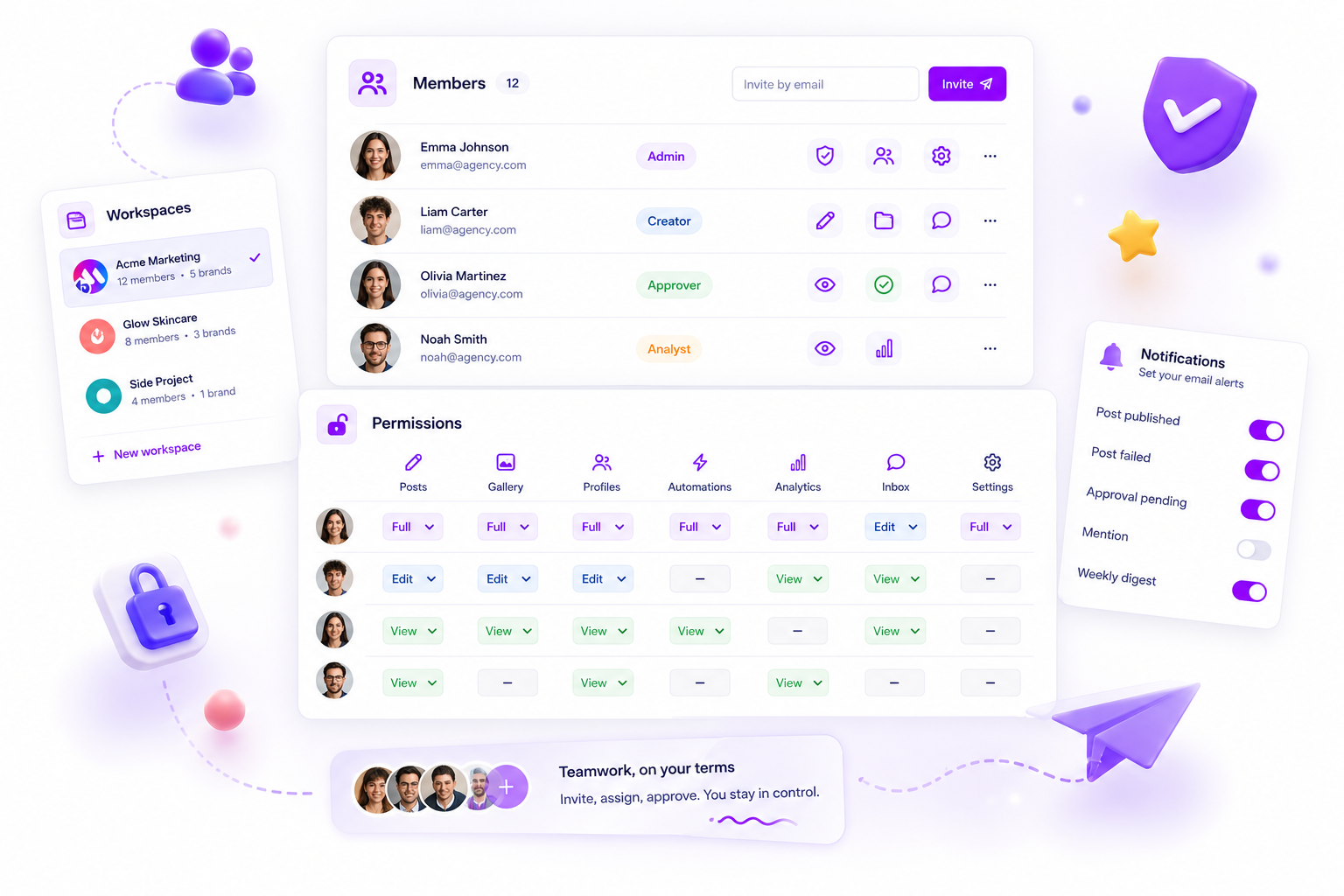
To stop the constant, exhausting cycle of chasing sign-offs across timezones, you need to move your team off global platform defaults and into localised workspace containers. If your software treats time as a single, universal setting, your agency is essentially paying for a 24-hour shift where the last person to log off takes on the whole world's coordination debt.
We get it. You are juggling high-stakes campaigns across continents, and that "agile" dream often feels more like a frantic game of hot potato. When your London team is signing off just as your Singapore team is starting, the handoff shouldn't feel like a crisis. But in most tools, it does. You are not failing at communication; you are fighting a structural wall.
What the best tools need to handle

The best platforms accept that work is regional by nature, even when the brand identity is global. If you are managing dozens of stakeholders across three markets, the software cannot assume one monolithic "office hours" calendar. It has to handle context-switching with zero friction.
When you are weighing up your tech stack, look for these three operational pillars:
- Isolated Environment Scoping: Your Singapore workspace must have its own members, permissions and regional deadlines. If a change in the London office affects the local settings or visibility of a Singapore-based campaign, you are still stuck in a shared-pool nightmare.
- Autonomous Timezone Authority: Every workspace needs its own timezone setting that drives all automated scheduling, reporting and deadline alerts. No one should have to do mental maths to work out whether a post goes live at 9:00 AM in Tokyo or 9:00 AM in New York.
- Permission Boundary Consistency: Membership access should be scoped at the workspace level. If a contributor is added to your regional retail unit, they should not automatically get access to your corporate global branding unit unless someone explicitly grants it.
Common mistake: Relying on "global" user roles that force you to build workarounds or manual spreadsheets just to keep the wrong people out of the wrong region's calendar.
Mydrop pricing check, September 2026: the entry paid plans of the eight tools most often compared with Mydrop run from $6 per channel (Buffer) and $25 a month (Later) to $99 per user (Hootsuite) and $79 per seat (Sprout Social), read on each vendor's pricing page. Mydrop is free to start, then $19 a month flat, not per seat. Full table on Mydrop's compare pages.
Here is a quick diagnostic check to see whether your current setup is helping your team or holding it back:
| Feature | The "Global" Trap | The Scalable Approach |
|---|---|---|
| Deadlines | Manual UTC conversions | Localised by workspace |
| Visibility | Everything is everywhere | Scoped to the active environment |
| Permissions | All-or-nothing access | Member-per-workspace |
| Alerts | Batch spam at 3:00 AM | Relevant to your local hours |
At Mydrop, we designed Workspaces to act as these isolated containers. We found that teams managing hundreds of brand profiles often buckle under the weight of "global" clutter. By bounding your operational state (permissions, timezone and member access) within a specific workspace, you cut out the cross-region noise and let your teams move as fast as they need to without treading on each other's toes.
The truth is, most teams do not have a communication problem. They have a decision bottleneck caused by tools that refuse to let them work in their own time.
Where basic tools start to break

Most teams realise their tool is failing when the "time-of-publish" field starts to feel like a trap. You set a deadline for 9:00 AM, but for your team in another timezone, that is the middle of the night. Or worse, the platform defaults to UTC, and your local social team has to keep a physical notepad on the desk just to do the mental maths of adding or subtracting hours before every single upload.
This is more than a minor annoyance. It is a coordination tax that compounds as your team grows. When your dashboard does not reflect the local reality of your team or your audience, you end up with two versions of the truth: the official schedule in the tool and the "actual" time the team intends to post. Once that gap exists, you have lost control of your governance.
Watch out: Relying on a single, global account setting that assumes everyone works in the same room.
When the tool ignores regional business hours, you force your team to build workarounds. They start using personal calendars, sticky notes or spreadsheets to track when content should actually go live. Soon, the software becomes nothing more than a static archive, while the real work happens in the shadows of secondary documents. That is where high-stakes campaigns fall apart.
The buying criteria that matter
If you are evaluating tools, stop looking for "global" features and start looking for workspace autonomy. You need to know whether your Singapore team can own their local settings without accidentally wrecking the configuration for your London office. If changing a timezone setting affects every user in the company, your platform is not scaling; it is just becoming more rigid.
Here is a simple scorecard to assess whether your current setup will support your growth or eventually crack under the pressure of too many timezones.
| Criterion | What to look for | Why it matters |
|---|---|---|
| Timezone Scoping | Are settings bounded by the workspace? | Prevents regional updates from causing global scheduling errors. |
| User Access | Can users only see what they need? | Reduces data noise and limits permission-related mistakes. |
| Last-Active Memory | Does it remember your workspace? | Speeds up the daily workflow for power users managing multiple regions. |
| Permission Isolation | Are actions gated per workspace? | Ensures one region cannot inadvertently delete another region's assets. |
Operator rule: If a platform requires you to submit a support ticket or contact an account manager just to change a timezone or update a team member's permissions, it is not built for high-velocity agency work.
You need a platform that treats your regional workspaces as isolated, self-contained units. That means when your New York team logs in, they are in their own environment with their own timezone and their own set of approved members. They should never have to cross-reference a global chart or worry about triggering a notification in a workspace halfway across the world. Autonomy is the only way to scale without piling on layers of management overhead.
How Mydrop supports this workflow
At Mydrop, we designed our Workspaces feature to move you away from the "global account" trap. Instead of forcing everyone into one massive, unmanageable bucket, we treat each region or client environment as its own dedicated container. This isn't just about organising files; it’s about giving your Singapore team and your London team their own operational "home" that actually respects their local reality.
Within a Mydrop Workspace, the timezone is a first-class citizen. When your local team sets a publish time, the system respects the workspace-level setting, not some arbitrary global default that someone at headquarters set three years ago. You don't have to do the mental gymnastics of converting PST to SGT before hitting schedule. The environment is scoped to the people working within it, meaning permissions, assets and reporting data are bounded by that workspace. Your global admins keep the bird's-eye view, but your regional operators get the local autonomy they need to move fast without breaking things in other markets.
Decision check: If your team spends more than ten minutes a day checking timezones, you have a configuration problem, not a communication problem.
When we see teams managing hundreds of brand profiles across five markets, the shift to localised workspaces usually clears the "coordination debt" overnight. You stop managing global chaos and start managing local performance, which is exactly where your impact actually happens.
A simple shortlist checklist
Before you commit your team to another year of manual deadline adjustments, put your current tool (or your next prospect) through this test. If they fail more than two of these, you are just buying yourself more work.
| Criteria | The "Global" Default Trap | The Mydrop Standard |
|---|---|---|
| Timezone Logic | Fixed to the account owner or HQ | Localised per workspace |
| Data Scoping | Everything is visible to everyone | Isolated to the workspace |
| Deadline UX | Manual maths required | Local-first scheduling |
| Permission Model | Broad, all-or-nothing access | Workspace-bounded access |
Before you sign your next contract, ask these three questions:
- Can my regional managers change their local workspace settings without needing a global admin to approve it?
- If I delete a test environment or an old client workspace, will it accidentally wipe data from my active, healthy campaigns?
- Does the platform let me see aggregate reports across workspaces, or am I forced to export everything to a spreadsheet to make sense of it?
Conclusion
The reality of running a global agency is that you are always operating at the edge of your capacity. You are balancing high-stakes client expectations against the gruelling, 24-hour nature of social media, and that pressure is exactly where the best teams set themselves apart. You don't solve this by hiring more people to chase approvals or by mandating longer hours. You solve it by removing the friction points that make the work harder than it needs to be.
If your tools force you to act like a human calculator for every single post, you are failing your team. Real scale isn't about doing more work faster; it is about building a system that lets your teams act locally while you keep governance global. Choose a path where the software works as hard as you do, and stop paying the hidden tax of poor architectural design. Your team, and your sanity, will thank you for it.

 Google review
 Trustpilot review
 Product Hunt comment





