






























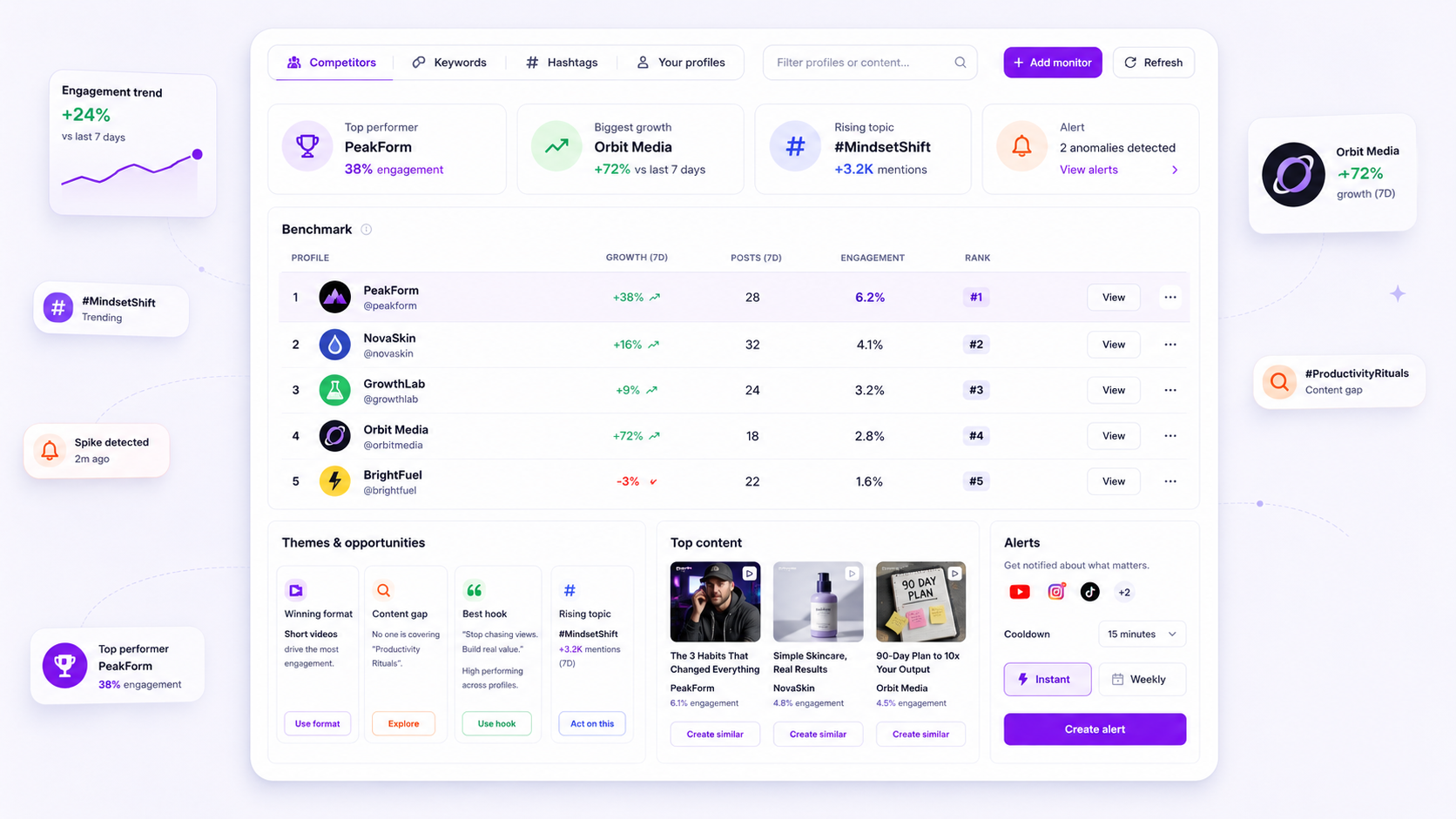
The best intelligence tool for your agency isn't just a data aggregator. It's an early-warning system that sets your current performance against rising industry themes and competitor benchmarks. If you're still relying on manual monthly reports to work out why a campaign flatlined, you're already two weeks behind the market. The aim is to stop tracking vanity metrics and start seeing exactly where your creative strategy is drifting from what your audience is watching right now.
We get it. You spend hours pulling reports, only to find the campaign is flat. By the time you adjust, the trend has moved on. It's high-pressure, it feels like chasing a target that won't keep still, and nobody enjoys justifying a creative change to a client when the data has already gone cold. You're not alone: most teams running dozens of accounts feel the same tension between shipping volume and keeping quality up.
What the best tools need to handle

When you manage several brands or large-scale social operations, you can't have your intelligence scattered across a dozen browser tabs. The best tools work as a central command, not just a bucket for data.
To go from "monitoring" to "active intelligence", your tool must handle these three non-negotiables:
- Automated Competitive Normalisation: You need a single interface that normalises data across YouTube, Instagram, and X. Comparing raw view counts between these platforms is pointless. Your tool should build benchmark rows and rankings for you, so you can see which competitor is really winning the market share you're losing, whatever the platform.
- Theme-Based Content Gaps: Don't just track "Top Posts". You need to see content recipe clusters. Can your tool tell you that "Short-form interviews under 60 seconds" are the winning hook in your niche right now? If it only shows likes and shares, it's letting you down.
- Proactive Triggering: You need alerts that matter. A basic tool emails you when a competitor hits a follower milestone. A great one alerts you when a topic cluster shifts, so you can spot an opportunity before the trend gets crowded.
| Capability | Basic Monitoring | Agency Intelligence |
|---|---|---|
| Data Scope | Vanity metrics (likes/followers) | Content themes & format recipes |
| Context | Snapshot in time | 90-day trend history |
| Alerts | Milestone based (e.g., +1k fans) | Opportunity based (e.g., topic spike) |
| Workflow | Manual export to CSV | Automated dashboard + Email digests |
At Mydrop, we see agencies get stuck because they analyse their data in a vacuum. You might have a great engagement rate on one post, but if a competitor has just moved to a new content theme that's winning twice the watch time in your category, your "good" engagement is really a missed market opportunity. The best intelligence tools don't only tell you what you did. They show you what you should be doing next.
Where basic tools start to break

Most teams start with what they already have: the native analytics of each platform. That works for a while, until you're looking after more than a handful of accounts across different markets. Suddenly you're not managing social media, you're managing a coordination nightmare.
Basic monitoring tools fall short because they're built around vanity metrics (likes, follows and reach) that tell you how loud you were, not how well you landed. They treat every platform as an island. You end up stitching PDFs together by hand, trying to connect a YouTube trend with an Instagram hashtag, and by the time the report is ready, the content strategy is already stale.
With a basic dashboard, you aren't really monitoring intelligence. You're just checking your mirrors. You can see where you've been, but not the lane next to you. If a competitor shifts their topic clusters or brings in a new visual hook, a basic tool will only show you the result weeks later, once their growth has already overtaken yours.
Common mistake: Treating "Reach" as a stand-in for "Market Intelligence." Reach tells you who saw your post. Intelligence tells you why your audience is drifting towards a competitor's content theme instead of yours.
Mydrop pricing check, September 2026: the entry paid plans of the eight tools most often compared with Mydrop run from $6 per channel (Buffer) and $25 a month (Later) to $99 per user (Hootsuite) and $79 per seat (Sprout Social), read on each vendor's pricing page. Mydrop is free to start, then $19 a month flat, not per seat. Full table on Mydrop's compare pages.
The intelligence monitoring scorecard
To help you audit your current setup, here's a scorecard. If your tool keeps failing these checks, you're probably working with a serious blind spot.
| Capability | Basic Monitoring Tool | Agency Intelligence (Mydrop-level) |
|---|---|---|
| Data Normalisation | Platform-specific silos | Cross-platform (YT/IG/X) unified view |
| Trend Detection | Manual review of post lists | Automated topic cluster & theme alerts |
| Competitive Context | Limited to owned profiles | Full public profile & hashtag benchmarks |
| Historical Depth | 30 days or less | 90-day+ deep historical trend analysis |
| Actionability | Static PDF report | Triggered alerts & inspiration suggestions |
The buying criteria that matter
When you're choosing a tool for an enterprise team, don't be swayed by a flashy interface or vanity features. The decision should come down to whether the tool removes the manual grind that stops your team acting. In our experience, if a tool needs your team to spend more than 15 minutes a week "refreshing" data, you haven't bought a tool. You've bought a new chore.
Look for a platform that treats intelligence as a dynamic workflow, not a static report. Can it take a new competitor profile and start mapping their content recipes straight away? Does it send alerts when a competitor's top-performing posts break from their usual pattern?
At Mydrop, we see teams go wrong when they put "number of features" ahead of "speed to insight". Your ideal tool does the heavy lifting of data normalisation so your team can focus on the creative change of direction. You need an early-warning system, not just a graph. If the tool can't suggest industry leaders based on your niche, it's making you do the discovery work that AI should be doing.
Finally, ask how the tool handles refresh rates and platform API limits. You need to know whether your "real-time" alert actually runs on a 24-hour batch cycle, or whether you can trigger a manual refresh when a campaign launch is just around the corner. A tool that hides how it works will leave you stranded when you need the data most.
How Mydrop supports this workflow
At Mydrop, we built the Intelligence Dashboard to cut through the noise of raw analytics. Instead of making you flick between five browser tabs for every platform, we normalise the data from your competitors and your own profiles into one clear view. You see the big picture without the manual tidying.
When you use the Intelligence feature, you're not just looking at charts. You're building an automated feedback loop. You choose the profiles and topics you care about, and the system does the heavy lifting of fetching daily trends and benchmarking.
- Benchmark Row Normalisation: We map performance metrics across YouTube, Instagram, and X, so you can compare how a Reel stacks up against a YouTube Short or an X thread without guessing.
- Theme and Gap Detection: The system highlights rising content themes and shows where you have a "content gap", meaning competitors are gaining ground with formats or topics you haven't touched yet.
- AI-Powered Inspiration: If your creative well is running dry, you can trigger a refresh of our AI-powered inspiration suggestions. It pulls in relevant industry leaders and lets you add them to your monitor list in one click, so your competitive radar stays current.
- Proactive Alerts: You set the rules. Whether you want an instant ping when a competitor has a breakout post or a weekly digest of industry topic clusters, the information comes to you, not the other way round.
Operator rule: Never refresh your intelligence data by hand unless you need to investigate a live spike. Let the scheduled jobs do the work. If you're clicking refresh every twenty minutes, you have a configuration problem, not a data problem.
A simple shortlist checklist
Before you commit to a new intelligence tool, run your current or prospective pick through this "Agency Reality" check. If it fails the first three items, it was built for influencers, not for a multi-brand enterprise setup.
| Criteria | The "Agency Ready" Standard |
|---|---|
| Normalisation | Can it map performance across YouTube, Instagram, and X in one view? |
| Theme Detection | Does it identify rising topic clusters rather than just top-performing posts? |
| Historical Depth | Does it offer at least 90 days of trend history for benchmark comparisons? |
| Alert Customisation | Can you route specific alerts (e.g., competitor spikes) to different team members? |
| Credential Hygiene | Does it require platform-native OAuth for data access, protecting your account security? |
Conclusion
The difference between an agency that changes course in time and one that keeps flogging a dead creative horse usually comes down to visibility. If you have to wait for the end-of-month report to learn why a campaign is underperforming, you're already three weeks behind the market.
Stop treating intelligence as an optional extra. It's the core diagnostic layer that tests your creative strategy against reality. Most teams don't have a content problem. They have a decision bottleneck, and the right intelligence loop is the best way to break it.
Pick a tool that surfaces opportunities before they become yesterday's news, set up your alerts, and get your team working on the themes that are really moving the needle. Your stakeholders will appreciate the clarity, and your team will be glad not to audit the competition by hand every Monday morning.


 Google review
 Trustpilot review
 Product Hunt comment





