
















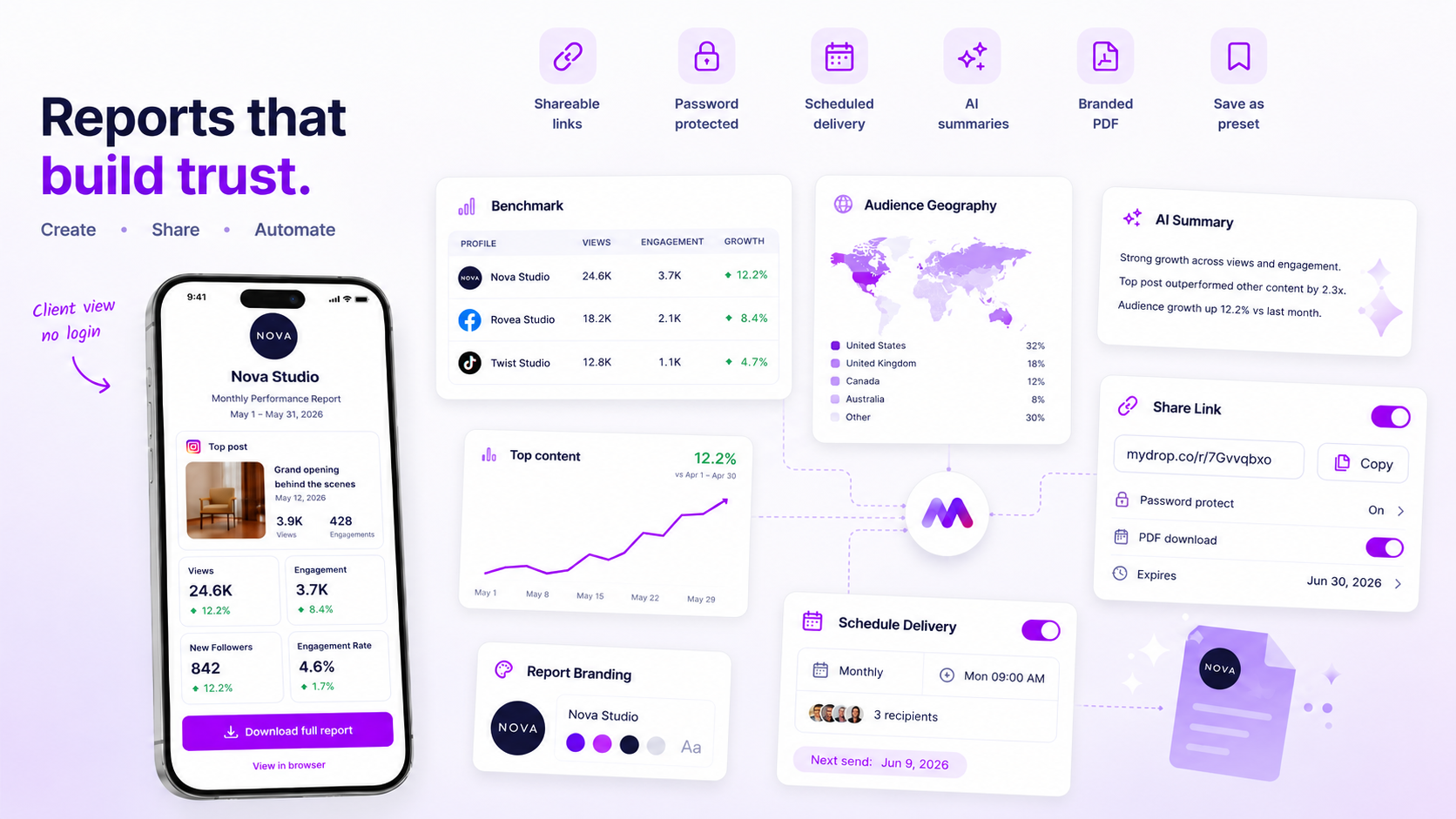
The best way to deliver analytics reports to clients is to stop sending files altogether and start sharing tokenized, secure access links. When you make a client dig through email attachments, you are not delivering insight. You are creating an admin bottleneck that hides the very data you worked so hard to surface.
We have all been there. You spend hours polishing a high-stakes campaign summary, export a crisp PDF, draft a professional email and hit send. Then the friction starts: the file is too big, it lands in spam, the client's legal team cannot open it without a specific plugin, or, worse, they have five different versions of "final_v2_updated.pdf" sitting in their inbox. It is a messy, repetitive loop that drains your team's energy and turns a moment of proven value into a maintenance headache.
What the best tools need to handle

When you are managing dozens of brand profiles and hundreds of stakeholders, "reporting" is not just about making charts look pretty. It is an access and governance problem. If your delivery mechanism makes a client log into your specific app portal, you have failed the first test of transparency: reducing friction.
The best delivery workflows put three operational must-haves first:
- No-login access: Clients should be able to land on a clean, branded report view through a secure link, with no password manager and no extra set of credentials.
- Granular PDF control: Analytics are dynamic, but sometimes a physical copy is needed for a boardroom meeting. You need to be able to switch download permissions on or off for each link.
- Access lifecycle management: A link should not be a permanent, unmonitored back door. Setting expiry dates or password-protecting a specific share token is a must for security compliance.
Operator rule: If your delivery workflow relies on email attachments, you have no version control and zero visibility into whether the report was ever actually opened.
Mydrop pricing check, September 2026: the entry paid plans of the eight tools most often compared with Mydrop run from $6 per channel (Buffer) and $25 a month (Later) to $99 per user (Hootsuite) and $79 per seat (Sprout Social), read on each vendor's pricing page. Mydrop is free to start, then $19 a month flat, not per seat. Full table on Mydrop's compare pages.
The goal is a near-zero effort ratio for the client. Every click a client has to make to get from their inbox to the data is a friction point that lowers the perceived value of your work. In our experience at Mydrop, teams that switch to tokenized delivery stop playing "attachment tag" and start using their reporting window as a proactive talking point.
When you treat reporting as a secure logistics workflow rather than a creative file-transfer exercise, you stop chasing approvals and start driving strategy. Moving from static email to dynamic, tokenized links is the single biggest lever for making your client transparency more professional.
Where basic tools start to break

Let's be honest: that folder of PDFs you are emailing around is a ticking clock. The moment you hit "send", you lose control. If you spot a slight reporting error or a miscalculated KPI, you are stuck in a loop of "re-attaching, re-sending and hoping the client did not already download the wrong version."
Beyond the version control headache, email-based reporting is the ultimate coordination debt. It makes clients treat your analytics like a library book: they download it, stash it in a sub-folder and forget where they put it. When they finally need that data, they are back in their inbox searching for your name.
Here is the brutal truth about manual reporting:
| Feature | Manual Email Attachments | Tokenized Reporting Links |
|---|---|---|
| Data Integrity | Static (out of date the moment it's sent) | Live (reflects the latest data) |
| Access Control | None (sent to everyone in the thread) | Granular (tokens/passwords/expiry) |
| Client Effort | High (download, open, find) | Low (one click, no login) |
| Brand Control | Limited (branding inside the PDF) | Total (branded, unified environment) |
When you send a static file, you are essentially telling the client that the report is a finished task. But in a fast-moving agency, the report is rarely a finished task. It is the conversation starter.
The buying criteria that matter
Moving away from the email graveyard means changing how you vet your tech stack. You are not looking for a "better way to attach files". You are looking for a delivery conduit.
When you evaluate tools, stop asking whether they can make pretty charts. Start asking whether they can manage the distribution logic. If the platform does not hit these three pillars, you are just buying a faster way to send the same broken emails.
1. Frictionless access without weaker security
The biggest friction point for clients is the "login wall". If they have to remember a password to see their own data, they will stop looking at it. Look for platforms that use tokenized links, where a unique, secure URL acts as the credential. But pair this with expiry policies. A link that stays live forever is a liability. You want to be able to set a "self-destruct" date for every share, so old data does not sit out there indefinitely.
2. Granular client autonomy
Does the tool let your client help themselves? A professional delivery workflow should give the client the choice to download a PDF for their internal deck, while still being able to pop back to the live link for the interactive drill-down. If you have to "enable" PDF downloads by hand every single time, you have not solved the problem. You have just moved the bottleneck to your own desk.
3. Immediate "kill-switch" capabilities
Sooner or later you will share a report with the wrong person, or need to revoke access to sensitive data once a project ends. A mature reporting tool must let you disable a link at the click of a button. If the only way to "un-share" is to email the client and ask them to delete your previous email, you do not have a secure reporting tool. You have a wish and a prayer.
Decision check: If your reporting workflow means "managing access" by sending new emails, you are not managing access. You are managing damage control.
The goal is not just to look professional. It is to build a system where the data is always where the client expects it, perfectly secure, and ready for their next big decision. Do not settle for tools that treat reporting like a one-off document dump. Look for systems that treat reporting as a continuous, managed distribution pipeline.
How Mydrop supports this workflow
At Mydrop, we have spent years watching teams drown in the email-attachment graveyard. The fundamental shift we built into our analytics delivery is simple: remove the friction entirely by treating the report as a living, secure web destination rather than a static document.
When you use Mydrop to deliver insights, you stop managing file permissions and start managing access policies. Inside the platform, you can generate a shareable, tokenized link for any report run. Instead of exporting a PDF and hoping it does not get lost in a cluttered inbox, you simply switch on the public share setting. Your client gets a clean, professional view that does not require them to remember yet another password or go through your workspace authentication.
It is about control without the admin overhead. You can set an expiry date on a report, so old data does not linger indefinitely in a client's browser. If you need an extra layer of privacy for sensitive performance reviews, you can switch on password protection with one click. If a client prefers an offline copy for their own internal records, you can choose to enable PDF download controls for each report.
Because the data is rendered through a secure, sanitised public endpoint, you never worry about accidentally exposing internal workspace details or team notes. If a campaign shifts or you need to pull the plug, you just disable the share link from your dashboard and the report becomes instantly unavailable. No manual follow-up emails, no "oops, sorry, please delete the last one" messages. You manage the visibility; they get the transparency.
A simple shortlist checklist
If you are evaluating your current stack, use this scorecard to see whether your reporting workflow is built for scale or is just waiting to become a bottleneck.
| Criteria | The "Stuck" Workflow | The "Professional" Standard |
|---|---|---|
| Data Access | Requires email/download | Secure, no-login browser view |
| Security | Attached file (uncontrolled) | Tokenized, expiring public link |
| Version Control | Manual resend required | Real-time link updates |
| Access Control | None once sent | Password and expiry enabled |
| Auditability | Unknown "read" status | Granular share state management |
Workflow check: If you are still emailing raw attachments to clients, you are not delivering reporting. You are managing a logistics chain. Your goal for this quarter should be to move to a zero-attachment reporting policy.
Conclusion
Moving from manual delivery to tokenized, secure access is less about the technology and more about winning back your team's time. Every hour spent chasing approvals, re-sending the "correct" versions or troubleshooting file access is an hour that could have gone into the next strategy. Stop seeing delivery as a chore to be cleared from your plate and start seeing it as a product you deliver to your clients. A transparent, friction-free reporting experience is not just a "nice-to-have" feature. It is the quietest, most effective way to build long-term trust with your stakeholders. Start by picking one major client account and moving their next monthly review to a secure, tokenized link. You will probably never look at your "Sent" folder the same way again.
 Google review
 Trustpilot review
 Product Hunt comment





