






























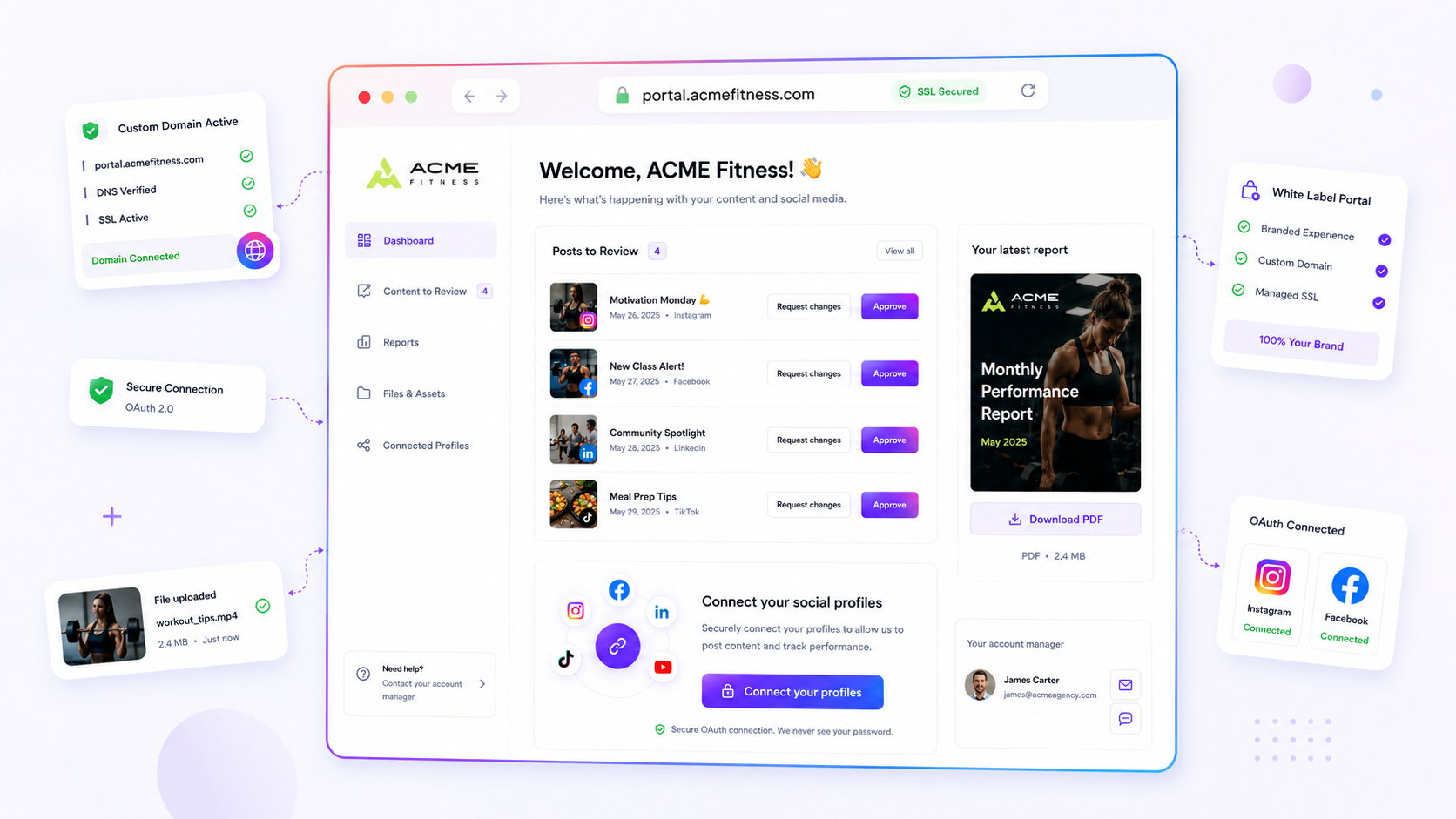
You're probably spending more time chasing client feedback on status updates and digging through email threads for assets than you are crafting strategy. If your client reporting still relies on sending files by email or giving stakeholders full access to the app, you aren’t just losing time: you're eroding client trust. The smartest move for any high-volume agency is to stop treating the client like a guest in your workspace and give them a dedicated, secure, permission-based Brand Portal.
We get it. You're the bridge between high-stakes brand strategy and chaotic execution. You're juggling multi-platform campaigns, tight deadlines and the constant fear of a miscommunication slipping through. It's messy, it's frantic, and the "email-everything" grind is a silent killer of your margins. You're not alone: we've seen this across hundreds of agencies, where coordination debt, not a lack of creative ideas, becomes the main reason teams stop scaling.
What the best tools need to handle
The goal isn't just to "centralise" information; it's to remove the friction that stops your clients seeing the value you provide. A modern portal should work as a self-service hub that respects your security protocols without becoming a technical barrier for the client. If they need a password manager just to view a report or approve a post, you've already lost them.
When you assess your current setup, look for these three non-negotiables:
- Zero-friction authentication: Your clients should be able to view assets, reports and campaign status without needing a full seat or an account. If they have to remember a login, they won't use it.
- Granular, scope-limited access: Not every stakeholder needs access to every setting. You should be able to toggle what's visible, like letting a client download a finished PDF report while keeping your draft campaign notes hidden.
- Secure asset and identity management: Sharing passwords is a liability. Your portal should support secure profile connections via OAuth, so clients can connect their own social accounts without you ever touching their credentials.
Common mistake: Teams often default to "everything or nothing" access. They either send raw files by email, which makes version control impossible, or give the client full admin rights to their management tool, which adds needless risk.
Mydrop pricing check, September 2026: the entry paid plans of the eight tools most often compared with Mydrop run from $6 per channel (Buffer) and $25 a month (Later) to $99 per user (Hootsuite) and $79 per seat (Sprout Social), read on each vendor's pricing page. Mydrop is free to start, then $19 a month flat, not per seat. Full table on Mydrop's compare pages.
| Workflow | Legacy Email/Attachment | Heavy CMS/Membership Site | Mydrop Brand Portal |
|---|---|---|---|
| Asset Delivery | Email attachment (Lost versioning) | Login required (Friction) | Secure link (Version controlled) |
| Reporting | PDF via email (Static/Dated) | Portal login (High barrier) | Live, secure dashboard access |
| Security | Password/Credential sharing | Complex user management | OAuth-based profile linking |
| Collaboration | Fragmented email threads | Internal-only tools | No-login, in-portal chat |
The difference between a high-growth agency and one drowning in admin is the move from manual, email-dependent reporting loops to a secure portal. At Mydrop, we see the most successful teams treat their portal as a product: a clean, white-labelled experience that signals professional competence rather than being just another link in an endless email chain.
Where basic tools start to break

Your agency workflow hits a ceiling the moment you make clients sign in. When you use standard, login-required CMS tools or general-purpose project management platforms, you effectively put a wall between the client and the work.
We've all seen the fallout. A stakeholder ignores your invite email for three days because they've forgotten their password, can't remember which of their five accounts they linked to your tool, or simply finds the interface too heavy for a quick thumbs-up. By the time they finally log in, your posting window has closed.
When software demands a password, it forces your client to act like an administrator. They aren't interested in managing settings, configuring profiles or finding their way around a dashboard; they just want to see the creative and give you the green light. Every extra click, every authentication prompt and every "forgot password" reset is a small piece of friction that drains your momentum.
Watch out: Using a general project management tool that requires full account creation for every stakeholder. It turns a ten-second approval into a ten-minute IT ticket.
The buying criteria that matter
Stop judging portals on their feature list and start judging them on the barrier to entry. A portal is only as useful as the ease with which your most distracted client can use it.
If your client runs five different brand lines, they can't cope with five different portals, each with its own login and unique interface. You need a solution that bridges the gap between secure governance and frictionless access.
Client Portal Efficiency Scorecard
Use this rubric to score your current setup. If your total is below 12, your coordination debt is probably costing you hours a week in unnecessary admin.
| Criteria | Score 1 (Manual/High Friction) | Score 2 (Mixed/Moderate) | Score 3 (Integrated/Seamless) |
|---|---|---|---|
| Authentication | Email, PDF, and manual threads | Password-protected portal | No-login access via secure link |
| Asset Delivery | Attached files in email | Upload to shared cloud drive | Integrated file preview and approval |
| Profile Setup | Sharing passwords in plain text | Manual profile configuration | Client-managed OAuth connection |
| Review Cycle | Back-and-forth email chains | In-app comments with login | Direct, login-free approvals |
- Formula: Sum the scores (4 to 12).
- Threshold: 11-12 is efficient. 7-10 is serviceable but risky. 4-6 is a business bottleneck.
When you look for your next portal, put OAuth-based profile connections first. They let clients connect their social channels to your agency dashboard without ever handing over their actual account credentials. It's the gold standard for compliance and security in an agency setting.
Finally, look for granular permissions. You should be able to toggle what a client sees on a per-brand or per-project basis. Some clients want the full analytics report, while others just need a post-approval feed. At Mydrop, we've found that giving clients a tailored, clean view, one where they see only what's relevant to their role, dramatically increases the chance that they'll actually use the platform instead of reverting to email.
The real test: If you can't onboard a new client to their dashboard in under two minutes without an IT support call, you aren't using a portal; you're using a digital filing cabinet.
How Mydrop supports this workflow
At Mydrop, we've seen this across hundreds of brands: the biggest bottleneck isn't the creative process; it's the coordination debt that piles up when stakeholders are forced into a system they don't understand.
We built our Brand Portal to break this pattern. Instead of dumping a pile of files into a shared drive or sending a calendar link that needs an enterprise login, you create a private, branded space for every client.
Clients get a clean, simple dashboard where they can see what matters: upcoming campaigns, posts ready for approval and finished reports. They don't need a password manager for their team because they don't need a Mydrop account to use the portal. You set the permissions, choose the slug and share the link.
When a client needs to connect their social profiles to a campaign, they use their own native OAuth logins directly inside the portal. You get the connection permissions you need without ever seeing or handling their actual passwords. It's cleaner, faster and, frankly, safer for everyone involved.
Operator rule: Never force a client to manage an extra set of credentials just to give you the green light on a post. If they can't approve it from a link in their inbox, your process is effectively broken.
A simple shortlist checklist
Before you commit to a portal solution, audit your current process against these five non-negotiables. If you can't tick them all, your current "solution" is probably costing you more than it saves.
- Zero-login access: Can the client view reports and approve content without creating an account?
- Scoped visibility: Can you control exactly which sections (e.g., Reports, Posts, Files) a specific client can access?
- Password-free connection: Can clients connect their social accounts via OAuth rather than sharing sensitive credentials?
- Centralised feedback: Is there a dedicated space for comments on specific assets, or are you still parsing email replies?
- Downloadable deliverables: Can the client grab a professional-grade PDF report or high-res asset directly without bugging you?
If you find yourself saying "no" to these, you're managing a tool rather than a relationship.
Conclusion
The move from email-dependent reporting to a modern client portal is rarely about software features; it's about reclaiming your team's time from admin friction. The goal is to take your agency from a "deliver-and-chase" model to a true partnership. When you remove the barriers between your team's strategy and the client's view of it, you stop fighting the process and start focusing on the actual work. Audit your current setup, strip out the friction points that demand extra logins, and give your clients a space that respects their time as much as you respect your own.

 Google review
 Trustpilot review
 Product Hunt comment





