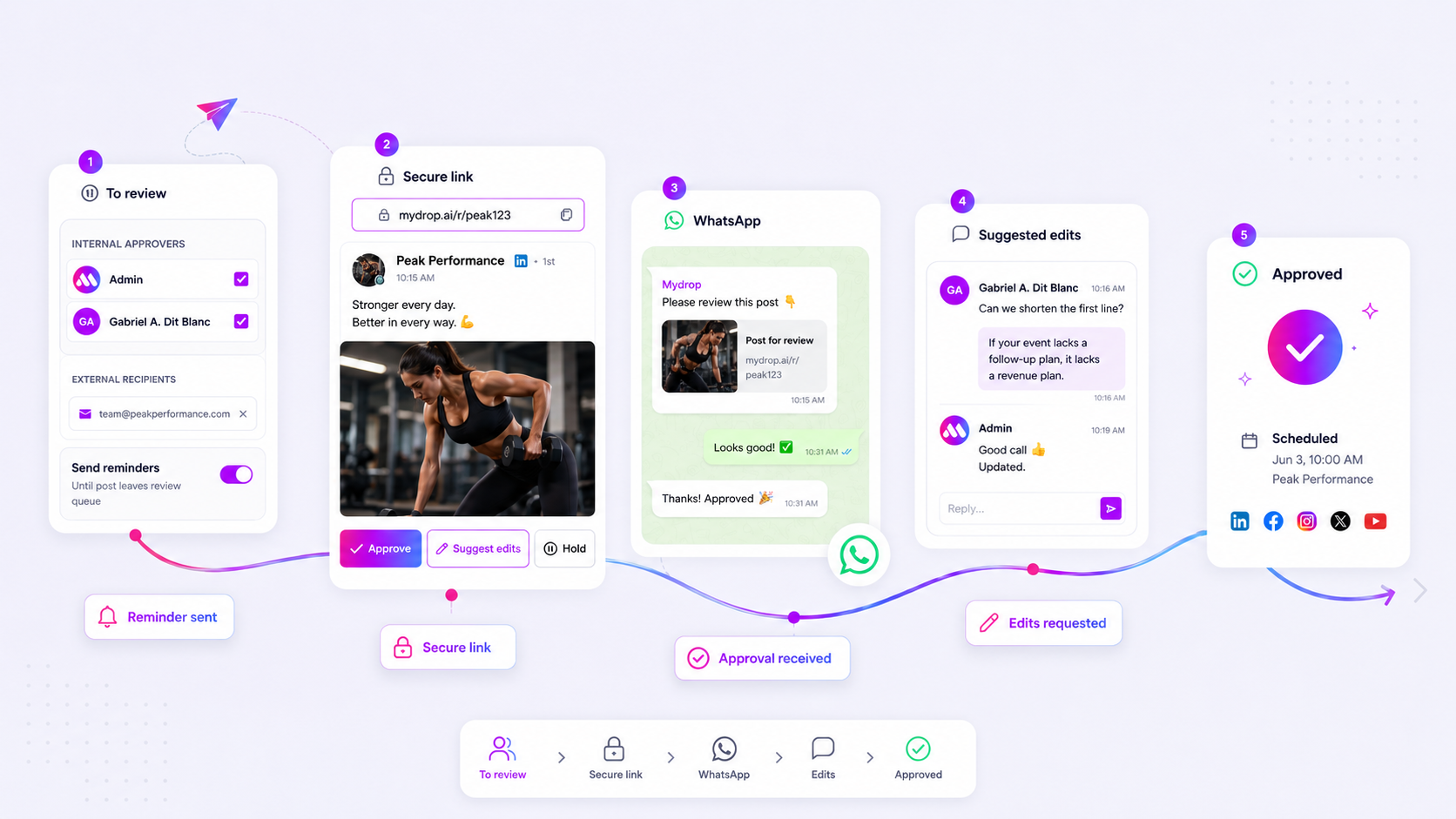
If your team’s approval process relies on a client getting to an email, you are not waiting for a decision; you are waiting for an inbox refresh that may never happen. Moving your approval requests to the same place your clients handle their daily communication-WhatsApp-is not just about speed. It is an essential operating standard for high-velocity teams who need to trade 24-hour email lag for 2-minute, one-tap sign-offs.
We get it: the handoff between creative production and client sign-off is where content goes to die. You have sent the draft, the deadline is breathing down your neck, and you are staring at a silent inbox while the tension builds. You send a "gentle follow-up," which only adds to the noise, further burying the original request under a pile of newsletters and internal alerts.
Where the handoff is actually breaking
The "urgent email" is a myth in modern marketing. When you treat email as a real-time communication channel for high-stakes approvals, you are fundamentally miscalculating how your clients actually work. Most stakeholders manage their inboxes as an archive or a to-do list, not as a live chat. By the time a client flags your request as "important," the window for real-time engagement has often closed.
At Mydrop, we built WhatsApp handlers specifically to bypass this bottleneck because we saw the same pattern across hundreds of brand profiles: the "I didn't see the email" excuse is almost always true. The inbox has become a graveyard of intent.
Here is why your email-based approvals are failing:
- Context switching tax: Moving from a project management tool to an email client to open an attachment or link forces the client to disconnect from their current work.
- The urgency paradox: Using "urgent" in a subject line signals marketing noise, not operational necessity. It blends into the background of a crowded inbox.
- Asynchronous drift: Email is built for long-form, non-linear communication. Asking for a "yes" or "no" in a thread often invites unnecessary feedback, questions, or long-winded caveats that lead to more back-and-forth.
Operator rule: If a decision takes longer than 60 seconds to process in the recipient's chosen interface, you are not waiting on a creative review-you are waiting on their administrative capacity to clear a backlog.
This is where teams usually get stuck: they assume the friction is in the creative output when the friction is actually in the conduit. When you move the interface to WhatsApp, the client receives a push notification that breaks through the noise, allowing them to tap a button to approve or suggest edits immediately. It turns a 24-hour email loop into a two-minute operational heartbeat.
The coordination debt checklist

Most teams do not have a content production problem. They have a decision bottleneck. If your team is stuck in a perpetual state of "waiting on the client," you are likely carrying heavy coordination debt.
Run this 5-point audit against your current process. If you answer "yes" to more than two of these, your email-based approval system is actively killing your team’s velocity.
| Audit Point | Why It Indicates Debt |
|---|---|
| Email Volume | Does a single post require 5+ emails to reach final sign-off? |
| Notification Noise | Do clients miss approvals because they are buried under non-urgent alerts? |
| Context Switching | Does your client have to open a new tab/app to view the actual draft? |
| Approval Lag | Does the average sign-off take > 6 hours after an "urgent" request? |
| Manual Tracking | Is someone on your team manually emailing "just checking in" reminders? |
If you are nodding along, you are burning hours on administrative overhead that should be spent on strategy. At Mydrop, we see teams managing hundreds of brand profiles lose entire afternoons just chasing status updates. When you add the risk of a miscommunication during a rushed email thread, the potential for a public brand error spikes.
How to move decisions closer to the work
The secret to breaking the cycle is simple: stop asking your clients to work in an inbox. Email is designed for asynchronous, low-stakes communication. It is a terrible interface for high-stakes, time-sensitive approvals.
You need to move the decision point to a place where your stakeholders already live. For most enterprise partners and busy agency clients, that is WhatsApp.
When you treat approval as a first-class message rather than an administrative task, the friction disappears.
The shift from Email to Instant Approval
- Remove the barrier to entry: Stop sending links that require a separate login just to see a draft. The draft should be accessible exactly where the notification arrives.
- Use intent-based buttons: Your client should not have to type "I approve this, please post it." They should be able to tap a single button like "Approve" or "Suggest Edits" directly inside their messaging app.
- Close the loop instantly: When a client suggests an edit on WhatsApp, the update should feed directly back into your workflow, not disappear into a thread that someone has to manually transcribe later.
At Mydrop, we built WhatsApp approval handlers specifically to solve this. We watched agency leads struggle with the "I didn't see the email" excuse too many times. By validating numbers and surfacing approval prompts in the same chat interface where clients discuss strategy, the response time often drops from hours to minutes.
Decision check: If a decision requires less than two minutes of thought, it should never happen in an email thread. Move it to a persistent, actionable chat channel where the context remains attached to the asset itself.
This approach changes the power dynamic of the relationship. Instead of being an "approver" who has to hunt for tasks, your client becomes a collaborator who can clear their queue in seconds while moving between meetings. You aren't just saving time; you are positioning your team as the partner who respects their time enough to remove the administrative noise.
The roles and rules that reduce rework
The fastest way to kill a campaign is to let "approvals" turn into an endless debate. When every stakeholder has equal power to suggest edits, your content becomes a design-by-committee nightmare. You need clearly defined lanes.
Define the approvers early, not mid-stream. We suggest a simple three-tier role system to keep the pipeline moving:
- The Producer: Responsible for the final asset and all metadata. They have total ownership of the
suggest-editsloop. - The Reviewer: Authorized to request minor copy tweaks. They are limited to two rounds of feedback.
- The Final Sign-off: The only person with the power to hit the "Approve" button. If they have issues, they must articulate them as a blocker rather than a vague request to "make it pop."
Workflow check: Never allow a "suggested edit" to turn into a open-ended email thread. If a request takes more than two minutes to resolve, move the conversation to a dedicated call or use the
suggest-editsfeature in Mydrop to capture the feedback directly on the post object itself.
When you use WhatsApp handlers for these workflows, you force a tighter feedback loop. Because the interface is mobile-first and chat-based, stakeholders tend to write shorter, more actionable feedback than they would in a formal email. They aren't writing a cover letter; they are dropping a quick note so the team can get back to work.
The weekly habit that keeps the system honest
Systems rot if you don't check them. If you are managing dozens of brand profiles and hundreds of posts, your approval latency will naturally drift upwards unless you have a "sanity check" cadence.
Every Friday, spend ten minutes looking at your approval dashboard. You are not looking for great content; you are looking for friction. If a specific campaign or client is consistently stuck in the approval phase, don't blame the client. Ask why the request flow is failing them.
Friday Approval Audit:
- Flag the laggards: Identify every post that took more than 24 hours to move from "Pending" to "Approved."
- Sort by bottleneck: Was it a slow response from the client, or did the team send it late?
- Adjust the notification trigger: If the client is missing emails, test moving them to WhatsApp alerts for high-priority tiers.
- Clear the deck: If a post is stuck in an edit loop for more than three days, kill the draft or escalate it to a phone call.
By running this ritual, you stop treating delays as "just part of the job" and start treating them as system failures to be engineered away.
Conclusion
At the end of the day, your clients are just as overwhelmed as you are. They don't want to dig through their inbox to find your approval request any more than you want to spend your afternoon chasing them down.
Moving approvals to WhatsApp isn't just about speed; it's about respect. It meets the client in their active flow of work, not in the administrative graveyard of their email. When you align your tools with how people actually operate, you stop chasing and start shipping.