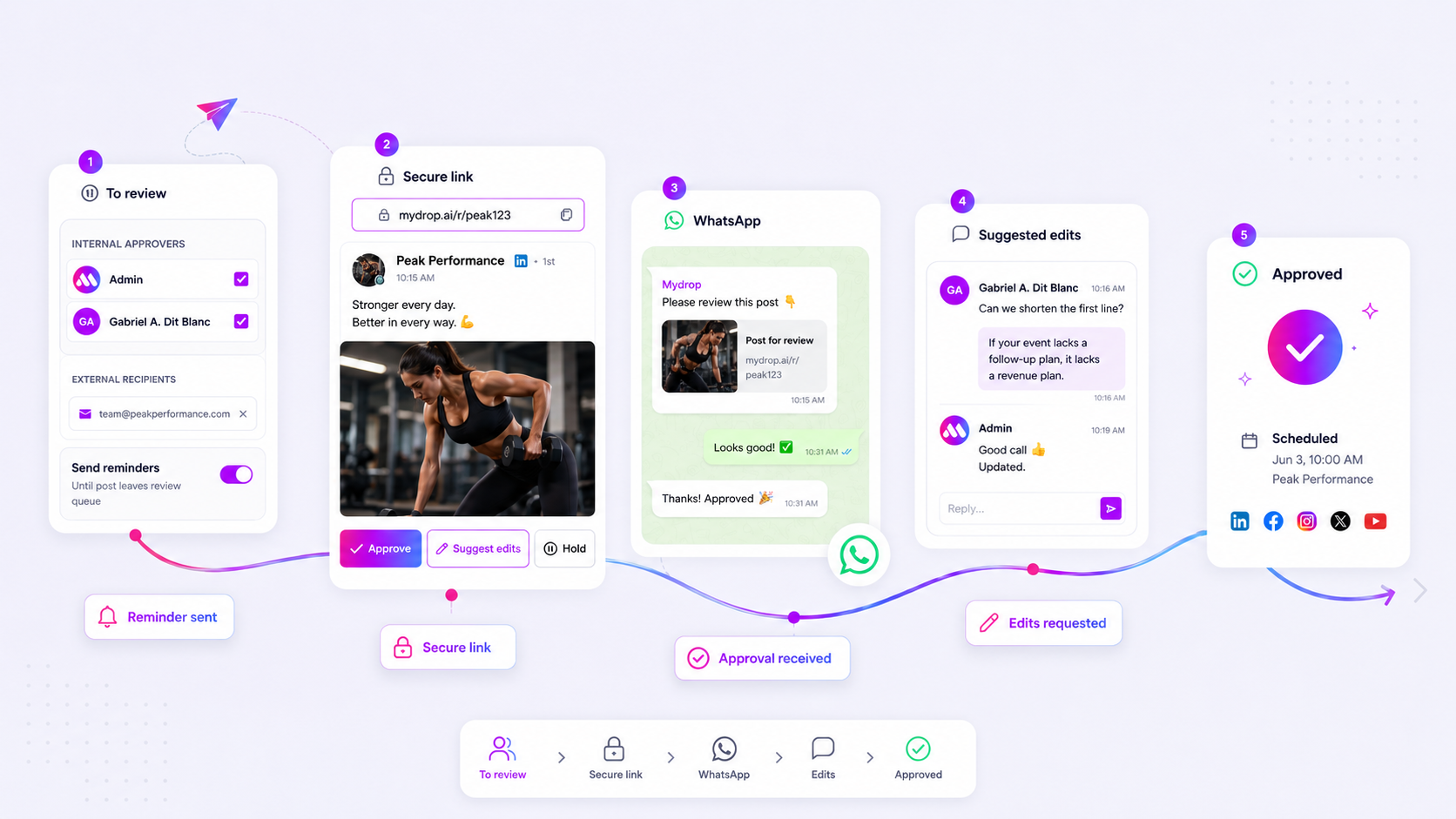
Stop using email for approvals and file transfers if you have more than two stakeholders involved or if your files require any semblance of version control. Move to a centralized portal the moment your "waiting for approval" time consistently exceeds your actual time spent creating the content.
We get it. Email feels like the path of least resistance because everyone already knows how to use it. But at 3:00 PM on a Tuesday, when you are hunting for the "final_final_v2" asset buried in a thread from three weeks ago, you know the messiness is costing you more than just time; it is costing you your team's sanity.
Most teams think they have a communication problem, but they actually have a coordination debt problem. Every time you send a file as an attachment, you create a new, disconnected silo. You lose the context of the feedback, the trail of the asset, and the ability for stakeholders to see the bigger picture.
The decision teams usually frame too broadly

Here is where teams usually get stuck: they think the fix is "better email habits." They write longer threads, enforce naming conventions, or try to manage everything through a shared spreadsheet tracker. It rarely works.
The issue isn't your team's discipline; it is the tool's architecture. Email is designed for synchronous back-and-forth, but enterprise social media management is fundamentally an asynchronous process. When you treat the inbox as your database, you are effectively paying interest on that coordination debt every single day.
At Mydrop, we see this across agencies managing hundreds of profiles. The teams that struggle most aren't the ones with too many stakeholders; they are the ones using the wrong conduit for the job.
Operator rule: If your stakeholders need to see the status of an asset rather than just discuss it, move them out of the inbox.
To help you diagnose if you have outgrown the thread, consider this simple breakdown:
| Symptom | Email-Based Cost | Portal-Based Value |
|---|---|---|
| Asset Location | Searching threads (Avg. 15m/file) | Centralized dashboard (Instant) |
| Version Control | Manual tracking (High error rate) | Single version of truth (Automated) |
| Approvals | Reply-all loop (High latency) | Permissioned review space (Fast) |
| Feedback Context | Disconnected from file | In-situ comments (High clarity) |
This isn't about ditching communication; it is about separating high-context strategy (keep that in your team chat) from low-context execution (files and approvals move to the portal). When you centralize the workspace, you let the work be the source of truth, so you can stop being a professional email forwarder and start being an operator.
What should stay manual and what can move faster

Here is the secret to managing your sanity: not every piece of communication belongs in a formal workflow. If you try to force every stray thought into a project management tool, you will just end up with an expensive, underutilized digital ghost town.
Keep your high-context strategy, creative brainstorming, and sensitive human-to-human feedback in your existing chat channels. That’s where the "why" happens. But the moment you move into "what" and "when"-like assets, post copies, and approval statuses-it is time to get out of the inbox.
In our experience, teams managing hundreds of brand profiles often fail because they treat execution like a negotiation. A centralized portal allows you to separate the conversation from the confirmation. When the client can log in, download their own reports, or see the status of a post without pinging you, your team stops being a human file-routing service and starts being a strategic partner.
Decision check: If a request involves more than two people, a deadline, or a file, it is an execution task. Do not discuss it; route it through a portal.
The tradeoff matrix
The following scorecard helps you decide whether to keep a client workflow in email or move them to a portal. The more "Yes" answers you have, the more your inbox is actually a hidden cost center.
| Workflow Trigger | Keep in Email | Move to Portal |
|---|---|---|
| Stakeholders | 1 to 2 | 3+ |
| Asset Volume | Low (occasional) | High (batch/daily) |
| Approval Chain | Single-step | Multi-stage/Regulatory |
| Version History | Low impact | High impact (critical audit) |
| Data Access | Need-to-know | Broad visibility requested |
If you find yourself manually checking off items on this list every morning, you have already crossed the threshold into coordination debt. At Mydrop, we see teams that were once drowning in 50+ emails per campaign recover nearly 10 hours a week simply by directing stakeholders to a branded portal where they can self-serve these routine actions.
When you shift from manual synchronization to a permission-based portal, you are not just getting organized. You are removing yourself as the bottleneck, ensuring that your clients have access to the status of their work without you having to be the one to confirm it at every single step.
How to pilot the workflow safely
You do not need to burn the ships to move to a portal. The biggest mistake we see is teams trying to move every single client, project, and stakeholder at once. That is a recipe for internal chaos and frustrated partners who just want their work approved. Instead, pick your most bottleneck-prone account-the one where the "email-to-approval" loop currently takes three times longer than the creative work itself-and run a two-week pilot.
- Select the Pilot: Identify one project with at least three internal stakeholders and a high volume of visual assets.
- Configure the
Brand Portal: Set up the portal settings to expose only what they actually need-usually files, posts for review, and analytics reports. - The "Soft" Switch: Tell your client: "We are moving our review process to a dedicated, secure space to make sure your feedback is attached directly to the assets, which will help us cut down on versioning errors."
- Keep Email for Strategy: Explicitly state that email remains the home for high-level strategy and sensitive conversations, while the portal is the single source of truth for execution.
Once your client sees they can review a post, drop a comment, and download a report in seconds without digging through a thread from last week, they will likely start asking to move their other brands to the same setup.
The operating rule to keep
The shift from inbox-based work to portal-based work is ultimately about governance. You are moving away from a world where information is trapped in individual accounts to a world where it lives in a shared, accessible, and permissioned ecosystem. When you provide a client with a public URL-protected by a simple password-they don't just get access to files; they get a sense of professional control that an email thread can never provide.
Workflow check: Never let a client request or approval live in an email thread if you plan to re-use that asset later. If it matters for the record, it belongs in the portal.
By centralizing these interactions, you stop being a human file-router and start being a strategic partner. You free up your team to focus on the content that moves the needle rather than spending their Tuesday evenings tracking down the "Final_V3_Updated" file.
Conclusion
At the end of the day, most teams do not have a content production problem; they have a decision bottleneck. You can scale your output all you want, but if your review process remains tied to the slow, linear nature of email chains, you are essentially trying to pour a firehose into a straw.
Centralizing your review, approval, and file management into a Brand Portal isn't just about cleaner inboxes. It is about building a scalable machine that can handle the complexity of multi-brand management without falling apart when the volume increases. Stop chasing the "final" version through your inbox. Put the work in a place where your team-and your clients-can finally see the same reality. Your sanity, and your client retention, will thank you.