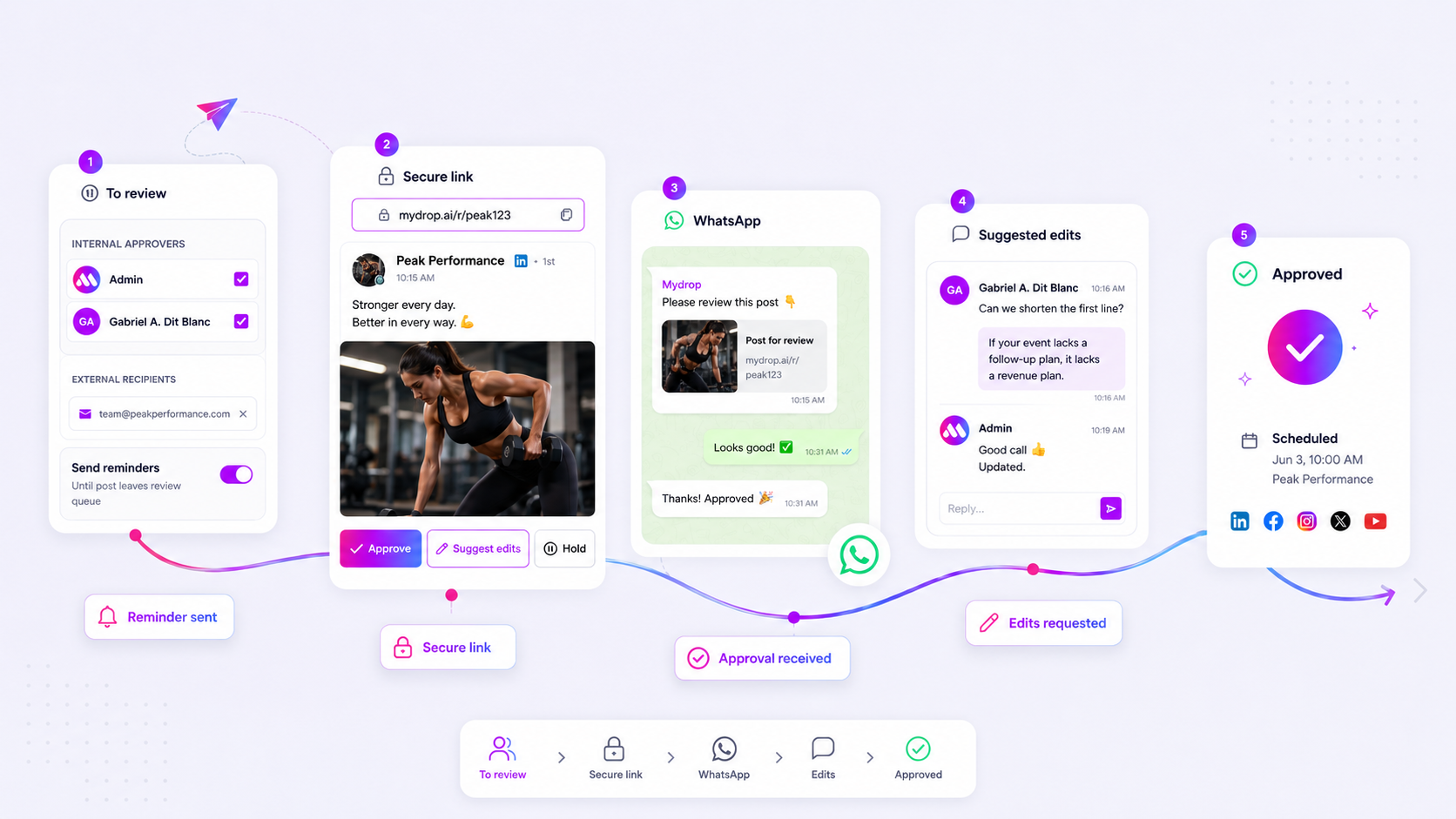
You can stop chasing client approvals by moving to tokenized, non-login access points. When you remove the requirement for external stakeholders to create an account, you turn a high-friction coordination tax into a single, effortless click. If your current workflow relies on email threads or "guest logins" to get a sign-off, you are essentially asking busy stakeholders to complete a registration form before they can do the work you actually need from them.
We have all been there. You have a campaign ready for launch, the creative is polished, and the team is ready to hit publish. Then, the silence begins. Two days later, you find out your client lost their password, their IT department blocked the invite, or they simply decided that logging into "another platform" was too much effort for a Friday afternoon. It is exhausting, and worse, it keeps your content locked in a pending state while your best publishing windows sail past.
The operating problem this solves

The "account-gated" era of social media management is effectively dead for teams at scale. In our experience working with agencies and multi-brand operators, the biggest bottleneck to hitting a publishing cadence isn't a lack of creative ideas or production capacity; it is coordination debt. Every time you introduce a login wall, you insert a manual, human-dependent gate that creates a predictable latency.
Here is what happens when you treat client access as a security requirement rather than a communication workflow:
| Metric | Account-Gated Workflow | Tokenized Approval Portal |
|---|---|---|
| Stakeholder Friction | High (Requires account/password) | Zero (Direct URL access) |
| Typical Delay | 24 to 48 hours | 1 to 3 hours |
| Visibility | Fragmented (Email threads/PDFs) | Unified (Live post/profile preview) |
| Failure Mode | "I didn't receive the invite" | Token expiration (if not rotated) |
When you manage dozens of channels, the cost of this friction is massive. You aren't just waiting for an approval; you are managing a spreadsheet of who has access, who forgot their credentials, and who is stuck in an email chain trying to remember which version of the post is the final one.
Friction is a design choice, not a technical necessity. By switching to secure, tokenized approval links, you align your workflow with your stakeholders' reality: they are on their phone, they are in a meeting, or they are jumping between apps. They don't have time to navigate a complex dashboard just to give a thumbs-up on a caption.
Operator rule: If a stakeholder has to remember a password to approve a post, you have already lost the timing battle. Assume the approval process should be as frictionless as a standard document link, protected by the token itself rather than a user account.
This shift does more than just speed up your timeline; it changes the relationship. Instead of acting as an IT administrator who manages permissions, you become a partner who sends over a clean, professional preview that says, "Click here to review." Everything else-the profile data, the media assets, the workspace context-should be handled by the platform in the background, not by the person trying to get the post live.
The minimum system that works
The secret to moving fast isn't adding more sophisticated permission layers; it is stripping away everything that forces your stakeholders to stop what they are doing. You need a direct, low-friction conduit for approval that works exactly like the email or chat notification they already received.
At Mydrop, we see teams of all sizes struggle when they treat the approval portal as an "application." If your client has to log in, you have already lost the momentum. The system that actually works is one where the link itself is the key. When you send a tokenized, unique URL, you aren't just sending a preview; you are handing them the permission to act without the barrier of a password reset.
Here is the difference in operational cost between the two paths:
| Workflow Step | Account-Gated Path | Tokenized Portal Path |
|---|---|---|
| Notification | Email alert + Login prompt | Link directly to post |
| Authentication | Password or SSO | None (Token handles access) |
| Review | Navigate dashboard | Instant preview in browser |
| Action | App state update | One-click Approve/Hold |
| Feedback | Separate email/message | Direct conversation context |
| Typical Delay | 24 to 48 hours | 1 to 2 hours |
The tokenized approach turns a bureaucratic process into a simple decision point. Because you are using unique, secure tokens for each post, you keep the sensitive data protected without making the reviewer pay a "coordination tax" for your security compliance.
Where teams overbuild the process
The most common trap we see in enterprise marketing teams is the instinct to "manage" external users by creating actual guest accounts for them. It sounds logical-"Let's just give them a limited login"-but it is a classic coordination anti-pattern.
When you create a guest account, you are effectively asking your client to learn your internal software, manage yet another set of credentials, and deal with your system's notification preferences. If they forget their password on a Friday afternoon before a big launch, the post sits in limbo. You end up spending more time on technical support than on creative strategy.
Common mistake: Creating guest accounts to "secure" your approval flow. This creates a high-friction bottleneck that scales linearly with the number of brands and stakeholders you manage.
Teams that overbuild this process eventually find themselves managing a sprawling list of abandoned user accounts and legacy permissions. Instead, treat external stakeholders as ephemeral partners. They should exist in your workflow only through the context of the specific post they are reviewing, not as permanent entries in your user database.
By keeping the portal public-facing and tokenized, you remove the burden of maintenance. You no longer have to manage account de-provisioning, access reviews, or "I can't see the post" tickets. The workflow becomes a simple rhythm: you generate the link, they open it, they approve it, and the post moves to scheduled.
Most teams do not have a review problem. They have a decision bottleneck. If you stop trying to make your clients "users" of your platform and start making them "participants" in the content flow, you will see your approval times drop significantly. Focus on the mechanics of the click, not the management of the identity.
How to run the cadence
Getting your team to adopt a no-login rhythm requires shifting from "chasing people" to "managing a queue." The most successful teams we see at Mydrop treat the approval portal not as a generic request but as a fixed checkpoint in their weekly operating rhythm.
If you are managing approvals across multiple time zones or dozens of stakeholders, don't rely on manual pings. Instead, build your cadence around these three pillars:
- The Batch Review Window: Set two fixed windows per week where you expect feedback. Send the tokenized links on a predictable schedule so your stakeholders know when to expect them. If a post doesn't move to "approved" by the end of the window, it automatically gets flagged.
- The WhatsApp Feedback Loop: When you have a high-stakes campaign, use direct channels. For recipients with validated mobile numbers, sending the approval link via WhatsApp allows them to approve or suggest edits in real-time. It transforms a formal review into a quick, conversational decision.
- Active Management of "Hold": When a client hits "hold" on a post, don't let it vanish. A hold state should trigger an immediate notification to the creator, pulling them back into the conversation to address the feedback.
Decision check: Never leave a post in "hold" for more than 24 hours. If it hasn't been resolved, pull the stakeholder into a 5-minute call. Coordination debt is expensive; don't let it compound.
The proof that the habit is working
You don't need a massive audit to know if this is working. The shift from "account-gated" to "tokenized" is usually visible in your platform’s metrics within two weeks.
We typically see teams cut their "time-to-publish" by more than 50% simply by eliminating the friction of password resets. Here is how you can measure the health of your new workflow:
| Metric | Account-Gated Path | Tokenized Portal Path |
|---|---|---|
| Average Approval Time | 24 to 48 hours | 2 to 6 hours |
| Friction Points | Login, MFA, Password Reset | 1 Click |
| Stakeholder Engagement | Low (avoidance) | High (direct) |
| "Hold" Resolution | Stalled threads | Active conversation |
Note: Calculations based on typical agency project lifecycles across five active markets.
If you find that your approval times are still high, check the number of "suggest edits" actions being used. High edit volume often means your team is missing the brief on the first pass, not that the portal is slow. If you see most posts moving from "pending" to "approved" in under three hours, your coordination engine is officially optimized.
Conclusion
At the end of the day, your stakeholders want to provide value, not manage credentials. The goal isn't just to get a green light; it is to remove the tax you pay every time you ask someone to "log in."
When you make the path of least resistance the best path for your business, you stop fighting your own process. Move the links to where your clients are, strip out the account wall, and watch your publishing schedule stop stalling. You'll find that once the friction is gone, the real creative work can finally move at the speed of the social feeds you're managing.