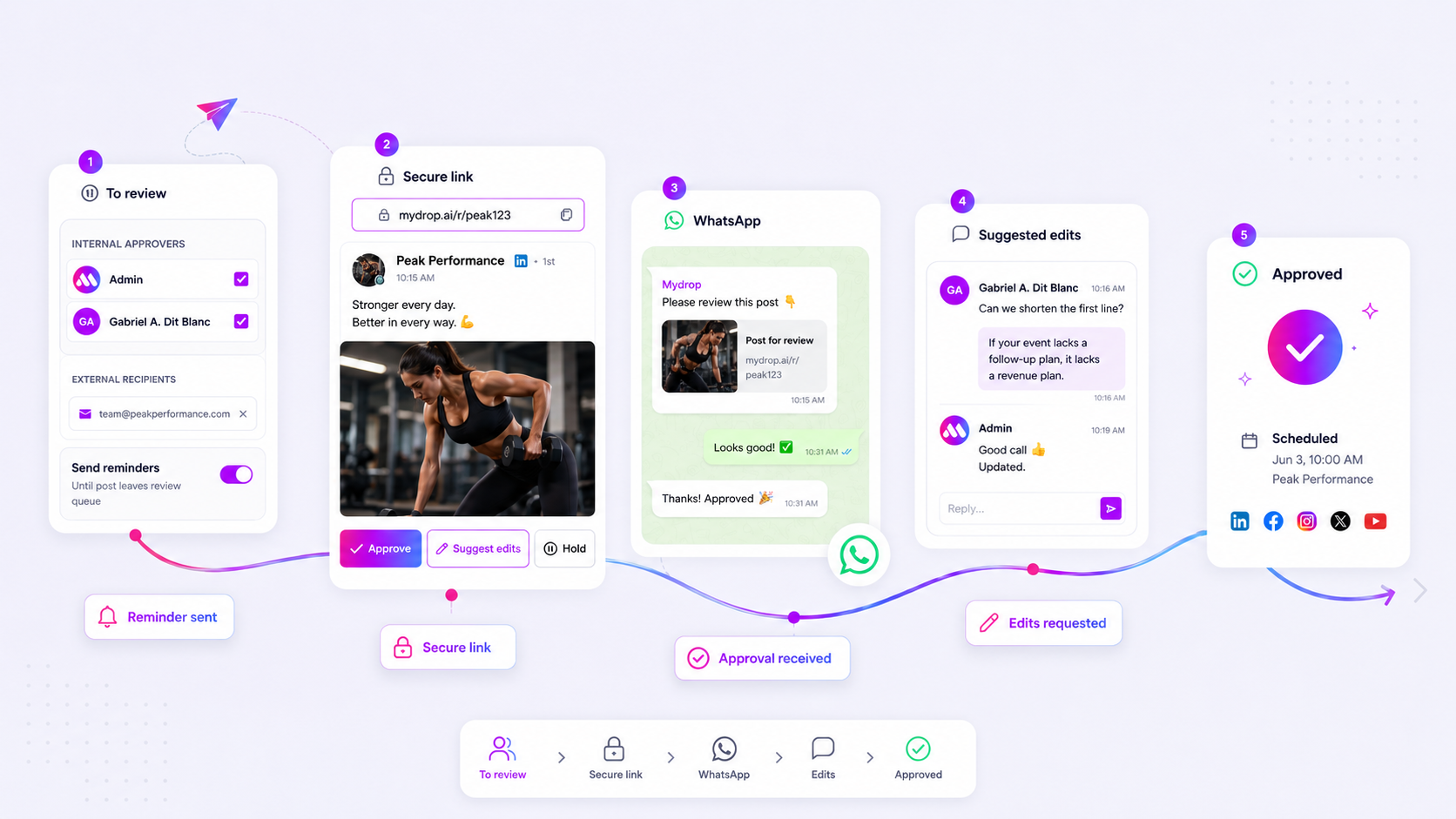
The short answer is to use WhatsApp only for creative rhythm and quick iterations, but always route final, high-stakes approvals through a dedicated portal. Think of WhatsApp as the "fast lane" for getting eyes on a draft to beat a trend, and your approval platform as the "compliance vault" that keeps you safe from regulatory or brand-safety blowback.
We get it. The "waiting for approval" email graveyard is where social campaigns go to die. We have watched teams manage hundreds of brand profiles, and we know that chasing a client into a login-walled portal at 6 p.m. to fix a single typo can feel like an unnecessary tax on your team’s sanity. When a trending moment is burning hot, a formal approval request feels like a blockade, not a safeguard. But treating every single post as an "emergency" that bypasses formal systems is how coordination debt accumulates until your entire content pipeline becomes a liability.
The decision teams usually frame too broadly

Most teams try to solve for "speed" or "security," as if they are mutually exclusive. They aren't. They are just different gears in your operating machine. The real problem isn't that you are using WhatsApp-it's that you are using it to track assets that require a permanent, time-stamped paper trail.
If you are just checking if the copy for a casual story "sounds right," WhatsApp is a perfectly fine conduit. But the moment that asset involves sensitive claims, high-budget media, or legal sign-off, you need a system that registers the approval outside of a volatile, ephemeral chat thread.
| Metric | WhatsApp Approval | Portal-Based Review |
|---|---|---|
| Response Latency | Seconds (High Velocity) | Hours (Systematic) |
| Auditability | Manual, high effort | Automated, time-stamped |
| Primary Use | Creative iteration / Rhythm | Final compliance / Governance |
| Risk Profile | High: Context can be lost | Low: Permanent state |
At Mydrop, we see teams struggle most when they lack this "Velocity vs. Verifiability" split. They either paralyze their team with excessive portal friction for low-risk content, or they leave themselves exposed by relying on informal chats for high-risk approvals. A simple operating principle helps: The 24-Hour Rule. If a campaign change needs a permanent, traceable compliance record to protect the agency, it must touch the portal. If it is a creative iteration that needs human eyes on it now to hit a window of opportunity, it belongs on WhatsApp.
When you start treating WhatsApp as a temporary staging area and the portal as the source of truth, you stop fighting your own tools. You gain the agility to move fast when the market demands it, and the peace of mind that comes with a locked-in audit trail when it counts.
What should stay manual and what can move faster

The golden rule here is simple: if it needs to hold up in an audit, it stays in the portal. Compliance teams, legal reviewers, and brand safety officers shouldn't be hunting for approval history in a fragmented WhatsApp chat that disappears when someone changes phones. When you have dozens of stakeholders and complex regulatory requirements across different markets, you need a single source of truth that is time-stamped and immutable.
Creative iterations, on the other hand, are the lifeblood of the modern social team. You are chasing trends, responding to breaking news, or just trying to get a caption tone exactly right. This is where the "rhythm" lives. If your lead copywriter is waiting four hours for a portal login and a formal email ping just to change one emoji, you are not being secure-you are just being slow.
The messy middle is where teams lose their minds. If you start an approval in WhatsApp, you have to ensure it lands in the portal for the final sign-off. The biggest mistake we see across large brands is using WhatsApp for the entire lifecycle, including the final legal sign-off. It creates a massive coordination debt that eventually leads to missing files, unapproved posts going live, and a total lack of visibility when a campaign inevitably runs into an issue.
The tradeoff matrix
When you are deciding which channel to trigger for your next campaign asset, use this rubric. It is not about which tool is better; it is about matching your communication channel to the level of risk and urgency inherent in the task.
| Metric | WhatsApp Approval | Portal Review |
|---|---|---|
| Primary Use | Creative iteration and tempo | Compliance and final sign-off |
| Response Latency | Seconds (High Velocity) | Hours (Asynchronous) |
| Context Retention | Weak (Fragile thread) | High (Persistent history) |
| Audit Readiness | Low (Manual export required) | High (Automated records) |
| Ideal For | Daily social, memes, testing | Legal, regulatory, high-stakes |
Operator rule: Never skip the portal for final publication. If the approval happens on WhatsApp, treat it as a "pre-flight" check, but force the final "Approve" button to be pressed inside the system.
At Mydrop, we see the most successful teams using a "Hybrid Sync" model. They use our WhatsApp integration to handle the rapid-fire creative back-and-forth because it keeps the momentum alive. But when the file is finalized, the system captures that intent. By keeping the final record in the portal, you get the speed of a chat app without the terrifying risk of losing your audit trail.
This prevents the "it was approved in the chat" argument during your quarterly compliance review. It turns your fast-moving WhatsApp channel into a high-performance extension of your formal review process rather than a shadow system that keeps your managers up at night.
How to pilot the workflow safely
You do not want to wake up on a Tuesday to find a high-stakes campaign image posted with a typo because it was approved via a stray WhatsApp sticker. Moving to a fast-track channel requires strict guardrails, otherwise, you are just trading coordination debt for compliance risk.
The best way to pilot this is to start with a "Low-Stakes Loop." Identify one recurring, low-risk content format-like a daily community update or a routine internal poll-and run your approvals through WhatsApp for one sprint. During this trial, keep the following rules in play:
- Restrict the participants: Only include the actual decision-makers. If a thread has more than four people, move it back to the portal immediately.
- Define the "Exit Point": If an approval conversation requires more than three back-and-forth messages, it is too complex for chat. Drop the link to the platform and move the discussion to the formal review interface.
- Mandate the formal sync: At the end of every week, whoever handled the WhatsApp approvals must cross-reference their chat history with the official platform dashboard. If it didn't happen in the system, it didn't happen for the records.
At Mydrop, we see teams struggle when they try to make WhatsApp do the work of a database. It is a communication tool, not a system of record. If your workflow relies on someone remembering to manually copy-paste an approval from a chat thread into your management software, you are one missed notification away from a failed campaign. Our own WhatsApp integration was built specifically to solve this by mapping those "thumbs up" reactions directly to the active approval context, ensuring the audit trail stays intact without forcing your clients to log into a portal when they are already on their phones.
Decision check: Never treat a WhatsApp approval as "done" until you have verified the status change in your management dashboard. The chat is the trigger; the platform is the ledger.
The operating rule to keep
The most common trap teams fall into is "Channel Drift," where the approval process gradually migrates from the secure portal to WhatsApp for everything, even when the stakes are high. To stop this, you need a hard-coded ritual.
We recommend a simple Approval Policy document shared with every client during onboarding. It clearly defines the scope:
- Standard Review: Use the portal. This is for all planned assets, brand-heavy creative, and regulatory sign-offs.
- Fast-Track Review: Use WhatsApp. This is for timing-sensitive adjustments, "final polish" creative checks, and live-event monitoring.
When a client pushes for a WhatsApp-only workflow on a high-stakes asset, hold the line. It is uncomfortable for a moment, but it protects your agency's reputation long-term. Explain that the portal acts as the shared vault that keeps everyone safe from "he said, she said" disputes.
Conclusion
The messy middle of social media management is rarely about a lack of creative ideas; it is almost always about the friction of getting from "draft" to "live." WhatsApp is a brilliant tool to clear that friction, but only when you respect it as a fast-moving stream rather than a permanent filing cabinet.
Use the portal to build the foundation of your accountability, and use WhatsApp to keep the rhythm of your creative execution. Once you stop treating every approval as an emergency, you will find that the "fast lane" actually makes the slow, deliberate work of enterprise compliance much easier to manage. Keep your audit trail secure, your communication agile, and your sanity intact by simply knowing which channel protects which outcome.