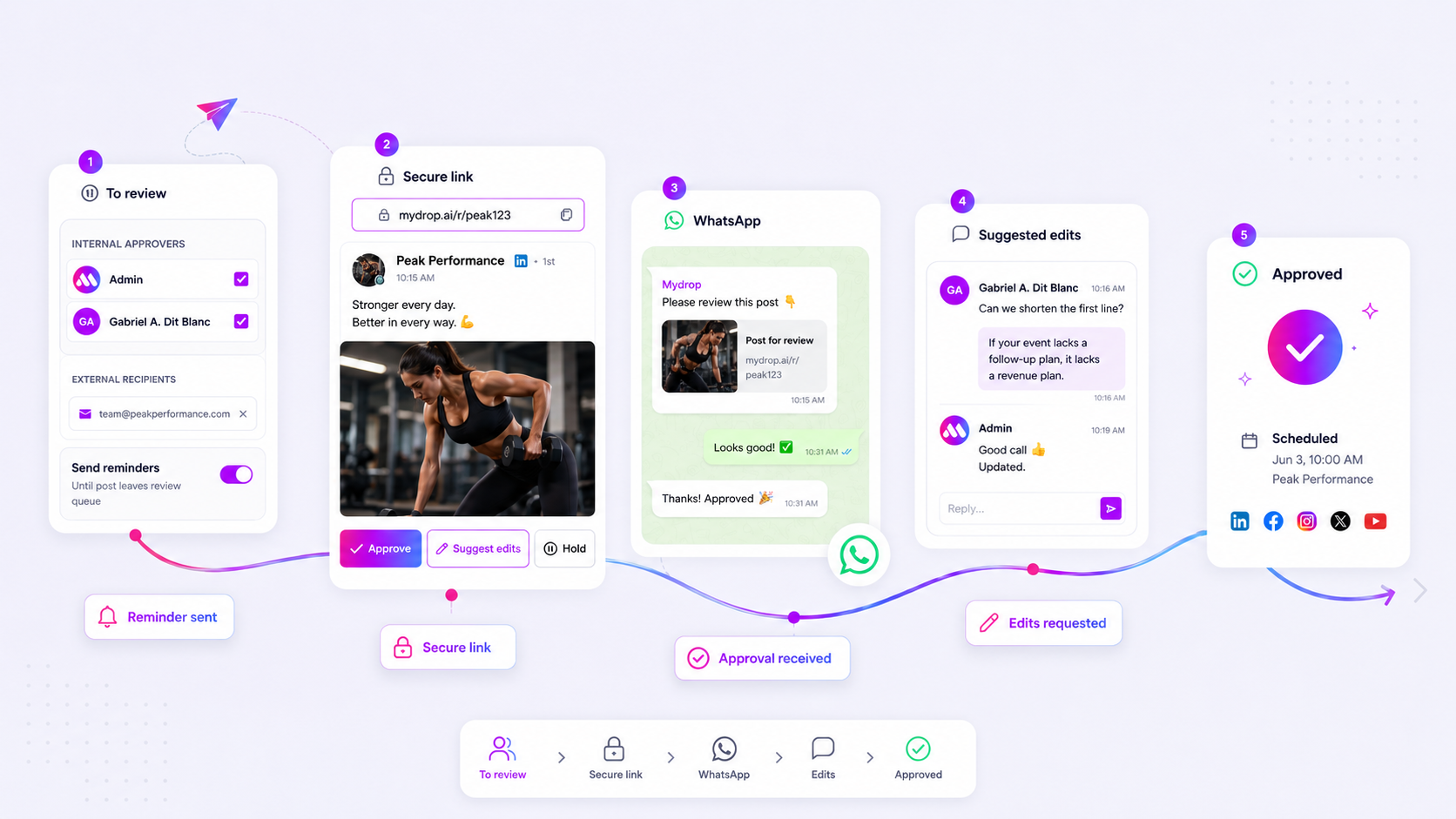
If your stakeholders are abandoning your approval portal for long, fragmented email threads, it is not a technical glitch; it is a symptom of a process that requires them to work harder than they should just to say yes. You built that portal to streamline the chaos, and watching people retreat to the inbox feels like a personal rejection of your hard work. But the uncomfortable truth is that your portal is likely forcing them to perform heavy lifting-like managing passwords or navigating complex menus-just to do a 10-second job.
We see this across hundreds of brands and agencies: you traded the friction of email for the friction of "yet another login," and the result is stalled momentum. The good news is that you do not need to scrap your workflow. You just need to lower the barrier to participation.
The operating problem this solves
Most teams do not have a content production problem; they have a decision bottleneck. When you see "email drift"-where your official portal remains empty while threads move fast-you are seeing the Email Paradox in action.
Email and messaging apps (like WhatsApp) succeed because they offer low-stakes, conversational comfort. Your portal, while designed to provide governance and tracking, often feels like a sterile, high-stakes sign-off sheet. The legal reviewer who just wants to check a caption does not want to log in, find the right project folder, and navigate an interface. They want to see the post, tap "Approve," and get back to their day.
If your portal asks for more effort than a "Reply" button, the portal loses. Every single time.
Here is how you can perform a quick diagnostic audit to see if you are creating unnecessary friction:
| Audit Factor | Why It Drives Email Drift |
|---|---|
| Auth Friction | Requiring a login for every review adds 30+ seconds of mental load per post. |
| Visibility | If the portal hides the conversation thread, it feels like a black hole compared to email. |
| Action Density | If users cannot approve or suggest edits in one click, they will inevitably switch to an email to explain why. |
| Notification Noise | If reminders lack context, they get ignored as system noise rather than actionable requests. |
Operator rule: If your external stakeholders have to log in to approve, you have already lost them. Use tokenized, link-based access for reviews whenever possible to keep the interaction as fluid as a direct message.
The goal is to match the convenience of the inbox while keeping the structure of the enterprise. When you make the portal the path of least resistance, the email threads naturally dry up.
The minimum system that works

If your portal asks for a password, you have already lost half the room. Every extra step-signing in, creating an account, or navigating a complex dashboard-adds to the cognitive tax your stakeholders pay just to see a post. At Mydrop, we see the most successful teams move to tokenized, no-login links.
When the stakeholder simply clicks a link in their email or WhatsApp, they land on a clean, safe preview that feels like a functional extension of their inbox. It is not about dumbing down the interface; it is about respecting the urgency of the person who just wants to click "Approve" and get back to their day. If they cannot approve, hold, or leave a quick note from that single view, they will inevitably retreat to an email reply just to voice a concern.
Decision check: If your review process requires more than one click to reach the content, you are fighting your own adoption rates.
The goal is to keep the "decision surface" as small as possible. Use a platform that treats a review not as a project management milestone, but as a conversational touchpoint. If they leave a comment, it should notify the creator immediately. If they are on the go, a WhatsApp integration that lets them tap "Approve" directly from the chat message usually fixes the email-drift problem overnight.
Where teams overbuild the process
The most common trap is creating "Governance Theater"-layers of mandatory approval tiers that look great in a policy memo but crumble in practice. When you force a post through three different departments for every minor social update, you create massive decision fatigue.
Teams often fall into the trap of requiring every stakeholder to sign off on every post, regardless of risk. This makes the approval portal feel like a high-friction toll booth rather than a collaborative workspace.
| Risk Level | Typical Approval Chain | Suggested Workflow |
|---|---|---|
| Low (Organic, Routine) | 3+ Departments | Creator + 1 Peer |
| Medium (Campaign, Promo) | Brand + Legal/Compliance | Creator + Lead + Brand |
| High (Crisis, Executive) | Full C-Suite/Legal | Custom Approval Flow |
If a post is "on hold," does the system make it easy to restart? We see many teams unintentionally kill their own pipeline because the "Hold" action locks the post until someone remembers to go back and manually re-submit it. A better approach is allowing direct feedback that, once addressed, keeps the post in the active queue.
The truth is that most teams do not have a content quality problem; they have a coordination bottleneck. When you build a portal that mirrors the bureaucracy of your organization, you encourage people to use the path of least resistance: a quick email to their friend on the social team.
Keep your workflow as lean as the content you are shipping. If the portal is the place where work goes to sit and wait, stakeholders will always choose the inbox instead.
How to run the cadence
Getting your stakeholders back into the portal is less about demanding compliance and more about engineering a predictable rhythm. When you treat the review process as an ad-hoc event, you invite the chaos of email. Instead, treat it like a weekly operations meeting that happens to be digital.
We have found that teams managing dozens of brand profiles succeed when they shift from "as needed" requests to a standardized approval cadence.
- The Batch Window: Set a fixed time (e.g., Tuesday at 10 a.m.) for "big batches." This trains your reviewers to expect a link rather than waiting for a surprise thread.
- Automated Nudges: Don't chase people manually. Use the platform’s automated reminder triggers to handle the heavy lifting. A friendly, scheduled email or WhatsApp notification 24 hours before a deadline is far more effective-and less annoying-than a frantic IM from you.
- The "Check-in" Protocol: For high-stakes posts, include a quick note in the approval comment field: "Hey, checking in on this-let me know if you need a quick call to resolve the edits."
Workflow check: If a post sits in
Pendingfor more than 48 hours without a touch, do not keep pinging. Archive it, trigger a formal "stale post" notification, and reset the conversation. A clean queue is more motivating than a graveyard of old requests.
The proof that the habit is working
How do you know the friction is actually gone? Watch the Decision-to-Action ratio. If stakeholders are spending more time in the portal than in their inbox, your adoption strategy is winning.
Use this simple scorecard to track the health of your workflow. If your "Email Fallback" rate is climbing, it is time to audit your portal link accessibility.
| Metric | Goal | Why it matters |
|---|---|---|
| Direct Portal Interaction | > 80% | Indicates the portal is the primary, not secondary, workspace. |
| Average Decision Time | < 4 hours | High speed means low friction; slow speed means decision fatigue. |
| Email Fallback Count | < 1 per post | Every email thread started is a failure of the portal’s feedback loop. |
| WhatsApp/Auto-Nudge Response | > 50% | High rates here prove your reminder cadence is hitting the right channel. |
Example calculation: (Total Portal Actions / (Portal Actions + Email Feedback Threads)) * 100
If your numbers show a high email fallback, don't blame the stakeholders. Look at your portal. Is the "Suggest Edits" path clearly visible? Can they approve directly from their phone? Often, all it takes is removing one click or enabling mobile-friendly approvals to bring the team back into the fold.
Conclusion
At the end of the day, your approval portal isn't just a sign-off sheet; it's a reflection of how much you trust your team's time. When you make the review experience lighter, faster, and more conversational, you stop fighting for your stakeholders' attention and start earning it.
Start by auditing your own process this week. Find one friction point-be it a login wall or a missed reminder-and fix it. Once the path of least resistance leads directly to your portal, the email threads will die off on their own. And honestly? Nobody in the office will miss them.