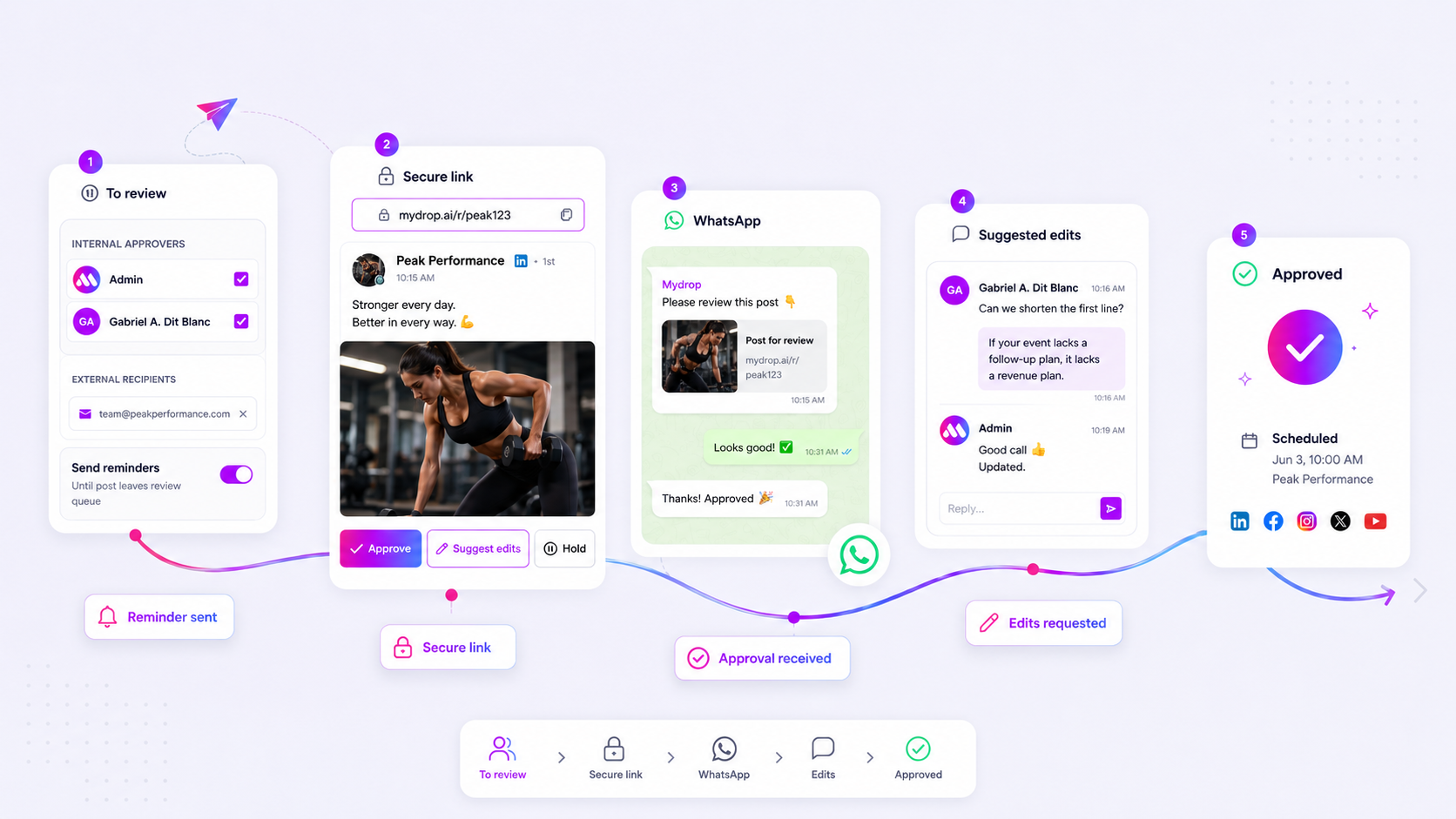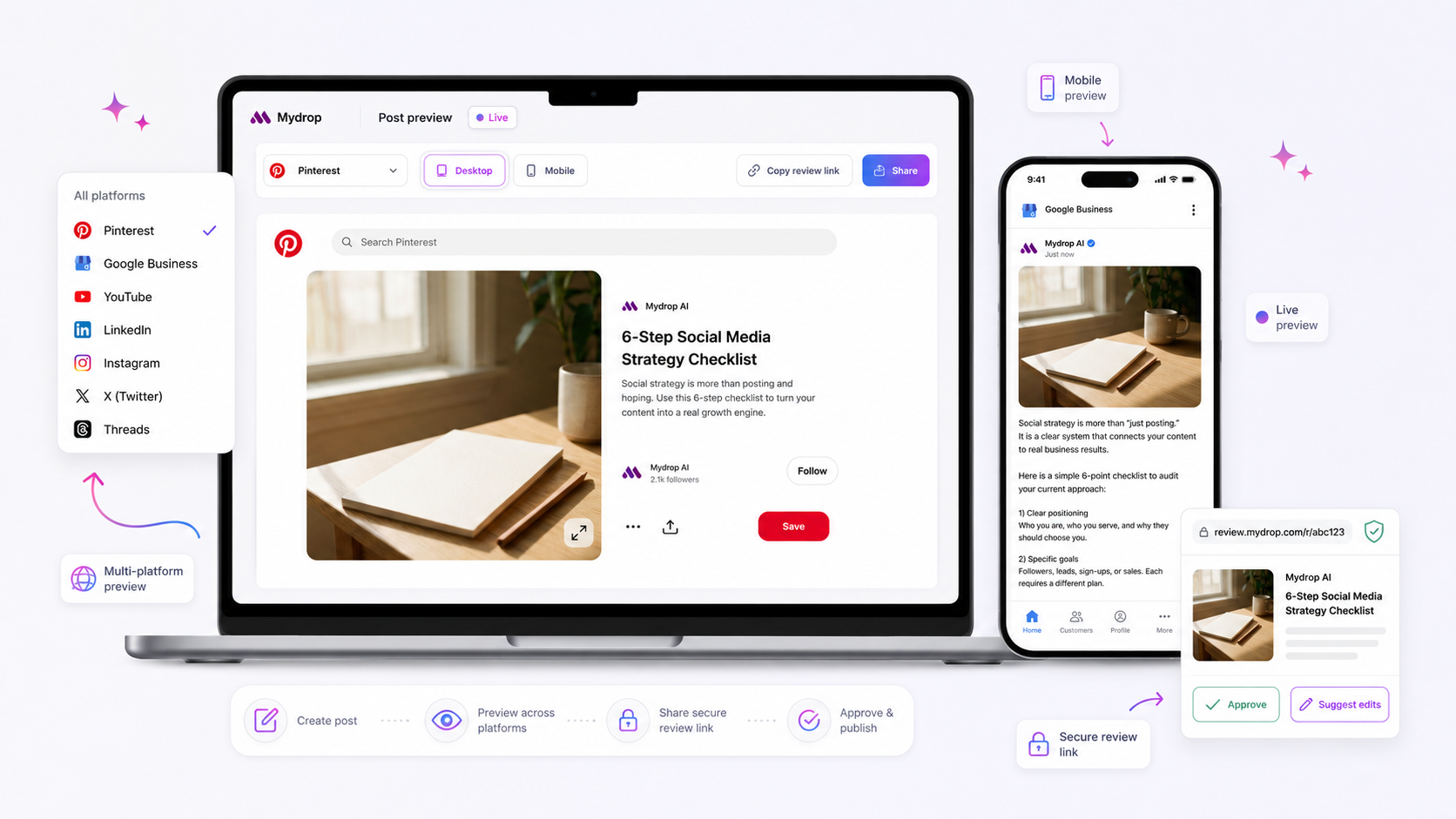
Your campaign stalls because creative assets are stranded in a fractured landscape of unlinked emails, fragmented feedback, and platform-specific formatting errors. The solution is to force every element-the file, the caption, the technical metadata, and the stakeholder sign-off-into a single, schema-aware workspace before a single post reaches a social network.
We understand the frustration. You are drowning in "final_final_v2.mp4" attachments, and your team is burning hours in Slack trying to figure out which version is cleared for which region. The mental load of keeping creative in sync with technical requirements is exhausting, and it turns every launch into a high-stakes guessing game. When you treat these components as separate files rather than one unified object, you invite the kind of avoidable failure that makes a Tuesday launch feel like a crisis.
Where the handoff is actually breaking

The breakdown happens the moment you move creative out of your design tool and into an unlinked review channel. Most teams treat the handoff as a relay race where information is dropped or garbled at each exchange. Your designer sends an export, a community manager drafts a caption, and someone else tries to figure out if that specific video resolution meets the platform requirements. By then, the original context is gone.
This cycle of passing files between silos creates a systemic failure we call fragmented synchronization. When the creative is decoupled from the platform logic, you inevitably end up with mismatched versions.
| Feature | Email/Slack Chaos | Unified Composer |
|---|---|---|
| Asset Source | Attached files in threads | Centralized, version-controlled library |
| Platform Logic | Manually checked (often wrong) | Schema-driven field validation |
| Approval | Separate approval emails | Inline status flags on the post |
| Metadata | Re-typed at the last minute | Captured during intake |
If your team is still spending the final hour before a launch chasing down missing thumbnails or re-typing location tags, your process is effectively bankrupt. The real issue is that most teams try to fix this by adding more process, rather than changing the environment where the work happens.
Common mistake: Treating approval as a "stamp of approval" on a finished file, rather than a sign-off on the full, platform-ready post configuration.
At Mydrop, we see teams managing hundreds of brand profiles who finally found stability by moving to a single source of truth. By using a composer that forces you to select your platforms upfront, you see exactly what fields you need to fill-whether it is a TikTok visibility setting, a LinkedIn post type, or an Instagram thumbnail-before you hit submit.
When you make the technical constraints visible at the exact moment the creative is being attached, you stop treating formatting as an afterthought and start treating it as part of the design process. You effectively move the decision-making closer to the source, ensuring that when the legal or brand lead hits "approve," they are looking at a ready-to-go post, not a creative concept that still needs technical assembly.
The coordination debt checklist

When your workflow relies on fragmented threads rather than a centralized source of truth, you aren't just losing time; you are actively accumulating a hidden operational backlog. This scorecard helps you audit your current process and diagnose where the friction actually lives.
| Check Item | Current Status | Why it matters |
|---|---|---|
| Unified View | [ ] | Does the uploader see the final caption and tags alongside the creative, or are they switching between tabs? |
| Approval Context | [ ] | Is the approval status attached to the asset, or is it buried in an unlinked email string? |
| Schema Accuracy | [ ] | Do you have to re-enter platform-specific fields (location, first comment, TikTok visibility) after creative is finalized? |
| Version Sync | [ ] | Is there a single source of truth for the asset, or are you hunting for "final_v3_real_v2"? |
If you checked fewer than two boxes, your team is likely operating with high manual overhead. Every time someone has to manually translate a strategy document into a platform field-like tagging a Threads thread or setting a YouTube visibility flag-you increase the risk of a compliance error or a botched launch.
Operator rule: If a team member has to open a separate document to remember the required fields for a post, you have already created an unnecessary bottleneck.
How to move decisions closer to the work
The most successful teams we have seen across hundreds of brands stop treating the creative and the technical requirements as two separate phases. Instead, they force every element-the asset, the caption, the stakeholder sign-off, and the technical metadata-into a singular workspace before the work is considered "drafted."
When you use a unified composer, you bring the intelligence of the platform requirements directly into the creative process. You stop guessing if a video's aspect ratio matches the required story format or if you have included the correct location data for a local market launch. By requiring these fields to be filled alongside the creative, you surface technical constraints before the legal or brand teams even start their review.
This shift changes the nature of your approvals. Instead of a manager asking, "Did you remember the first comment?", they are looking at a completed artifact that is ready to ship.
At Mydrop, we often see teams use the post editor to bake these decisions into the start of the workflow. Because the composer understands the requirements for each selected profile, it acts as a silent assistant that prevents you from entering the review loop with a technically incomplete post. You aren't just saving time on the backend; you are removing the need for those awkward, last-minute "can you please update this?" emails that drain your team's energy.
The goal is to stop the ping-pong of feedback. By centralizing the technical constraints of each platform-from TikTok visibility settings to Pinterest board assignments-directly inside the editor, you ensure that the creative vision survives the transition into a live post, intact and compliant.
The roles and rules that reduce rework
The reason creative handoffs become a black hole for productivity is simple: authority is rarely matched with context. You likely have a talented designer or copywriter who produces a brilliant asset, only for it to sit in limbo because the person managing the approval has no idea if the file fits the technical requirements for LinkedIn versus TikTok.
To fix this, you need to establish a centralized gatekeeping role. This person is not just an approver; they are the final validator. They check the post schema inside your composer before it ever hits the live environment. By assigning this role to someone who understands the platform-specific constraints-like first comment placement or thumbnail aspect ratios-you effectively kill the "we need to re-upload this" feedback cycle.
Decision check: Every asset must be validated against its final platform schema before the approval request is triggered. If the composer flags a missing location tag for a local campaign or an invalid file format for a specific placement, the submitter fixes it in place. No one should be approving "concept art" while hoping it magically conforms to the platform specs later.
This role creates a culture of front-loaded precision. Instead of "move fast and break things," your team operates on "define once and scale correctly."
The weekly habit that keeps the system honest
If you leave the hygiene of your campaign assets to chance, your library will turn into a digital graveyard of abandoned drafts and broken links within a month. You need a weekly operational reset to clear the pipes.
Every Friday, or early Monday morning, your social operations lead should run a Status Audit of all pending drafts. This is not just checking boxes; it is the act of pruning the work that lost momentum.
The 15-Minute Weekly Audit
| Focus Area | Action | Goal |
|---|---|---|
| Pending Drafts | Delete or archive any drafts missing an assigned campaign or date. | Maintain a clean, actionable workspace. |
| Approval Loops | Ping any stakeholder holding a post in review for > 24 hours. | Force a binary decision: Approve or Reject. |
| Metadata Check | Scan the latest batch for missing tags, thumbnails, or location data. | Prevent "day-of-launch" panic. |
| AI Context | Review saved chat sessions for ongoing creative discussions. | Summarize key learnings for next week’s content. |
This habit keeps the team honest. If a post has been sitting in "Pending Approval" for three days, it means the creative didn't land or the stakeholder is blocked. By forcing a decision every week, you stop the accumulation of unfinished work that clutters your dashboard and drains your team's focus.
Conclusion
The bottleneck in your campaign process is almost never about a lack of creative ideas. It is about the friction between those ideas and the technical reality of your distribution channels. When you keep the entire lifecycle-from initial brainstorm and AI-assisted captioning to final platform-specific schema validation-inside a single, unified composer, you stop chasing versions and start hitting goals.
Stop treating your handoff process like an ongoing negotiation over email. Start building a system where the constraints are visible, the approval is centralized, and the work is validated before the clock starts ticking. Your team will stop wasting energy on re-uploads and re-edits, and your launches might actually start feeling like a planned event rather than a last-minute scramble.