

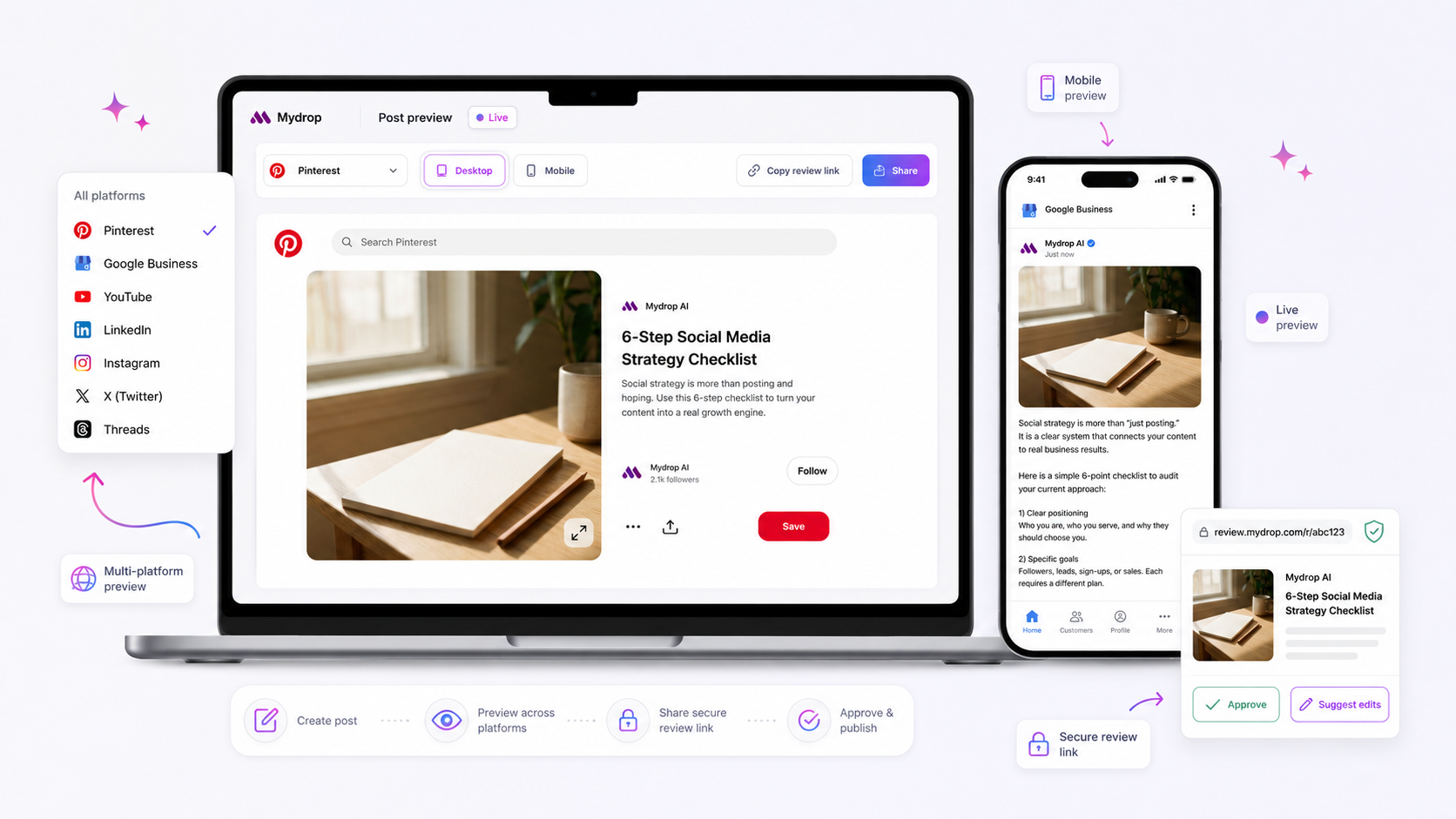
Your multi-platform posts are failing validation because you are treating the drafting phase as an exercise in creative writing rather than a schema-mapping exercise. The red flags you see at the finish line are rarely technical glitches; they are symptoms of a workflow that waits until the final second to reconcile the conflicting requirements of different platforms.
We get it. You are juggling five brands, a dozen channels, and a launch window that seems to shrink by the hour. It is easy to view the composer as just a place to polish your caption. But when you treat every platform as a generic slot for the same asset, you are guaranteed to hit a wall. That "validation error" isn't a bug; it is the system catching a collision between your content and the specific rules of the platforms you selected, which you simply did not have the visibility to see earlier.
The fix isn't more software. It is a change in discipline. You need to move your validation checkpoints to the beginning of the process, ensuring every media choice and caption tweak complies with platform constraints before you ever reach the scheduling screen.
Where the handoff is actually breaking

Most teams treat scheduling as a linear, one-way street: write, approve, select platforms, and publish. The breakdown happens because this model assumes that a post created for Instagram will naturally work everywhere else. In reality, you are managing a complex set of overlapping requirements.
When you draft in a silo and only attach your LinkedIn, TikTok, and Instagram profiles at the final step, you are inviting failure. Here is why this handoff fails:
- Late-stage discovery: You discover that your high-resolution video is perfect for Instagram Reels but violates the technical requirements for a specific platform’s ad unit, forcing a last-minute scramble to resize or re-export.
- Missing platform-specific triggers: You forget that Instagram allows a First Comment for hashtags, while other platforms may treat that as a separate post or ignore it entirely. By the time you realize you need a different strategy for each, you have to rip apart the entire post.
- Reviewer friction: Your stakeholders are approving content they think is "done," only for the system to reject the final post because a mandatory field-like a Pinterest board selection or a specific thumbnail aspect ratio-was left blank.
At Mydrop, we see this across hundreds of accounts: the best teams don't draft in a vacuum. They use the composer to surface these platform constraints the moment they select their channels. Instead of treating the tool like a simple text box, they view it as a live validator.
Operator rule: If you cannot validate your post against your target platforms within the first ten minutes of drafting, you are not ready to assign it to an approver.
The goal isn't to get to "Schedule" as fast as possible. The goal is to ensure the post is structurally sound for every destination from the first word you write. When you flip your process, you move from "fixing errors at 6 p.m." to "publishing with confidence at noon."
The coordination debt checklist
You can stop the last-minute fire drills by performing a quick audit before you open your publishing tool. Think of this as the flight check every pilot does, regardless of how many times they have flown the same route. If you wait until you are hitting "Schedule," you have already lost the leverage to fix issues without disrupting your team's rhythm.
Use this checklist to catch common mismatches before they become expensive rework:
| Audit Item | Why it breaks the flow | How to fix it early |
|---|---|---|
| Media Aspect Ratio | TikTok needs 9:16; LinkedIn prefers 4:5 or 16:9. | Standardize on a "safe" center crop for all platforms. |
| First Comment | Instagram and Threads allow it, but Facebook and LinkedIn may not. | Draft primary text as a standalone caption; reserve extras for specific platforms. |
| Character Limits | Headlines on LinkedIn or X are unforgiving compared to Facebook. | Write the shortest headline first; add detail to longer-form platforms later. |
| Asset Metadata | Missing alt text or thumbnails will cause a hard stop on professional networks. | Keep a shared folder of platform-optimized thumbnails ready before drafting. |
| Mentions & Tags | Handles vary across networks or might not be linked correctly. | Verify user handles against a central brand cheat sheet. |
How to move decisions closer to the work
The most successful teams we work with stop treating the composer as a "send" button and start using it as an early warning system. Instead of drafting in a separate document and only copying it into your management tool at the end, bring your platform selection forward. By picking your profiles at the very beginning of the creative process, you surface platform-specific fields-like required thumbnails or custom tags-while you are still in the mood to edit.
When you use the Mydrop composer, for instance, selecting your target channels immediately renders the unique input requirements for each one. This creates a "schema-first" workflow. If you realize that your chosen video format won't support a thumbnail on a specific platform, you find that out when you attach the media, not when you are staring at a failed publication report an hour before launch.
Decision check: If a platform field is mandatory in your management tool, treat it as a requirement in your brief. Do not assume you can "fill that in later."
This forces a shift in how you allocate time. You aren't just writing one caption and broadcasting it; you are mapping one core asset to the constraints of five different ecosystems. By making these small, platform-specific choices while the work is still "in-flight," you prevent the massive pileup of errors that usually happens during final review. It turns a chaotic end-of-day sprint into a methodical, predictable process. Most teams do not have a content problem; they have a decision bottleneck at the end of the pipeline. Fixing this means deciding early, rather than reacting late.
The roles and rules that reduce rework
The best way to stop the back-and-forth is to move the validation gate as far upstream as possible. When you leave platform-specific compliance checks until the final review, you are essentially asking your stakeholders to act as human error-catchers. That is a job that drains energy and invites oversight. Instead, clarify exactly who owns the final sign-off for each platform requirement.
We have found that teams operate best when they treat creative assets and platform technicals as separate but parallel tracks. The copywriter drafts the hook, but the channel lead owns the schema checklist. By assigning a clear owner to the final "technical sanity check" within the composer, you eliminate the ambiguity of who is responsible when a post hits a wall.
Workflow check: If a stakeholder cannot answer why a specific field (like an Instagram story duplicate or a LinkedIn post type) is required, that field should not be their responsibility.
Define these roles before your next campaign cycle:
- The Architect: Owns the content strategy and the initial draft in the composer.
- The Channel Specialist: Audits the platform-specific fields and metadata settings.
- The Approver: Reviews the final preview to ensure brand alignment, not to hunt for technical errors.
When these roles are distinct, your approval process stops feeling like a technical audit and starts looking like a creative review.
The weekly habit that keeps the system honest
If you are constantly surprised by validation flags, your process has a blind spot that won't fix itself. You need a short, tactical session to review the "near-misses" from the previous week. This isn't a post-mortem to assign blame; it is a collaborative audit to see where your internal rules drifted from platform reality.
Take twenty minutes every Friday to look at the posts that triggered red flags. Ask one simple question: "Could we have caught this on Monday?"
- Audit common conflicts: Are your templates consistently missing the latest character limits or thumbnail requirements?
- Update your internal checklist: If a rule changes on a platform, update your team's standard operating procedure immediately.
- Refine your composer presets: If you find yourself repeatedly adjusting the same settings for a specific brand, bake those into your recurring draft templates.
This habit transforms those annoying technical errors into a feedback loop. At Mydrop, we see the most successful teams treating these "validation misses" as data points, not just daily irritations. They use these insights to tweak their workflow, eventually reaching a point where the composer becomes a frictionless part of their day rather than a final hurdle.
Conclusion
The "validation whack-a-mole" you are playing is not a sign that your team is unskilled. It is a sign that you are operating at a scale where manual, ad-hoc processes have finally hit their limit.
When you treat post-composition as a structured mapping task-matching your creative vision against the rigid requirements of each platform-you reclaim the forty minutes you currently lose to last-minute fixes. You do not need more hours in the day; you need a clearer path to the finish line. Start by auditing one campaign this week, identify the specific point where your team lost alignment, and move that decision forward. Once you stop the constant rework, you will find that the real work-building a brand that resonates across every channel-finally gets the attention it deserves.




