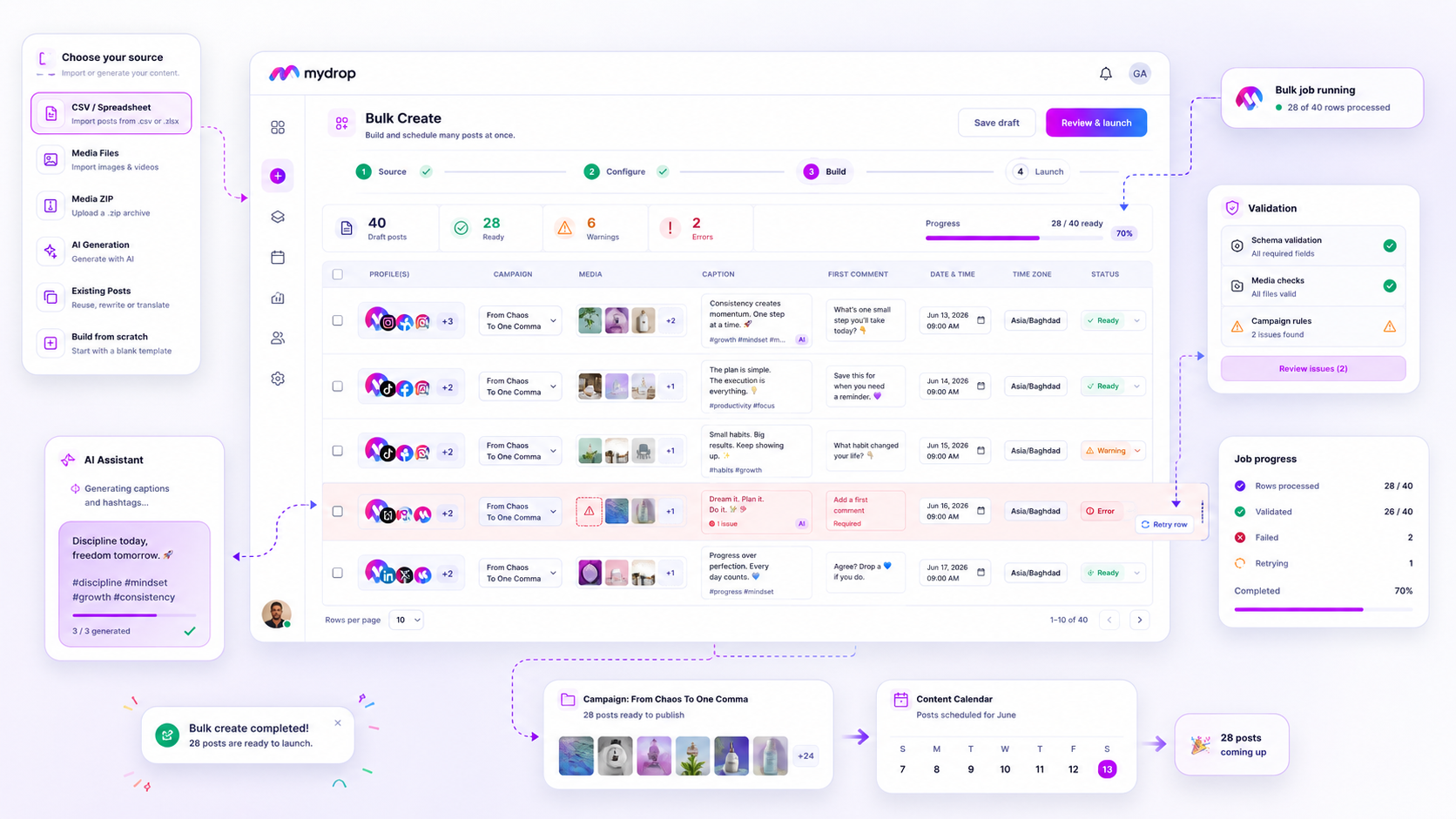
When a batch of 50 scheduled posts hits a wall in the Bulk Create modal, your first move should be to isolate the error by row, not by total batch failure. Most bulk import headaches aren't catastrophic system bugs; they are simple "coordination debt" issues-like a missing file in your ZIP, a date formatted for the wrong locale, or an unsupported image format-that prevent the system from validating the row. Instead of deleting the CSV and starting from scratch, use the row-level error log to identify the specific break, fix it, and retry only the rejected segments.
We get it. The campaign launch is in two hours, your team has spent days on the creative, and now the system is throwing red flags instead of scheduling posts. It is the kind of gut-punch that turns a high-speed production workflow into an agonizing manual cleanup session. But here is the good news: most failures are predictable, and once you know where to look, they are rarely fatal to your timeline.
The decision teams usually frame too broadly
The mistake most managers make is treating the entire bulk job as a single, indivisible unit of work. When the status changes to "failed," they panic, assume the entire dataset is corrupt, and waste hours manually rebuilding posts in the composer.
In reality, bulk processing is just a pipeline. If row 12 fails because of a broken image path, the other 49 rows are often perfectly valid and ready to go. The key is to stop viewing the job as a monolith and start treating it as a collection of individual tasks that can be audited and corrected independently.
Operator rule: Never scrap a full campaign because of a partial validation error. If the platform allows row-level retries, that is your primary path to recovery. Re-uploading the same file without fixing the underlying schema violation is just paying the same debt twice.
To get your head around why these failures happen, think of your source file as the "single source of truth" for your campaign. If that truth doesn't match the constraints of your destination platforms-like character limits, aspect ratios, or mandatory field requirements-the system has to stop.
The Failure Diagnostic
Here is how to quickly audit your inputs before you ever trigger the "Launch" button, based on the most common traps we see across large-scale social operations:
| Failure Type | Common Culprit | Fix Action |
|---|---|---|
| Data Integrity | MM/DD vs DD/MM date switch | Standardize dates to ISO-8601 (YYYY-MM-DD) |
| Media Bottleneck | Path mismatch in CSV vs ZIP | Verify relative paths; use a flat asset directory |
| Schema Violation | Missing handle or empty caption | Add a "Draft" placeholder for missing creative |
| Logic Conflict | Platform tag exceeds limit | Validate character counts per platform API docs |
When you treat these as data quality issues rather than "tech problems," your team stops feeling like they are fighting the software and starts acting like they are managing a high-velocity production line.
What should stay manual and what can move faster

The biggest mistake teams make with bulk creation is treating it like a magic button for every type of content. Some things are built for automation, like high-volume evergreen scheduling or routine promotional pushes. Other things are essentially hand-crafted gifts that lose their value the moment you run them through a CSV parser.
If a post requires deep creative nuance-like a specific, non-repetitive brand interaction, a sensitive announcement, or a highly visual story-keep it manual. Automation is for consistency, not for moments that demand a human touch. When you force a complex, bespoke post into a bulk import flow, you are almost guaranteeing a validation error because the schema simply wasn't designed for that level of variability.
For everything else, move it to the machine. If you are scheduling your standard distribution content across five markets, there is no reason for your team to manually re-build those posts in the composer. That is where we see the most coordination debt: talented people spending their best hours copy-pasting content instead of auditing the strategy.
The tradeoff matrix
To decide where your content belongs, use this decision framework. It helps you identify when you are adding unnecessary complexity to a bulk job versus when you are efficiently scaling your operations.
| Content Type | Automation Potential | Risk Profile | Recommended Workflow |
|---|---|---|---|
| Routine Distribution | High | Low | Bulk Create: Use CSVs with standard defaults. |
| Evergreen Reposting | High | Low | Bulk Create: Feed existing post history into the job. |
| Campaign Announcements | Moderate | Moderate | Hybrid: Manual setup for hero posts, bulk for supporting assets. |
| High-Touch Brand Stories | Low | High | Post Composer: Manual, high-care creation. |
| Real-time Crisis Comms | None | Critical | Manual: Single-item creation only. |
Decision check: If you find yourself manually editing more than 20 percent of the rows after importing a CSV, you have outgrown your schema. Stop the job, refine your defaults in the Bulk Create modal, and re-import. It is faster to fix the file than to patch the errors in the UI.
The goal here isn't to automate everything-it's to reclaim your team's time. When you use Mydrop to handle the heavy lifting of standardizing and validating your batch content, you aren't just moving faster; you are actually reducing the friction that leads to errors in the first place. By shifting the repetitive work to a structured process, you stop chasing data debt and start focusing on the actual quality of your output.
Ultimately, automation is a mirror. If your data is messy, your automation will reflect that mess on a larger scale. Spend the extra ten minutes on the front end to clean your source files, and you will save hours of headache in the Bulk Jobs listener when things inevitably need a quick, row-level retry.
How to pilot the workflow safely
When you are ready to hit launch on a massive batch, stop and treat the process like a commercial flight: you do not want to find out about a mechanical issue mid-air. The most reliable way to pilot a bulk workflow is to run a small-batch simulation before committing your full campaign file to the system.
Pick five rows from your CSV-ideally ones representing different scenarios, like a link-in-bio post, a video asset, and a plain-text update-and run them through the Bulk Create modal first. If these pass validation and appear as expected in your calendar, you have effectively de-risked the technical side of your import. If they fail, you catch the formatting error in five minutes instead of realizing at 4 p.m. that 200 posts are stuck in a "pending" death spiral.
Workflow check: Never upload a campaign of more than 20 rows without running a three-row "canary" test first.
This saves your team from the most common form of coordination debt: the "cleanup after launch" shift. Once you know your schema and your media paths are stable, you can layer in the full campaign with confidence. If you use Mydrop, you can also save these partial tests as drafts, letting you verify the output at your own pace before queueing the entire production job.
The operating rule to keep
The most resilient teams we support do not view bulk uploading as a "set it and forget it" task. They view it as a governance checkpoint. If your team treats bulk creation as a way to dump content into the calendar without oversight, you will inevitably end up with a mess of broken links, mismatched dates, and formatting errors that your community will see before you do.
Instead, formalize a simple "pre-flight" ritual. Assign one person to be the owner of the source truth-the master spreadsheet that everything pulls from-and mandate that no bulk job is launched unless the source data has been verified for date accuracy and media connectivity.
| Checkpoint | The "Why" |
|---|---|
| Asset Path Check | Ensures the system can find and render every media file before the row processing starts. |
| Date Consistency | Prevents the "MM/DD vs DD/MM" nightmare that can push content to the wrong month. |
| Placeholder Audit | Confirms all AI generation requests have corresponding creative context to avoid skipping steps. |
| User/Brand Sync | Verifies the posts are landing in the correct profile, not a sandbox or an inactive channel. |
This habit shifts the burden from "fixing broken posts" (which takes hours) to "verifying clean data" (which takes ten minutes). You will find that when your data is clean, the platform's automation becomes a force multiplier rather than a source of mystery errors.
Conclusion
Bulk import failures are almost always a symptom of missing alignment between your offline planning and your online requirements. You don't need a more powerful tool; you need a more disciplined way to translate your strategy into the platform's schema.
By isolating errors at the row level, testing your data in small batches, and treating your upload as a formal governance event, you take the chaos out of campaign day. Most teams struggle not because they lack great ideas, but because they haven't built a bridge between their creative intent and their execution pipeline. Build that bridge with these habits, and you will spend your time managing campaigns instead of debugging spreadsheets.