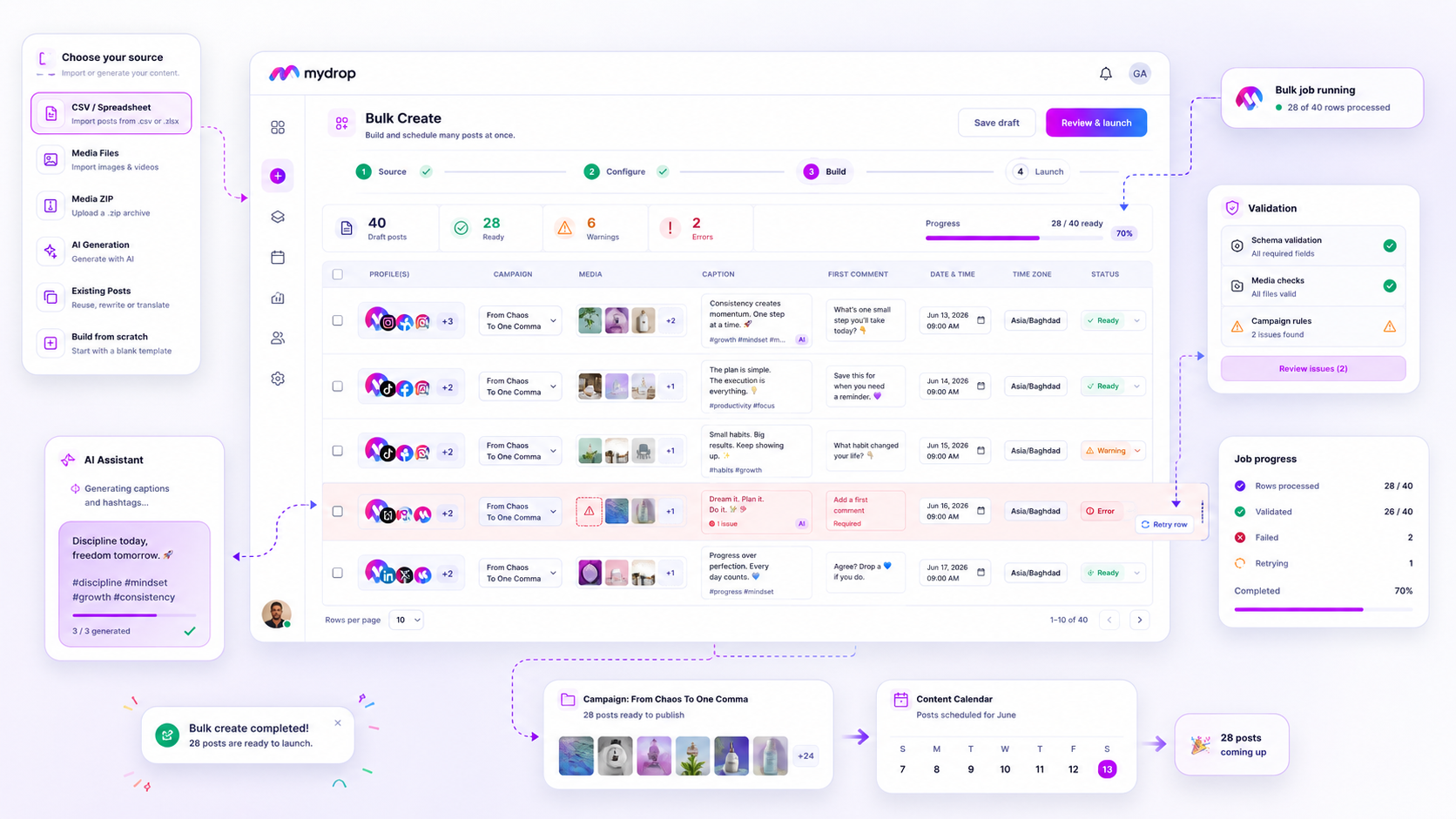
When your bulk campaign upload stalls at 40%, stop hitting refresh and back away from the re-upload button. Most bulk failures are not system errors but silent signaling errors-tiny discrepancies between your spreadsheet and the platform schema that turn a ten-minute import into an hour of manual damage control. Instead of deleting the batch and starting over, treat the failure as a diagnostic audit. You don't need a perfectly clean spreadsheet; you need the discipline to isolate the rows that are actually broken.
We get it. You have a massive campaign launch and a dozen stakeholders hovering over your Slack notifications. When the progress bar hangs, the pressure to "just fix it" by clearing the slate and re-launching feels like the safest move. It is actually the most expensive one. Re-uploading in a panic creates a mess of duplicate content and conflicting schedules that can haunt your calendar for weeks.
The decision teams usually frame too broadly

The mistake most teams make is viewing a bulk failure as a binary state: it either imported completely, or it failed completely. This leads to the "Re-upload Trap," where you end up with two half-finished campaigns and a mountain of cleanup.
In reality, bulk creation engines are designed to be granular. When you process rows in parallel batches, a failure in row 52 doesn't invalidate the successes in rows 1 through 51. The real operational failure happens when you treat the whole batch as a monolithic object rather than a collection of individual posts.
Across the thousands of enterprise campaigns we have seen, the most successful teams don't aim for "perfect imports." They aim for "high-resolution recovery." They use a simple row-level audit to distinguish between systemic configuration issues and localized data errors.
Operator rule: If a bulk job fails, your first action is to identify the failed row IDs, not the bulk job ID. Cancel the panic, not the batch.
The following audit table helps you determine whether you are dealing with a structural problem in your setup or a simple data mismatch that can be cleared with a quick retry.
| Failure Symptom | Most Likely Cause | Diagnostic Action |
|---|---|---|
| Complete job abort | Invalid CSV structure or schema mismatch | Check header names and required column types. |
| Multiple row failures | Mismatched media references in ZIP/cloud | Verify all image/video file paths are valid. |
| Intermittent row errors | API character or platform limits | Check caption lengths and platform-specific constraints. |
| "Queued" status hangs | Network/connectivity during async process | Wait for the job listener to report final state. |
Once you shift your mindset from "re-do the batch" to "patch the rows," you move from being a victim of your automation to being its operator. Most failures can be resolved by checking these three things: column mapping accuracy, media reference integrity, and character count limits. When you isolate the specific rows that flagged an error, you can verify the data, fix the discrepancy, and use a dedicated retry path to push only those missing pieces through the pipeline. This preserves your progress and keeps your stakeholders happy, even when the data hits a snag.
What should stay manual and what can move faster

The biggest mistake we see teams make is attempting to force high-context, high-variability content through the same pipe as routine, evergreen posts. Bulk import is a miracle for operational efficiency, but it is not a cure-all for creative strategy.
When you treat your CSV as a "set it and forget it" machine for everything, you lose the nuance that actually stops a scroll. Routine updates, status reports, and time-sensitive announcements with static media are perfect for bulk workflows. However, the high-stakes launch content that requires last-minute copy edits based on breaking industry news, or media assets that need delicate color-grading, should stay within your manual post-composer workflow.
If you find yourself manually overriding bulk-created posts because the "bulk" settings didn't capture the brand voice for that specific market or campaign, you are creating coordination debt. You are essentially doing the work twice.
The tradeoff matrix
To decide what gets automated and what needs a manual touch, use this matrix. It helps teams determine if a campaign segment is "bulk-ready" or if it belongs in the hands of a dedicated campaign manager.
| Campaign Segment | Automation Potential | Decision Rule |
|---|---|---|
| Evergreen / Repurposed | High | If media exists and copy is standardized, use Bulk Create. |
| Low-Risk Updates | High | Use bulk for standard alerts; save manual time for engagement. |
| High-Stake Launches | Low | Manual review is mandatory to ensure local market alignment. |
| Experimental Formats | Low | If the format is new, human oversight avoids platform-side display errors. |
| High-Frequency Data | High | Use for repeating content; keep manual for "event-driven" surprises. |
Decision check: Never bulk-import content that hasn't been approved in its final, asset-complete form. Using bulk import as a "drafting sandbox" for unfinished content will lead to 100 failed rows and a very messy afternoon.
At Mydrop, we see thousands of workflows, and the teams that succeed are those that treat bulk automation like a specialized tool, not a default state. They reserve the bulk-create engine for the heavy lifting of campaign distribution, ensuring that their creative team is free to focus on the 20 percent of content that actually defines their brand’s quarterly performance.
The goal isn't to automate 100 percent of your social presence. It is to automate the friction out of your supply chain so you can afford the time to be human where it matters most. When you stop trying to bulk-upload your creative soul, you’ll find that the few rows that do fail are much easier to handle. You stop panicking about the batch and start focusing on the specific row that needs a quick fix.
How to pilot the workflow safely
When you are pushing a large batch through, the difference between a minor annoyance and a full-blown crisis is how you handle the first sign of red text. You do not need to pause everything just because a few rows failed to validate.
The most effective teams treat the Bulk Jobs Listener not as a status monitor, but as an active command center. When you see a failure notification, the urge is to scrap the batch and re-import everything. Fight that urge. It is almost always cleaner to let the job finish, then inspect the specific errors.
Here is how you handle the "messy middle" like a pro:
- Stay with the job: If the job is still processing, let the worker finish. Closing the window or trying to force a cancellation often creates more cleanup work, as the system has to roll back partially completed posts.
- Filter for the failure: Once the job settles, head straight to the job history. Use the view to isolate only the
failedrows. You do not need to touch the successful ones. - Perform a surgical audit: Look at the specific error for one row. Usually, it is a simple mismatch-a date format that didn't parse correctly or an image link that went dead. Once you see the pattern, you can often fix all remaining failed rows in one go.
- Execute the targeted retry: Use the retry failed rows function. This bypasses the successful work, preserves your schedule, and clears your progress notification naturally once the batch is clean.
Workflow check: Never scrap a batch until you have exported the error log. Most bulk failures are caused by a single misconfigured column or a missing media file in a folder of two hundred. Fix the source, retry the failed rows, and move on.
The operating rule to keep
The ultimate goal of using bulk tools isn't just to save clicks; it is to build a predictable content supply chain. If your team is constantly troubleshooting the same CSV formatting issues, you are paying a "coordination tax" on every single launch.
We have found that teams who move from "panic-fixing" to "process-auditing" see their campaign turnaround time drop significantly. By standardizing your import templates and running a quick 5-point audit on your source data before you ever hit the upload button, you effectively move the failure point from "in-production" to "pre-flight."
Conclusion
Bulk campaign management feels high-stakes because it usually happens when the pressure is at its peak. But the reality is that a failed import is rarely a catastrophe; it is simply a diagnostic signal that something in your preparation didn't match the platform's requirements.
Stop treating the progress bar as a pass-fail test. Instead, treat it as a loop. Build your rows, validate the batch, and when-not if-a row fails, use it as a data point to refine your template. At Mydrop, we see the most successful agencies and brands treating their campaign factory as an iterative system. They don't aim for perfect uploads; they aim for clean, fast, and repeatable recovery paths. When you stop fearing the "failed" status and start using it to identify where your supply chain is breaking, you stop being a firefighter and start being a publisher.