

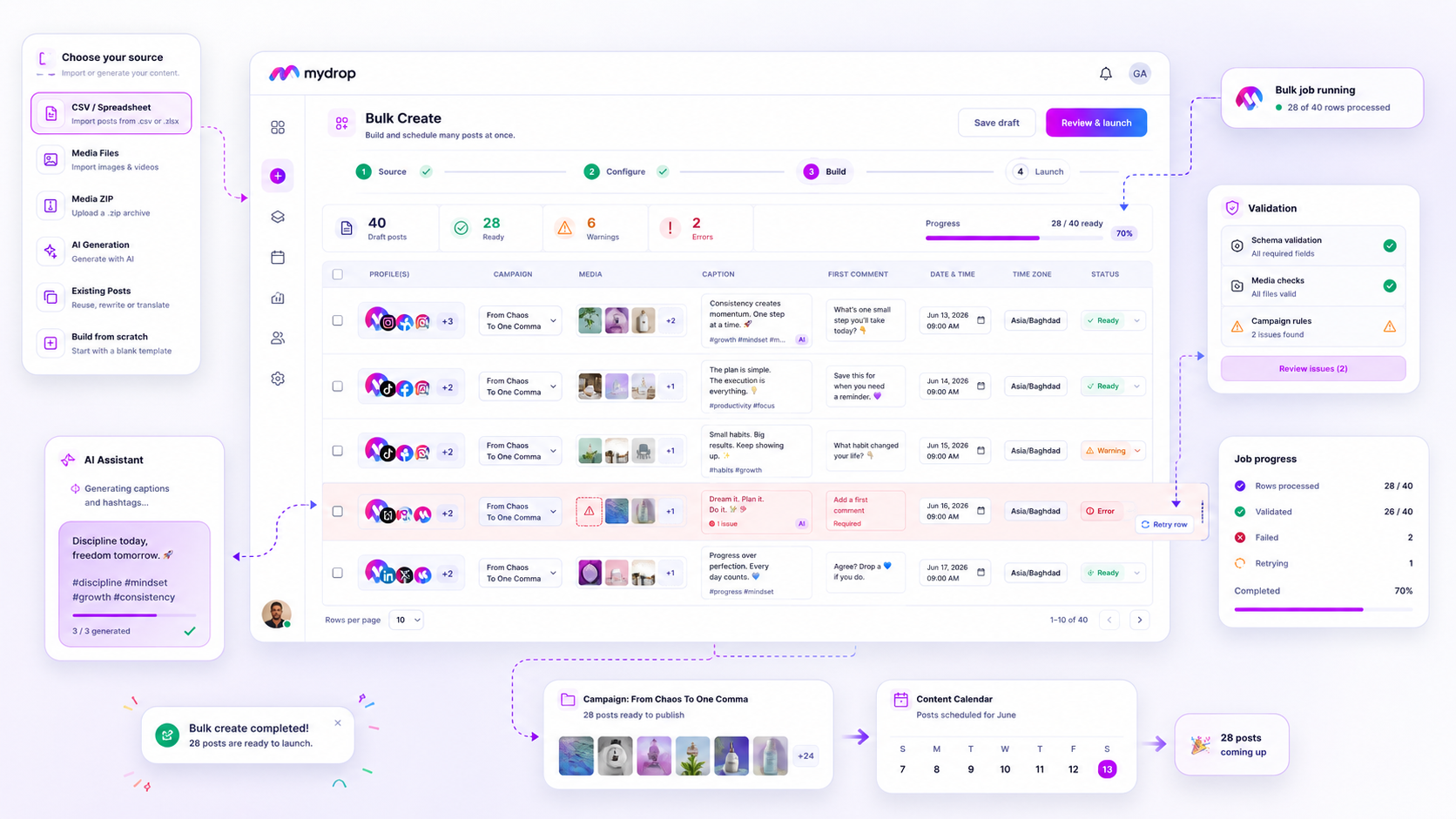
When a bulk social media job stalls at 80% completion, the impulse is to kill the process, scrap the CSV, and restart from zero. That instinct is your biggest enemy. You are not fighting a system failure; you are likely just fighting a single malformed row or an expired platform token. By treating bulk jobs as granular, row-level operations rather than monolithic events, you can transform high-stress launch days into repeatable factory-line workflows.
We get it-you have spent hours aligning a launch calendar across five brands and twenty platforms. Watching a "Job Failed" notification pop up right before a go-live feels like watching your hard work evaporate. This work is inherently messy, but you should not have to rebuild the entire house just because one brick was cracked. The goal here is simple: stop the total reset, isolate the point of friction, and finish the job you started.
The decision teams usually frame too broadly

The most common trap is asking, "Why did my bulk job fail?" That is a dead-end question. It forces you to look at the entire project as a binary success or failure. Instead, you need to ask, "Which rows failed, and why?"
When you shift your perspective to the row level, you stop reacting and start managing. You stop being the person who hits "Cancel" and prays the next attempt works, and you become the person who audits the individual errors.
At Mydrop, we often see teams get caught in the "All-or-Nothing" fallacy. They treat a batch of 200 posts as a single entity, which makes the recovery process feel impossible. But if you break that job down into its atomic parts-the content rows-you will often find that 195 posts were perfectly valid and only five were held up by a minor issue like a broken link or a date format that the system didn't recognize.
Operator rule: Never restart a bulk job until you have isolated and resolved the specific row errors first.
Most failures aren't systemic issues; they are localized data or permission mismatches. If your CSV is missing a required header or if an account token expired during the night, the system is simply doing its job by pausing that specific entry to protect your brand's integrity. Don't fight the safeguards. Learn to use the granular status reports to your advantage, fix the individual data points, and let the machinery finish its run.
Here is a quick way to triage your next stalled job before you lose your cool.
| Error Type | Common Symptom | Immediate Fix |
|---|---|---|
| Data Validation | Row status "Failed" immediately | Check CSV syntax, specifically date/time strings against your regional format. |
| Media/Asset | Post created but image missing | Verify the file path is accessible and the format (e.g., .webp) is supported. |
| Platform/Auth | "Permission Denied" error | Re-authorize the specific channel token; check if the platform revoked access. |
| Constraint | Over-limit or schema error | Confirm characters, hashtag counts, or conflicting campaign-level constraints. |
What should stay manual and what can move faster

The golden rule here is simple: Automate the assembly, never the strategy.
When we see teams struggle with bulk job failures, it is almost always because they tried to "batch" work that actually required human judgment. If you are uploading a CSV with 50 posts, that is a production task-a perfect job for a bulk creation engine. But if you are trying to guess how a brand voice should shift during a sudden market crisis, keep your hands on the wheel.
Strategy is a dialogue between your team and your stakeholders. Execution is just the delivery of that outcome. If you find yourself spending more time fixing metadata in a spreadsheet than actually refining your campaign narrative, you have shifted too much into the "fast" lane.
Decision check: If a change requires an internal sign-off or a brand-specific nuance that feels "fuzzy," do not bulk-create it. Keep it in your standard composer, get the human eyes on it, and then let the automation handle the final distribution.
The tradeoff matrix
To stop the cycle of "all-or-nothing" failures, you need to map your content against its risk profile. Not every post deserves the same level of granular oversight, and treating a high-risk brand announcement like a routine evergreen update is how you invite chaos.
Use this matrix to decide where to apply your energy.
| Complexity of Content | Low Scale (1-5 posts) | High Scale (50+ posts) |
|---|---|---|
| High (Sensitive, multi-market, legal risk) | Standard Composer: Manual review and individual scheduling. | Hybrid: Bulk-create the shells, then audit every row individually. |
| Low (Evergreen, templates, recurring series) | Standard Composer: Fine to handle manually. | Bulk Engine: Ideal for high-speed, validated production. |
Diagnostic Framework: When to trust the machine
When your bulk job hits a wall, stop. Instead of killing the process, use this logic to partition your path forward:
- Check the volume: Are 90% of your rows failing? That is an input issue (check your CSV headers, date formats, or media links). Fix the source file and re-queue.
- Check the distribution: Are specific platforms failing while others succeed? That is a token or permission issue. Refresh your credentials for those specific accounts and trigger a row-level retry.
- Check the asset: Did one massive video file break the process? That is a limit issue. Remove that asset, push the rest, and handle the heavy lifting manually.
At Mydrop, we see the most successful teams treat bulk creation as a factory line. You build the rows, you run a 3-row "smoke test" to ensure your syntax is perfect, and only then do you launch the job. If a single row trips a sensor, the system tells you exactly where the jam is.
You do not need to burn down the factory to fix one conveyor belt. When you can isolate the failure to a single row, you stop being a firefighter and start being an operator. That is the moment your team stops managing "social media crises" and starts hitting your content calendar with clinical precision.
How to pilot the workflow safely
The easiest way to avoid a full-scale catastrophe is to stop treating the "Launch Job" button as a leap of faith. Before you push a 200-post CSV into the machine, you should always run a 3-row smoke test.
It sounds simple, but it saves your team from the embarrassment of a mass-publishing error that would take hours to undo. Take three rows-one representing your "perfect" case, one with a complex asset like a video or carousel, and one intentional "edge case" if you have one-and run them through your bulk workflow. If these three clear validation and appear correctly in your staging area, the rest of the job has a significantly higher probability of success.
If you are using a platform like Mydrop, this is where the Bulk Create modal becomes your best friend. Instead of firing off the whole batch and walking away, use the preview step to spot alignment issues in your metadata or broken media links before they ever hit the server.
Workflow check: Never treat a bulk job as a "set and forget" task until you have successfully executed at least one smoke test with the current file.
The operating rule to keep
The most common trap we see in agency life is the cycle of "Delete and Restart." A job hits 95% completion, hangs on the final few rows due to a transient API hiccup or a minor formatting issue, and the team kills the whole process. That is a massive waste of energy.
Instead, shift to a Row-Level Lifecycle mindset. In a robust system, rows don't just disappear; they hold state. If a row fails, let it stay failed. Don't touch the other 199 posts that are already queued and ready for approval. Focus your energy only on the specific rows that flagged an error. Once you have tweaked the CSV syntax or refreshed the specific token for those dead rows, hit the retry button.
You are effectively turning a high-stress, all-or-nothing event into a simple, iterative cleanup task.
| Phase | Strategy | Benefit |
|---|---|---|
| Intake | Validate 3-row smoke test | Catch syntax errors early |
| Processing | Monitor job progress in real-time | Spot bottlenecks as they form |
| Failure | Isolate failed rows only | Prevent full job abandonment |
| Cleanup | Batch retry fixed rows | Restore 90% of lost time |
Conclusion
At the end of the day, bulk scheduling failures are just data points disguised as disasters. When you strip away the panic of a missed deadline, you are left with simple, fixable problems: a stale token, a mangled date, or a broken file link.
Most teams do not have a "process" problem. They have a coordination bottleneck. By moving from monolithic "launch-and-pray" cycles to a granular, row-level management style, you shift the burden off your shoulders and back onto a repeatable, predictable machine.
Next time a job hits a snag, don't reach for the delete key. Open the job log, check the row status, fix the single brick that cracked, and let the rest of your campaign launch exactly as planned. Your sanity-and your team's Friday afternoon-will thank you.



