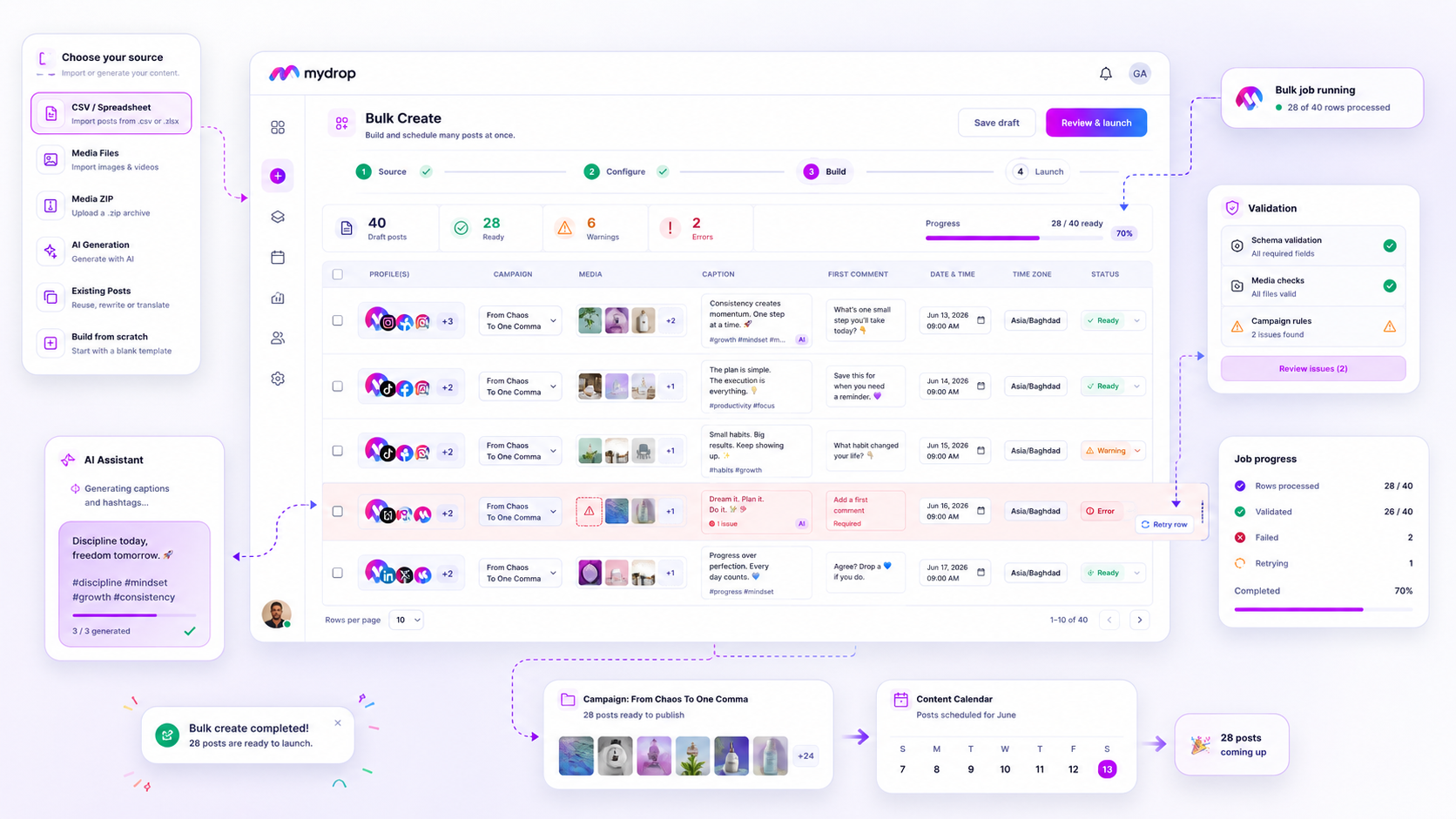
Stop manually building your post-campaign calendar. When your launch schedule exceeds fifty assets, the standard composer transforms from a creative tool into a mechanical trap, forcing your team to repeat identical configurations until errors become inevitable. You are not failing to execute; you are hitting a hard ceiling where human input cannot keep pace with campaign requirements.
The shift to bulk creation is not just about raw speed. It is about replacing fragile, manual steps with a repeatable, validated process that locks in your governance before the first post hits a single platform.
We get it. You have been told that high-touch, individual post creation is the only way to ensure quality. But when you are managing multi-brand initiatives or cross-market drops, that approach often leads to versioning mismatches, inconsistent tagging, and a frantic race to correct broken links at the eleventh hour. The goal is to move your team away from firefighting and toward a campaign factory model, where you define the standards once and let the system handle the heavy lifting.
The decision each metric should trigger

You can tell exactly when to abandon the manual composer by tracking where your energy goes during a launch. If your team is spending more time on data entry, formatting tweaks, and triple-checking compliance than on actual strategy, it is time to switch.
Use this decision matrix to identify your next move:
| Scenario | Primary Friction | Recommended Workflow |
|---|---|---|
| Low complexity, low volume | Basic scheduling tasks | Manual Post Composer |
| High complexity, low volume | Custom stakeholder approvals | Post Composer + Templates |
| Low complexity, high volume | Repetitive input overhead | Bulk Create (CSV/Scratch) |
| High complexity, high volume | Scaling creative assets | Bulk Create + AI/ZIP Packages |
Operator rule: If a campaign requires more than three hours of manual data entry for a single launch, you have already moved past the point where human accuracy can be guaranteed.
When your volume is high, your biggest risk is not a bad creative choice; it is a batch-wide failure caused by one misformatted row. At Mydrop, we see teams move from scattered, error-prone spreadsheets to centralized bulk jobs because they need to see exactly which posts pass validation and which rows need a quick touch-up. This is how you reclaim your time, ensuring that your senior operators spend their energy on brand strategy rather than fixing broken metadata.
The scorecard that keeps reporting useful

Stop obsessing over vanity metrics before your campaign has even finished its first week. When you run a batch of fifty posts, reporting needs to shift from post-level tracking to batch-health monitoring. If you spend three hours manually aggregating performance data for every single asset in a bulk run, you have already lost the efficiency gains you fought for during the launch.
The best operators we see use a simplified scorecard. Instead of checking if "Post #34" hit its exact like target, they look at the aggregate signal. If you are using Mydrop, the Bulk Jobs interface gives you that roll-up view automatically, showing which percentage of the campaign landed as expected and where the gaps remain.
| Metric | Why it matters | Decision Trigger |
|---|---|---|
| Row Success Rate | Identifies if your creative assets or copy had format mismatches. | If <95%, audit the source CSV or media set before the next run. |
| Publish Latency | Measures if your scheduled timeline was hit without platform delays. | If >30 min variance, check your timezone configuration or API connection. |
| Error-to-Action Ratio | Tells you how long your team spent fixing versus creating. | If >1:5, transition from manual composer to bulk automated workflows. |
| Validation Failures | Highlights recurring governance or compliance blockers. | Use these to update your global defaults and templates. |
Use this scorecard to decide if a campaign needs a course correction or just more time to breathe. If a bulk job shows a 90% success rate, don't waste your senior manager's time hunting for the missing 10%. Just trigger a targeted retry of those failed rows and move on to the next strategy meeting.
What to stop measuring by default
You need to ruthlessly cut data that creates noise without helping you make a decision. Most enterprise teams drown in "process metrics" that don't actually change how they work.
Stop tracking these three things immediately:
- Total cumulative likes across all posts. It is a feel-good metric, but it tells you nothing about which segment of your campaign actually moved the needle.
- Individual post-editor login times. If you are tracking who spent how long in the composer, you are managing time-sheets, not social impact. If the work is done, let it go.
- Draft-to-publish duration for minor content. If a post takes four days of back-and-forth for a routine update, your approval process is the problem, not the staff.
The goal of shifting to automated batch production is to free up your team to solve high-level creative problems, not to micromanage the scheduling interface. If you find your team is still spending significant hours manually verifying posts after they have been pushed through a bulk engine, look at your approval thresholds.
Decision check: If your team spends more than ten minutes per bulk-created post in post-launch verification, your automated validation rules are too loose or your trust in the initial source data is too low.
When you trust your batch process, you stop auditing the machine and start auditing the results. That is the moment your department moves from a glorified broadcast desk to a true campaign factory.
How to connect metrics to next actions
Most dashboards are digital graveyards where perfectly good data goes to die. To make numbers actually work for you, map every reportable trend to a specific operational lever. If you see a dip in engagement across a bulk job, don't just stare at the line chart; look at your row-level status.
We often see teams treat "failed rows" as an abstract problem, but at Mydrop, we treat them as individual work items. When a batch hits a snag, your next action should be binary: retry the specific failed rows or tweak the input source.
Here is how to map your output signals to the right move:
| Observed Signal | The "Why" | Your Next Action |
|---|---|---|
| High Row Failure Rate | Validation mismatch or asset timeout | Check the row-level error logs and update your source CSV or media set. |
| Consistent Caption Tone Mismatch | AI generation needs better context | Tighten the campaign defaults in your next Bulk Create configuration. |
| Batch Completion Latency | Network overhead or API limit hitting | Increase your buffer time or split your large ZIP packages into smaller batches. |
| Unexpected Content Volume | Too many active bulk jobs | Cancel and re-queue to clear the path, or use the bulkJobId to identify and scrub orphan posts. |
Workflow check: Never "hope" a failed batch fixes itself on a retry. If a row failed twice, there is a structural issue in your source file. Fix the source, then hit retry.
The review cadence that makes the model stick
A campaign factory only runs as smoothly as its final checkpoint. If you aren't reviewing your bulk-create activity as part of a recurring rhythm, you will inevitably drift back into manual, high-risk work.
The secret is separating technical validation from brand approval. Your technical team should handle the row-level validation (ensuring links, tags, and character counts are clean), while your brand leads handle the creative look and feel.
Run this three-step review cadence to keep the system clean:
- The Pre-Flight (Weekly): Review the bulk job status for all upcoming drops. If a job is still in
queuedorpendingstate 48 hours before the target date, investigate the bottleneck. - The Post-Batch Audit (Real-time): When a
Bulk Createjob finishes, glance at the completion summary. Did every row clear? If not, address those items immediately rather than letting them pile up. - The Monthly "Clean-House" (Monthly): Search by
bulkJobIdto identify any lingering drafts or misfired experiments. Using Mydrop's bulk cleanup capability to delete these stale assets prevents your calendar from becoming a messy, unnavigable workspace.
Conclusion
The transition from manual composition to a campaign-scale engine is rarely about the tech itself. It is about admitting that your current process has a ceiling. When you move to an automated workflow, you aren't just saving time; you are shifting your team's energy from "copy-pasting text" to "governing the strategy."
Stop fighting the clock every time you launch a product or run a seasonal blitz. By using bulk jobs to handle the heavy lifting, you build an operating habit that scales. You get to keep the creative control that matters while offloading the mechanical errors that don't. At the end of the day, your brand deserves a professional, predictable delivery pipeline, and your team deserves a week that doesn't end in a frantic, manual scramble.