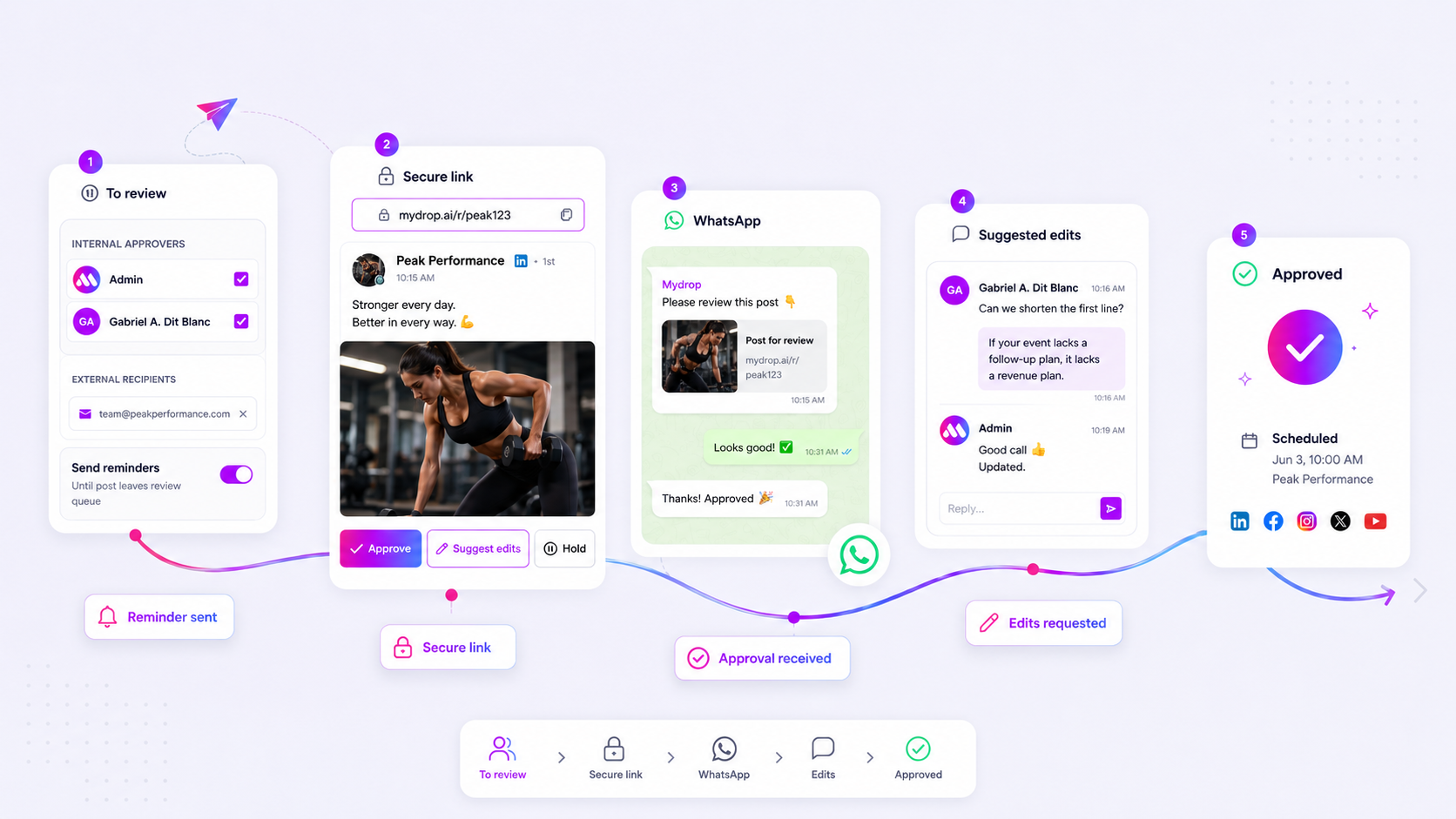
Stop hunting through fragmented email threads, Slack DMs, and project management comments to find out if a client approved that holiday campaign. The best collaboration software doesn't just centralize comments; it bridges the gap between external client feedback and your internal workspace without forcing clients into yet another login portal.
We know the drill. You have a high-stakes campaign ready, but the approval is buried in an email thread three departments deep, with different versions of the creative attached to each reply. It is messy, it is stressful, and it kills your velocity. When your feedback loops are disconnected from your actual creative assets, you are not just managing social media; you are managing a coordination disaster waiting to happen.
Across teams managing hundreds of brand profiles, we have seen that the real bottleneck is rarely the creative work itself. It is the friction of getting the right eyes on the right version at the right time. If a client has to jump through hoops to leave a simple note, they will default to email, and your team is back to square one, manually transcribing feedback while hoping nobody misses a detail.
What the best tools need to handle

To scale, you need to stop thinking of collaboration as a place to store chat logs and start seeing it as a unified feedback bridge. The best platforms treat conversations as metadata attached to the asset, not as separate ticket items.
When evaluating software, look for these three non-negotiables:
- Asset-Linked Context: If a stakeholder leaves a comment, it must be tethered to the specific version of the post. No more "the red one" when you are on version five of the creative.
- Frictionless External Access: Authentication is a progress killer. Your tools must allow clients to open an approval link, leave a comment, and trigger a reaction without needing to create an account or navigate a complex portal.
- Intelligent Notification Fan-out: Feedback is useless if it sits in a void. A high-performing system should automatically notify the relevant team members the moment a client interacts with a post or portal surface.
Common mistake: Teams often rely on general project management tools that require external stakeholders to log in. In our experience, forcing a client to authenticate just to say "looks good" is the fastest way to drive them back to email, effectively destroying your centralized source of truth.
At Mydrop, we see this pattern constantly: teams struggle not because they lack communication tools, but because their tools are fragmented. The goal is to move from "chasing approvals" to "managing progress." When your feedback lives where the work lives, you eliminate the version chaos that plagues enterprise agencies. If your collaboration software isn't bridging that gap between public approval links and your internal workspace, it is just adding another layer of noise.
Where basic tools start to break

Most teams rely on a mix of generic project management tools and email to handle feedback. It works fine for a team of three managing two brands. But once you hit ten stakeholders and twenty active campaigns, the coordination debt becomes crippling.
The primary failure point is authentication friction. If your collaboration tool requires a client to sign in, create a password, or navigate a complex dashboard, they simply won't use it. They will hit reply on your latest email, attach a marked-up PDF, and send it to three different people. Now, that feedback is locked away in a siloed thread, disconnected from the actual asset in your workspace.
Basic tools also lack the structural context needed for high-velocity social media operations. When feedback arrives as a generic comment, it rarely links to specific media versions or timestamps. You end up wasting hours manually reconciling email threads against your content calendar.
Watch out: Treating a generic ticketing system as a creative review portal. If the software cannot distinguish between an internal team note and a client-facing edit request, your team will eventually delete a private comment by mistake or miss a critical client directive buried in the noise.
The buying criteria that matter
When evaluating collaboration software, you need to look past the marketing promises and stress-test the actual review loop. You are not just buying a chat window; you are buying a feedback bridge.
Use this scorecard to evaluate your current or potential tools. If a tool fails more than two of these criteria, it will become an administrative burden within six months.
Agency Review Scorecard
| Criterion | What to look for | Why it matters for enterprise scale |
|---|---|---|
| No-Login Access | Can clients comment via a secure, tokenized link? | Removes the biggest barrier to client adoption. |
| Asset-Linked Threads | Is the conversation anchored to a specific media version? | Eliminates version confusion; no more "which file?" emails. |
| Notification Fan-out | Are the right team members notified automatically? | Keeps the account team in the loop without manual tagging. |
| Internal/External Scoping | Can you keep internal strategy private from clients? | Protects your internal workflow while enabling collaboration. |
| Audit Trails | Is every change request time-stamped and version-mapped? | Essential for compliance and accountability. |
The 5-Point Non-Negotiable Checklist
If you are currently evaluating tools, ensure the platform supports these specific workflows to avoid the email graveyard.
- Direct-to-Asset Feedback: Comments must appear on the asset itself, not in a general project sidebar.
- Notification Intelligence: Does the system ping the relevant creator or manager as soon as a client hits "post"? If it requires a manual "you've been tagged" email, your velocity will drop.
- Sanitized Guest Access: The portal must provide a clean, brand-safe UI that hides your internal workspace architecture while exposing only the necessary assets.
- Reaction Support: Sometimes a simple "thumbs up" from a client is enough. If a tool forces a comment for every minor approval, you are just adding friction.
- Native Integration: Feedback should trigger workspace updates instantly. If you have to export data from your review tool into your management tool, you are still living in the "feedback-via-email-chain" era.
At Mydrop, we often see that the best review process is the one your client forgets they are using. If they can leave feedback as easily as sending a text, they will do it-and your team stays in control. Most teams do not have a content problem; they have a decision bottleneck. The right software turns that bottleneck into a straight line.
How Mydrop supports this workflow
At Mydrop, we have seen that most social media "failures" at the agency level are actually just coordination debt-the interest you pay on delayed decisions, misaligned versions, and scattered communication. We built Mydrop specifically to stop the inbox madness by anchoring every conversation directly to the creative asset.
When a team uses our platform, you are not waiting for a client to log into yet another portal or digging through a chain of 40 emails. Instead, your approval flow and internal chat exist in the same environment. When a client clicks an approval link, they do not need to create an account. They can drop feedback directly on the asset, and that comment automatically surfaces as a conversation thread for your team.
This creates a clean public-to-private bridge. Your client sees a simple, safe portal, while your team gets an in-app notification that triggers an immediate workflow. No one has to copy-paste feedback into a tracking sheet, and the "version drift" between what the client saw and what the designer is editing vanishes.
A simple shortlist checklist
If you are auditing your current tools this week, use this 5-point checklist to see if your feedback loop is actually built for scale or just waiting to break.
| Feature Requirement | Why it matters |
|---|---|
| No-Auth Guest Access | If a client has to sign up, they will email you. Period. |
| Asset-Tethered Threads | Comments must be linked to the specific creative, not a general ticket. |
| Real-time Fan-out | New feedback should auto-notify only the relevant team members. |
| Sanitized Portal State | Clients should see only their brand, never your internal workspace mess. |
| Cross-Device Reactions | Emoji reactions on messages reduce "got it" email noise by 80 percent. |
Operator rule: If your feedback tool requires a login for the client, you are not using a collaboration tool; you are using an obstacle course.
Conclusion
Most teams do not have a content problem. They have a decision bottleneck.
Fixing this is not about buying more software; it is about choosing a platform that forces communication to live where the work actually happens. Stop letting your high-stakes campaigns die in the graveyard of an email thread. When your team can move from "feedback" to "finalized" without switching windows, your output velocity will naturally double, and your team will actually enjoy the process again.
If you are ready to stop chasing approvals at 6 p.m. and start building a tighter, faster machine, it is time to stop the context switching and start centralizing your conversations. Your creative team, your account managers, and-most importantly-your clients will thank you.