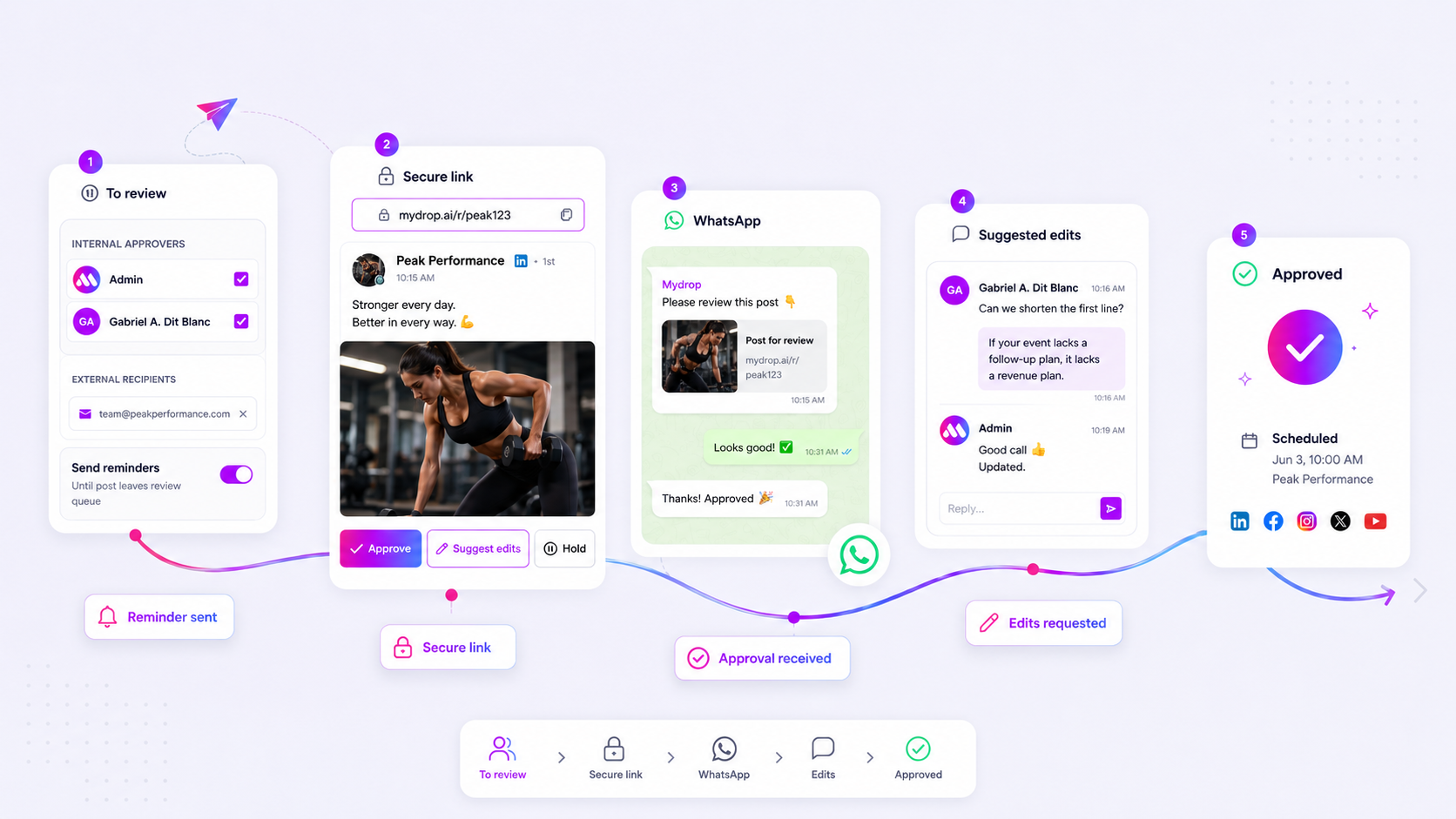
The best social media calendar isn't just a scheduling grid. It is a high-precision filter that allows stakeholders to see only the content requiring their specific approval, organized by brand and campaign. If your team is still chasing down sign-offs via email threads or tracking status in a static spreadsheet, you aren't just moving slowly. You are actively building coordination debt that will eventually break your publishing rhythm.
We get it. You are juggling ten different brand voices and twice as many stakeholder groups. Somewhere between the "final-final" attachments and the missing Slack pings, you are losing hours to manual status tracking. The good news is that this isn't a failure of your creative process; it is a failure of your interface. You need a centralized calendar surface that acts as a single source of truth, effectively killing the email bottleneck for good.
What the best tools need to handle

When you move from managing a single account to overseeing a multi-brand operation, your calendar needs to act less like a whiteboard and more like a database. Basic scheduling tools fail here because they treat all content as equal. In an enterprise environment, a post for a flagship brand requires a different approval path-and often a different reviewer-than a post for a local affiliate.
The best tools on the market prioritize atomic status updates. Instead of relying on a human to manually update a "Pending" cell in a spreadsheet, the tool should update the post status automatically based on the user's action. If you click "Approve," the post should immediately unlock for the publishing pipeline.
Operator rule: If your calendar tool doesn't allow you to filter by post status, campaign, and profile group simultaneously, it isn't an enterprise calendar. It is just a display case for your next set of missed deadlines.
At Mydrop, we see teams struggle most when their calendar view is a monolithic dump of every post across every brand. You need granular visibility. The best platforms allow you to save specific views: "Q3 Campaign Approvals for North America," for example. This turns a high-pressure, broad-spectrum review into a series of focused, manageable tasks.
If you are evaluating a tool, look for these requirements:
| Requirement | Why it matters for enterprise scale |
|---|---|
| Filtered List Mode | Allows bulk review of pending items across disparate brands without manual sorting. |
| Permissioned Actions | Ensures legal and brand managers only see (and edit) what they are authorized to touch. |
| Status-Driven Workflow | Changes state on action (e.g., Draft -> In Review -> Approved) to prevent publishing errors. |
| Unified Preview | Keeps creative, caption, and metadata in one view so reviewers don't hunt for attachments. |
Most teams do not have a content problem. They have a decision bottleneck. If your tool doesn't make it blindingly obvious what needs to be approved right now, it is part of the problem.
Where basic tools start to break

Most teams start with the same toolkit: a spreadsheet, a shared folder, and a long string of "final-final-v2" emails. It works perfectly-until it doesn't. When you are managing three brands, the spreadsheet is a fine start. But once you scale to a dozen profiles across multiple regions, that spreadsheet inevitably transforms into a crime scene.
The breakdown usually happens in three predictable spots:
- The context-switching tax: You are looking at a row in a sheet, then jumping to a folder to check the image, then searching your inbox to see if the legal team approved the copy. You lose ten minutes every time you pivot.
- The "black hole" status: A post sits in a "Pending" state, but no one knows who is actually looking at it. Is it with the designer? Did the regional manager miss the email? The tool doesn't know, so you have to send another message to ask.
- Lack of granular visibility: If your tool shows you every post for every brand at once, you will spend half your day just filtering through noise. If you can’t isolate only the content that requires your specific sign-off, you are wasting energy on things that don't need your eyes.
We see this across agencies and enterprise teams all the time. The hidden cost isn't the work itself; it's the constant, low-level coordination debt created when social content lives in attachments rather than a living, status-aware calendar.
The buying criteria that matter
If you are shopping for a tool to solve this, stop looking for "features" and start looking for "friction reducers." An enterprise-grade calendar shouldn't just display dates; it should act as an active gatekeeper for your brand.
Here is a simple scorecard to evaluate whether a platform can actually handle your volume without forcing you back into the email trap.
| Criterion | What to look for | Why it matters |
|---|---|---|
| Atomic Statuses | Can you move a post from Draft -> Review -> Approved within the calendar UI? |
If the tool requires a status update in a separate tab, the calendar is just a static picture. |
| Filtered Views | Can you save a view like "All pending posts for Brand X" and return to it instantly? | Filtering by campaign or brand group is the only way to stay sane in a high-volume environment. |
| Unified Preview | Does clicking a slot open the full post, assets, and approval buttons in one window? | Opening three different windows to check a post is why your team keeps going back to email. |
| Contextual Notes | Can you leave a note directly on the post card for the creator? | Keeping feedback tethered to the content keeps the audit trail clean and visible to everyone. |
| Multi-Role Permissions | Can you restrict who can approve, edit, or publish on a per-brand basis? | Without this, you are one accidental click away from a compliance nightmare. |
Decision check: A calendar tool is not a "source of truth" if your team has to email to verify the status of a post. If the tool doesn't show you the state, the work doesn't exist.
When you look for your next tool, prioritize the List Mode visibility. While a monthly grid is great for high-level planning, an enterprise team lives in the list view. Being able to sort by Approval Status and bulk-select items is the difference between clearing your queue in five minutes or five hours. At Mydrop, we designed our calendar to treat these filters as the primary navigation. We assume you don't want to see everything; you want to see the specific set of tasks that are currently stuck in your lane.
This is the part most teams underestimate: you aren't just buying a place to drop posts on a grid. You are buying a way to stop the "Hey, is this approved?" Slack messages that derail your entire morning.
How Mydrop supports this workflow
In our experience, teams don't actually need more "features"; they need a clearer line of sight. At Mydrop, we built our Calendar Planning surface to function as that missing filter between a messy brainstorming session and a live social feed.
When you open the Mydrop calendar, you aren't just looking at a grid. You are looking at a state-aware engine. Because we pull data directly into unified views, you can immediately toggle your view to show only the "pending approval" items across five different sub-brands. If you are a manager responsible for regional compliance, you don't have to scroll through global noise; you simply apply the profile group filter and focus entirely on the queue that actually needs your signature.
The real efficiency gain happens in the post preview actions. Instead of toggling to email to suggest a copy change, you open the preview directly on the calendar, make your edit or note, and trigger the status shift. The system handles the rest, ensuring that the person who created the post gets the notification exactly where they are working. It removes the "email tax"-that constant context switching that turns a ten-second approval into a ten-minute distraction.
Workflow check: Never approve content in a place where you cannot also edit it. If your current tool forces you to read a draft in one window and type feedback in another, you are not managing a workflow; you are managing a courier service.
A simple shortlist checklist
If you are evaluating tools to replace your current spreadsheet-plus-email nightmare, use this criteria. If the tool can't hit these five marks, it's just a prettier version of what you already have.
| Criteria | Why it matters |
|---|---|
| Atomic Status Triggers | Can a status change (e.g., "Ready to Review") instantly notify the right stakeholder without manual email? |
| Cross-Brand Filtering | Can you isolate content by profile group or campaign in under three clicks? |
| Contextual Previews | Do you see the actual rendered post rather than a link to a separate document or thread? |
| Integrated Edits | Can you fix a typo or swap an asset from within the preview without breaking the approval loop? |
| List Mode Visibility | Can you toggle to a sorted list view for bulk review during high-volume periods (like product launches)? |
Conclusion
The bottleneck in your content operation isn't the creative process; it is the coordination debt. Most teams don't need a more expensive scheduling engine-they need a single source of truth that keeps stakeholders informed without turning their inboxes into a graveyard of "final-final" drafts.
Moving your team to a status-aware calendar isn't just about moving boxes on a grid. It is about reclaiming the hours you currently spend chasing updates. When your calendar stops being a passive visual layer and starts acting as an active management tool, you stop managing people and start managing the strategy.
Pick one brand, set up your filtered views, and see how much faster the "pending" queue clears when everyone is looking at the same source of truth. Your legal team, your designers, and your own sleep schedule will thank you.