

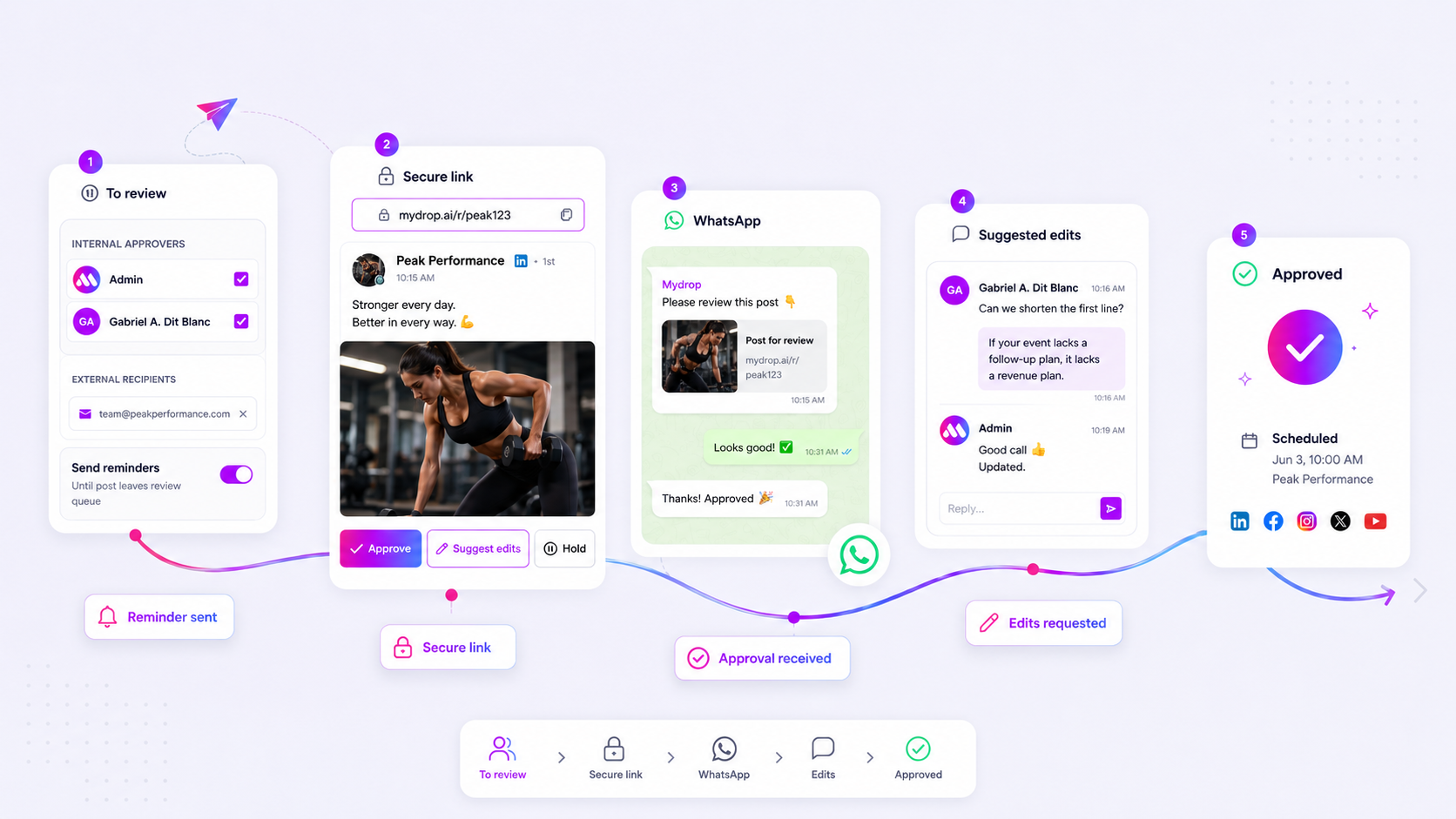
The best social media approval software for your agency is not the one with the most features, but the one that makes the "client sign-off" invisible. If your team is still juggling email threads, manual spreadsheets, or forcing clients to create accounts just to click a button, you are losing more than just time; you are losing client confidence. The fix is moving to a frictionless, no-login approval environment that brings the content to the client instead of making them hunt for it.
We get it. You have been there: staring at a calendar at 6 p.m. on a Friday, waiting for a brand manager to reply to an email chain three levels deep. You are not a bottleneck by design, but your current workflow is likely acting like one. When you stop chasing feedback and start centralizing it, you stop being a project manager and start being the creative partner your clients hired.
What the best tools need to handle

Most general-purpose scheduling tools treat approval as a checkbox inside their own ecosystem. This is where the friction starts. If a client needs a password to see a preview, you have already created a barrier that will stall your publishing schedule. An agency-grade approval flow needs to be as effortless for the client as reading a text message.
To see if your current tool is actually serving your agency or just adding to your coordination debt, run it through this simple friction test.
The Agency Approval Friction Test
Trigger Success Metric (Low Friction) Failure Mode (High Friction) Access Instant view via token link (no login) Requires email signup or app invite Preview Exact-match visual rendering Static text or screenshot attachment Feedback Inline comments on the specific asset Replies to an external email thread Urgency Automated WhatsApp or push nudge Manual chasing via email/Slack State Auto-locks to schedule upon approval Requires manual export/copy-paste
If your process requires your team to perform more than two manual steps after a client gives the thumbs-up-like moving a file from a shared folder into a scheduler-you are paying a hidden tax on every post you publish.
The goal is a one-touch transition. When a client hits "approve," the post should ideally shift from a pending state to a scheduled one without anyone on your team having to manually refresh a spreadsheet or trigger a separate workflow.
At Mydrop, we have seen this across thousands of posts: when you remove the login barrier, feedback cycles that used to take 48 hours often collapse to under two. We built our tokenized approval portals specifically to address this. Clients review the live preview on their own time, and if they have a change, they drop a comment right there. If they are on the go, they can even handle the approval via WhatsApp.
When your software handles the reminder logic and the state management for you, your team can focus on the strategy instead of the status updates. Remember, most agencies do not have a content production problem; they have a decision bottleneck. The right tool turns that bottleneck into a seamless, automated handoff.
Where basic tools start to break

Your scheduling tool is likely built to push content out, not to bring feedback in. When you move past managing a single brand on a shoestring budget, this becomes a major structural liability. Basic schedulers assume that the person who writes the post is the same person who hits "publish." In an agency environment, that is almost never true.
Here is where the cracks start to show:
- The Login Wall: If a client has to create an account or navigate a dashboard just to see a draft, they will not do it. They will screenshot your preview, circle something in red, and text it to you. Now, your structured data is trapped in an image file, and you are playing digital tag.
- Context Fragmentation: Feedback often ends up in Slack, email, or a phone call. When the copy changes on v3 of a post, the context-the "why" behind the change-is lost somewhere in a thread from three days ago.
- Approval Drift: Without automated reminders, posts sit in "pending" limbo while clients get busy. Your team ends up manually chasing signatures, which is a massive waste of senior-level creative hours.
Most teams do not have a content problem. They have a coordination debt. If your tool forces you to act as a human middleware between a spreadsheet and the platform, you are already losing margin on every post.
The buying criteria that matter
When you are ready to swap out your current workflow, don't just look for a feature checklist. Look for how the software handles the messy, human reality of client sign-off. Use this scorecard to audit your current process against a high-velocity standard.
| Feature Category | High-Velocity Standard (Success) | Low-Velocity Trap (Failure) |
|---|---|---|
| Review Access | No-login, tokenized links for one-click access. | Mandatory account creation or platform login. |
| Feedback Loop | In-place comments on media/copy. | Feedback via email chains or screenshots. |
| Alerting | Direct, actionable notifications (WhatsApp/Email). | Generic dashboard notifications ignored by client. |
| Accountability | Automated, persistent reminder schedules. | Manual "did you see this?" follow-ups. |
| Versioning | Transparent edit history and state changes. | Overwriting drafts with no trail. |
Operator rule: If a feedback loop takes more than two clicks for your client, your turnaround time will never improve.
A serious agency tool must move the approval process out of the inbox and into a dedicated environment. At Mydrop, we designed our approval portals to work this way: the client gets a secure, public link-no passwords required-where they can see the exact preview, leave notes, or approve instantly. If they prefer to handle it on their phone, our WhatsApp integration lets them tap "Approve" directly from the chat.
When you evaluate software, ask if it creates a single, immutable source of truth for every post. If you still find yourself copy-pasting client notes into a post editor, you are paying for software that isn't doing the work.
How Mydrop supports this workflow
At Mydrop, we built our approval flow because we got tired of watching brilliant social teams turn into professional email-chasers. When you support hundreds of profiles across different markets, you realize that coordination debt-not creative block-is what actually kills your velocity.
We stripped out the friction. Instead of forcing your brand manager or client to create a portal account they will forget the password for, our system uses tokenized review links. Your stakeholders click, see exactly what the post looks like in context, and hit approve or suggest edits. It is that simple.
- No-login review: The public approval portal shows the exact post, media, and profile context, so there is no guessing games.
- WhatsApp integration: If your stakeholders live in WhatsApp, we bring the approval to them. They can approve or flag content directly from their phone, which feeds back into your Mydrop conversation thread.
- Automated guardrails: If you do not have permission to publish, the post stays in a
pendingstate until an authorized set of eyes clears it. No more frantic "did you see the email?" messages.
Decision check: If your tool requires a client to login, count it as two days of extra lead time. Friction is not just a nuisance; it is a direct tax on your publishing schedule.
A simple shortlist checklist
Before you commit to a platform, run it through this audit. If it fails on any of these points, you are setting yourself up for future bottlenecks.
| Requirement | Why it matters | Agency Priority |
|---|---|---|
| No-Login Access | Eliminates the single biggest source of "ghosting" from clients. | Critical |
| Contextual Previews | Clients need to see the post exactly as it will appear in the feed. | Critical |
| WhatsApp/Slack Hook | Meeting stakeholders where they work, not where you work. | High |
| Commentary Threads | Keeping feedback attached to the specific asset, not buried in an email. | High |
| Automated Reminders | Moving responsibility for "chasing" from the human to the machine. | Medium |
Conclusion
The "approval dance" is not a creative necessity; it is a symptom of a system that wasn't built for volume. Stop treating feedback as an administrative burden and start treating it as a part of your technical infrastructure.
Most teams do not have a content problem. They have a decision bottleneck. Once you move your feedback loop into a centralized, low-friction environment, you stop chasing people and start actually shipping. If you are ready to stop managing email threads and start managing your calendar, look for a platform that understands that your client's time is as valuable as your own.




