

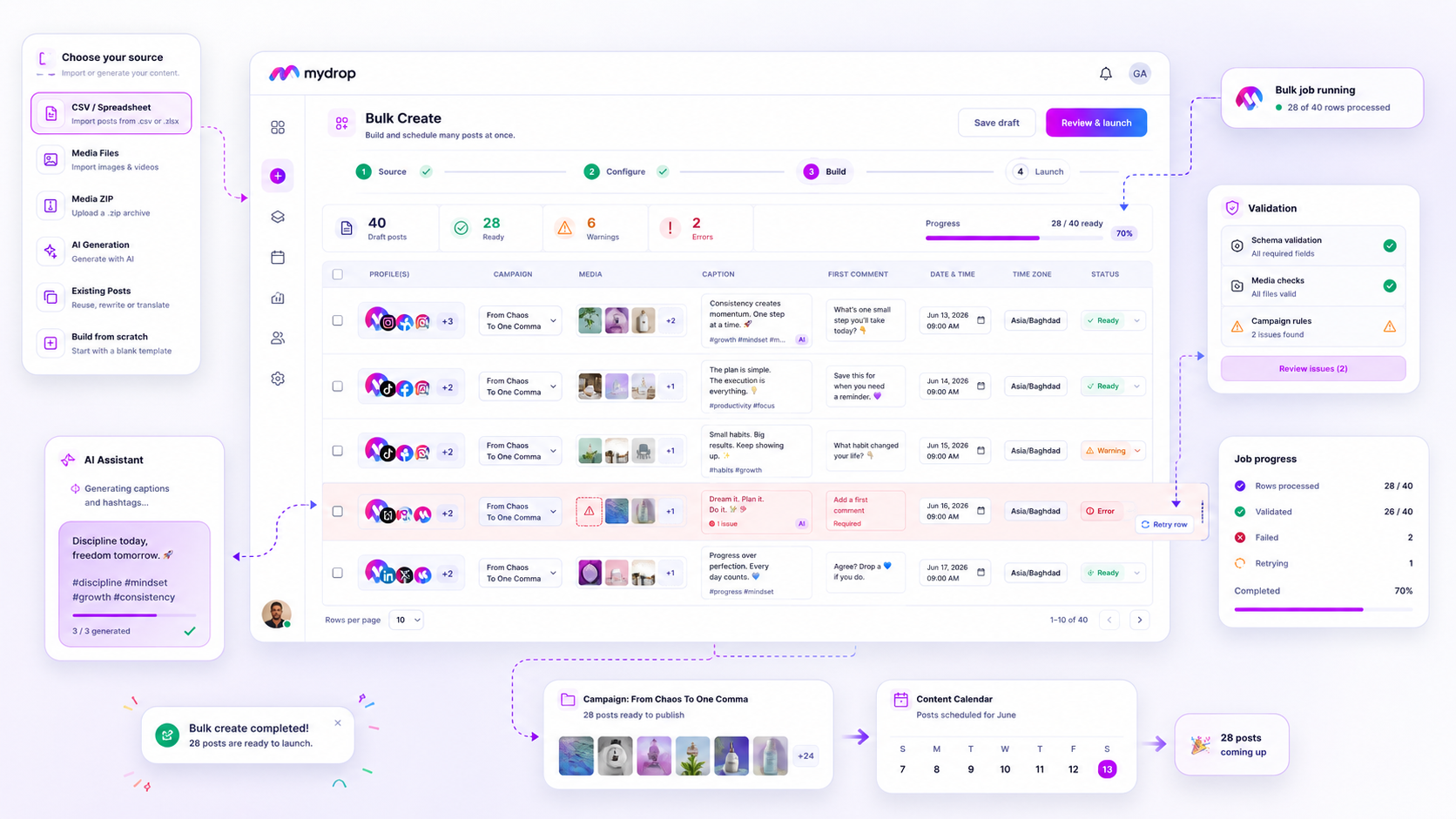
Scaling your content operations isn't about finding a faster way to upload rows; it’s about choosing a system that treats every piece of your campaign as a resilient, trackable asset. If your current "bulk" process is a black box where success is a mystery and failure is a manual emergency, you aren't scaling-you’re just accumulating future stress. For enterprise teams managing high-volume calendars across dozens of brands, true bulk scheduling software must prioritize autonomous, row-level validation and granular recovery over simple, "fire-and-forget" batch uploads.
We have all been there: it is late on a Friday, the client needs a hundred posts live across three markets, and your bulk upload just threw an opaque "unknown error" warning. That sinking feeling of staring at a partially imported, broken calendar is where most agencies lose their sanity. When the software cannot tell you exactly which rows failed or why, you are forced to reconcile the damage manually, turning your high-efficiency tool into a high-labor liability.
What the best tools need to handle

The most common bottleneck we see isn't the upload itself; it is the coordination debt created when a bulk job lacks a safety net. Across thousands of posts and hundreds of brand profiles, we have learned that a production-grade bulk engine must function like a factory floor, not a file transfer service. It needs to account for the reality that campaign data is often messy, inconsistent, or subject to shifting platform constraints.
When evaluating your stack, look for these three non-negotiable operational pillars:
- Row-Level Autonomy: Every row in your CSV or source set must be treated as an independent job. If row 42 fails due to a missing media asset or a character limit violation, rows 1 through 41 should continue to publish, and row 43 should not be held hostage by the failure of the row before it.
- Async Visibility: You should never have to keep a browser tab hostage to monitor progress. A professional bulk engine offloads processing to the background and keeps a persistent listener open, reporting status back to your dashboard in real time, even if you navigate away or close your laptop.
- The "Safety Reset": This is the part most teams underestimate. If you trigger a bulk launch that turns out to have a flawed caption or a wrong date, you need an atomic "cancel and cleanup" function. It should not just kill the job; it should proactively remove the tainted posts from your calendar to prevent a messy, public platform error.
Operator rule: If your bulk scheduling tool does not allow you to retry only the failed rows after fixing the source data, you are not using a production engine. You are just performing manual data entry with extra steps.
At Mydrop, we designed our Bulk Create feature to bridge this gap. Instead of forcing you to re-upload a massive CSV because five rows had validation errors, the system isolates those failures, flags the specific issue, and lets you patch and retry just those fragments. It turns a potential Friday-night emergency into a simple, three-click maintenance task.
Ultimately, your bulk software should provide a clear, deterministic status for every row:
| Status | Operational Meaning | Action Required |
|---|---|---|
| Queued | Data validated; waiting for worker slot. | None |
| Processing | Row is currently being transformed/scheduled. | None |
| Done | Post is live on the calendar. | None |
| Failed | Schema/validation mismatch. | Fix data & click [Retry] |
| Cancelled | Cleanup triggered; post removed. | None |
Where basic tools start to break

Most standard scheduling tools treat your bulk upload as a "fire-and-forget" command. You drag a CSV, click submit, and watch a progress bar that gives you one of two outcomes: a green checkbox or a generic "Import Failed" message. If you’re lucky, you get a line number that points to the error. If you’re unlucky, the system just dies silently.
The "All-or-Nothing" fallacy is where teams bleed the most time. If a file contains 200 posts and row 142 has a malformed image URL or an unsupported character in the caption, these tools often roll back the entire job. You are then left staring at 200 rows, guessing which ones made it to your calendar and which ones disappeared into the ether.
When your bulk tool lacks row-level persistence, your calendar becomes a crime scene. You spend your afternoon cross-referencing your source CSV against the app, deleting half-imported posts, and re-uploading the remainder. It turns a ten-minute job into a three-hour forensic investigation.
Decision check: If you cannot retry a single failed row without re-uploading the entire batch, your scheduling tool is not an agency-grade platform. It is a hobbyist spreadsheet wrapper.
The buying criteria that matter
To stop the cycle of manual cleanup, you need to stop asking "How many posts can I import?" and start asking "How does the system handle the failure of a single row?" Here is how to evaluate the tools that actually scale.
| Feature | The Amateur Standard | The Production Standard | Why it matters |
|---|---|---|---|
| Row Processing | Synchronous (all at once) | Asynchronous (batch queues) | Avoids timeouts during heavy volume. |
| Error Visibility | "Import Failed" | Per-row error reports | Tells you exactly what to fix. |
| Cleanup Logic | Manual deletion | Auto-rollback & cleanup | Keeps your calendar clean after errors. |
| Progress Tracking | Modal-only UI | Persistent background status | Allows the team to keep working. |
The "Bulk Resilience" Checklist
When evaluating your next tool, use this checklist to force a demo of the backend logic, not just the front-end design.
- Async background listeners: Does the job finish even if I close the browser tab? If the answer is "no," you are tethered to your desk every time a campaign hits.
- Granular retry: Can I fix a broken image link for one row and click "Retry" just for that row? You shouldn't have to re-process the 199 rows that already succeeded.
- Validation preview: Does the tool validate row constraints (character counts, aspect ratios) before the job hits the live server? A pre-flight check saves everyone from 4:55 PM panic.
- Cancellation safety: If I cancel a job halfway through, does the system offer a cleanup sweep to remove the orphaned posts, or do I have to hunt them down manually?
At Mydrop, we’ve seen thousands of workflows. The most successful teams don't just optimize for speed; they optimize for repairability. They assume the data will occasionally be messy, and they pick tools that treat every single row as an autonomous, trackable asset. When your bulk engine treats every post as a first-class citizen, the "bulk" part of your job finally stops feeling like a liability.
How Mydrop supports this workflow
At Mydrop, we see this exact spreadsheet-to-chaos scenario every week. The fix isn't just "better software," it is about changing your relationship with the import. When we designed our Bulk Create engine, we focused on replacing that "all-or-nothing" anxiety with a system that treats every row as an independent, trackable asset.
Instead of a black box, Mydrop gives you a real-time Bulk Jobs Listener. Think of it as a transparent monitor for your campaign launch. If you are pushing 200 posts and 10 of them hit an asset error, the system doesn't trash the other 190. It isolates the failures, logs the specific row-level error, and lets you hit a "Retry" button on just the problematic items after you fix the source data.
Workflow check: Never accept a bulk tool that forces a full, manual re-upload when a single row fails. If you cannot retry just the failed rows, you are not scaling; you are just working harder.
This gives your team the confidence to launch massive campaigns without hovering over the screen, waiting for the inevitable crash. You can close the modal, grab a coffee, and rely on the persistent background job to finish the heavy lifting while you handle the actual creative work.
A simple shortlist checklist
Before you commit your next campaign to any bulk tool, run through this quick audit. If the answer is "no" to more than one of these, you are setting your team up for a Friday afternoon crisis.
| Audit Point | Why it matters |
|---|---|
| Row-level retry | Allows you to fix one bad CSV row without re-processing the entire batch. |
| Async backgrounding | Frees up your browser; the job finishes even if you close the tab. |
| Detailed logging | Tells you exactly why a row failed (e.g., missing asset, validation error). |
| Cancel & Cleanup | Automatically rolls back changes so your calendar doesn't end up with "ghost" posts. |
| Validation pre-flight | Checks your formatting before the job launches, not during it. |
Conclusion
The difference between a frantic agency and a high-performance operation is rarely about the volume of content produced. It is about the quality of the production pipeline.
Stop treating bulk scheduling as a single, high-stakes gamble. By moving toward a model that values granular validation, row-level transparency, and automated cleanup, you stop fighting the tool and start focusing on the strategy. Your team deserves a workflow that works for them, not one that requires constant babysitting.
If your current process leaves you guessing, it is time to audit your stack and stop paying for the privilege of manual cleanup. After all, the best campaign launch is the one that happens reliably in the background, leaving you free to focus on the next big idea.



