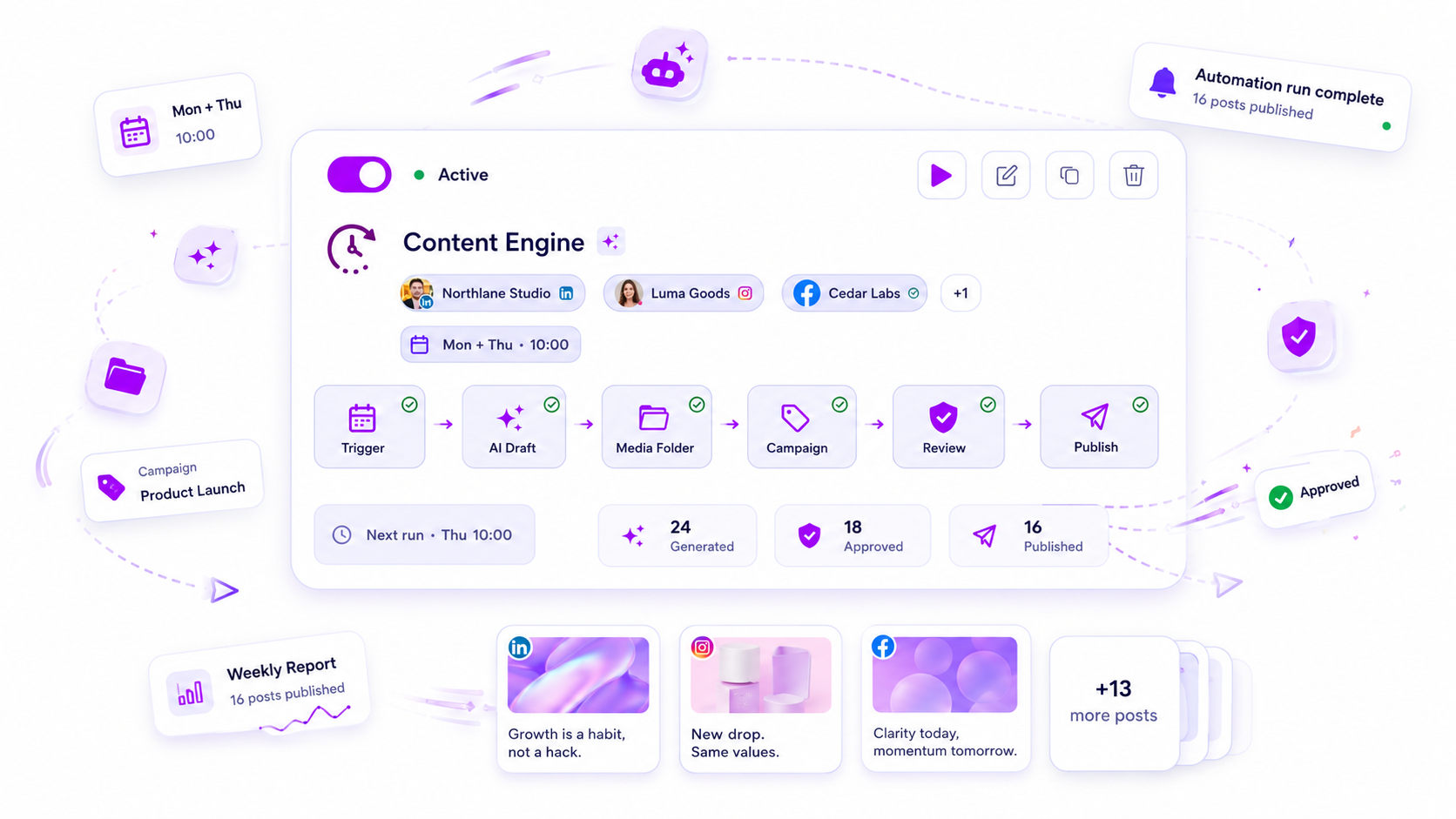
The best AI tool isn't the one that writes the most creative caption-it's the one that eliminates the five-step manual reconciliation between your strategy documents, your media assets, and your final content calendar. We see teams lose hours every week chasing this alignment, turning a simple content request into a game of telephone that inevitably ends in a formatting headache or an off-brand post.
We’ve all been there. You get a brilliant strategy brief, feed it into a generic AI chat, get a great hook, and then... nothing happens. You’re left copying, pasting, resizing images, and manually checking if the tone actually matches your brand guidelines. You didn't save time; you just changed the type of work you’re doing. The real bottleneck in enterprise operations isn't a lack of ideas. It is coordination debt. You are burning daylight on the manual glue that holds your strategy and your execution together.
What the best tools need to handle

If you are evaluating AI tools for a professional marketing team, you need to stop looking for a "better writer" and start looking for an operational engine. Your AI shouldn't just exist in a browser tab-it needs to exist in your workspace.
To actually solve the execution gap, an agent must move beyond generic chat advice and handle the transition from intent to executable artifact.
The Workflow Reconciliation Scorecard
If your current process involves moving text between three different browser windows, you are paying a "friction tax" on every single post. Use this scorecard to audit where your current AI stack is costing you the most.
| Workflow Step | Generic AI Chat | Workspace-Aware Agent |
|---|---|---|
| Context Loading | Manual: You paste brand rules/assets | Automatic: Direct access to your workspace |
| Artifact Creation | Text: Requires copy-paste and formatting | Native: Creates structured post/campaign objects |
| Verification | Blind: You hope it's correct | Guarded: Validates against brand constraints |
| Application | Manual: You build the post yourself | Direct: Applies the draft to your calendar |
Most teams do not have a content problem; they have a decision bottleneck.
When an agent is workspace-aware, it understands your specific brands, your media library, and your existing automations. It doesn't guess what "professional tone" means for your company-it looks at your last hundred successful posts and aligns with that reality.
The transition from a "chat" mindset to an "artifact" mindset is where the real efficiency gains live. You should never be "copying" AI output. You should be reviewing, verifying, and applying a structured draft that is ready to go live. If your AI isn't capable of drafting a campaign object that your content manager can simply approve and schedule, you aren't using an assistant-you're just using a very fast, very demanding intern who needs constant supervision.
Where basic tools start to break
Here is the awkward truth about most AI content tools: they are designed for the writing phase, but your actual operation lives in the governance phase.
When you use a generic chat tool to "brainstorm" a campaign, you aren't really saving time. You are actually front-loading work. That chat window becomes a digital scratchpad. Once the AI hits a "good enough" draft, your team has to manually copy that text, hunt for the right brand assets in a separate folder, format it to## Where basic tools start to break
Here is the awkward truth about most AI tools: they are designed to be a clever chat partner, not a workspace partner. When you use a generic tool to draft a post, you are effectively creating a new file in a vacuum. You then have to copy that text, find your brand font and image files, reformat it for LinkedIn or Instagram, and manually check if it actually aligns with your campaign goals.
This is the Copy-Paste Trap. It sounds like a minor convenience issue, but for teams managing hundreds of brand profiles across five markets, it is a silent productivity killer. Every time you move text from a chat window to your real content platform, you lose context. Metadata vanishes. Approval notes get left in a Slack thread. The final post is an orphaned object with no connection to the strategy that birthed it.
In our experience, teams lose more time reconciling these disconnected pieces than they ever save by using AI to generate the first draft.
The Workflow Reconciliation Scorecard
How does your current AI stack handle the gap between intent and execution? Use this scorecard to audit where your process is leaking value.
| Process Step | Generic AI Tool (The "Chat" Model) | Workspace-Aware Agent (The "Operating" Model) |
|---|---|---|
| Context Access | Zero (Needs manual prompt input) | Native (Inspects existing brand/media assets) |
| Output Format | Unstructured text in chat window | Structured product artifact (e.g., draft post) |
| Verification | Manual (Human eyes only) | Automated (Check against platform constraints) |
| Deployment | Copy/Paste/Reformat | One-click apply to workspace objects |
| Governance | None (Risk of off-brand drift) | Enforced by workspace-aware agent blueprints |
The buying criteria that matter
Stop shopping for "creativity" and start shopping for operational throughput. When you evaluate an AI assistant, ignore the marketing claims about "human-like" writing. Instead, grill your vendors on how they handle your actual data and how they bridge the gap to your final output.
If the tool doesn't move you from a vague intent to an executable object, it is just adding another document to your pile.
4 Questions to ask your vendor before buying:
- Does the agent see my workspace? Can it inspect my actual brand guidelines, media library, and previous post history, or am I just pasting text into a prompt? If it can't see your assets, it can't respect your standards.
- Does it output text or objects? You do not need more text. You need structured artifacts-actual campaign drafts, link-in-bio pages, or media plans-that the system recognizes as real content objects.
- Where is the verification step? A tool that drafts content without checking it against your specific platform constraints is a liability. You need a built-in validation layer that flags issues before you ever click apply.
- Can it move to execution? The finish line is not the chat window. It is the platform where you schedule or publish. If the tool can't bridge that final gap, you are still doing the heavy lifting yourself.
At Mydrop, we see teams get stuck when they treat AI as a content generator rather than a coordination layer. A post that doesn't match your visual assets or campaign goals isn't a post-it is just more rework for your team. The best tools are the ones that make it harder to make a mistake, not just easier to hit "generate."
How Mydrop supports this workflow
At Mydrop, we see teams lose hours to the "middle management" of content: moving text from an AI chat window into a spreadsheet, manually reformatting a caption to fit a channel’s constraints, or hunting for a matching brand asset to pair with a draft. It is frustrating, and frankly, it is where the best strategies go to die.
We built the Mydrop assistant to kill that friction by turning intent into executable workspace objects. Instead of generating a generic block of text that you then have to fix, the agent loads your actual brand context-your colors, past high-performing posts, and current campaign goals-to draft a post as a structured artifact.
You are not just getting a chatbot; you are getting an operator that understands your account's architecture.
| Feature | The Generic AI Experience | The Mydrop Agent Approach |
|---|---|---|
| Output Type | Plain text (needs copy-paste) | Structured Artifact (ready to apply) |
| Context | "Guessing" your brand voice | Loads your actual brand assets |
| Verification | Blind trust in the LLM | Native draft validation against platform rules |
| Downstream | Manual formatting | Direct one-click application to campaigns |
When you ask the agent for a new social series, it doesn't just write captions. It pulls the relevant brand guidelines, selects a placeholder media plan from your library, and generates an artifact you can review, tweak, and push directly into your campaign workflow. It bridges the gap between "having an idea" and "having a post in the calendar."
A simple shortlist checklist
Before committing your team to a new AI tool, use this to see if it is built for operations or just for show.
- Context Injection: Can the agent see your current brand assets, past posts, and active automations? Or does it start from a blank slate every time?
- Artifact Integrity: Does it output a "post object" that the platform understands, or are you stuck formatting text in a different window?
- Native Verification: Can it catch common mistakes-like broken links, missing image specs, or character limit violations-before you ever see a "publish" button?
- Platform Permissions: Does it respect your existing approval layers, or does it bypass the roles your team spent months defining?
If a tool fails on these, it is not an assistant. It is just another source of manual work.
Conclusion
Most teams do not have a content problem. They have a decision and coordination bottleneck.
Adding more AI to the top of your funnel doesn't help if your team is still drowning in the formatting and compliance work at the bottom. The goal isn't just to write faster; it is to remove the friction between a great idea and a live, verified post.
Focus your energy on tools that treat content as an executable object rather than a text stream. When your agent understands the difference between a suggestion and a task, your team stops acting like manual editors and starts acting like strategic operators.
That is how you turn a chaotic operation into a scalable machine.