

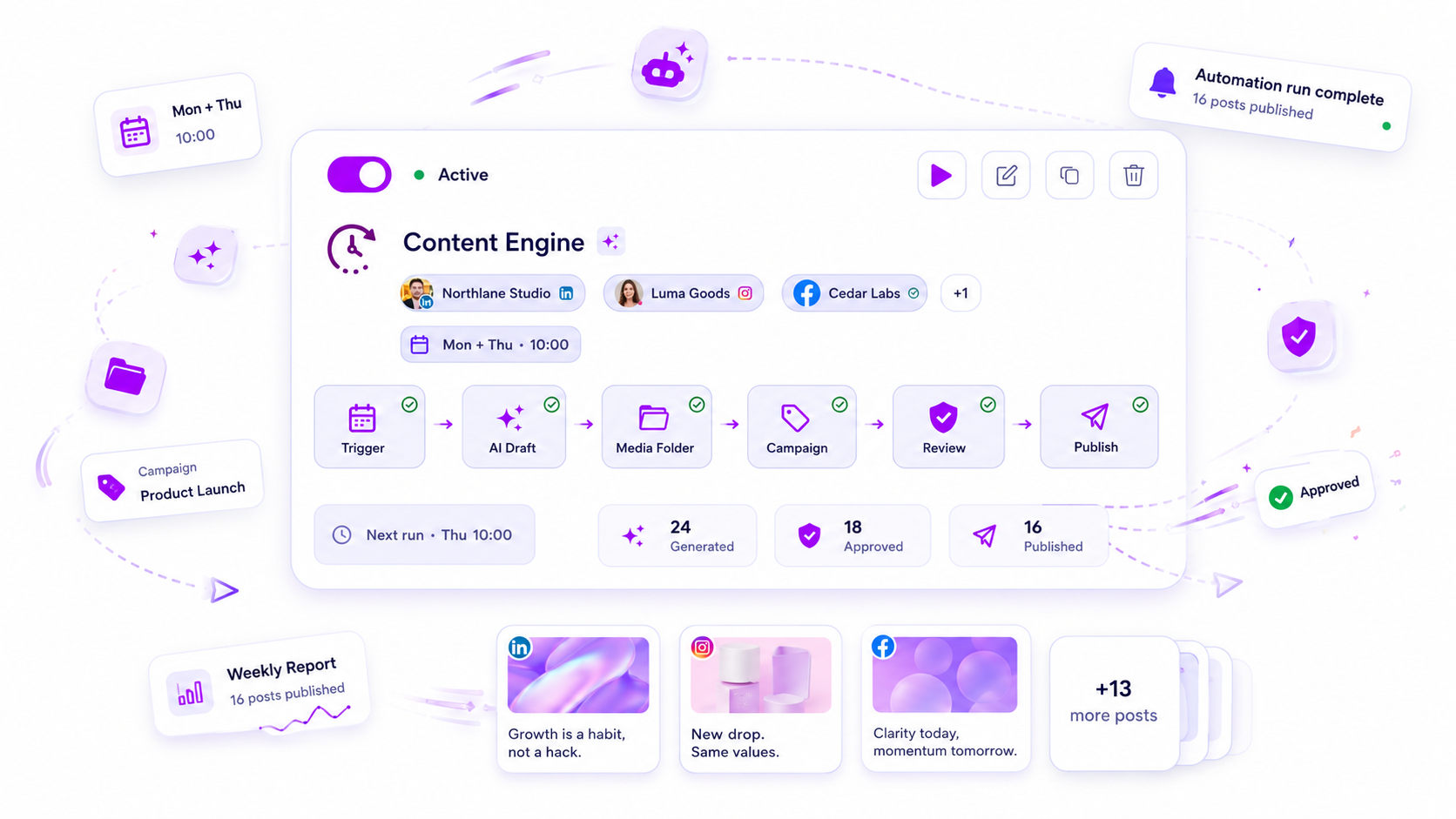
For agency teams, the "best" automation software isn't the one with the most bells and whistles; it is the one that treats compliance and human review as first-class citizens alongside content generation.
We get it. You are juggling dozens of brand voices, shifting client calendars, and a constant flood of requests. The work is messy, often frantic, and the fear of a misaligned post going live under your agency name is a constant, low-grade stress. You are not alone. Most teams we talk to are drowning in coordination debt, and the tools they bought to scale are actually making the problem worse by removing the safety rails they need most.
What the best tools need to handle
The awkward truth is that most software in this space was built for individual creators, not multi-client operations. When you use them at scale, you aren't building a content system; you are building a liability hazard. To move from chaotic firefighting to repeatable output, your stack must support three distinct layers.
First, Governance by Design. You cannot automate the "publish" action without first automating the "check." The best tools allow you to route every piece of generated content into a mandatory review queue. If your tool pushes content straight to live, it is a liability, not an asset.
Second, Context-Aware Content Generation. A prompt that works for a lifestyle brand will fail for a financial firm. You need software that allows for field-level mappings, where brand context, specific campaign goals, and even internal style guides are locked into the generation flow.
Third, State Management. Content exists in different stages: draft, internal review, client approval, and scheduled. Your platform must track these states independently. If you cannot see which posts are waiting for client sign-off versus which are ready for the feed, your operational visibility is zero.
Operator rule: If your automation lacks a distinct Post State and an Approval Gate, it is not an enterprise tool. It is an experimental toy.
Here is how your current setup might be sabotaging your actual capacity compared to a platform built for agency realities:
| Feature | Generic Creator Tool | Agency-Ready Platform |
|---|---|---|
| Approval Flow | Optional or non-existent | Mandatory for every output |
| Media Handling | Upload per post | Folder-based slot rotation |
| Campaign Linkage | Disconnected | Tied to specific ROI goals |
| Safety Net | Publish now by default | Draft/Review by default |
When we see teams struggle, it is rarely because they lack ideas. It is almost always because their tooling forces them to manually assemble every post from scratch, even when the components are the same week after week. True agency-grade software handles the production mechanics so your team can focus on the one thing that truly scales: the strategy.
Where basic tools start to break

The real trouble begins the moment you stop managing a single brand and start coordinating a portfolio. Most entry-level schedulers are built on a "one-human-one-account" mental model. When you try to force an agency through that narrow door, the process starts to fracture.
You will notice it first in the versioning chaos. If your tool lacks a formal separation between a draft, a pending review, and a live post, your team ends up using workarounds like internal chat pings or disconnected spreadsheets to keep track of who approved what. The actual scheduling platform becomes a glorified calendar, while the real coordination happens in the shadows.
Then there is the content mismatch. Basic tools treat every post as a unique event that must be hand-crafted. But at your scale, you are often dealing with recurring themes, seasonal campaigns, and repetitive asset usage. If your software does not support field-level mapping or intelligent reuse of media, your team spends three hours rebuilding the same brief for the fiftieth time. That is not creative work; that is administrative tax.
Common mistake: Relying on a tool that only supports "Publish" or "Draft" states. For an agency, this creates a dangerous binary where human review is easily bypassed, turning your social channels into a high-stakes guessing game.
The buying criteria that matter
Stop evaluating tools based on their interface flair and start grading them on their operational governance. You need a system that acts as a hard filter between your production workflow and your public-facing feed.
When vetting your next platform, focus on these four non-negotiable pillars:
| Capability | Agency Requirement | Why it matters |
|---|---|---|
| State Control | Distinguish between draft, review, and ready-to-go states. | Ensures no content goes live without a human green light. |
| Field Mapping | Automate captions, tags, and campaign links from templates. | Eliminates the repetitive "copy-paste" error cycle. |
| Media Governance | Track usage of folder-based assets to avoid duplication. | Keeps your feed fresh without manual asset audits. |
| Approval Routing | Route output to specific client stakeholders by brand. | Moves the review bottleneck out of your internal inbox. |
The "Agency Reality" Scorecard
Use this simple logic to see if your current stack is actually helping you:
- Does your tool allow you to define an automated workflow? (If you have to manually upload every file for every brand, you are capped at a low volume.)
- Can you trigger a post from a form submission or a schedule? (If the tool does not link to your intake process, you are still manually transcribing client requests.)
- Is human review mandatory for automated outputs? (If the answer is no, you are just one errant AI prompt away from a major brand embarrassment.)
- Are campaigns linked to content? (If you cannot report performance by campaign across multiple clients, you are flying blind on ROI.)
Most teams do not have a content problem. They have a decision bottleneck.
At Mydrop, we see teams move from "manual-every-time" to "configured-once" workflows by focusing on those automated pipes. Instead of building posts, you build the rules that produce them. You set the trigger, define the brand constraints, and let the system assemble the payload. But crucially, you keep the final permission step in the hands of a human who knows the brand context.
That is how you turn a frantic daily grind into a repeatable operation that actually scales.
How Mydrop supports this workflow
At Mydrop, we see the most effective teams treat their output as a curated flow rather than a firehose. When you have dozens of brand voices and complex approval hierarchies, you cannot simply dump everything into a scheduler and hope for the best. You need a system that enforces your governance rules before the first draft is even created.
Our approach centers on what we call Approval-Safe Production. Instead of forcing your team to manually build, tag, and route every single post, you define the rules of the game once.
- Trigger-based logic: You set the timing-be it recurring daily pulses or specific client-form submissions-and the system handles the creation.
- Contextual mapping: We map your brand prompts, media folders, and campaign tags directly into the generation phase. This ensures that an automated post for "Client A" never accidentally pulls creative assets intended for "Client B."
- Approval gates: You can designate an automated output to land directly in a "Review" or "Waiting" state. The work is ready, but it remains locked behind a human check.
Decision check: If your tool does not allow you to set an "approval-required" status on automated output, you are not managing a workflow; you are just outsourcing risk.
When you use folder-slot media management, you are essentially creating a supply-chain for your content. The system tracks which assets have already been utilized, preventing the dreaded "why did we post that same photo three times this week?" scenario. It turns a chaotic content scramble into a predictable, tiered system of production and oversight.
A simple shortlist checklist
Before you commit to a new platform, put it through this five-minute stress test. If your current or prospective tool cannot answer "yes" to these, you are likely setting your team up for a future headache.
| Requirement | Why it matters |
|---|---|
| State-Awareness | Can you force automated content into a "Draft" or "Review" status automatically? |
| Field Mapping | Does the builder allow mapping form submissions or AI prompts to specific brand fields? |
| Media Governance | Can it track used files to ensure you aren't recycling the same creative assets? |
| Campaign Linking | Is every automated job automatically tied to a specific reporting campaign? |
| Approval Routing | Does it notify specific stakeholders when an automated draft is ready for review? |
If you are currently evaluating options, ask your vendors how they handle the hand-off. Most tools are brilliant at the "start" (the scheduling) and the "end" (the publishing), but they leave a massive gap in the middle where the human reviewer has to fix the mess.
Conclusion
The messy middle of your agency operations is where your reputation is actually made-or lost. It is not about finding the tool that can publish the fastest, but the one that allows your team to move with confidence, knowing that the guardrails are in place.
Stop fighting the tools that force you into a single-account mindset. Look for platforms that understand the nuance of multi-brand compliance and treat human verification as the final, most important step in your creative lifecycle. Your team will thank you, your clients will stay, and you can finally get back to the strategy work that actually moves the needle.




