Choosing the right social scheduling tool for high-volume operations comes down to one non-negotiable reality: you are running a distributed manufacturing system, not just a calendar. If your current tool prioritizes a pretty drag-and-drop interface while obscuring the mechanics of API handshakes, rate limits, and asynchronous job states, you are eventually going to be the person frantically refreshing a post page at 2 a.m. because a silent failure occurred.
We get it. You are managing dozens of channels across five time zones, and the pressure to increase output without sacrificing governance is immense. You don't have time to play detective when a post doesn't go live. The goal isn't just "scheduling"-it is building a resilient flow that treats every update as a managed object with clear, trackable outcomes.
What the best tools need to handle

The most common operational failure we see isn't a lack of creative ideas; it is coordination friction. When you graduate from posting sporadically to maintaining a high-volume rhythm, your tool needs to account for the messy reality of platform APIs.
A reliable system must move beyond "posted" vs. "draft." It needs to provide deep visibility into the actual transaction. When a post fails to reach LinkedIn, does the platform return a specific media format error, or just a generic "failed"? Does your current dashboard let you retry that specific job without rebuilding the entire asset library? If the answer is no, you are essentially flying blind.
In our experience, these are the core criteria that separate professional-grade systems from casual creator tools:
| Criteria | Basic Scheduler | Infrastructure-First Platform |
|---|---|---|
| Error Surfacing | Generic "Failed" status | Detailed provider-specific error codes |
| Job Visibility | Hidden queue logs | Accessible job state (waiting, warning, failed) |
| Partial Success | Treat as total failure | Track success per-platform, warn on others |
| Resilience | Manual manual triage | Automated retry/triage-ready flagging |
Operator rule: If your tool hides the distinction between a platform rate-limit error (transient) and a media-format rejection (permanent), you are wasting human hours on machine-solvable problems.
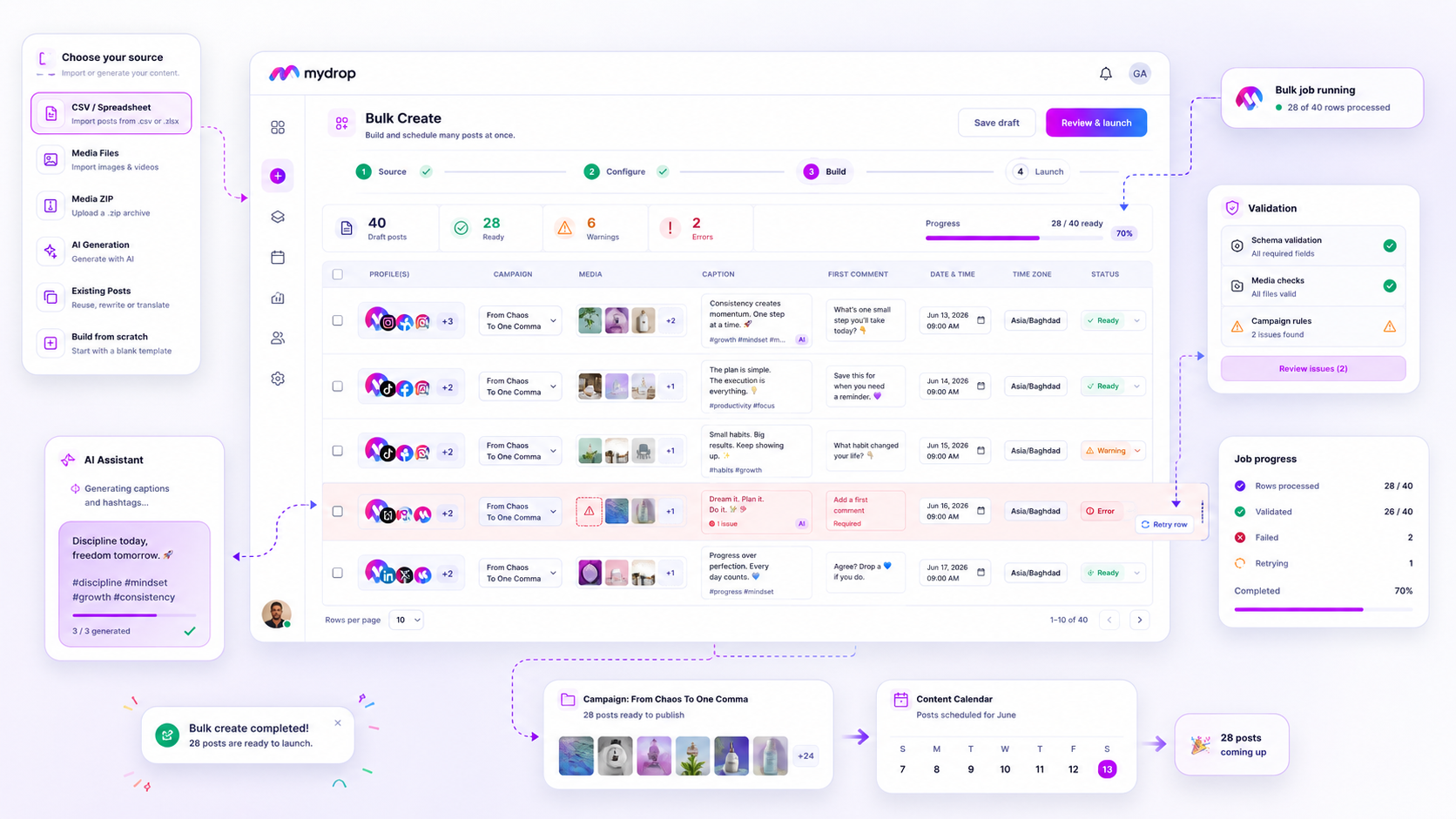
At Mydrop, we see the scheduling process as a series of distinct, observable stages. When you hit publish, the system doesn't just "fire and forget." It assigns the task to a cloud-based processor that tracks the journey from canonical record to platform delivery. By exposing these states-waiting, warning, or failed-directly in your calendar view, we allow your team to address bottlenecks immediately, rather than discovering them through an angry notification from a community manager at the start of their day.
Where basic tools start to break

Most teams realize their scheduler is undersized only when the chaos hits a certain frequency. You start with a few accounts and a simple calendar, and everything feels manageable. But when you move to managing dozens of profiles across multiple regions, the cracks appear.
Basic schedulers treat a post as a static request that simply triggers at a specific time. If the platform API rejects the payload because of a minor character limit change, or because your media resolution isn't supported, the tool often just buries the error. You might get a generic notification hours later, or worse, nothing at all.
At this scale, you are not just managing content; you are managing a distributed system. When a post fails, you need to know exactly why-whether it was a network timeout, a rate limit, or a missing asset. If your tool doesn't surface these states clearly-differentiating between waiting, warning, and failed-your team spends half their day manually verifying posts instead of creating them.
Decision check: If your tool requires you to refresh the page to see if a post actually went live, you have already lost. True reliability is proactive, not reactive.
The buying criteria that matter
Stop evaluating based on "ease of use" and start auditing for operational transparency. During your next demo, force the provider to show you how they handle the ugly stuff.
Use this scorecard to pressure-test your current setup. If you can't check most of these boxes, your operation is likely leaking time on manual triage.
| Feature | Commodity Scheduler | Infrastructure-First Tool |
|---|---|---|
| API Failure Surfacing | Silent errors or vague "failed" alerts. | Provider-specific error codes (e.g., token expired, media size limit). |
| Partial Success Handling | Stops the entire multi-platform batch. | Posts to supported platforms, flags specific failures for review. |
| Queue Visibility | Opaque job status; hidden background logic. | Explicit state tracking: waiting, warning, failed, posted. |
| Retry Logic | Manual trigger only. | Configurable automated retries for transient network issues. |
| Asset Validation | Checks at publish time. | Pre-flight validation against platform specs before scheduling. |
When reviewing these criteria, keep an eye on how the system manages the handshake with external platforms. You want to see evidence that the tool is tracking the post lifecycle, not just firing a request and hoping for the best.
Ask these three questions to cut through the marketing:
- "How does the system distinguish between a soft warning and a hard failure?" You want a tool that lets a post go live on Threads even if it misses an X post due to a missing media file, rather than blocking the entire batch.
- "If a platform API updates its media constraints overnight, how do I find every scheduled post that is now at risk?" You need a global view of all pending jobs that might be impacted by a platform change.
- "Where is the source of truth for post status?" Ensure the tool logs the exact response from the platform so you aren't chasing ghosts when a URL fails to attach.
At Mydrop, we approach this by treating every scheduled post as a managed job within a unified flow. We want you to see the health of your entire schedule at a glance, allowing your team to jump straight to the specific platform error that requires attention, rather than scanning a calendar for hours. The goal is to move from manual triage to exception-based management, where you only touch what is actually broken.
How Mydrop supports this workflow
At Mydrop, we approach social operations by treating every scheduled post as an observable job rather than a "fire and forget" request. When you manage high-volume publishing across multiple channels, you need more than a calendar; you need a system that recognizes the difference between a successful delivery and a silent API failure.
Our architecture manages this through a centralized state-tracking system. When you schedule a post, our Cloud Scheduler creates a managed record that follows the post from the draft stage through to final publication or error reporting. If a platform returns a specific error-say, an expired Instagram token or a LinkedIn media processing issue-the system automatically flags the post with a warning or failed state.
This gives your team immediate visibility in the dashboard. Instead of manual triage, you see exactly which channel needs attention. By centralizing the status of these jobs, we remove the need for your team to cross-check native platform apps, letting them focus on actual content optimization instead of playing IT detective.
A simple shortlist checklist
If you are auditing your current stack this week, use this quick scorecard to see if your infrastructure is holding up or just barely running.
| Criteria | Basic Tool (The Trap) | Infrastructure-First Tool |
|---|---|---|
| Error Visibility | Post shows as "Sent" even if it failed. | Status updates to "Failed" with specific provider error. |
| State Tracking | No record of the background job. | Every state (draft, waiting, warning, posted) is stored. |
| Retries | Manual refresh required. | Automated logic for transient API hiccups. |
| Media Handling | High-res files break the publisher. | Pre-validated media constraints before queuing. |
Audit Checklist:
- Can you sort your feed by "Failed" or "Warning" status in one click?
- Do you receive an email alert the moment a platform API rejects a post?
- Is there a clear record of why a post failed, or just a generic "error"?
- Does the tool block you from scheduling if the post format violates a platform's current media rules?
- Can you edit a failed post and re-trigger the publish attempt without deleting the original?
If you answered "No" to three or more of these, you are likely carrying massive coordination debt. It is not just about the tool; it is about the hours your team spends correcting mistakes that a robust platform should handle automatically.
Conclusion
The reality of enterprise social media is that the work is inherently fragile. Platforms change, APIs throttle, and media formats shift overnight. When you choose your scheduling stack, you are essentially deciding how much of your team's sanity you want to spend on manual troubleshooting.
Most teams think they need "more features" to solve their publishing woes, but what they really need is a more predictable foundation. Stop letting your scheduling tool hide the mess. Move to a system where status is transparent, errors are actionable, and your team spends their time creating, not constantly reconciling the difference between what was scheduled and what actually went live.